• Hail, we're RedGuides. We want you to play six (yes, 6!) EverQuest characters at once. We have scripts and a friendly community to help, please join our playstyle and say hello! 👋
  • We've added LLM sections to our Terms & Rules and Resource Rules, for everyone's sanity & in-game safety.
    Read more
    a. Do not replace your voice with an LLM. This goes for your posts and your scripts. Drafting and editing with a tool is fine, but don't take you out of what you share.
    b. Do not replace your EQ character's voice with an LLM. We don't want scripts that speak over /ooc, /shout or other public channels. This has been an unwritten rule that's kept casino scripts off the site for decades, but we're now compelled to make it clear: keep automated communication private.

    Why Does RG Review Scripts?
    Nearly every LLM-written Lua script we see is making your character do impossible things, and rarely in a way that's beneficial to you. We've seen heavy server hammering, /target over impossible distances when /nav spawn would passively accomplish the same thing, a spawn search that fires 20+ times per second, and other pointless actions that are likely annoying GMs.

    You are welcome to use LLMs as a tool to structure, draft, and edit your work, but please read critically before hitting /lua run

Problem - MySeq - No Zone Outlines - Windows 11

BWease

New member
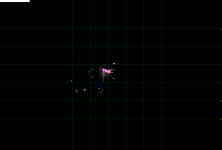
Hey everyone, I just upgraded to Windows 11 - Launched Red Guides and SEQ and my map seems a bit wonky, it currently looks like the image attached - Looking for advice on how to get my zone border lines back please
 

Attachments

  • SEQ Issues.png
    SEQ Issues.png
    18.8 KB · Views: 10
Solution
Hey everyone, I just upgraded to Windows 11 - Launched Red Guides and SEQ and my map seems a bit wonky, it currently looks like the image attached - Looking for advice on how to get my zone border lines back please
Point your map to your eq map folder.

This is in your myseq settings, under folders. You point the path to the literal eq map folder of your choice.

The new myseq doesn't currently support the compressed map files.
 
Solution
Problem - MySeq - No Zone Outlines - Windows 11

Users who are viewing this thread

Back
Top
Cart