
-
 Hail, we're RedGuides. We want you to play six (yes, 6!) EverQuest characters at once. We have scripts and a friendly community to help, please join our playstyle and say hello! 👋
-
 We've added LLM sections to our Terms & Rules and Resource Rules, for everyone's sanity & in-game safety.
Read more
a. Do not replace your voice with an LLM. This goes for your posts and your scripts. Drafting and editing with a tool is fine, but don't take you out of what you share.
b. Do not replace your EQ character's voice with an LLM. We don't want scripts that speak over/ooc,/shoutor other public channels. This has been an unwritten rule that's kept casino scripts off the site for decades, but we're now compelled to make it clear: keep automated communication private.
Why Does RG Review Scripts?
Nearly every LLM-written Lua script we see is making your character do impossible things, and rarely in a way that's beneficial to you. We've seen heavy server hammering,/targetover impossible distances when/nav spawnwould passively accomplish the same thing, a spawn search that fires 20+ times per second, and other pointless actions that are likely annoying GMs.
You are welcome to use LLMs as a tool to structure, draft, and edit your work, but please read critically before hitting/lua run
You are using an out of date browser. It may not display this or other websites correctly.
You should upgrade or use an alternative browser.
You should upgrade or use an alternative browser.

Release MQItemColor
- Thread starter redfox
- Start date


Ortster submitted a new resource:
MQItemColor - Changes the background color of items depending on item type
Read more about this resource...
MQItemColor - Changes the background color of items depending on item type
View attachment 14767
MQItemColor
MQItemColor changes the background color of your items depending on the type of item, making sorting much easier. Right now it handles Quests, Tradeskill, Collectiable, No Trade and Attunable items.
View attachment 14766
Default colors
Tradeskill: Yellow (F0F000)
Quest: Purple (F01DFF)
Collectible: Orange (FF8C20)
No Trade: Red (FF2020)
Attunable: Cyan (6BBAFF)...
Read more about this resource...
Last edited by a moderator:

How does one install this into the MQNext folder? I am a fast learner, and I hate to waste someone's time. Be safe, and take care.
As Ortster mentioned, you'll need to build it yourself. Most likely it'll be incorporated into the main Next build at some point.
Till it gets added in to the MQNext build its a "build your own" situation. But should be added more than likely on the next build.
There are a handful of improvements I am looking to make in my free time, such as better settings toggling. I would like to add more coloring options as well if anyone has any suggestions. Bonus points if those suggestions include where it would fit in the coloring order, even even more if you have a suggestion on the color to use.
For now it replicates decently what MQ2SlotColors was doing for those of us that were missing it while using MQNext.
I reworked a bit how No Trade works on Firiona.
By default items that are No Trade on other servers but not on Firiona will not be colored.
If for some reason you want to color items that are Tradeable on FV but No Trade on other servers, you can set the "FVNormalNoTrade" setting to 1.
By default items that are No Trade on other servers but not on Firiona will not be colored.
If for some reason you want to color items that are Tradeable on FV but No Trade on other servers, you can set the "FVNormalNoTrade" setting to 1.
godsfshrmn
Well-known member
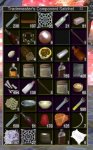
Is there a way to adjust the color intensity? It is a bit too faint to see the lighter colors like yellow. They were a lot more visible in the regular version for me
To get the background texture that gives things more of a "pop" to show up you'll need to do a "/reload" or "/reloadui". Only needed if the plugin hasn't been loaded before. If the plugin is set to auto load you won't need to do it again, should show up every time you start your client.
Probably a bit uncommon but I caught an exception from ItemColor when doing a /unload at character select. Looks like its trying to reset inventory slot colors which wasn't so happy when no inventory.
mqitemcolor.DLL!SearchInventory(bool setDefault) Line 388 C++
mqitemcolor.DLL!ShutdownPlugin() Line 514 C++
mqitemcolor.DLL!SearchInventory(bool setDefault) Line 388 C++
mqitemcolor.DLL!ShutdownPlugin() Line 514 C++


no, mqitemcolor is different than mq2slotcolors mqitemcolor is next only > Here < is Orster's gitIs eqmule actively supporting this? This would be perfect for showing, at a glance, whether a collectible has been collected or not. Code for the boolean search is available.

allandallis235
Well-known member
I always love finding a new plugin that improves my QOL! I feel like every day is Easter. Love this plugin, thank you!
I don't know if this was intentional, but noticed recently that the plugin looks only at the flags on base items, but not final result after adding augments. For instance, I have a tradeable necklace, but it has a nodrop augment in it. The plugin does not color code the necklace as notrade(red default), but has a transparent background based on the item default. I don't know about others, but would prefer the item be color coded based on the current setting, not default.
Ortster updated MQItemColor with a new update entry:
20230220
Read the rest of this update entry...
20230220
Read the rest of this update entry...


The flags it currently works on are Quest, Tradeskill, Collectible, Heirloom, NoTrade, Attuneable. You could probably combine the colors, but it would likely be hard to tell which is which just by combining their default colors and something that is multiple would likely be some shade of brown at that point. However, if the only thing you want is Tradeskill + Quest, that's doable.Really love this plugin.
Would be real cool if it were possible to have colors for multi-tagged items. ie set tradeskill to blue, quest to red, and set tradeskill+quest to purple.
The flags it currently works on are Quest, Tradeskill, Collectible, Heirloom, NoTrade, Attuneable. You could probably combine the colors, but it would likely be hard to tell which is which just by combining their default colors and something that is multiple would likely be some shade of brown at that point. However, if the only thing you want is Tradeskill + Quest, that's doable.
Yeah the latter is sort of what I mean, though not so much that the plugin merges the colors. More like an additional section after Attunable called "Custom Multi" (perhaps), with check boxes for all the above types, and whatever boxes you check (again, for example Quest + Tradeskill) has Normal/Rollover colors to be applied separately (as in, would override whatever would have been applied with either single tag).
I'm not savvy enough with UI coding to begin to guess how much work that would be, but hopefully the the logic at least makes sense.
Ortster updated MQItemColor with a new update entry:
20230601
Read the rest of this update entry...
20230601
Commits
(c2ce965) ~OrtsterComment out texture set function to avoid crash when creating hotbutton for item that has custom texture applied. Temporary until better fix can be found
Merge branch 'Tempfix-For-HotButton-Crash-On-Create' into 'main'
Comment out texture set function to avoid crash when creating hotbutton for...
See merge request...
Read the rest of this update entry...
There is a possible issue with the new UI engine causing a crash when creating an item hot button for an item that has the custom "glow" texture applied to it. Items that have the normal texture work fine and won't cause a crash. So items that don't fall into a coloring category are always fine.
I added a setting to Enable/Disable using the "glow" texture, Enabled by default. Till I can find a better workaround you can disable the use of the texture if you need to create an item hot button. Again, only an issue for items that fall into a coloring category and have the glow texture applied.
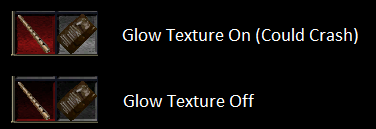
I added a setting to Enable/Disable using the "glow" texture, Enabled by default. Till I can find a better workaround you can disable the use of the texture if you need to create an item hot button. Again, only an issue for items that fall into a coloring category and have the glow texture applied.
Ortster updated MQItemColor with a new update entry:
20230601
Read the rest of this update entry...
20230601
(c1f6bd0) ~OrtsterAdd setting for using custom glow texture, defaulted on. User can turn off to prevent crashing for now when creating item hot buttons
...Merge branch 'Add-Texture-Use-Option' into 'main'
Add setting for using custom glow texture, defaulted on. User can turn off to...
See merge request Ortster/MQItemColor!13
Read the rest of this update entry...
Ortster updated MQItemColor with a new update entry:
04/23/2024
Read the rest of this update entry...
04/23/2024
Read the rest of this update entry...
Ortster updated MQItemColor with a new update entry:
09/05/2024
Read the rest of this update entry...
09/05/2024
Read the rest of this update entry...
Ortster updated MQItemColor with a new update entry:
09/16/2024
Read the rest of this update entry...
09/16/2024
Read the rest of this update entry...
Ortster updated MQItemColor with a new update entry:
09/07/2025
Read the rest of this update entry...
09/07/2025
Read the rest of this update entry...
Users who are viewing this thread
Total: 1 (members: 0, guests: 1)
Share: