• You've discovered RedGuides, an EverQuest multi-boxing and scripting community 🧙‍♀️⚙️. We want you to play several EQ characters at once, come join us and say hello! 👋

  • A TLP without truebox has thawed (Very Vanilla ready)
    Frostreaver
Resource icon

Release MQ2XPTracker

Teichou

RedGuides OG
Creator
Joined
Jun 15, 2011
RedCents
853¢
MQ2XPTracker

Rich (BB code):
Usage:
/xptracker - Display time tracking was started.
/xptracker on - Starts the tracker
/xptracker reset - Reset all events and begin tracking as if plugin was just loaded
/xptracker total - Display total gains since tracking start
/xptracker quiet - Toggle output of tracking messages
/xpevents - list the events/timestamps of the events we've tracked
/xpevents [#] - lists the events tracked in the past [#] seconds
/xpaverage - lists the average (mean) xp per-kill

TLO's

${XPTracker.Total}: Returns total floating amount of XP since the plugin loaded
${XPTracker.KillsPerHour}: Returns your Kills Per Hour rate as a floating number.
${XPTracker.PctExpPerHour}: Returns your floating rate of experience points as percentage of level per hour.
 
Last edited by a moderator:
Is it possible to have the MQ2XPTracker info running on the HUD?
Kills per minute and time to level is invaluable for me.
 
There's no listed TLOs on the plugin page for this so i dont think it can be integrated in to Hud.
 
It seems the latest patch broke this plugin. MQ2 has been updated and it's reporting ${Me.PctExp} correctly now, but this plugin is still showing numbers like 60% experience gain per kill (if only that were true.)
 
I've found the issue based on eqmule's update to MQ2DataTypes.cpp and will be testing a fix tonight.
C++:
    case PctExp:
        Dest.Float = (float)pChar->Exp / 3.30f;
was changed to
C++:
    case PctExp:
        Dest.Float = (float)pChar->Exp / 1000.0f;


similar change for PctAAExp


currently the code for MQ2XPTracker.cpp is
C++:
    if(!strcmp(Type,"Experience"))
    {
      FLOAT TotalXP = (float)TrackXP[Experience].Total/3.30f;
      return (float)TotalXP/RunningTimeFloat;
    }
    else if(!strcmp(Type,"AltExperience"))
    {
      FLOAT TotalXP = (float)TrackXP[AltExperience].Total/3.30f;
      return (float)TotalXP/RunningTimeFloat;
    }

So should just need to change those 3.30f's to 1000.0f

It's in a lot more locations, but that's the general idea.
 
This used to run automatically for me on startup. After changing server it's not running unless I do
/xptracker on every time I log in. I can't remember what I did to have it always running. Anyone got a suggestion?
 
This used to run automatically for me on startup. After changing server it's not running unless I do
/xptracker on every time I log in. I can't remember what I did to have it always running. Anyone got a suggestion?

You could run a /if command in your zoned.cfg to check if it's on and if it isn't, turn it on.
 
Does anyone have the TLOs working for this plugin? It just displays 0.00 for me
 
It's not showing for me also
I was going to look at this this morning (because it could definitely use some love) - but as soon as i fired it up and could earn aaxp (not capped) it was reporting as expected

1611745738970.png

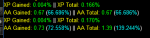
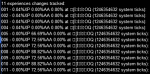
(this next output is absolutely smashed and definitely needs a fix - but you can see as soon i used fireworks glyph so i wasn't capped AA - on event 005, i start earning aaxp, and there is where the output from above came from

1611745911814.png


are you seeing regular xp output?
- if not try /xptracker quiet to ensure you see quiet mode is off - its a toggle, so if its currently off you will have to toggle it twice
1611745990881.png

can you confirm you are not AA capped?
 
Looks like GetCharInfo()->PercentEXPtoAA is returning incorrectly. Which is preventing it from calculating AA exp gained. Technically could just remove the added check, but instead I'm trying to verify that something else isn't wrong that caused the issue in the first place.

For some of my characters it's returning zero.
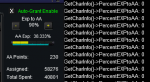
1611965016407.png
In the above screenshot, even though I'm max AA and max banked, it should still reflect 90 for PercentEXPtoAA

For others it's returning incorrect value.
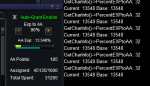
1611964900431.png

Granted this particular character isn't gold, so it's not gaining any AA Exp. So the output is accurate for current/base, but inaccurate for PercentEXPtoAA

Additionally, changing the value of EXP to AA in the AA Window has no effect on the output of what PercentEXPtoAA is currently.

I'm accessing it directly through the plugin, but you could also /echo ${Me.PctExpToAA} to see what your particular character is returning.
 
Last edited:
It was doing something odd earlier I noticed. The two toons it was working on were using kissassist, the other wasn't using kiss and it wasn't showing. I fired off a glyph on a bad pull on the capped tank, bought the glyph back, and it immediately started working again until the tank was capped. I don't know if that helps or if I screwed my plugins up somehow.
 
Well I had already found the issue as I mentioned in the post directly above yours. 32 != 90, and changing the value should reflect the change. So it has nothing to do with your kissassist or you doing anything to your plugins.
 
It seems that ${XPTracker.Total} and ${XPTracker.PctExpPerHour} get reset every time you zone? I have them displayed in boxhud while running mq2grind and everytime I finish a run and zone back in both get reset to 0.00. Is this by design? If so, is there any way to have a flag set to keep them rolling through zoning?

-G
 
You are correct. I had added a setting for this at one point but it included other changes that were not desired so the feature never made it in. If I have time perhaps I can look at it again.
 
Redbot updated MQ2XPTracker with a new update entry:

data type fixed, ResetOnZone toggle, ini for settings, corrected time issues, /xp reset fix


Read the rest of this update entry...
 
Seems each time I zone I need to issue a /xptracker on command for it to show up in my MQ chat window. I read the change notes and it said it was set to use an ini file. I do not have one in configs folder.
 
Any idea how to fix the issue of the XPtracker not displaying each time you zone?
 
Was there an update removing AA XP tracking? It's only tracking regular XP now for me.
 
Nope, not accurately at least. I read your message right when you posted and checked the average. It showed an incorrect average for AAs / kills that was way off. I reset it right away and it's now been running for ~40 mins and is still showing "No experience changes tracked". FYI, this is on Test.
 
The plugin checks for changes to EXP and AAEXP every 3rd pulse.
It doesn't use an event or anything that requires that text be seen, so it's not linked to that bit. It's directly checking for if your last XP (or AA XP) amount is different than the last time the plugin documented the value. Which would have either been on init (/xp reset or at load) or, oddly enough, OnDrawHUD.

In order for it to consider tracking AAXP changes you must have a value assigned to Percent EXP to AA in the AA Window. This is a simple check to ensure it's not checking for a change when it's not possible for there to be a change.

So, if you're not actually gaining AA XP, you don't have any EXP going to AA, you are not in game currently, it's the 0, 1, 2, or 3rd pulse, and you haven't set it to "bQuiet" then it would report changes to AA XP.

The calculations for the values haven't changed in some time. When reviewing the code I see nothing obvious that would prevent it from tracking XP Changes.

You mention you're on test. I believe once upon a time the information for PercenttEXPtoAA wasn't returning correctly and that prevented it from acknowledging that there was a change in AA XP. As far as the plugin itself, all the code looks to be as it is expected it would be, and things should work provided all values returned from MQ are correct and valid.
 
With the bonus weekend I've noticed that when AA gain is capped to the maximum 5 points XPTracker doesn't track any changes. My guess is that since the AA value doesn't change for perfectly even values (e.g., keeps saying 73.110%) the tracker doesn't see it as changed. It also doesn't seem to register kills, since no XP changes are noticed. Not sure this can be or needs fixing.
 
With the bonus weekend I've noticed that when AA gain is capped to the maximum 5 points XPTracker doesn't track any changes. My guess is that since the AA value doesn't change for perfectly even values (e.g., keeps saying 73.110%) the tracker doesn't see it as changed. It also doesn't seem to register kills, since no XP changes are noticed. Not sure this can be or needs fixing.
Seems I have no idea how vitality and AA really work. I figured I could fix the tracker issue by lowering the AA% down so I wasn't maxing at 5 points. Went down to 80% - 4AAs exactly. 60% - 3AAs. At 10% it was exactly 0.50AA.

So it seems they first calculate using 100% AA, then apply cap, and then apply AA split. Bummer.
 
This plug stopped working for me. I have to unload it and then load it again for it to work at all. Sometimes it works a few times, other times it does not work at all. Am I doing something wrong?
 
Release MQ2XPTracker

Users who are viewing this thread

Back
Top
Cart