
-
 Hail, we're RedGuides. We want you to play six (yes, 6!) EverQuest characters at once. We have scripts and a friendly community to help, please join our playstyle and say hello! 👋
You are using an out of date browser. It may not display this or other websites correctly.
You should upgrade or use an alternative browser.
You should upgrade or use an alternative browser.

Plugin - MQ2War (2 Viewers) 3.1.52471.42
- Thread starter ChatWithThisName
- Start date

that isn't mq2war. in that case you're not using mq2war to pull.I see now what was going on. I had everything set up correctly, and it is working fine unless I am using MQ2Grind. I am guessing that it has it's own pulling code and not using what CWTN has determined as a pulling method. I don't know, I am ust guessing here.

thats not the way this works.... grind has its own pull ability setting under tank configuration its NOT using plugins pull abilities at allI see now what was going on. I had everything set up correctly, and it is working fine unless I am using MQ2Grind. I am guessing that it has it's own pulling code and not using what CWTN has determined as a pulling method. I don't know, I am ust guessing here.

Berkz
Well-known member
Thank you Turnipin game type /grind ui
tank configuration
go to the GTDistPullCmd tab, it should look something like
[Tank]
GTDistPullCmd=/squelch /multiline ; /face; /timed 5 /cast 9
replace the /cast 9 with /useitem "Staff of Viral Flux"

- Commits
- 191
- Seller
- #1,606
ChatWithThisName updated MQ2War with a new update entry:
5/12/2023
Read the rest of this update entry...
5/12/2023
- On demand WarCry
-- /War Warcry
Read the rest of this update entry...

It tells you right there.View attachment 48736
Not sure what changed, lol went to work and come home, booted up and now cant use Easy ?!?
Yep, if you have use projection turned on. Not everyone's cup of teaWhat conditions trigger Projection of Fury, does it just fire on a burn?
Hey, all. I have been experiencing an issue with MQ2War. Every couple of hours, my warrior will randomly disconnect when set to either puller tank or assist tank. The issue isn't consistent and seems to occur randomly.
When this happens, I receive the following error message:
---------------------------
EverQuest Crash Detected
---------------------------
MacroQuest caught a crash:
Version: 3.1.0.1424
Location: TpWorkOnBehalfClearTicket+0 (C:\Windows\SYSTEM32\ntdll.dll+0000000000033930)
CrashID: 6ccd26c2-437c-4b62-a581-2af03c572b3e
You can either:
* [RETRY] Continue execution and hope for the best.
* [CANCEL] Write a crash dump and terminate EverQuest.
---------------------------
Retry Cancel
---------------------------
I've done some research and found a couple of potential solutions. One suggestion was to delete the MacroQuest_Overlay.ini file, and another was to check if a bad UI file might be causing the issue. The concern I have is that my other 17 toons aren't experiencing the same issue - so I am not sure this will solve it and I don't want to cause issues for my other plugins.
Before I proceed with the above solutions, I wanted to check if anyone else has encountered this issue and how you might have resolved it. Any input would be appreciated.
Thanks in advance for your help!
When this happens, I receive the following error message:
---------------------------
EverQuest Crash Detected
---------------------------
MacroQuest caught a crash:
Version: 3.1.0.1424
Location: TpWorkOnBehalfClearTicket+0 (C:\Windows\SYSTEM32\ntdll.dll+0000000000033930)
CrashID: 6ccd26c2-437c-4b62-a581-2af03c572b3e
You can either:
* [RETRY] Continue execution and hope for the best.
* [CANCEL] Write a crash dump and terminate EverQuest.
---------------------------
Retry Cancel
---------------------------
I've done some research and found a couple of potential solutions. One suggestion was to delete the MacroQuest_Overlay.ini file, and another was to check if a bad UI file might be causing the issue. The concern I have is that my other 17 toons aren't experiencing the same issue - so I am not sure this will solve it and I don't want to cause issues for my other plugins.
Before I proceed with the above solutions, I wanted to check if anyone else has encountered this issue and how you might have resolved it. Any input would be appreciated.
Thanks in advance for your help!
Unfortunately that does not appear to be an mq2war crashHey, all. I have been experiencing an issue with MQ2War. Every couple of hours, my warrior will randomly disconnect when set to either puller tank or assist tank. The issue isn't consistent and seems to occur randomly.
When this happens, I receive the following error message:
---------------------------
EverQuest Crash Detected
---------------------------
MacroQuest caught a crash:
Version: 3.1.0.1424
Location: TpWorkOnBehalfClearTicket+0 (C:\Windows\SYSTEM32\ntdll.dll+0000000000033930)
CrashID: 6ccd26c2-437c-4b62-a581-2af03c572b3e
You can either:
* [RETRY] Continue execution and hope for the best.
* [CANCEL] Write a crash dump and terminate EverQuest.
---------------------------
Retry Cancel
---------------------------
I've done some research and found a couple of potential solutions. One suggestion was to delete the MacroQuest_Overlay.ini file, and another was to check if a bad UI file might be causing the issue. The concern I have is that my other 17 toons aren't experiencing the same issue - so I am not sure this will solve it and I don't want to cause issues for my other plugins.
Before I proceed with the above solutions, I wanted to check if anyone else has encountered this issue and how you might have resolved it. Any input would be appreciated.
Thanks in advance for your help!
I am sorry - I am definitely at a novice level and learning MQ. Is there any chance you could identify it for me? My assumption was MQ2 war because that plugin is the only difference between my characters. I did not mean to mispost.Unfortunately that does not appear to be an mq2war crash
It says ntdll which could be all sorts things, likely just eq crashing, or a local computer issue or conflict.I am sorry - I am definitely at a novice level and learning MQ. Is there any chance you could identify it for me? My assumption was MQ2 war because that plugin is the only difference between my characters. I did not mean to mispost.
Opening the crash dmp may or may not offer insight, but since it is the ntdll crash, there's often not enough information for someone with my skill level me to discern the issue - and if there was it might not necessarily be something that is actionable - eq has crashes.
I'd definitely start by doing the normal things;
- windows updates
- ensure you're not running into resources issues (run framelimiter)
- ensure you're not having devices shut down
- ensure you're not getting file locks due to scanning/syncing issues with antivirus and things like onedrive
- check logfile size for that eq toon
Thank you. I'll do some more digging and see what I can find out. My CPU usage is only at 74% and my memory usage is at 60%. I have antivirus bypassing EQ and MQ, but I will definitely check OneDrive and the log file size. Thank you, Sic.It says ntdll which could be all sorts things, likely just eq crashing, or a local computer issue or conflict.
Opening the crash dmp may or may not offer insight, but since it is the ntdll crash, there's often not enough information for someone with my skill level me to discern the issue - and if there was it might not necessarily be something that is actionable - eq has crashes.
I'd definitely start by doing the normal things;
- windows updates
- ensure you're not running into resources issues (run framelimiter)
- ensure you're not having devices shut down
- ensure you're not getting file locks due to scanning/syncing issues with antivirus and things like onedrive
- check logfile size for that eq toon
- Commits
- 191
- Seller
- #1,616
Thank you. I'll do some more digging and see what I can find out. My CPU usage is only at 74% and my memory usage is at 60%. I have antivirus bypassing EQ and MQ, but I will definitely check OneDrive and the log file size. Thank you, Sic.
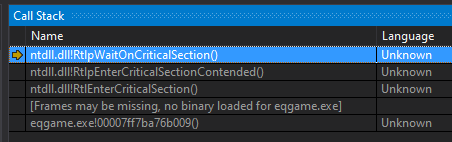
Based on what I see in the call stack it originates from eqgame.exe which as sic mentioned is a crash from eq, or exceeds my skill level as well to determine the cause. Our dump stack collection claims EXCEPTION_ACCESS_VIOLATION_WRITE.
https://learn.microsoft.com/en-us/windows-hardware/drivers/kernel/libraries-and-headers is the explaination I have available to me for what ntdll.dll is, but the plugin doesn't use it directly. But know that the crash shows up automatically in a list of crashes and can be investigated by the mq developers. If a lot of users are getting the same crash it'll group them and reflect that it's a high cause of crashes. However it may or may not be mq related to be fixed. So running with the suggestions as Sic said is probably a good start.
Thank you. I disabled OneNote updates and renamed the warrrior's log file to refresh it. So far, no crash. I also reloaded default UI to be safe (I run the same custom UI on all 18 toons). I am not sure why it was only the warrior that was crashing, but I appreciate the hell out of you guys responding so quickly. I'll post tomorrow if it is resolved. I might start another post in general chat since this is not an mq2war issue. I am sorry again for posting here.View attachment 49245
Based on what I see in the call stack it originates from eqgame.exe which as sic mentioned is a crash from eq, or exceeds my skill level as well to determine the cause. Our dump stack collection claims EXCEPTION_ACCESS_VIOLATION_WRITE.
https://learn.microsoft.com/en-us/windows-hardware/drivers/kernel/libraries-and-headers is the explaination I have available to me for what ntdll.dll is, but the plugin doesn't use it directly. But know that the crash shows up automatically in a list of crashes and can be investigated by the mq developers. If a lot of users are getting the same crash it'll group them and reflect that it's a high cause of crashes. However it may or may not be mq related to be fixed. So running with the suggestions as Sic said is probably a good start.
blackwisper
Member
Can we have a toggle for unrelenting attention since there are some situations where using it off cooldown is detrimental.
- Commits
- 191
- Seller
- #1,619
Can we have a toggle for unrelenting attention since there are some situations where using it off cooldown is detrimental.
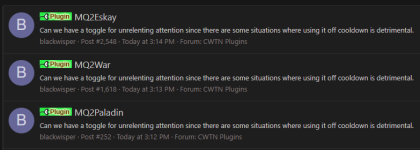
Is it necessary to post the same thing in 3 different places back to back?
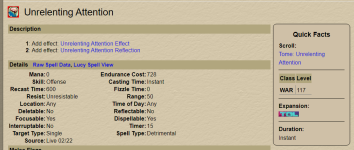
Probably worth mentioning that unrelenting attention only shows as being a warrior ability.
Last edited:
No, not at this time.Can we have a toggle for unrelenting attention since there are some situations where using it off cooldown is detrimental.
And please make sure to check the "how to ask for help".
Making a bold/broad statement and the. Providing zero information about it isn't helpful. Then creating more under-the-hood work by posting all over the place, isn't a great use of anyone's time.
Because very often people think XYZ needs adjusting when in reality it is doing what it is supposed to.
We use it while tanking and burning. So not tanking or not burning - not using it.
Mode, role, burn settings.
If it is a matter of a character not wanting the aggro reduction, they should click it off.
But you didn't say. So hard to address specifically.
Please see >>> Getting Started with CWTN plugins! (Movement, UI Window, Clickies, Pulling, ETC) Check Here First! <
Let us know if you want to provide enough information to help you - but almost exclusively the answer is always a no until it is not.

AimlessRooster
New member
I noticed today that mq2War is firing Wars Sheol's, Brace for Impact & Rage of Rallos AAs on trash mobs when I'm not burning. And yes, I have BurnAlways OFF in the plugin. Is the firing of those AAs intentional even when not burning or is something goofy?
And what is your burncount set to relative to number of mobs on xtarget? folks often overlook that whent hey want to "and yes" about settingsI noticed today that mq2War is firing Wars Sheol's, Brace for Impact & Rage of Rallos AAs on trash mobs when I'm not burning. And yes, I have BurnAlways OFF in the plugin. Is the firing of those AAs intentional even when not burning or is something goofy?
but no, those abilities we use when we can, always have
AimlessRooster
New member
Burncount is set to 5, it's happening when I'm fighting single mobs.
aye i'll take a look on what we intended on doing - but none of those have been adjusted in a long time so it isn't anything new.Burncount is set to 5, it's happening when I'm fighting single mobs.
I was much worse at "doing future me a solid" by putting notes of intent and reasoning, but at a glance, there'll likely be some adjustments
AimlessRooster
New member
Glad I wasn't crazy and imagining it haha. Thanks for checking on it Sic.aye i'll take a look on what we intended on doing - but none of those have been adjusted in a long time so it isn't anything new.
I was much worse at "doing future me a solid" by putting notes of intent and reasoning, but at a glance, there'll likely be some adjustments
- Commits
- 191
- Seller
- #1,628
ChatWithThisName updated MQ2War with a new update entry:
7/6/2023
Read the rest of this update entry...
7/6/2023
- Wars Sheol's will now respect the need to be burning
- Brace for impact will now respect the need to be tanking and burning
- Rage of Rallos will now respect the need to be burning
Read the rest of this update entry...
As someone that 99% of time runs in manual, this is lovely... thanks!ChatWithThisName updated MQ2War with a new update entry:
7/6/2023
Read the rest of this update entry...
So this isn’t really a CWTN plugin issue (although I guess it could be a feature add). Anyway I come from playing sk/pal tanks primarily but recently made an all van shir group and so thta means war. For pulling I’ve been using arrows but it’s annoying they only stack to 100, have to constantly replace. Are people just using clickies for pulling or has anybody come up with an ammo reload (have more in inventory) work around?
use a huntsman's ethereal quiver in your summon addclicky - set it to 101, and when it autinventories it, it will go to your ammo slotSo this isn’t really a CWTN plugin issue (although I guess it could be a feature add). Anyway I come from playing sk/pal tanks primarily but recently made an all van shir group and so thta means war. For pulling I’ve been using arrows but it’s annoying they only stack to 100, have to constantly replace. Are people just using clickies for pulling or has anybody come up with an ammo reload (have more in inventory) work around?
Thank you. I had a feeling there was an easy solution. No way this crowd wouldn’t QOL fix it. I just never play warriors. So new problem for me.use a huntsman's ethereal quiver in your summon addclicky - set it to 101, and when it autinventories it, it will go to your ammo slot
if you want the ultimate warrior pulling, do the work to get a staff of viral fluxThank you. I had a feeling there was an easy solution. No way this crowd wouldn’t QOL fix it. I just never play warriors. So new problem for me.

Do AE stuff. Set your AE count to 2. Use Expanse instead of Precision. But the plugin is not going to randomly swap targets around to check if it has all the agro. The client, and thus MQ, only know the agro status of the current target. It has no idea if the 2 other mobs in camp are on the warrior or another group member. Swapping targets also tells your dps to change targets, which would break mez on mezzed mobs. Instead, the plugins are design under the assumption that you have sufficient AE threat generation and/or active crowd control or that your group can take a hit or two without going splat.Is there a way to get the warrior to attempt to pick up aggro on any mob in the camp that isn't already on him, rather than just focusing on a single mob?
We don't swap targets, or lock you to them. So if you need to change targets, do so.Is there a way to get the warrior to attempt to pick up aggro on any mob in the camp that isn't already on him, rather than just focusing on a single mob?
I'd suggest turning off precision and turning on expanse, and understanding the diff.
Should consider some CC too

Question:
Is there a way to stop the plugin from using Unrelenting Attention? If not, I propose adding that to the settings, in certain situations I like to keep that disc available, mostly for raiding...
Is there a way to stop the plugin from using Unrelenting Attention? If not, I propose adding that to the settings, in certain situations I like to keep that disc available, mostly for raiding...
We use it while tanking and burning, so if you're not tanking or not burning you won't use itQuestion:
Is there a way to stop the plugin from using Unrelenting Attention? If not, I propose adding that to the settings, in certain situations I like to keep that disc available, mostly for raiding...
I don't think I can provide enough information to answer this, but am going to try. And I think this has happened on more than just MQ2war cwtn (I think I had rogue do this, and maybe druid).
I am doing something that makes the cwtn controlled toon just stop and do nothing and I can't get it started again until I unload and load the plugin again. I'll be in tank mode and a mob will come into camp and he will just sit there, if he was in puller mode he doesn't pull and doesn't say why. Its like he is in manual mode or maybe invis but neither of those things is true. I've only just started playing again with the full group so I can't see this is new or not. It is almost certainly user error, and I know I am not providing enough information. But maybe someone has seen something like this and knows what stupid thing I did.
It MIGHT be happening after I have moved my group and reset camp, or changed modes rapidly, or been invis recently But when in this state I am surely not invis and surely the ui says I am in tank mode. I tried changing to manual and back to tank and still nothing. Naturally I only notice this when a mob is in camp so I am frantically trying to fix things rather than debug the situation. But reloading the plugin gets things going again.
I am doing something that makes the cwtn controlled toon just stop and do nothing and I can't get it started again until I unload and load the plugin again. I'll be in tank mode and a mob will come into camp and he will just sit there, if he was in puller mode he doesn't pull and doesn't say why. Its like he is in manual mode or maybe invis but neither of those things is true. I've only just started playing again with the full group so I can't see this is new or not. It is almost certainly user error, and I know I am not providing enough information. But maybe someone has seen something like this and knows what stupid thing I did.
It MIGHT be happening after I have moved my group and reset camp, or changed modes rapidly, or been invis recently But when in this state I am surely not invis and surely the ui says I am in tank mode. I tried changing to manual and back to tank and still nothing. Naturally I only notice this when a mob is in camp so I am frantically trying to fix things rather than debug the situation. But reloading the plugin gets things going again.
Not really a thing unless mob is too large and is actually outside of camp. The FAQ explains that.I don't think I can provide enough information to answer this, but am going to try. And I think this has happened on more than just MQ2war cwtn (I think I had rogue do this, and maybe druid).
I am doing something that makes the cwtn controlled toon just stop and do nothing and I can't get it started again until I unload and load the plugin again. I'll be in tank mode and a mob will come into camp and he will just sit there, if he was in puller mode he doesn't pull and doesn't say why. Its like he is in manual mode or maybe invis but neither of those things is true. I've only just started playing again with the full group so I can't see this is new or not. It is almost certainly user error, and I know I am not providing enough information. But maybe someone has seen something like this and knows what stupid thing I did.
It MIGHT be happening after I have moved my group and reset camp, or changed modes rapidly, or been invis recently But when in this state I am surely not invis and surely the ui says I am in tank mode. I tried changing to manual and back to tank and still nothing. Naturally I only notice this when a mob is in camp so I am frantically trying to fix things rather than debug the situation. But reloading the plugin gets things going again.
Going into tank mode would set a camp - you can't roam around in tankmode, so nothing to resetcamp - that's usually if during a fight or in sictank mode.
Tank mode will do tanking stuff following the settings it has.
My bet is your campradius is too small - or you're levitating or having an issue with your mesh where you're at.
Users who are viewing this thread
Total: 3 (members: 0, guests: 3)
Share: