Sorry, maybe I was giving you the wrong info. I am the tank, my target is hitting me and i am the target of taget. However, I keep spamming taunt and bazu bellow. The problem is I will be run out of energy to tank the next boss.well
if the target of your target is not you, while you are tanking you will use roar and provoke lines with at least a 2 second delay until you are the target of target.
there are no other uses of these two timers, unless you are at or above 86.
this change was made specifically for lower wars under lvl 86, as i mentioned. based on the code, my testing, and confirmation from the folks i asked to confirm it works, it does what it is supposed to do
> here for example <
this change was done back in november because timer 8 and 9 were causing folks huge headaches.

-
 Hail, we're RedGuides. We want you to play six (yes, 6!) EverQuest characters at once. We have scripts and a friendly community to help, please join our playstyle and say hello! 👋
You are using an out of date browser. It may not display this or other websites correctly.
You should upgrade or use an alternative browser.
You should upgrade or use an alternative browser.

Plugin - MQ2War 3.1.52471.42
- Thread starter ChatWithThisName
- Start date

you will continue to use taunt, as i mentioned.Sorry, maybe I was giving you the wrong info. I am the tank, my target is hitting me and i am the target of taget. However, I keep spamming taunt and bazu bellow. The problem is I will be run out of energy to tank the next boss.
you will not continue to use bazu. we only use timer8 and timer9 on mobs that a: are not targeting you, and b: don't already have the debuff from the spell c: greater than 2 seconds since last time we checked
can you show me your mq2war window spamming bazu? on the same target that is targeting you.
because that isn't what the code says, nor what other people (and myself) experience.
you will continue to use taunt, as i mentioned.
you will not continue to use bazu. we only use timer8 and timer9 on mobs that a: are not targeting you, and b: don't already have the debuff from the spell c: greater than 2 seconds since last time we checked
can you show me your mq2war window spamming bazu? on the same target that is targeting you.
because that isn't what the code says, nor what other people (and myself) experience.
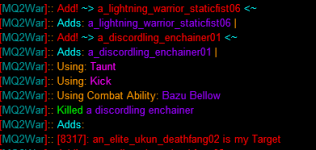
this doesn't show spam.
this looks like you had an add, and then you used an ability, and then the add died.
can you please show me an instance of you using bazu on the mob multiple times in a row
I think the culprit is MQ2melee. I am not sure how it's still running.this doesn't show spam.
this looks like you had an add, and then you used an ability, and then the add died.
can you please show me an instance of you using bazu on the mob multiple times in a row
we unload mq2meleeI think the culprit is MQ2melee. I am not sure how it's still running.
but yeah, if you have a macro or something else doing it, then yup, that'd be a problem

- Commits
- 191
- Seller
- #1,367
Sic updated MQ2War with a new update entry:
Jan-17-2022
Read the rest of this update entry...
Jan-17-2022
Some of these already were active, now that RG is building directly, we should be able to keep update notes updated.
MQ2War
- Added a "UseSnare" option to toggle usage of the "Call of Challenge" AA
- (lower level) We will now cancel "stonewall discipline" if you are in pullerassist or pullertank (not hunter), and have no mobs on xtarget.
- workaround for issue where our aura would now fail our stacking check despite not having the aura.
Read the rest of this update entry...
MQ2War is not currently loading in EQ. MQ2War, MQ2Cleric, and MQ2Berzerker are currently giving the same error:
"Plugin mq2(insert class name) could not be loaded Plugin was not built for this version of everquest was built for Jan 5 2022 12:11:01"
MQNext updated to 20/01/2022 03:49:54 version (on uk time so dunno if that matters)
all plugins and macros updated also
EQ updated and checked for all files
"Plugin mq2(insert class name) could not be loaded Plugin was not built for this version of everquest was built for Jan 5 2022 12:11:01"
MQNext updated to 20/01/2022 03:49:54 version (on uk time so dunno if that matters)
all plugins and macros updated also
EQ updated and checked for all files

Are you sure? Because the error message basically says "you're out of date"all plugins and macros updated also
Did your license expire since the last update?
Yes I am sure and no they did not expire. I also have pretty decent reading comprehension.
I mentioned that my addons were updated in an effort to skip over the "did you update?" messages.
I placed the previous comment in an effort to inform the plugin writers that there appears to be an issue, they may already be aware.
I mentioned that my addons were updated in an effort to skip over the "did you update?" messages.
I placed the previous comment in an effort to inform the plugin writers that there appears to be an issue, they may already be aware.
I had the same error this morning. I updated yesterday after the EQ patch, played all night. Then had that same error message this morning. There was another update to very vanilla after the first one for the EQ patch. I re-updated and everything works fine.Yes I am sure and no they did not expire. I also have pretty decent reading comprehension.
I mentioned that my addons were updated in an effort to skip over the "did you update?" messages.
I placed the previous comment in an effort to inform the plugin writers that there appears to be an issue, they may already be aware.
check your launcher.MQ2War is not currently loading in EQ. MQ2War, MQ2Cleric, and MQ2Berzerker are currently giving the same error:
"Plugin mq2(insert class name) could not be loaded Plugin was not built for this version of everquest was built for Jan 5 2022 12:11:01"
MQNext updated to 20/01/2022 03:49:54 version (on uk time so dunno if that matters)
all plugins and macros updated also
EQ updated and checked for all files
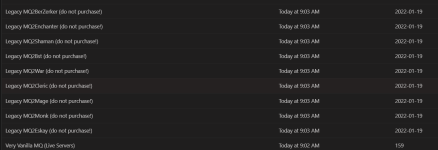
you are downloading MacroQuest - but you are downloading MacroQuest2 "Legacy" plugins.
you are not downloading the correct plugins
you said:Yes I am sure and no they did not expire. I also have pretty decent reading comprehension.
I mentioned that my addons were updated in an effort to skip over the "did you update?" messages.
I placed the previous comment in an effort to inform the plugin writers that there appears to be an issue, they may already be aware.
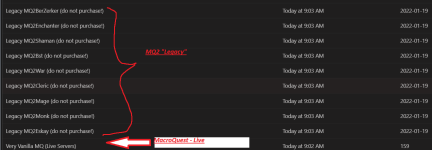
Make sure your launcher is the correct version - v1.0.74
(if your launcher is not the correct version of the launcher you could potentially be downloading the wrong files)

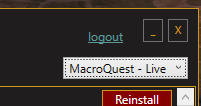
Make sure you are using the correct version of MacroQuest
if you don't have MacroQuest - Live selected, then you won't be able to see the MQ plugins on the plugins tag
and make sure they all show they are last updated correctly
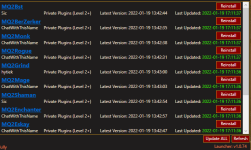
otherwise hit that update all button
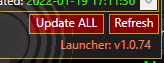
if instead you have an "install" button where you see "reinstall above", hit that. as you need to install them for the first time.
but based on your download history - you appear to have only just downloaded the official version of macroquest we're using "MacroQuest - Live" in the launcher, but you never have downloaded the correct version of the plugins.
Here is some information about MacroQuest - and how to migrate your legacy settings/configs/resources.
It is OFFICIAL! MacroQuest is the version of MacroQuest that we offer here at RedGuides.
You will see this with "MacroQuest - Live" in the RG Launcher.
Please, check out this link: >>> Functions & Features Demo + Migration to the new MacroQuest<<<
mental notes:
1. mq2map click is Control+Shift+Click
2. new easyfind self travel is Control+Click (reminder in find window title bar)
3. new easyfind group travel is Control+Shift+Click
4. If you selected a destination in your zone guide and want to activate it you /travelto activate
5. /yes and /no are now aliases, there is no mq2yes plugin
Attachments
Thank you for the post this has fixed the issue
Entire launcher needed updating which seems to have fixed the incorrect versions of the plugins error.
All of the plugins were working correctly right up to the patch yesterday. If I was downloading the incorrect versions before then there were no indications, so by "never" do you mean "since yesterdays patch"?
I did notice the "legacy" and "do not download" parts on the addons but they were not present when i first encountered the error and made the post.
Entire launcher needed updating which seems to have fixed the incorrect versions of the plugins error.
All of the plugins were working correctly right up to the patch yesterday. If I was downloading the incorrect versions before then there were no indications, so by "never" do you mean "since yesterdays patch"?
I did notice the "legacy" and "do not download" parts on the addons but they were not present when i first encountered the error and made the post.
yes by never i mean "does the launcher say you have never installed them" since the versioning of them changed with the changes to the launcher.Thank you for the post this has fixed the issue
Entire launcher needed updating which seems to have fixed the incorrect versions of the plugins error.
All of the plugins were working correctly right up to the patch yesterday. If I was downloading the incorrect versions before then there were no indications, so by "never" do you mean "since yesterdays patch"?
I did notice the "legacy" and "do not download" parts on the addons but they were not present when i first encountered the error and made the post.
which is why i said "if instead you have an "install" button where you see "reinstall above", hit that. as you need to install them for the first time."
glad you're all patched up and fixed
hey CWTN and Sic,
not sure this was covered already. Timer 10 blades discs are AE taunts, but they seem to be used in the single taunt rotation.
In manual mode it can generate a problem when it grabs aggro on someone else target.
It'd also be a nice ability to use when bard or cleric get aggro. But its often down when needed due to being in rota.
best regards
r0b
not sure this was covered already. Timer 10 blades discs are AE taunts, but they seem to be used in the single taunt rotation.
In manual mode it can generate a problem when it grabs aggro on someone else target.
It'd also be a nice ability to use when bard or cleric get aggro. But its often down when needed due to being in rota.
best regards
r0b
Last edited:
turnittotheright
Well-known member
Noticed an uptick in crashes on my war when i receive tells since the last patch. was wondering if anyone else is having this issue.
please post in the correct location.Noticed an uptick in crashes on my war when i receive tells since the last patch. was wondering if anyone else is having this issue.
no i've never heard this.
can you send me a crash dmp in pm plz
it isn't.hey CWTN and Sic,
not sure this was covered already. Timer 10 blades discs are AE taunts, but they seem to be used in the single taunt rotation.
In manual mode it can generate a problem when it grabs aggro on someone else target.
It'd also be a nice ability to use when bard or cleric get aggro. But its often down when needed due to being in rota.
best regards
r0b
knuckle is also timer 10.
we only use dragonstrikeaoe if you have useaoe on.
if useaoe is on and you're tanking, we're going to dragonstrikeaoe, if useaoe is off, we're going to use knuckle.
If you want full control of that while in manual, I believe it stops using Knuckle if you have UseAOE turned on.hey CWTN and Sic,
not sure this was covered already. Timer 10 blades discs are AE taunts, but they seem to be used in the single taunt rotation.
In manual mode it can generate a problem when it grabs aggro on someone else target.
It'd also be a nice ability to use when bard or cleric get aggro. But its often down when needed due to being in rota.
best regards
r0b
Then bump the AOE targets up to 100 so it doesn't fire Tempest / AE Taunt willy nilly


vanemon
Active member
yes, that's what i thought too.... but toon runs directly to next mob without using the bow (doesn't matter which zone i am in) - well, will try a full restart of the machine in the next hours... who knowsJust need a bow and arrows equipped to pull with a bow. Plugin automagically detects them.
yes, arrows in bag and in slot and in the ini;-)Can sound stupid, but , do you have arrows?
Happened to me after i forgot to put back on my war the item that summons arrows.
usually means it doesn't find line of sight on the way to the mob, and ends up too close, so it uses meleeyes, that's what i thought too.... but toon runs directly to next mob without using the bow (doesn't matter which zone i am in) - well, will try a full restart of the machine in the next hours... who knows
yes, arrows in bag and in slot and in the ini;-)
Right on! I don't really care what I pull with as long as it's a range item lol. Thanks guys

vanemon
Active member
thanks sic! i guess that's itusually means it doesn't find line of sight on the way to the mob, and ends up too close, so it uses melee
vanemon
Active member
for sure - but a ton of progression to make too;-)Best war pull item ever.
Need a little help on war im not sure if its a setting i didnt update but my issue is that when i use this pluging i cant position mobs. Im sticking to them when i have stick off. I know manual mode will let me move but it doesnt seem to fire off all abilities my other issue is in tank mode i seem to be looking at ceiling or my feet depending on the size of the mob.
yup, if you don't want to any sticking to the mob while tanking, use manual mode.Need a little help on war im not sure if its a setting i didnt update but my issue is that when i use this pluging i cant position mobs. Im sticking to them when i have stick off. I know manual mode will let me move but it doesnt seem to fire off all abilities my other issue is in tank mode i seem to be looking at ceiling or my feet depending on the size of the mob.
you can't adjust the tank stick - so if you are scrolled in 1st person mode, you will look up/down. scroll out if you don't want to do that. (or manual mode)
manual ability 100% uses your abilities the same as other modes do. make sure you have checked out all the infos
Please see >>> Getting Started with CWTN plugins! (Movement, UI Window, Clickies, Pulling, ETC) Check Here First! <<<
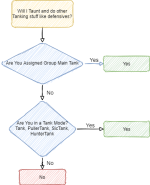
especially this part - as that would be the only way you would do something differently in manual mode vs being in a tank mode --- if you were not assigned group main tank.
you can't adjust the tank stick - so if you are scrolled in 1st person mode, you will look up/down. scroll out if you don't want to do that.
When i fight a giant im looking at ceiling when i fight a slime i look at my feet can this be turned off somehow?
i hit home key to center and it snaps right back...
and sic thank you for reply
When i fight a giant im looking at ceiling when i fight a slime i look at my feet can this be turned off somehow?
i hit home key to center and it snaps right back...
and sic thank you for reply
noyou can't adjust the tank stick - so if you are scrolled in 1st person mode, you will look up/down. scroll out if you don't want to do that.
When i fight a giant im looking at ceiling when i fight a slime i look at my feet can this be turned off somehow?
i hit home key to center and it snaps right back...
and sic thank you for reply
as i said "you can't adjust the tank stick - so if you are scrolled in 1st person mode, you will look up/down. scroll out if you don't want to do that."
i already answered this question and you quoted it.
scroll out from 1st person mode if you dont want to see the game in 1st person - for automation we use the UW sticking - so you will want to be scrolled out if you dont' want looking up and down. or be in manual mode.
Q: can i not look at the ground/sky when fighting a mob
A: yes, scroll your mouse out to get out of 1st person camera view
Q: can i adjust the tank stickhow so it doesn't use UW
A: no
couldnt you put in a check box on this to stick uw vs stick normal in the menu?
i wanted clarification on your scroll out answer ...
i never play in 3rd person so i didnt fully get the scrolled out instructions you gave i dont really play in 3rd person
i wanted clarification on your scroll out answer ...
i never play in 3rd person so i didnt fully get the scrolled out instructions you gave i dont really play in 3rd person
no, there is no adjusting the tank sticking. it is going to use the UW any time it is doing tank stickingcouldnt you put in a check box on this to stick uw vs stick normal in the menu?
i wanted clarification on your scroll out answer ...
i never play in 3rd person so i didnt fully get the scrolled out instructions you gave i dont really play in 3rd person
q: is there presently or will there be in the future a way to adjust tank sticking?
a: no, as mentioned, there is not a way to adjust that, and we have zero plans to do so. if you want to handle it yourself, you would want to use manual mode.

This should go under mq2war.
Is this recent? always happened? unknown, just got the plugin? glad to help if you can give me some details please.
Is this recent? always happened? unknown, just got the plugin? glad to help if you can give me some details please.
Hello grampy,My window has no setting tabs
i have unloaded and done everything I can think of but always the same
this is with combat warrior
thank you
Please make sure to check the stickied "check here first" thread. There is a video about the UI, and that will likely answer all your questions.
Please see >>> Getting Started with CWTN plugins! (Movement, UI Window, Clickies, Pulling, ETC) Check Here First! <<<
@grampyOn my Mq2 window
the tabs dont load. Have reloaded and updated
nothing so far
how do I get them back ?
did you check here where i responded to you?
you already posted this and i already answered
Hello grampy,
Please make sure to check the stickied "check here first" thread. There is a video about the UI, and that will likely answer all your questions.
Please see >>> Getting Started with CWTN plugins! (Movement, UI Window, Clickies, Pulling, ETC) Check Here First! <<<
I play in 1st person mode and this is what I do to avoid the look up/down:you can't adjust the tank stick - so if you are scrolled in 1st person mode, you will look up/down. scroll out if you don't want to do that.
When i fight a giant im looking at ceiling when i fight a slime i look at my feet can this be turned off somehow?
i hit home key to center and it snaps right back...
and sic thank you for reply
EQ Options/Mouse/check box Look Spring
Users who are viewing this thread
Total: 1 (members: 0, guests: 1)
Share: