• You've discovered RedGuides, an EverQuest multi-boxing and scripting community 🧙‍♀️⚙️. We want you to play several EQ characters at once, come join us and say hello! 👋

  • A TLP without truebox has thawed (Very Vanilla ready)
    Frostreaver
Resource icon

Release MQ2Tracking

Kallo

Member
Joined
Jun 10, 2009
RedCents
34¢
CURRENT VERSION: 0.13

*Please re-download if your version doesn't match that above. Check MQ2Tracking.cpp for version info!

Disclaimer:
I AM NOT THE PLUGIN'S ORIGINAL AUTHOR

I wrote this, simply for the love of the plug-in, and the lack of updates whoever original wrote it has given to it. I suspect they've moved onto other games, and wanted to help continue their legacy.

@Original Author: Thanks! I love this plug-in!
@Compilers: Feel free to update your builds with this, if you desire.

So, 2 years ago... I had received the Source of MQ2Tracking from you guys, and up to this day, I have seen no evident changes or fixes made to it even though game mechanics have changed. Plus, things remained broken about it.

The things that I found wrong were:
1) You cannot search by Grey (Didn't exist back then)
2) You cannot sort the results by any means indicated

I use /track a lot, for various things and it always bothered me that I couldn't do these things! So, a while ago I developed my own tweaks to it.

...But, this time around I figured I'd share something. If you like it, feel free to add it to any compile builds.

Things that are FIXED/ADDED:

v0.13
  • Fixed White con color filtering too! (It used to be referenced as "black")

v0.12
  • You can view Gray Spawns
  • You can Sort by Level (default), Name, Distance, or ID.
  • You can filter by Named* spawns now
(*Note: The definition of Named used in this sense is the MQ2 interpretation of a named spawn. That is, it has # in the name, or is made of capitals like this: Fippy Darkpaw)

Enjoy it, if you use it =)

edit: Oops, I put this in the wrong section. Sorry =P Feel free to move it.
 
Last edited:
Re: MQ2Tracking Update

Moved to plugins and offsets.

Great work!
 
Re: MQ2Tracking Update

Updated my source files for all future compiles. Many thanks!
 
A friend let me know of another bug with MQ2Tracking, and that's the White Color Con changes.

I have also updated it to fix White Color cons showing up. This bug was in the previous versions of MQ2Tracking as well. Sorry about the quick update.

Please re-download :)
 
MQ2Tracking - This plugin will provide a similar tracking window to the one used by native tracking characters.

/track help - Show command help

/track off - Stop tracking the current spawn

/track target - Start tracking the current target

/track players [all | pc | group | npc] - What you want to track

/track refresh [on|off] - Explicitly turns on or off window refresh

/track refresh - Toggles the window refresh on or off

/track refresh # - Sets the refresh time in seconds

/track filter [off|<spawn search string>] - Sets or removes custom spawn search parameters (same as /who)

/tracknames [<value>|reset] - Sets or removes custom naming for spawn entries in the list (see NamingSpawn)
 
Last edited by a moderator:
How do you get this to work if your a non tracker?

have done /plugin MQ2Tracking and get message its loaded but no window, any ideas?
 
This plugin is broken it seems will have to look at it next week.

Use your map in the mean time. you can /target mob name and the map should draw a line to it

if you don't see the line then /mac map
 
Last edited:
Hello all, having an issue when I use TRACK (Plugin) on my Non-Ranger, Bard, Druids. When I use on other types, Necro/Mage and such, it opens the TRACK sub-screen like normal, but as soon as your choose a "color" to track (like Blue or Yellow) it shuts that session of EQ down to desktop. No error message, nor back to character select, just closes it.
 
Hello all, having an issue when I use TRACK (Plugin) on my Non-Ranger, Bard, Druids. When I use on other types, Necro/Mage and such, it opens the TRACK sub-screen like normal, but as soon as your choose a "color" to track (like Blue or Yellow) it shuts that session of EQ down to desktop. No error message, nor back to character select, just closes it.
^^this^^ I open track with wizard I click a color and then if I attempt to sort or click on the mob I am trying to track that box window crashes. This is an awesome plugin and I hope there is a solution. thanks.
 
please recompile
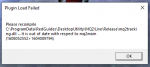
c:\users\xxxxxxx\appdata\local\veryvanilla\live\release\mq2tracking.dll--it is out of date with repect to mq2main (1604452863>1604089794)

have recompiled / updated four times, does not resolve issue.
so what am i doing wrong?
 
Removed due to lack of fixes and possibly upsetting DBG.
Stupid question: To get rid of the recompile error message window do we just delete the offending .dll, or are we just living with this error window until the next VV patch?
 
I use this alot. Is there something similar that has replaced it or is the tracking ability just gone now?
mq2map or myseq functionality i believe. this is one of the plugins that dbg has "flagged/identified" as something they aren't dtf with
 
Is there a way to make it show you a list of the mobs that are up sorted by Name or Level?
myseq you can - but not with mq2map - adding "tracking" to classes which can't is what dbg had issue with mq2tracking (presumably)
 
Dang, I have been using it for years, I had gotten used to being able to just sort mobs by Level/Name in the window and be able to click on them to see where they are. Im guessing with MySEQ, you cant actually click on the mob either?
 
You can achieve a lot with /who and using /whofilter to turn on spawnid so you can find specific mob ID's to target


An even better way yo[BGCOLOR=initial]u can use is for example /target ${Spawn[npc radius 500 trakanon]}[/BGCOLOR]

[BGCOLOR=initial]you can use this to search by pretty much anything, class, level range, bodytype, all parameters at the link below[/BGCOLOR]

[BGCOLOR=initial] [/BGCOLOR]

Honestly I don't know why a plugin like that would be removed from circulation when all the functionally and more remains in base MQ2 but it seems like DBG were tightening the clamps in the past on the MQ2 devs by threatening to make more regular and severe struct changes which would make updating MQ2 after game patches a lot harder and or seems like nobody has been maintaining the code on this one.

I didn't remember it at first as I haven't used it over the last 6 months since I came back playing, but I think I did use it back before I quit around 2008. I've been getting by OK with just using the map and the /who searches and can honestly say I haven't missed it at all.
 
Last edited:
MQ2Tracking.dll has been terminated as its one of the plugins that eq are able to scan for and actively scans for. so its no longer part of the RG suite.

to fix it go to your macroquest.ini in your /mq2/release folder and remove the line

mq2tracking=1
 
Getting the error below for the last month or so. I've tried deleting MQ2Tracking, repatching, etc. Doesn't fix it. Gone through several patches now and still getting it. Just been kind of ignoring it, but with the new expansion, I'd like to be able to get it to work. Any suggestions?

1608079848083.png
 
Getting the error below for the last month or so. I've tried deleting MQ2Tracking, repatching, etc. Doesn't fix it. Gone through several patches now and still getting it. Just been kind of ignoring it, but with the new expansion, I'd like to be able to get it to work. Any suggestions?

View attachment 26606
mq2tracking has been removed from the VV compile for a few reasons.

you will want to a: delete the file and b: go into your macroquest2.ini and change mq2tracking=1 to mq2tracking=0 (or remove that entry)

unfortunately when something is removed/changed our RG launcher doesn't have a way to nuke old files - so you gotta do it, but that'll fix you right up
 
shoouldnt we nuke this resource then?
it does show unmaintained - and there might be historical reasons for wanting it or emu or whatever
it also still wouldn't fix the issue of the launcher not deleting stuff that gets removed - but yeah i get what you're sayin
 
mq2tracking has been removed from the VV compile for a few reasons.

you will want to a: delete the file and b: go into your macroquest2.ini and change mq2tracking=1 to mq2tracking=0 (or remove that entry)

unfortunately when something is removed/changed our RG launcher doesn't have a way to nuke old files - so you gotta do it, but that'll fix you right up
Thanks. It's just crazy to me that this would suddenly be a problematic plugin with DB.
 
Release MQ2Tracking

Users who are viewing this thread

Back
Top
Cart