• You've discovered RedGuides, an EverQuest multi-boxing and scripting community 🧙‍♀️⚙️. We want you to play several EQ characters at once, come join us and say hello! 👋

  • A TLP without truebox has thawed (Very Vanilla ready)
    Frostreaver
MQ2Rewards

Release MQ2Rewards

Joined
Jun 13, 2016
RedCents
31,901¢
MQ2Rewards

MQ2Rewards allows control over specifying, selecting, and claiming rewards from macros.

This has been written specifically to support the Overseer macro. Has been tested on Test during the 5/20 24-hour outage on Live, so hasn't been tested on Live yet. Through Overseer needs, will be tested much further.

Caution: Rewards are highly sensitive to mistakes and tricky to test as acquiring rewards and combinations to experiment with is not always easy.
Still more validation to perform, but has been functioning properly to date.

Commands
  • /rewards help - displays the below list of commands
  • /rewards reward <reward> - Opens reward window and selects the specified reward (tab) if exists. May be name (string) or 1-based number Error if no appropriate match found.
  • /rewards option <option> - Selects the specified option for the currently selected reward (tab). May be name (string) or 1-based number. Error if no appropriate match found.
  • /rewards claim - claims the currently selected reward and option.
    • Due to the sensitivity in rewards, there is not a single "Select and claim" option yet. Until proven, this ensures all clients have the opportunity to select and verify on their own before actually claiming.
Examples
  • /rewards reward 3
    • Selects the third reward (tab)
  • /rewards reward "Essence of Dragons"
    • Selects the first reward titled "Essence of Dragons"
  • /rewards option 3
    • Selects the third option in the reward option list.
  • /rewards option "Collection Item Dispenser"
    • Selects the option labeled "Collection Item Dispenser"
TLO: Rewards
  • ${Rewards.Count} - Returns number of currently pending rewards
  • ${Rewards.Reward[<#/name>]} - Return the appropriate reward by index or name; else return NULL
Reward
  • ${Rewards.Reward[<#/name>].Text} - Returns name of the indicated reward if available; else NULL
  • ${Rewards.Reward[<#/name>].Selected} - Returns TRUE if indicated reward is available and selected; else FALSE
  • ${Rewards.Reward[<#/name>].Select} - Selects the specified reward. TRUE if available and able to select; otherwise FALSE.
  • ${Rewards.Reward[<#/name>].Claim} - Claims the specified reward if available and option (if any) selected. TRUE if able to claim; otherwise FALSE
  • ${Rewards.Reward[<#/name>].Options} - Returns number of options for the specified reward if available. Otherwise NULL.
  • ${Rewards.Reward[<#/name>].Option[#/name]} - Returns the appropriate option by index or name; else returns NULL
  • ${Rewards.Reward[<#/name>].Items} - Returns number of items (right-side list) for the specified reward and selected option if available. Otherwise NULL.
  • ${Rewards.Reward[<#/name>].Item[#/name]} - Returns the appropriate item by index or name; else returns NULL
Option
  • ${Rewards.Reward[<#/name>].Option[#/name].Text} - Returns name of the indicated option if available; else NULL
  • ${Rewards.Reward[<#/name>].Option[#/name].Selected} - Returns TRUE if the indicated option is available and selected; otherwise FALSE
  • ${Rewards.Reward[<#/name>].Option[#/name].Select} - Selects the specified option. TRUE if available and able to select; otherwise FALSE
  • ${Rewards.Reward[<#/name>].Option[#/name].ItemCount} - Returns number of items (right-side list) for the specified reward and selected option if available. Otherwise NULL.
  • ${Rewards.Reward[<#/name>].Option[#/name].Item[#/name]} - Returns the appropriate item by index or name; else returns NULL
Item
  • ${Rewards.Reward[<#/name>].Item[#/name].Text} - Returns name of the indicated option if available; else NULL
 

Attachments

Last edited:
MQ2Rewards

MQ2Rewards allows control over specifying, selecting, and claiming rewards from macros.

This has been written specifically to support the Overseer macro. Has been tested on Test during the 5/20 24-hour outage on Live, so hasn't been tested on Live yet. Through Overseer needs, will be tested much further.

Caution: Rewards are highly sensitive to mistakes and tricky to test as acquiring rewards and combinations to experiment with is not always easy.
Still more validation to perform, but has been functioning properly to date.

Commands
  • /rewards help - displays the below list of commands
  • /rewards reward <reward> - Opens reward window and selects the specified reward (tab) if exists. May be name (string) or 1-based number Error if no appropriate match found.
  • /rewards option <option> - Selects the specified option for the currently selected reward (tab). May be name (string) or 1-based number. Error if no appropriate match found.
  • /rewards claim - claims the currently selected reward and option.
    • Due to the sensitivity in rewards, there is not a single "Select and claim" option yet. Until proven, this ensures all clients have the opportunity to select and verify on their own before actually claiming.
Examples
  • /rewards reward 3
    • Selects the third reward (tab)
  • /rewards reward "Essence of Dragons"
    • Selects the first reward titled "Essence of Dragons"
  • /rewards option 3
    • Selects the third option in the reward option list.
  • /rewards option "Collection Item Dispenser"
    • Selects the option labeled "Collection Item Dispenser"
TLO: Rewards
Currently only "Rewards" is TLO. Will migrate to Reward, Option, and Item as needs/time allows.
  • ${Rewards.Count} - Returns number of currently pending rewards
  • ${Rewards.Open} - Opens the Rewards window
  • ${Rewards.Close} - Closes the Rewards window
  • ${Rewards.Reward[<#/name>]} - Return the appropriate reward by index or name; else return NULL
Reward
  • ${Rewards.Reward[<#/name>].Name} - Returns name of the indicated reward if available; else NULL
  • ${Rewards.Reward[<#/name>].Selected} - Returns TRUE if indicated reward is available and selected; else FALSE
  • ${Rewards.Reward[<#/name>].Select} - Selects the specified reward. TRUE if available and able to select; otherwise FALSE.
  • ${Rewards.Reward[<#/name>].Claim} - Claims the specified reward if available and option (if any) selected. TRUE if able to claim; otherwise FALSE
  • ${Rewards.Reward[<#/name>].OptionCount} - Returns number of options for the specified reward if available. Otherwise NULL.
  • ${Rewards.Reward[<#/name>].Option[#/name]} - Returns the appropriate option by index or name; else returns NULL
Option
  • ${Rewards.Reward[<#/name>].Option[#/name].Name} - Returns name of the indicated option if available; else NULL
  • ${Rewards.Reward[<#/name>].Option[#/name].Selected} - Returns TRUE if the indicated option is available and selected; otherwise FALSE
  • ${Rewards.Reward[<#/name>].Option[#/name].Select} - Selects the specified option. TRUE if available and able to select; otherwise FALSE

TODO
  • Migrate Reward and Option to TLO
  • Add Item (Right-list box) options or TLO
  • Add "Select and claim" option
This is awesome man, you have some amazing contributions around here!

have you considered submitting this to the git for review/addition to VV? since most folks don't compile themselves for test
 
Redbot submitted a new resource:

MQ2Rewards - MQ2Rewards allows control over specifying, selecting, and claiming rewards from macros.

MQ2Rewards

MQ2Rewards allows control over specifying, selecting, and claiming rewards from macros.

This has been written specifically to support the Overseer macro. Has been tested on Test during the 5/20 24-hour outage on Live, so hasn't been tested on Live yet. Through Overseer needs, will be tested much further.

Caution: Rewards are highly sensitive to mistakes and tricky to test as acquiring rewards and combinations to...

Read more about this resource...
 
  • ${Rewards.Reward[<#/name>].Item[#/name]} - Returns the appropriate item by index or name; else returns NULL
Does not seem to work
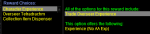
/echo ---${Rewards.Reward[1].Item[1]}---${Rewards.Reward[1].Item[2]}---${Rewards.Reward[1].Item[2]}---

Nothing returned. Not even NULL, just blank text

1608969429171.png
reward was
1608969448040.png


${Rewards.Count} bugging out claiming there is 5 rewards when there is only 4.
steps:
get >1 rewards
/echo ${Rewards.Count}
claim one manually
/echo ${Rewards.Count}
 
Last edited:
The first issue has been fixed. The example above will return --- All of the options for this reward include: --- Trade Overseer Experience --- ---
Update should be in the next release.


The second issue is disappointing and I have no answer yet. I have not found the right flag or data to identify this and keep the count correct. Tab windows are obnoxious and only partially supported in the underlying framework. Will continue to work on it.
 
How do you open EQ /reward window when MQ2Rewards is loaded ?

I want to run /reward claim but for that I need rewards window open.

Looking through https://www.redguides.com/docs/projects/mq2rewards/ I do not see a simple open window command.

So far the only option has been to unload MQ2Rewards and reload afterwards...

EDIT: One can do EQ->Quests->Rewards with a mouse but I am looking for a command line option
 
How do you open EQ /reward window when MQ2Rewards is loaded ?

I want to run /reward claim but for that I need rewards window open.

Looking through https://www.redguides.com/docs/projects/mq2rewards/ I do not see a simple open window command.

So far the only option has been to unload MQ2Rewards and reload afterwards...

EDIT: One can do EQ->Quests->Rewards with a mouse but I am looking for a command line option

So far the best - worst workaround is to /plugin mq2rewards unload
/reward - regular Everquest command
/plugin mq2rewards load
/reward claim

Unfortunately /rewards reward does not work -> it prints Reward not found " even when there are active rewards to be claimed (via EQ->Quests->Rewards )
 
This needs a differentiated slash command from the EQ command. For some reason my reward window stopped auto-appearing for other things like rank 3 clicks and the only way to get it open is to go through the menu since the plugin subsumes the EQ /reward command.

I'd suggest /mq2rewards
 
Last edited:
OK, I think I found a minor issue. Selecting a reward by number does not work correctly when there are multiple rewards with the same name. For example, if "Brownie Parts" is on tab 5 and 9 then /rewards reward 5 and /rewards reward 9 will select the 5th tab. This would be expected is selecting by name/text, but not by number.

Looking at the .cpp, it seems this is related to the implementation of SelectReward(). The function sequences through all of the tabs by index and then stops at the first tab with matching text. But this seems odd, since the FindRewardInternal() function is able to select a tab by number no problem.

It seems the current sequence is:
- use FindRewardInternal() to get a pointer to the page/reward
- pass the pointer to the page/reward to 'SelectReward()'
- use the page text to search for the matching tab by name

I think this could be corrected (pass szLine to SelectReward() and have it do a bit more of the processing instead of having FindRewardInternal() do the initial lookup, or maybe caching the page index as well as the pointer in the reward struct), but it likely does not matter if using the plugin to claim rewards, since once the duplicate is claimed it will find the second one if starting over. But it did cause some unexpected behavior so I thought I would report it.
 
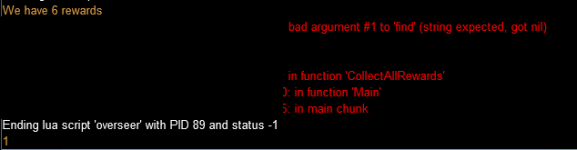
I think I found a new issue with rewards. It seems the reward count sometimes get out-of-whack.

Using overseer, I had 6 reward tabs, and it claimed 5 of them. The last one was not claimed because of character XP cap. After that, the plugin keeps reporting 6 rewards available even though there is only 1. This causes a crash. See below.
1670083729969.png
The reward window itself is not messed up, as evidenced by the tab count being 1 (returned from 'mq.TLO.Window('RewardSelectionWnd').Child('RewardPageTabWindow').TabCount()', shown at the bottom).

The problem persisted after camping to character select, but have not completely restarted.
 
This needs a differentiated slash command from the EQ command. For some reason my reward window stopped auto-appearing for other things like rank 3 clicks and the only way to get it open is to go through the menu since the plugin subsumes the EQ /reward command.

I'd suggest /mq2rewards

Yes please!
 
I'd suggest /mq2rewards

Yes please!
I added a PR that will let you use both /mqrewards and /rewards. /rewards will bring up the EQ window as you requested. /rewards with arguments will still work but it'll tell you to use /mqrewards instead. In a while we can remove /rewards from the plugin.

I didn't look at @vandersl 's issue, I don't actually use MQ2Rewards. Might want to create an issue so it doesn't get lost https://gitlab.com/redguides/plugins/mq2rewards/-/issues
 
[Rewards]
1=Collection Item Dispenser
2=Character Experience
3=Mercenary Experience
index=1


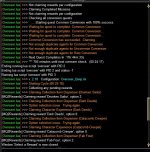
Keeps claiming character experience. Sometimes the overseer Lua even claims the reward when "claimRewards=0".
 

Attachments

  • EQ000226.jpg
    EQ000226.jpg
    152.4 KB · Views: 2
RedMan updated MQ2Rewards with a new update entry:

20230211

〰️Commits​


- Add /mqrewards command
- Update to allow /rewards to pass to the EQ command when no arguments are sent
- Deprecate /rewards in favor of /mqrewards so there are no conflicts with the EQ command
(da05327)
- Merge branch 'mqrewardscommand' into 'master'

Add /mqrewards command

See merge request redguides/plugins/mq2rewards!3...

Read the rest of this update entry...
 
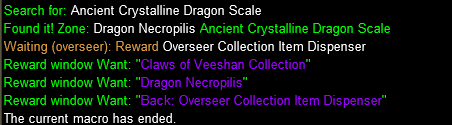
Odd one here. I tried searching the ini (collection.ini, shiny.ini) and the shiny.mac for any mention of "Dragon Necropilis" but came up empty. Not sure where it is is getting this "Dragon Necropilis" from (should be Dragon Necropolis).

1680186649724.png
 
Release MQ2Rewards

Users who are viewing this thread

Back
Top
Cart