• You've discovered RedGuides, an EverQuest multi-boxing and scripting community 🧙‍♀️⚙️. We want you to play several EQ characters at once, come join us and say hello! 👋

  • A TLP without truebox has thawed (Very Vanilla ready)
    Frostreaver
MQ2React

Release MQ2React (1 Viewer)

somehow my yaml got corrupted, despite looking ok for my eyes.
Incorrect offset. Line 379: BrdSelos

[CODE title="BrdSelos"] BrdSelos:
action: /alt activate 3704
condition: "!${Me.Buff[Selo's Accelerato].ID} && ${React.Global[NmoveNinvNsit]}"[/CODE]


the globals are:
[CODE title="globals"]globals:
GemZrelik: 12
GlobalExample: "${Me.CombatState.NotEqual[COMBAT]} && ${Me.PctHPs} <= 25"
IC: "${Me.CombatState.Equal[COMBAT]}"
MageAllianceNextID: 0
NIC: "${Me.CombatState.NotEqual[COMBAT]}"
Nmove: "!${Me.Moving}"
NmoveNinvNsit: "!${Me.Moving} && !${Me.Invis} && !${Me.Sitting}"[/CODE]

I dont see any wormg with BrdSelso, and its part of my Yaml since month
Anyone can give me clue?

Edit: solved
the React b4 BrdSelos called "BrdSwap" a pice of code I picked at RG caused the Error.
Somehow this one got corrupted. I just eliminated that, was not as important as I thought.
 
Last edited:
The idea is to remove Torpor as soon as the fight ends so the tank can run around and loot corpses and be ready for the next pull without being snared the whole time:

Code:
 remtorp:
    action: /removebuff torpor
    condition: "${SpawnCount[npc radius 50 xtarhater]}=0 || ${Me.CombatState.Equal('RESTING')}"

I also tried:

Code:
  remtorp:
    action: /removebuff torpor
    condition: "${Me.XTarget}<1"

Both seem to work I think but I have to use MQ2 which means /removebuff sometimes doesn't work. But this should work for most people.
 
Last edited:
going to ask this here i loaded myreact not sure what to add to the file to get my group to stop and med then start up again and help please?
 
Here is my problem: I'm on EMU (Project Lazarus) and I am trying to circumvent KA cure system (I have issues in KA with this but that is another thread on another post XD). So with GoD being the latest expansion, I find myself hunting in Riftseeker's Sanctum a lot. The Pyrilan and other mobs hit you with all sorts of Magic based debuffs and DoTs. So even if I had cures working well, it wouldn't get these. My current work around is having my cure in my buffs section and conditioned to specifically look for Pyronic Lash. The removes it out of combat which is rather pointless at that time anyway. I think I spent nearly all of yesterday trying to get something working in MQ2React and I really feel the answer is close. My first issue is perspective. Do I try and work this from the Cleric/Shaman or PullerTank's perspective? So if I am taking pullerTanks perspective (or anyone other than the healer, really), I would try and create something IF I am hit with Pyronic Lash (or any of the other debuffs) THEN issue COMMAND: /dex Cleribbit /alt act 153. OR Healer's perspective where it would work just like a more complicated version of the cures section of KA. I saw in this thread where someone had a big list of things to look for. I tinkered a lot with 101 different versions of that with no avail. Once I get this formatted correctly, I would continually add more stuff to look for. I feel like this should be very easy and I am missing something.

My goal to achieve: IF anyone in group has a debuff on the list THEN I cast whatever spell to remove bad effect. I would copy and paste what I have been working off of but I am so bad at this that you would all probably curl up in the shower like Jim Carrey did when he discovered Finkle is Einhorn.
 
Here is my problem:...

I did something like this a few years ago for the Torment of Velious expansion and it's nasty Restless Ice infection dot. I only set it up on my puller/tank and my cleric character. Rather than using a React I used the mq2event plugin.

On my tank he got an event like:
Code:
[NeedRestlessIceCure]
trigger=#.#You have taken #*# damage from Restless Ice Infection.#*#
command=/tell Cleric_Char I need a cure for Restless Ice!

[NeedShardCure]
trigger=#.#A shard of bone begins to wriggle toward your heart.#.#
command=/tell Cleric_Char I need a cure for Restless Ice!

then on the cleric I used an event like:

Code:
[DoRestlessIceCure]
trigger=#*# tells you, 'I need a cure for Restless Ice!'
command=/multiline ; /mqp on ; /stopcast ; /rt ; /cast 12 ; /mqp off

Although to be honest I'm not sure it ever worked reliably and as my tank got strong enough, I quit worrying about cures entirely and just healed through it.
 
I did something like this a few years ago for the Torment of Velious expansion and it's nasty Restless Ice infection dot. I only set it up on my puller/tank and my cleric character. Rather than using a React I used the mq2event plugin.

On my tank he got an event like:
Code:
[NeedRestlessIceCure]
trigger=#.#You have taken #*# damage from Restless Ice Infection.#*#
command=/tell Cleric_Char I need a cure for Restless Ice!

[NeedShardCure]
trigger=#.#A shard of bone begins to wriggle toward your heart.#.#
command=/tell Cleric_Char I need a cure for Restless Ice!

then on the cleric I used an event like:

Code:
[DoRestlessIceCure]
trigger=#*# tells you, 'I need a cure for Restless Ice!'
command=/multiline ; /mqp on ; /stopcast ; /rt ; /cast 12 ; /mqp off

Although to be honest I'm not sure it ever worked reliably and as my tank got strong enough, I quit worrying about cures entirely and just healed through it.
Thanks! Going to give this a shot. And I don't think the effects I was looking to cure were really affecting me much either. But it annoys the OCD in me outright! I can't let the terrorists win!
 
Trying to set up a react that will pause M2Qgrind when my wizard is out of mana to allow the group to med back up. I took an example I found in the M2Qgrind forum from Shadow:

servername:
ShadowKnightName:
GrindP: enabled
GrindR: disabled

reacts:
GrindP:
action: >-
/multiline ; /shd mode 4; /grind pause; /react enable GrindR; /dex
ClericName /clr mode 1; /react disable GrindP
condition: >-
${Group.Member[ClericName].PctMana} < 20 && ${Grind.Active}
GrindR:
action: >-
/multiline ; /shd mode 7; /grind resume; /react enable GrindP; /dex
ClericName /clr mode 2; /stand; /react disable GrindR
condition: >-
${Group.Member[ClericName].PctMana} > 95 && ${Grind.Paused}


I use my wizard's name and switch clr mode to wiz mode. When I run the macro I get a message that "Default Example react Disables itself when you're at 100%HP and out of Combat"

I don't want the condition to be based on my Shadow Knight's health and combat state. I would like to to pause the grind to allow the group to med up out of combat when my wizard's mana is below 20%.

My shadow knight is running CWTN and my wizard is running Kissassist.

Any help is much appreciated.
 
Trying to set up a react that will pause M2Qgrind when my wizard is out of mana to allow the group to med back up. I took an example I found in the M2Qgrind forum from Shadow:

servername:
ShadowKnightName:
GrindP: enabled
GrindR: disabled

reacts:
GrindP:
action: >-
/multiline ; /shd mode 4; /grind pause; /react enable GrindR; /dex
ClericName /clr mode 1; /react disable GrindP
condition: >-
${Group.Member[ClericName].PctMana} < 20 && ${Grind.Active}
GrindR:
action: >-
/multiline ; /shd mode 7; /grind resume; /react enable GrindP; /dex
ClericName /clr mode 2; /stand; /react disable GrindR
condition: >-
${Group.Member[ClericName].PctMana} > 95 && ${Grind.Paused}


I use my wizard's name and switch clr mode to wiz mode. When I run the macro I get a message that "Default Example react Disables itself when you're at 100%HP and out of Combat"

I don't want the condition to be based on my Shadow Knight's health and combat state. I would like to to pause the grind to allow the group to med up out of combat when my wizard's mana is below 20%.

My shadow knight is running CWTN and my wizard is running Kissassist.

Any help is much appreciated.
Heya! I believe this is deprecated now as Grind has a mana check feature built into it - I believe! I haven't really checked as all of my toons are beyond the mana check phase...but might want to look into the Grind settings. Additionally, I think there is a LEM available for this in the LEM library - or I can whip one up for you.
 
Shadow, thanks for the reply. MQ2Grind does a mana check at the end of the grind, but I can't find any other settings within MQ2grind itself regarding mana. This is all new to me, I'll start learning about LEM and see if that could help. 👍
 
Anyway to make per character react files? It looks like there's just 1 file called "MQ2React.yaml" would be nice to have server_character_mq2react.yaml so i can configure different reacts for different characters without having to cram everything in 1 file and putting character name checks in the conditions.
 
Anyway to make per character react files? It looks like there's just 1 file called "MQ2React.yaml" would be nice to have server_character_mq2react.yaml so i can configure different reacts for different characters without having to cram everything in 1 file and putting character name checks in the conditions.
Inside the file you have the ability to turn off the reacts per character, is this what you meant by name checks in conditions?
 
I said it wrong, but yeah it does have the ability to enable/disable reacts per character, but i guess it would just be nice to separate them out per character. one character might only need 1 or 2 reacts, another could have 20 and another could have 5, would be nice to only have the relevant things defined in the file for right character. instead of having to sift through every react and every global that is used for every character when i want to make 1 little change.
 
Is there any TLO able to read the last message sent in the chat? I would like to put it as a condition on MQ2React.
 
Is there a way to check the number of beneficial buffs on a target? I want to write some reacts to dispel my target, but I want it to use either Abashi's Rod of Disempowerment or my chest item depending on how many buffs it has. The chest has a 10 second reuse timer, so if there are multiple buffs I want to use Abashi's instead to remove more buffs faster. But if there's only 1 buff I want to use the chest because Abashi's has a 3 second cast time and the chest is a 0.7s cast time.

Code:
  DispelChest:
    action: /useitem Stillmind Tunic
    condition: >-
      ${Me.CombatState.Equal[COMBAT]} && ${Target.Aggressive}
      && ${Target.Dispellable Beneficial Buff Count} == 1      <<<=== This part obviously doesn't work. Is there anything I can put here to check the number of buffs???
      && !${Me.Casting.ID} && !${Me.Invis} && !${Me.Moving} && !${Me.Ducking} && ${FindItemCount[=Stillmind Tunic]} && ${Me.ItemReady[Stillmind Tunic]}
  DispelAbashi:
    action: "/useitem Abashi's Rod of Disempowerment"
    condition: >-
      ${Me.CombatState.Equal[COMBAT]} && ${Target.Aggressive}
      && ${Target.Dispellable Beneficial Buff Count} > 1      <<<=== This part obviously doesn't work. Is there anything I can put here to check the number of buffs???
      && !${Me.Casting.ID} && !${Me.Invis} && !${Me.Moving} && !${Me.Ducking} && ${FindItemCount[=Abashi's Rod of Disempowerment]} && ${Me.ItemReady[Abashi's Rod of Disempowerment]}
 
Is there a way to check the number of beneficial buffs on a target? I want to write some reacts to dispel my target, but I want it to use either Abashi's Rod of Disempowerment or my chest item depending on how many buffs it has. The chest has a 10 second reuse timer, so if there are multiple buffs I want to use Abashi's instead to remove more buffs faster. But if there's only 1 buff I want to use the chest because Abashi's has a 3 second cast time and the chest is a 0.7s cast time.

Code:
  DispelChest:
    action: /useitem Stillmind Tunic
    condition: >-
      ${Me.CombatState.Equal[COMBAT]} && ${Target.Aggressive}
      && ${Target.Dispellable Beneficial Buff Count} == 1      <<<=== This part obviously doesn't work. Is there anything I can put here to check the number of buffs???
      && !${Me.Casting.ID} && !${Me.Invis} && !${Me.Moving} && !${Me.Ducking} && ${FindItemCount[=Stillmind Tunic]} && ${Me.ItemReady[Stillmind Tunic]}
  DispelAbashi:
    action: "/useitem Abashi's Rod of Disempowerment"
    condition: >-
      ${Me.CombatState.Equal[COMBAT]} && ${Target.Aggressive}
      && ${Target.Dispellable Beneficial Buff Count} > 1      <<<=== This part obviously doesn't work. Is there anything I can put here to check the number of buffs???
      && !${Me.Casting.ID} && !${Me.Invis} && !${Me.Moving} && !${Me.Ducking} && ${FindItemCount[=Abashi's Rod of Disempowerment]} && ${Me.ItemReady[Abashi's Rod of Disempowerment]}
The Spawn TLO has a member BuffCount, so something like ${Target.BuffCount} should return the integer you're after.
 
Trying to figure out how to use mq2react for the following, but having a hard time understanding how to accomplish it. I want to react to getting the message "Your target is too far away, get closer!" by pausing, moving back 50 units, waiting 5 secs, then unpausing. Can someone help me achieving this?
 
Trying to figure out how to use mq2react for the following, but having a hard time understanding how to accomplish it. I want to react to getting the message "Your target is too far away, get closer!" by pausing, moving back 50 units, waiting 5 secs, then unpausing. Can someone help me achieving this?
that looks like a job for mq2events
 
Question, cant get this to work and advise? with the MarkBuffTest show error

MaskBuff:
action: >-
/multiline ; /stopcast ; /useitem "Jann's Veil" ;/g --- Mask Buff
condition: "${Me.CombatState.NotEqual[COMBAT]} && !${Me.Moving} && !${Me.Invis} && !${Me.Buff[Illusion Benefit Greater Jann:Permanent].ID}"


MaskBuffTest:
action: >-
/multiline ; /stopcast ; /useitem "Jann's Veil" ;/g --- Mask BuffTest
condition: "!${Me.Buff[Illusion Benefit Greater Jann].ID}"

has error on line condition: "!${Me.Buff[Illusion Benefit Greater Jann].ID}"
I tryed with !${Me.Buff[Illusion Benefit Greater Jann:Permanent].ID}" and tried condition: >- . I can't get anything to work. new to this plugin. I have been doing /react reload /react on /react enable MaskBuffTest and the MaskBuff.

Im using MGmerc, so adding buff to Mq2React would be awesome.
 
Question, cant get this to work and advise? with the MarkBuffTest show error

MaskBuff:
action: >-
/multiline ; /stopcast ; /useitem "Jann's Veil" ;/g --- Mask Buff
condition: "${Me.CombatState.NotEqual[COMBAT]} && !${Me.Moving} && !${Me.Invis} && !${Me.Buff[Illusion Benefit Greater Jann:Permanent].ID}"


MaskBuffTest:
action: >-
/multiline ; /stopcast ; /useitem "Jann's Veil" ;/g --- Mask BuffTest
condition: "!${Me.Buff[Illusion Benefit Greater Jann].ID}"

has error on line condition: "!${Me.Buff[Illusion Benefit Greater Jann].ID}"
I tryed with !${Me.Buff[Illusion Benefit Greater Jann:Permanent].ID}" and tried condition: >- . I can't get anything to work. new to this plugin. I have been doing /react reload /react on /react enable MaskBuffTest and the MaskBuff.

Im using MGmerc, so adding buff to Mq2React would be awesome.
this is what I have been using

CheckIllusionBenefit:
action: /useitem Jann
condition: >-
!${Me.Buff[Greater Jann].ID} && ${Me.CombatState.NotEqual[COMBAT]}
&& !${Me.Moving} && !${Me.Sitting} && !${Me.Invis}
 
this is what I have been using

CheckIllusionBenefit:
action: /useitem Jann
condition: >-
!${Me.Buff[Greater Jann].ID} && ${Me.CombatState.NotEqual[COMBAT]}
&& !${Me.Moving} && !${Me.Sitting} && !${Me.Invis}
Ty got it work with your setup. Notice I had to do /react save before it started working.. even if I saved all in the file with doing command after /react reload /react on
 
Look for a react to add onto the capabilities of CWTN. I am unsure how to condition the 2hander portion to say less than 2 mobs or NOT a named. Could anyone help?

Shield:
action: >-
/multiline ; /bandolier Activate 1h ; /react disable Shield ; /react
enable Twohander
condition: "${Me.XTarget}> 3 || ${Target.Named}"
Twohander:
action: >-
/multiline ; /bandolier Activate 2h ; /react disable Twohander ;
/react enable Shield
condition:
 
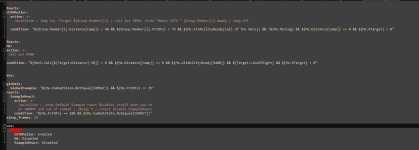
Any idea why this action doesn't put CTWN plugins into pause? The action make my chars sit and spew out resting, but doesn't seem to put them into pause status so they don't go whacking things while rallying buff is active.

1705092095409.png
 
Any idea why this action doesn't put CTWN plugins into pause? The action make my chars sit and spew out resting, but doesn't seem to put them into pause status so they don't go whacking things while rallying buff is active.

View attachment 55878
you're not waiting at all before unpausing. that /timed 3000 isn't being applied to any command with that ; immediately after it.
 
Hi there,

Anyone is using mq2react? I retired my holyshits/downshits in mq2melee and I would like to get two of them to work in react.

I read the help files and tried to put together 2 reacts. Of course, it turned out to be a total disaster. In both instances eq locked up.

Here is the react I wrote based upon the sample the plugin created in the ini:

(this is the example mq2react created in the ini)
globals:
GlobalExample: "${Me.CombatState.NotEqual[COMBAT]} && ${Me.PctHPs} <= 25"
reacts:
ExampleReact:
action: >-
/multiline ; /echo Default Example react Disables itself when you're
at 100%HP and out of Combat ; /delay 5 ; /react disable ExampleReact
condition: "${Me.PctHPs} == 100 && ${Me.CombatState.NotEqual[COMBAT]}"
sleep_frames: 15

MQ2REACT created this ini entry on my sk, edited the format and added action and condition

Server name):
(SK NAME):
HA:
action: >-
/alt act 9400

condition: "${Math.Calc[${Target.Distance}-30]} > 0 && ${Me.Distance[Camp]} == 0 && ${Me.AltAbilityReady[Hate's Attraction]} && ${Target.LineOfSight} && ${Me.XTarget} >= 1"

I used the same format for the mage react to coth tank when getting beat up during pull.

(server name):
(mage name):
COTHPuller:
action: >-
/Multiline ; /mqp on; /Target ${Group.Member[1]} ; /alt act 7050 ; /echo "React COTH " {Group.Member[1].Name} ; /mqp off

condition: "${Group.Member[1].Distance[Camp]} >50 && ${Group.Member[1].PctHPs}<50 && ${Me.AltAbilityReady[Call of the Hero]} && !${Me.Moving} && ${Me.Distance[Camp]} == 0 && ${Me.XTarget} >= 1"

Let me know if you can help.

Is react up to date btw? Anyone uses it?
 
I still use reacts and events.. I can’t get my head around LEM (not that I’ve tried much) these work for me then i put them into mine..

[CODE title="reacts"] HA:
action: >-
/alt act 9400
condition:
${Math.Calc[${Target.Distance}-30]} > 0 && ${Me.Distance[Camp]} == 0 && ${Me.AltAbilityReady[9400]} && ${Target.LineOfSight} && ${Me.XTarget} >= 1
COTHPuller:
action: >-
/multiline ; /mqp on; /Target ${Group.Member[1]} ; /alt act 7050 ; /echo "React COTH " {Group.Member[1].Name} ; /mqp off
condition: >-
${Group.Member[1].Distance[Camp]} >50 && ${Group.Member[1].PctHPs}<50 && ${Me.AltAbilityReady[Call of the Hero]} && !${Me.Moving} && ${Me.Distance[Camp]} == 0 && ${Me.XTarget} >= 1[/CODE]
 
I still use reacts and events.. I can’t get my head around LEM (not that I’ve tried much) these work for me then i put them into mine..

[CODE title="reacts"] HA:
action: >-
/alt act 9400
condition:
${Math.Calc[${Target.Distance}-30]} > 0 && ${Me.Distance[Camp]} == 0 && ${Me.AltAbilityReady[9400]} && ${Target.LineOfSight} && ${Me.XTarget} >= 1
COTHPuller:
action: >-
/multiline ; /mqp on; /Target ${Group.Member[1]} ; /alt act 7050 ; /echo "React COTH " {Group.Member[1].Name} ; /mqp off
condition: >-
${Group.Member[1].Distance[Camp]} >50 && ${Group.Member[1].PctHPs}<50 && ${Me.AltAbilityReady[Call of the Hero]} && !${Me.Moving} && ${Me.Distance[Camp]} == 0 && ${Me.XTarget} >= 1[/CODE]
as far as I understand there is only 1 ini. so you have react running on 1 toon only? how do you specify which toon the react applies to?
 
Yes one react file, there is a section above / below your reacts with server and then the names of your guys.. so for expample

vox:
bob:
ExampleReact1: enabled
ExampleReact2: disabled
steve;
ExampleReact: enabled
gary:
ExampleReact: enabled
sausagelover:
ExampleReact: enabled

you need to place the names of your reacts at your guys has above, with enabled on them, you can turn them off with disabled but you dont need to put all reacts on everyone, just the ones that need that part
 
Yes one react file, there is a section above / below your reacts with server and then the names of your guys.. so for expample

vox:
bob:
ExampleReact1: enabled
ExampleReact2: disabled
steve;
ExampleReact: enabled
gary:
ExampleReact: enabled
sausagelover:
ExampleReact: enabled

you need to place the names of your reacts at your guys has above, with enabled on them, you can turn them off with disabled but you dont need to put all reacts on everyone, just the ones that need that part

it is not fully clear. Could we work on this example? I could you fix it if it is off:

Vox:
mymage's name:

ExampleReact: enabled

COTHPuller:
action: >-
/multiline ; /mqp on; /Target ${Group.Member[1]} ; /alt act 7050 ; /echo "React COTH " {Group.Member[1].Name} ; /mqp off
condition: >-
"${Group.Member[1].Distance[Camp]} >50 && ${Group.Member[1].PctHPs}<50 && ${Me.AltAbilityReady[Call of the Hero]} && !${Me.Moving} && ${Me.Distance[Camp]} == 0 && ${Me.XTarget} >= 1"

my sk's name:
ExampleReact: enabled

HA:
action: >-
/alt act 9400
condition:
"${Math.Calc[${Target.Distance}-30]} > 0 && ${Me.Distance[Camp]} == 0 && ${Me.AltAbilityReady[9400]} && ${Target.LineOfSight} && ${Me.XTarget} >= 1"
 
change ExampleReact: enabled to HA: enabled and COTHPuller: enabled to start with
 
change ExampleReact: enabled to HA: enabled and COTHPuller: enabled to start with
I pusted this with toon names:

Vox:
mymage's name:

COTHPuller: enabled

COTHPuller:
action: >-
/multiline ; /mqp on; /Target ${Group.Member[1]} ; /alt act 7050 ; /echo "React COTH " {Group.Member[1].Name} ; /mqp off
condition: >-
"${Group.Member[1].Distance[Camp]} >50 && ${Group.Member[1].PctHPs}<75 && ${Me.AltAbilityReady[Call of the Hero]} && !${Me.Moving} && ${Me.Distance[Camp]} == 0 && ${Me.XTarget} >= 1"

my sk's name:

HA: enabled

HA:
action: >-
/alt act 9400
condition:
"${Math.Calc[${Target.Distance}-30]} > 0 && ${Me.Distance[Camp]} == 0 && ${Me.AltAbilityReady[9400]} && ${Target.LineOfSight} && ${Me.XTarget} >= 1"

I run the plugin on my mage.

got message: magename: examplereact DISABLED

INI looks like this now:

maybe I am a bit too tired for today, but I don't get what the format should be

COTHPuller:
action: >-
/multiline ; /mqp on; /Target ${Group.Member[1]} ; /alt act 7050
; /echo "React COTH " {Group.Member[1].Name} ; /mqp off
condition: >-
${Group.Member[1].Distance[Camp]} >50 && ${Group.Member[1].PctHPs}<75
&& ${Me.AltAbilityReady[Call of the Hero]} && !${Me.Moving} && ${Me.Distance[Camp]}
== 0 && ${Me.XTarget} >= 1
HA:
action: /alt act 9400
condition: >-
${Math.Calc[${Target.Distance}-30]} > 0 && ${Me.Distance[Camp]} ==
0 && ${Me.AltAbilityReady[9400]} && ${Target.LineOfSight} && ${Me.XTarget}
>= 1
magename:

skname:

Vox:

globals:
GlobalExample: "${Me.CombatState.NotEqual[COMBAT]} && ${Me.PctHPs} <= 25"
reacts:
ExampleReact:
action: >-
/multiline ; /echo Default Example react Disables itself when you're
at 100%HP and out of Combat ; /delay 5 ; /react disable ExampleReact
condition: "${Me.PctHPs} == 100 && ${Me.CombatState.NotEqual[COMBAT]}"
sleep_frames: 15
vox:
magename:
ExampleReact: disabled
 
I think I got the syntax down.
just the react doesn't fire :)
suggestions?

1707606737162.png
 
I made progress:
I think you cannot add react by editing the file, you have to use the /react add command

I tried this:

/react add COTHPuller "${Group.Member[1].Distance[Camp]} >50 && ${Group.Member[1].PctHPs}<75 && ${Me.AltAbilityReady[Call of the Hero]} && !${Me.Moving} && ${Me.Distance[Camp]} == 0 && ${Me.XTarget} >= 1" "/multiline ; /mqp on; /Target ${Group.Member[1]} ; /alt act 7050 ; /echo "React COTH " {Group.Member[1].Name} ; /mqp off"

it added the react only until /echo , because I think it reads until the "

I was able to enable the react with:

/react enable

Summary:

/add react is the only way to add react (from my limited experience). It makes sense to write the entire line in notepad, copy/paste to eq and execute. It will read between quotes only, do not use quotes in tha command line or in the react.
 
Can anyone please check the syntax is my MQ2React.yaml file? I cannot figure out why NONE of the reacts trigger for ANY of the characters I have them enabled for, even though the conditions do indeed apply.

By the way, I initiate the plugin by typing: /dgae /plugin mq2react load . I hope that is the correct way.

Anyway, below is my code... thanks in advance!!!

YAML:
Server Name:
  Character1:
    DA1: disabled
    DA2: disabled
    Death Peace: disabled
    Touch of Mujaki: disabled
    Meditate in combat: disabled
    Meditate out of combat: disabled
  Character2:
    DA1: enabled
    DA2: enabled
    Death Peace: enabled
    Touch of Mujaki: enabled
    Meditate in combat: enabled
    Meditate out of combat: enabled
  Character3:
    DA1: enabled
    DA2: enabled
    Death Peace: enabled
    Touch of Mujaki: enabled
    Meditate in combat: enabled
    Meditate out of combat: enabled
  Character4:
    DA1: enabled
    DA2: enabled
    Death Peace: enabled
    Touch of Mujaki: enabled
    Meditate in combat: enabled
    Meditate out of combat: enabled
  Character5:
    DA1: enabled
    DA2: enabled
    Death Peace: enabled
    Touch of Mujaki: enabled
    Meditate in combat: enabled
    Meditate out of combat: enabled
  Character6:
    DA1: enabled
    DA2: enabled
    Death Peace: enabled
    Touch of Mujaki: enabled
    Meditate in combat: enabled
    Meditate out of combat: enabled

globals:
  MainAssist: "Character1"
  Casting: "${Me.Casting.ID}"
  Invis: "${Me.Invis}"
  Moving: "${Me.Moving}"
  Feigning: "${Me.Feigning}"
  Aggro: "${Me.PctAggro}==100"
  LowAggro: "${Me.PctAggro}<60"
  FullHPs: "${Me.PctHPs}==100"
  FullMana: "${Me.PctMana}>=90"
  InCombat: "${Me.XTarget}>0"

reacts:
  DA1:
    action: "/cast Quivering Veil of Xarn"
    condition: "${React.Global[InCombat]} && !${React.Global[FullHPs]} && ${React.Global[Aggro]} && ${Me.SpellReady[Quivering Veil of Xarn]} && !${React.Global[Casting]} && !${React.Global[Invis]} && !${React.Global[Moving]} && !${React.Global[Feigning]}"
  DA2:
    action: "/cast HarmShield"
    condition: "${React.Global[InCombat]} && !${React.Global[FullHPs]} && ${React.Global[Aggro]} && !${Me.SpellReady[Quivering Veil of Xarn]} && ${Me.SpellReady[HarmShield]} && !${React.Global[Casting]} && !${React.Global[Invis]} && !${React.Global[Moving]} && !${React.Global[Feigning]}"
  Death Peace:
    action: "/cast Death Peace"
    condition: "${React.Global[InCombat]} && !${React.Global[FullHPs]} && ${React.Global[Aggro]} && !${Me.SpellReady[Quivering Veil of Xarn]} && !${Me.SpellReady[HarmShield]} && ${Me.SpellReady[Death Peace]} && !${React.Global[Casting]} && !${React.Global[Invis]} && !${React.Global[Moving]} && !${React.Global[Feigning]}"
  Touch of Mujaki:
    action: "/multiline ; /stand ; /delay 1 ; /assist ${React.Global[MainAssist]} ; /delay 1 ; /cast Touch of Mujaki"
    condition: "${React.Global[InCombat]} && !${React.Global[FullHPs]} && ${React.Global[LowAggro]} && ${Me.SpellReady[Touch of Mujaki]} && !${React.Global[Casting]} && !${React.Global[Invis]} && !${React.Global[Moving]} && !${React.Global[Feigning]}"
  Meditate in combat:
    action: "/book"
    condition: "!${React.Global[FullMana]} && ${React.Global[InCombat]} && ${React.Global[LowAggro]}"
  Meditate out of combat:
    action: "/book"
    condition: "!${React.Global[FullMana]} && !${React.Global[InCombat]}"

sleep_frames: 15
 
Can anyone please check the syntax is my MQ2React.yaml file? I cannot figure out why NONE of the reacts trigger for ANY of the characters I have them enabled for, even though the conditions do indeed apply.

By the way, I initiate the plugin by typing: /dgae /plugin mq2react load . I hope that is the correct way.

Anyway, below is my code... thanks in advance!!!

YAML:
Server Name:
  Character1:
    DA1: disabled
    DA2: disabled
    Death Peace: disabled
    Touch of Mujaki: disabled
    Meditate in combat: disabled
    Meditate out of combat: disabled
  Character2:
    DA1: enabled
    DA2: enabled
    Death Peace: enabled
    Touch of Mujaki: enabled
    Meditate in combat: enabled
    Meditate out of combat: enabled
  Character3:
    DA1: enabled
    DA2: enabled
    Death Peace: enabled
    Touch of Mujaki: enabled
    Meditate in combat: enabled
    Meditate out of combat: enabled
  Character4:
    DA1: enabled
    DA2: enabled
    Death Peace: enabled
    Touch of Mujaki: enabled
    Meditate in combat: enabled
    Meditate out of combat: enabled
  Character5:
    DA1: enabled
    DA2: enabled
    Death Peace: enabled
    Touch of Mujaki: enabled
    Meditate in combat: enabled
    Meditate out of combat: enabled
  Character6:
    DA1: enabled
    DA2: enabled
    Death Peace: enabled
    Touch of Mujaki: enabled
    Meditate in combat: enabled
    Meditate out of combat: enabled

globals:
  MainAssist: "Character1"
  Casting: "${Me.Casting.ID}"
  Invis: "${Me.Invis}"
  Moving: "${Me.Moving}"
  Feigning: "${Me.Feigning}"
  Aggro: "${Me.PctAggro}==100"
  LowAggro: "${Me.PctAggro}<60"
  FullHPs: "${Me.PctHPs}==100"
  FullMana: "${Me.PctMana}>=90"
  InCombat: "${Me.XTarget}>0"

reacts:
  DA1:
    action: "/cast Quivering Veil of Xarn"
    condition: "${React.Global[InCombat]} && !${React.Global[FullHPs]} && ${React.Global[Aggro]} && ${Me.SpellReady[Quivering Veil of Xarn]} && !${React.Global[Casting]} && !${React.Global[Invis]} && !${React.Global[Moving]} && !${React.Global[Feigning]}"
  DA2:
    action: "/cast HarmShield"
    condition: "${React.Global[InCombat]} && !${React.Global[FullHPs]} && ${React.Global[Aggro]} && !${Me.SpellReady[Quivering Veil of Xarn]} && ${Me.SpellReady[HarmShield]} && !${React.Global[Casting]} && !${React.Global[Invis]} && !${React.Global[Moving]} && !${React.Global[Feigning]}"
  Death Peace:
    action: "/cast Death Peace"
    condition: "${React.Global[InCombat]} && !${React.Global[FullHPs]} && ${React.Global[Aggro]} && !${Me.SpellReady[Quivering Veil of Xarn]} && !${Me.SpellReady[HarmShield]} && ${Me.SpellReady[Death Peace]} && !${React.Global[Casting]} && !${React.Global[Invis]} && !${React.Global[Moving]} && !${React.Global[Feigning]}"
  Touch of Mujaki:
    action: "/multiline ; /stand ; /delay 1 ; /assist ${React.Global[MainAssist]} ; /delay 1 ; /cast Touch of Mujaki"
    condition: "${React.Global[InCombat]} && !${React.Global[FullHPs]} && ${React.Global[LowAggro]} && ${Me.SpellReady[Touch of Mujaki]} && !${React.Global[Casting]} && !${React.Global[Invis]} && !${React.Global[Moving]} && !${React.Global[Feigning]}"
  Meditate in combat:
    action: "/book"
    condition: "!${React.Global[FullMana]} && ${React.Global[InCombat]} && ${React.Global[LowAggro]}"
  Meditate out of combat:
    action: "/book"
    condition: "!${React.Global[FullMana]} && !${React.Global[InCombat]}"

sleep_frames: 15
try /react list
see if they are there
then maybe /react on
 
Release MQ2React

Users who are viewing this thread

Back
Top
Cart