• Hail, we're RedGuides. We want you to play six (yes, 6!) EverQuest characters at once. We have scripts and a friendly community to help, please join our playstyle and say hello! 👋
  • We've added LLM sections to our Terms & Rules and Resource Rules, for everyone's sanity & in-game safety.
    Read more
    a. Do not replace your voice with an LLM. This goes for your posts and your scripts. Drafting and editing with a tool is fine, but don't take you out of what you share.
    b. Do not replace your EQ character's voice with an LLM. We don't want scripts that speak over /ooc, /shout or other public channels. This has been an unwritten rule that's kept casino scripts off the site for decades, but we're now compelled to make it clear: keep automated communication private.

    Why Does RG Review Scripts?
    Nearly every LLM-written Lua script we see is making your character do impossible things, and rarely in a way that's beneficial to you. We've seen heavy server hammering, /target over impossible distances when /nav spawn would passively accomplish the same thing, a spawn search that fires 20+ times per second, and other pointless actions that are likely annoying GMs.

    You are welcome to use LLMs as a tool to structure, draft, and edit your work, but please read critically before hitting /lua run
MQ2OTD

Release MQ2OTD

Alatyami

NotAddicted.com Engineer (Retired)
Bug report ....

There were several functions commented out. Last year MQ2 changed DrawHUDText by adding another argument "size". Which would have created compile errors, back in the day.

Attached are the updated cpp and dll.

-Alatyami
 
Last edited by a moderator:
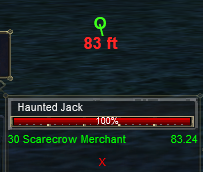
MQ2OTD - Hud driven directional arrow pointing towards target.

Commands available:
Rich (BB code):
/otd (displays available options)
/otd moveto x y (centers the output at x,y - and stores in ini file)
/otd moveby x y (Like moveto, but moves from where it is by x and y)
/otd on (turns on output)
/otd off (turns off output)
/otd range (toggles numeric range display)
/otd reload (reloads ini file)
/otd drawtight (default off - displays range very close to direction pointer)
/otd getloc (displays current x,y location)
 
Hi, I know this plugin has been retired but is there a plugin that does similar? Having something that points out the direction and actively shows you where the mob is was very useful to me and since coming back I have been missing it.
 
Hi, I know this plugin has been retired but is there a plugin that does similar? Having something that points out the direction and actively shows you where the mob is was very useful to me and since coming back I have been missing it.
I'm unfamiliar with this plugin and the specifics of it, but Between mq2map, myseq, and even using mq2hud with the "Target in LoS" and direction arrow i don't have issues knowing the direction or location of a mob
 
mq2map
open map
in search type in the name or rightclick the spawn
a line will be drawn between you and the spawn (and updated)

mq2nav + mesh
/tar iwantto_kill_YOU01
/nav target
Takes off running to the mob
 
mq2map
open map
in search type in the name or rightclick the spawn
a line will be drawn between you and the spawn (and updated)

mq2nav + mesh
/tar iwantto_kill_YOU01
/nav target
Takes off running to the mob
Yeah, I know about all that but nav will take you off running right through see invis as well and map requires the map to be open to work. The reason I liked OTD is because it used HUD to show a constant arrow showing the direction of the target without needing to open things. If anyone knows how to replicate what it did in HUD to get the arrows it would be appreciated. I haven't played in over 5 years and forgot how to even work in HUD and never did anything to advanced with it to begin with. Any help would be appreciated.
 
Yeah, I know about all that but nav will take you off running right through see invis as well and map requires the map to be open to work. The reason I liked OTD is because it used HUD to show a constant arrow showing the direction of the target without needing to open things. If anyone knows how to replicate what it did in HUD to get the arrows it would be appreciated. I haven't played in over 5 years and forgot how to even work in HUD and never did anything to advanced with it to begin with. Any help would be appreciated.
are you looking for something for mq2hud? like

Code:
Direction=3,260,78,255,0,0,${If[${Target.ID}==NULL,"",${If[${Math.Calc[((${Me.Heading.Degrees}-${Target.HeadingTo.Degrees}+375)%360)*-1]}>-30,"   XXX",${If[${Math.Calc[((${Me.Heading.Degrees}-${Target.HeadingTo.Degrees}+360)%360)*-1]}>-180,"<--","      -->"]}]}]}
 
are you looking for something for mq2hud? like

Code:
Direction=3,260,78,255,0,0,${If[${Target.ID}==NULL,"",${If[${Math.Calc[((${Me.Heading.Degrees}-${Target.HeadingTo.Degrees}+375)%360)*-1]}>-30,"   XXX",${If[${Math.Calc[((${Me.Heading.Degrees}-${Target.HeadingTo.Degrees}+360)%360)*-1]}>-180,"<--","      -->"]}]}]}
That is close and I think I can mod it to work how I want it. Thank you for the head start :)
 
Redbot submitted a new resource:

MQ2OTD - Displays a compass to your target, aka "overhead target direction"

Adds an icon to the HUD indicating where your target is located in relation to you and how far away it is.

Mq2otd.png

Read more about this resource...
 
Hey all, with the last update of 5-12-23 I lost my OTD compass on all my toons. I checked to make sure its still loaded and also the config.ini and see that that didn't change.
I unloaded and reloaded the plugin as as reloading the .ini without success.
Any ideas to get it showing again please?

Thanks- BB
 
I agree with AQO but the issue is you probably need to hit F11. If you can’t see the lag meter at the top left you won’t see OTD.
This was it. As always, thanks Knightly.
My UI windows for the CWTN plugins are in the top left of my screen so I didn’t even notice the lag meter wasn’t displayed.

BB
 
This is really easily recreated as a lua script, dannuic basically did all the work already anyways. Might even say the yellow arrow looks better.

View attachment 48560

Code:
/lua run otd
I do like the look of the arrow. But really like the ability to move the OTD compass to where I want it on screen. Can that be done with this?
Either way thanks for posting this man. I look forward to giving it a whirl!

BB
 
This is really easily recreated as a lua script, dannuic basically did all the work already anyways. Might even say the yellow arrow looks better.

Code:
/lua run otd
Ack! Since the noresize flags are set on the ImGui window, you end up with something like this with no way to correct it without modifying the script.

1689421641686.png
I set a height and width on the window so that the next guy doesn't have to mess with it unless they want.
1689422904098.png
 

Attachments

how can i place this properly? plugin or Lua. I used the x and y settings in the plugin ini, but then it doesnt show up at all for me. Didnt find settings for the Lua. Any pointer would be appreciated.
 
Release MQ2OTD

Users who are viewing this thread

Back
Top
Cart