• Hail, we're RedGuides. We want you to play six (yes, 6!) EverQuest characters at once. We have scripts and a friendly community to help, please join our playstyle and say hello! 👋
  • We've added LLM sections to our Terms & Rules and Resource Rules, for everyone's sanity & in-game safety.
    Read more
    a. Do not replace your voice with an LLM. This goes for your posts and your scripts. Drafting and editing with a tool is fine, but don't take you out of what you share.
    b. Do not replace your EQ character's voice with an LLM. We don't want scripts that speak over /ooc, /shout or other public channels. This has been an unwritten rule that's kept casino scripts off the site for decades, but we're now compelled to make it clear: keep automated communication private.

    Why Does RG Review Scripts?
    Nearly every LLM-written Lua script we see is making your character do impossible things, and rarely in a way that's beneficial to you. We've seen heavy server hammering, /target over impossible distances when /nav spawn would passively accomplish the same thing, a spawn search that fires 20+ times per second, and other pointless actions that are likely annoying GMs.

    You are welcome to use LLMs as a tool to structure, draft, and edit your work, but please read critically before hitting /lua run

Question - MQ2Nav pruning

Warl0ck45

Well-known member
Working on getting better performance out of some of my nav files while I wait for the raid guilds to progress further into TBL expansion, and stop stealing named (sigh)

I discovered a few zone files do not match with the ingame use. By this I mean for instance, Ethernere Tainted West Karana. There are instanced versions of it that have sections walled off. Well apparently the file (only seeing the one) is set up with these blocks... so they exist for MQ2Nav mesh files. Which means the pathing stops when running into this non existent walls... run toon past them, pathing works again.

Is this something that can be fixed using the pruning tool, and if so, how does one use it?
 
Unless there is an option for those types of instances in the plugin to select instance zones, I'm not sure its possible.

I don't even know how you would do this since it doesn't work like LDON instances which had different zone names. These type of instances have # instance id's that are temporary iirr for the duration of the instance. So they are constantly changing.

Someone who is a developer would know better though, I'm just guessing blindly here.
 
this is currently not fixable in the meshgenerator, but as i can understand brainiac is working on updating it, and this issue is on his list to look at and possibly fix.
 
How about making "walkable" areas that the plugin will actually use?

For instance in Demiplane of Life... the staircases are divided chunks... and no amount of making a walkable volume will get the pathings to traverse this. Is there a trick to it, or this wont work on places deemed unwalkable in the initial rendering?

I think I asked about this before when working on a Chardok mesh, but can't seem to find the thread to verify =/ If I recall correctly I could only get it to work in sections... rendering the mesh just as divided but... more or less moved the divide somewhat

Need more eggnog...
 
walkable areas wont create mesh where there is none, its just to mark cost of areas to walkl throguh so when the mesh calculates a route it will take those areas into consideration.

could you show one of these stair cases in demiplane of life, cause mine seems fine.
 
That is what I was thinking but again, never hurts to ask in case someone has managed to find a way to work around it.

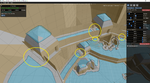
I have tried various setting, this file one is from the mesh library, which looks to be using default settings. But it still highlights how the pathing leading down the pit has numerous breaks
 
ahh yes i dont have those on mine, its a setting with the agent heigh, since the height under those are less than 6
 
It looks to be pathing through the walkway areas circled above, but had to reduce the height considerably for this. It paths in the plugin. Pathing ingame looks to be snagging on things, so... either increase radius, or find trouble spots and make unwalkable/water volumes to divert pathing around trouble spots... (thinking out loud, sorry) but it appears to solve that issue, thanks.

Just to be clear on this, this is character height correct? I am basically telling the plugin to create a mesh for a 1.5 foot tall toon?

I had tried messing with height on other meshes but with little luck, the radius was issue there, didn't think to play with it on this mesh, was trying different slop and climb settings.

Sorry, I tend to check the boards when my insomnia is kicking in and babblt a lot...., I was trying to just "encase someone has a suggestion" thing, not trying to make an issue out of it. This works for most of what I want it to do, just the occasional hiccups like above, or the zone files not meeting with ingame as seen in CotF a lot. Just turned my shiny collector loose in Neriak to find it is walled off in several places, heh.

Appreciate the help though =)
 
i rran this with an ogre at one point and thought he get stuck at nything under 6 agent height but in tbm he didnt. so i dont know if its a fixed height, or some zones might be different.
 
Figured, heh.

Dealing with training for a long time and I find that even the stupid questions can be helpful at times.. never know when you might have a fundamental assumption incorrect =)
 
Question - MQ2Nav pruning

Users who are viewing this thread

Back
Top
Cart