
-
 Hail, we're RedGuides. We want you to play six (yes, 6!) EverQuest characters at once. We have scripts and a friendly community to help, please join our playstyle and say hello! 👋
You are using an out of date browser. It may not display this or other websites correctly.
You should upgrade or use an alternative browser.
You should upgrade or use an alternative browser.

Release MQ2LinkDB
- Thread starter svarina
- Start date
 This is a pic of the crash I get, it still happens
MQ2LinkDB - This plugin basically allows you to be a LinkBot. It stores links in a database and allows you to request a link to be posted. Make sure you type import the database with the "/link /import" command after getting ingame and unzipping the file in the right spot...see below.
SYNTAX for MQ2LinkDB
Commands:
Top-Level Objects:
Note: The TLO is only available in v2.
string ${LinkDB[name]}
Display the link found by name. Use =name for an exact match.
Examples:
You will get a tell with a link to the Baby Joseph Sayer.
If the item is not found, the TLO returns an empty string, so you probably don't want to be directly shouting about Baby Joseph Sayer in your backpack. If you do and misspell his name, you will end up shouting about an empty string which isn't recommended.
Current DB can be found at MacroQuest2, or downloaded from RedGuides
http://www.macroquest2.com/downloads/MQ2LinkDB-txt.zip
SYNTAX for MQ2LinkDB
Commands:
Rich (BB code):
/link
Display statistics
/link /import
Import items.txt as downloaded from 13th-Floor. To import this file, do the following:
Download the items.zip file directly using this link
Unzip the items.txt file to the \Release directory
In game, type /link /import and wait a few seconds for the items to be added
Out of game, edit the MQ2LinkDB.txt file and:
Remove the first line (ends in "wornlevel")
Search for "iksar left hand" and delete the 3 lines that end in '=\
/link /max #
Set maximum number of results (default 10)
/link search
Find items containg search string
[edit]
Added by v2
/link /scan [on|off]
Turn on and off scanning incoming chat
/link /click [on|off]
Click on the link generated?
Top-Level Objects:
Note: The TLO is only available in v2.
string ${LinkDB[name]}
Display the link found by name. Use =name for an exact match.
Examples:
Rich (BB code):
/link baby joseph sayer
Rich (BB code):
/shout OMG I'm a dork! I have ${LinkDB[=Baby Joseph Sayer]} in my pack. Ha!Current DB can be found at MacroQuest2, or downloaded from RedGuides
http://www.macroquest2.com/downloads/MQ2LinkDB-txt.zip
Last edited by a moderator:


MQ2LinkDB Fixed by rswiders at MQ2.
Download both files
Toss them in your root MQ2 folder
Unzip MQ2LinkDB.zip
/plugin MQ2LinkDB
Instructions are here http://www.redguides.com/community/showthread.php/24776-MQ2LinkDB?p=197088#post197088
Download both files
Toss them in your root MQ2 folder
Unzip MQ2LinkDB.zip
/plugin MQ2LinkDB
Instructions are here http://www.redguides.com/community/showthread.php/24776-MQ2LinkDB?p=197088#post197088
Attachments

roadwork
New member
maskoi,
is there an easily accessible items.txt file to be used with this plugin ? the 13th-floor site is no longer active.
EDIT
whoops, nevermind -- i was reading the instructions provided by the wiki too literally. i have since realised what the /link /import command actually does xP
is there an easily accessible items.txt file to be used with this plugin ? the 13th-floor site is no longer active.
EDIT
whoops, nevermind -- i was reading the instructions provided by the wiki too literally. i have since realised what the /link /import command actually does xP

- Commits
- 191
MQ2LinkDB
This plugin allows you to access links to items you don't have on you using a database file. It stores links in a database and allows you to request a link to be posted.
Read more about this resource...
This plugin allows you to access links to items you don't have on you using a database file. It stores links in a database and allows you to request a link to be posted.
Read more about this resource...
RoboClaptrap4
Member
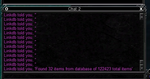
This plugin seems to be broken as of some point in the last two weeks, can't pinpoint when exactly. It still correctly searches the database and determines how many items match the search terms, but it returns blank strings instead of item links. See the attached screenshot
Attachments

LorDeth
<<NO GIF ATTACHED>>
This plugin seems to be broken as of some point in the last two weeks, can't pinpoint when exactly. It still correctly searches the database and determines how many items match the search terms, but it returns blank strings instead of item links. See the attached screenshot
I noticed this recently as well. Doing this same behaviour for me on test server. I tried rebuilding the file too, with no improvement in result..
It seems to me that I noticed this started when the TBL patch came out.. at least on test, the VV compile from Dec-5th...
LorDeth
<<NO GIF ATTACHED>>
that happens when a new field is added to the link, it has happened every time a "new" feature is added to items, like luck stat that was not there before. Heroic stats was fun links when they first came out.
So that will break it until they update the plugin (and database?) to support the luck stat? In my case, where I don't have TBL yet, and i am looking up pre-TBL items, still no good..
LorDeth
<<NO GIF ATTACHED>>
yeah they change the struct length for all items so the plugin will need to add in that extra piece for it to work. Same thing happened with herioc and power sources changes to items. They retrofit the older items with that enhancement nulled out but still part of the struct.
ahh ok makes sense..
RoboClaptrap4
Member
Anyone know if this particular plugin is still owned by anyone, or whether it's just in maintenance mode?

RoboClaptrap4
Member
A fix, I'm wondering whether anyone's going to fix the bug that prevents the plugin from being used

foreverandeternity
Well-known member
Hopefully they can fix this plugin, I loved being able to get a link to an item at will.
The plugin was already "fixed" to work with the new TBL item link format. I have updated the MQ2LinkDB.txt file, found on the macroquest2.com site, to include the links from the sodeq items download.
LorDeth
<<NO GIF ATTACHED>>
The plugin was already "fixed" to work with the new TBL item link format. I have updated the MQ2LinkDB.txt file, found on the macroquest2.com site, to include the links from the sodeq items download.
Thanks Swifty, i didnt even know it was fixed.
I've attached a link to your post on macroquest2.com with the download link for others to get to.
https://www.macroquest2.com/phpBB3/viewtopic.php?f=29&t=14791&p=126008&hilit=MQ2LinkDB#p126008
foreverandeternity
Well-known member
@swiftymuse @LorDeth omg, I love you so much, thank you
RoboClaptrap4
Member
Hmmmm. I feel like I'm missing something. I downloaded the new version, replaced my current database, and reloaded the plugin. Still getting gibberish links back. I'm on the most recent very vanilla build. What did I do wrong?
howlinhoss
Active member
Anyone use this plugin recently? I am having issues loading the database with /link /import. I downloaded the MQ2LinkDB.txt and put it in my release folder but am getting a Source file not found (items.txt) error. Any one else having this issue?
Edit: I loaded and unloaded the plugin a few times and it ended up working. I did not have to do the /link /import to get it to link items.
Edit: I loaded and unloaded the plugin a few times and it ended up working. I did not have to do the /link /import to get it to link items.
Last edited:

Redbot updated MQ2LinkDB with a new update entry:
importing now easier
Read the rest of this update entry...
importing now easier
Updated to not require an item on cursor to do /link /import and to not poof the item used as the template.
Read the rest of this update entry...

illslim
Member
I am starting to look at what gear I want to go get and I used to use this plugin to help me find what I want and compare it in game. But, I cannot get the plugin to work. I downloaded the zipe file and unzipped it into the MQ2 folder. I went in and couldn't find the first line that needed to be deleted. But, I believe I got the other three with iksar left hand deleted properly. I go in game and do /link /import and it says "MQ2linkDB: Link Source not Found items.txt.
Anyone on an Emu server had any luck figuring this plugin out and have it up and working and can give advice?
Anyone on an Emu server had any luck figuring this plugin out and have it up and working and can give advice?

TheyTookErJerbs
Member

yeah illslim and i were talking about this - this is the file that comes zipped in the resource - but doing the /link import thing is asking for an items.txt file to import.This should do the trick. I found it digging around a couple of months ago. I'm not 100% certain if it's up to date in live, but it should have a lot of gear in it.
my guess was that the mq2linkdb.txt was just the file that got created after the import since the 13th-floor site was not existent any longer
/link /import
Import items.txt as downloaded from 13th-Floor. To import this file, do the following:
Download the items.zip file directly using this link
Unzip the items.txt file to the \Release directory
In game, type /link /import and wait a few seconds for the items to be added
Out of game, edit the MQ2LinkDB.txt file and:
TheyTookErJerbs
Member
I can't remember exactly where I found it, but I just /link imported the file name, and it has served me very well on Rizlona.

When 13th floor went down a few years ago the database was moved and is no longer available in raw text format. The website that it can be found on is fairly slow and I'm not going to push large amounts of traffic their way.
In lieu of that, I posted a resource that has the downloaded, converted, and zipped (for size) items.txt that you can drop into your RedGuide install folder and follow the import procedure.
You can find the resource here!
It's okay to not talk if you don't know the answer.
In lieu of that, I posted a resource that has the downloaded, converted, and zipped (for size) items.txt that you can drop into your RedGuide install folder and follow the import procedure.
You can find the resource here!
It's okay to not talk if you don't know the answer.
Users who are viewing this thread
Total: 1 (members: 0, guests: 1)
Share: