
sweet a-ok budIt's okay to not talk if you don't know the answer.

-
 Hail, we're RedGuides. We want you to play six (yes, 6!) EverQuest characters at once. We have scripts and a friendly community to help, please join our playstyle and say hello! 👋
You are using an out of date browser. It may not display this or other websites correctly.
You should upgrade or use an alternative browser.
You should upgrade or use an alternative browser.

Release MQ2LinkDB
- Thread starter svarina
- Start date


Yeah. I'm not going to unleash a ton of nerds on a small site to download a 100MB file without the owner's consent. Lucy doesn't have it available but I'm sure that you have the Google skills to find it yourself.
I'm sure that you're on the edge of your seat waiting for my cadence. I haven't updated my personal LinkDB in like five months.
I'm sure that you're on the edge of your seat waiting for my cadence. I haven't updated my personal LinkDB in like five months.

illslim
Member
When 13th floor went down a few years ago the database was moved and is no longer available in raw text format. The website that it can be found on is fairly slow and I'm not going to push large amounts of traffic their way.
In lieu of that, I posted a resource that has the downloaded, converted, and zipped (for size) items.txt that you can drop into your RedGuide install folder and follow the import procedure.
You can find the resource here!
It's okay to not talk if you don't know the answer.
Sorry, I am still not seeing what I need to do. I clicked the link and read that post and clicked the link there, it lead me back to where I started. I think I am not getting something very basic that I need to do.
Alright, baaaad sir, whut youse goin' t'do be click de link t'go t'de resource page dat hosts de stash. Click de waaay download button and ya' should receive an items.ZIP dat ya' gots'ta jimmey wid yo' archive program uh choice. Widin dat archive be items.TXT.
Extract da damn items.TXT into de RedGuides VeryVanilla folder. It should 'esist in de same folda' as macroquest2.exe and mq2linkdb.dll.
Once ya''ve done dat load da damn plugin in-game wid
/plugin MQ2LinkDB load
and den type
/link /import
Note dat bod commands gots some slash cuz' it's sayin' "Hey Jollymister MQ2LinkDB, man, why duzn't ya' /impo't dat stash"
Success gots'ta provide ya' wid an output likes de followin':
[2020/09/22 08:58:14] Plugin 'mq2linkdb' loaded.
[2020/09/22 08:58:16] MQ2LinkDB: No item database yet
[2020/09/22 08:58:39] MQ2LinkDB: Importing items.txt...
[2020/09/22 08:58:39] MQ2LinkDB: Generating links...
[2020/09/22 08:58:48] MQ2LinkDB: Complete! 128811 links generated
Please feel free to ask any follow up questions or to find me for assistance in Discord. I'm more than happy to help you get this useful feature functional.
Extract da damn items.TXT into de RedGuides VeryVanilla folder. It should 'esist in de same folda' as macroquest2.exe and mq2linkdb.dll.
Once ya''ve done dat load da damn plugin in-game wid
/plugin MQ2LinkDB load
and den type
/link /import
Note dat bod commands gots some slash cuz' it's sayin' "Hey Jollymister MQ2LinkDB, man, why duzn't ya' /impo't dat stash"
Success gots'ta provide ya' wid an output likes de followin':
[2020/09/22 08:58:14] Plugin 'mq2linkdb' loaded.
[2020/09/22 08:58:16] MQ2LinkDB: No item database yet
[2020/09/22 08:58:39] MQ2LinkDB: Importing items.txt...
[2020/09/22 08:58:39] MQ2LinkDB: Generating links...
[2020/09/22 08:58:48] MQ2LinkDB: Complete! 128811 links generated
Please feel free to ask any follow up questions or to find me for assistance in Discord. I'm more than happy to help you get this useful feature functional.
illslim
Member
Alright, baaaad sir, whut youse goin' t'do be click de link t'go t'de resource page dat hosts de stash. Click de waaay download button and ya' should receive an items.ZIP dat ya' gots'ta jimmey wid yo' archive program uh choice. Widin dat archive be items.TXT.
Extract da damn items.TXT into de RedGuides VeryVanilla folder. It should 'esist in de same folda' as macroquest2.exe and mq2linkdb.dll.
Once ya''ve done dat load da damn plugin in-game wid
/plugin MQ2LinkDB load
and den type
/link /import
Note dat bod commands gots some slash cuz' it's sayin' "Hey Jollymister MQ2LinkDB, man, why duzn't ya' /impo't dat stash"
Success gots'ta provide ya' wid an output likes de followin':
[2020/09/22 08:58:14] Plugin 'mq2linkdb' loaded.
[2020/09/22 08:58:16] MQ2LinkDB: No item database yet
[2020/09/22 08:58:39] MQ2LinkDB: Importing items.txt...
[2020/09/22 08:58:39] MQ2LinkDB: Generating links...
[2020/09/22 08:58:48] MQ2LinkDB: Complete! 128811 links generated
Please feel free to ask any follow up questions or to find me for assistance in Discord. I'm more than happy to help you get this useful feature functional.
I have done all of those steps, multiple times last night, and I just did them two more times this morning after reading your reply and using your link you kindly provided and still it does not work for me. Thank you for help. Thank you to Sic and TheyTookEreJerb for helping red cents to you'sas.
Last edited:
illslim
Member
yeah illslim and I were talking about this - this is the file that comes zipped in the resource - but doing the /link import thing is asking for an items.txt file to import.
The file in the zip file is labeled MQ2LinkDB.txt. And as you can see from Sic's response what I get when I do /link /import. I have even tried renaming that file to item.txt and it did nothing.
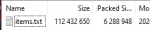
The file that's included with RedGuides is MQ2LinkDB.txt. The resource I posted, items.zip, contains a file that is named items.txt.
items.txt is a 109,798 kb file. MQ2LinkDB is expecting the format from items.txt and not MQ2LinkDB.txt..
It seems from your response that you're working with the incorrect file which is why it's failing.
items.txt is a 109,798 kb file. MQ2LinkDB is expecting the format from items.txt and not MQ2LinkDB.txt..
It seems from your response that you're working with the incorrect file which is why it's failing.
illslim
Member
Let me see if I can do this, this way.
First I did this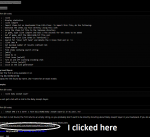
Then this gets downloaded

When I unzip the file, this is what is in it and goes into my MQ2 very vanilla release folder MQ2LinkDB.text
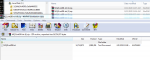
There is no item.txt file, that I can find in the zipfile.
I have even tried to rename it and it did not work.
This was just a luxury that helps make it quicker and easier for me to determine what items I will farmnext for my characters.
First I did this
Then this gets downloaded
When I unzip the file, this is what is in it and goes into my MQ2 very vanilla release folder MQ2LinkDB.text
There is no item.txt file, that I can find in the zipfile.
I have even tried to rename it and it did not work.
This was just a luxury that helps make it quicker and easier for me to determine what items I will farmnext for my characters.
You want to download the file located here:

 www.redguides.com
I've included a few arrows to help you locate the Download button:

Utility - items.txt (used for MQ2LinkDB)
This file includes every item in EverQuest and is intended to be used with MQ2LinkDB, though you can certainly find other uses. Items.txt is updated daily by an automated process. The "updated date" above will not reflect this fact. Place it in...
www.redguides.com
I've included a few arrows to help you locate the Download button:
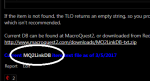
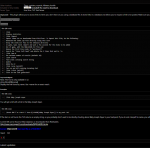
It seems from your response that you're working with the incorrect file which is why it's failing.
illslim
Member
You want to download the file located here:
Utility - items.txt (used for MQ2LinkDB)
This file includes every item in EverQuest and is intended to be used with MQ2LinkDB, though you can certainly find other uses. Items.txt is updated daily by an automated process. The "updated date" above will not reflect this fact. Place it in...
I've included a few arrows to help you locate the Download button:
View attachment 24501
View attachment 24502
Why did you link to that other page when you replied if this is the page I was supposed to go download from.
illslim
Member
I do not even know where to begin. I have done bookkeeping for a national strip club chain for over a decade and I think this whole thing is as close to the time I had a stripper who had me deposed due to her having gotten oral sex from some bouncer of ours who had Gingivitis and thought it made her sterile. And I was there being deposed because I was the unlucky person to take her first call into our office, she got lucky and got my extension. That life experience of mine being shared is like this response filled with links you knew went to the wrong page.
Alright, baaaad sir, whut youse goin' t'do be click de link t'go t'de resource page dat hosts de stash. Click de waaay download button and ya' should receive an items.ZIP dat ya' gots'ta jimmey wid yo' archive program uh choice. Widin dat archive be items.TXT.
Extract da damn items.TXT into de RedGuides VeryVanilla folder. It should 'esist in de same folda' as macroquest2.exe and mq2linkdb.dll.
Once ya''ve done dat load da damn plugin in-game wid
/plugin MQ2LinkDB load
and den type
/link /import
Note dat bod commands gots some slash cuz' it's sayin' "Hey Jollymister MQ2LinkDB, man, why duzn't ya' /impo't dat stash"
Success gots'ta provide ya' wid an output likes de followin':
[2020/09/22 08:58:14] Plugin 'mq2linkdb' loaded.
[2020/09/22 08:58:16] MQ2LinkDB: No item database yet
[2020/09/22 08:58:39] MQ2LinkDB: Importing items.txt...
[2020/09/22 08:58:39] MQ2LinkDB: Generating links...
[2020/09/22 08:58:48] MQ2LinkDB: Complete! 128811 links generated
Please feel free to ask any follow up questions or to find me for assistance in Discord. I'm more than happy to help you get this useful feature functional.
My very first response to you included a direct link. I can lead you to water but I can't teach you how to read or properly grok what's meaningful data in a sea of website design that's intended to be useful but confused you.
You can find the resource here!
Let me see if I can do this, this way.
First I did this View attachment 24497
Then this gets downloaded
View attachment 24498
When I unzip the file, this is what is in it and goes into my MQ2 very vanilla release folder MQ2LinkDB.text
View attachment 24499
There is no item.txt file, that I can find in the zipfile.
I have even tried to rename it and it did not work.
This was just a luxury that helps make it quicker and easier for me to determine what items I will farmnext for my characters.
MQ2LinkDB.txt is the file that the plugin reads to retrieve the link for you when you use the /link command. It is not the input file to the import process, that is the items.txt file.

Thank you
True but I prefer folks try and help regardless. I know I do!
It's okay to not talk if you don't know the answer.
True but I prefer folks try and help regardless. I know I do!
Last edited:
Even if he was wrong (which I can't say, never used this plugin) it's still fine by me. I'd rather people try and help, that's how some folks learn.
I'd like to understand this plugin. This update seems strange to me,
Does that mean it stopped relying on an external server for items.txt? Is it looking for the file locally, and we just don't include it?
I'd like to understand this plugin. This update seems strange to me,
Code:
]// 1.05 Fixed the really stupid mistake with item bitfield. And found out
//      a new equation:
//      Moved items.txt import into plugin (You can still use it external if
//      you want)
Does that mean it stopped relying on an external server for items.txt? Is it looking for the file locally, and we just don't include it?

I'd like to understand this plugin. This update seems strange to me,
Does that mean it stopped relying on an external server for items.txt? Is it looking for the file locally, and we just don't include it?
LinkDB doesn't have a concept of "local" and "remote" updates. It's all the one file, so if someone has it set to gather, their file will be different than say ... an export.
The import functionality, I believe, does a merge of what you have with what you import.
That said, it is probably most likely that the RG users using this plugin don't care about that and just want updated item links. If their file gets overwritten, it will likely have more items rather than be missing items assuming the data is sane.
Keeping that in mind a mid-tier solution might be to occasionally download the items.txt, import it into the MQ2LinkDB.txt file and use RG to distribute the updated MQ2LinkDB.txt file.
Long term I'd like to see us distribute a SQLite items database that can be used for multiple things. (I'm looking at you, quantity of summoned items code)
That's what I'm wondering as wellif i understand this correctly... it uses item.txt for emus? but works like normal on live as redbot mentions?
The permanent download link for items.txt is here:
If anyone is interested in making this download from the plugin, or better, allowing the plugin to download a compressed file, please submit a merge request and/or contact me! There's a bounty if you're interested in such things.
If anyone is interested in making this download from the plugin, or better, allowing the plugin to download a compressed file, please submit a merge request and/or contact me! There's a bounty if you're interested in such things.
Last edited:

make sure you get the latest items.txt!Note of caution on this plugin.
I had looter freeze whenever items were being looted, finally tracked it down to this plugin and this setting. Probably caused by CoV new items not being in my current file.
/link /scan on
You can use the TLO to do whatever you want with the link, but why do you want it to send it to you that way?Hey guys, since moving over to MQ Next, the links appear in the MQ2 window. Is there a way to make it send you whispers like it did before??

Kasino7
Well-known member
You can use the TLO to do whatever you want with the link, but why do you want it to send it to you that way?
My MQ2 window gets filled with information faster than I can watch it. I tried to check a link this morning took me about 2 minutes to capture it in MQ2. Had to stop all my guys from doing stuff. PMs are so much better don't have to stop my groups from doing stuff to see things.
EDIT: How would you go about changing this to send it to my whisper window like it was doing prior to Next?
My MQ2 window gets filled with information faster than I can watch it. I tried to check a link this morning took me about 2 minutes to capture it in MQ2. Had to stop all my guys from doing stuff. PMs are so much better don't have to stop my groups from doing stuff to see things.
EDIT: How would you go about changing this to send it to my whisper window like it was doing prior to Next?
;tell server.CharName ${LinkDB[youritem]}I can't get the import to work. Weird error:

If you're not using Next, please use this items.txt:
Unloaded MQ2LinkDBIf you're not using Next, please use this items.txt:
Downloaded the items.txt from the link provided. Placed in root MQ2 folder.
Loaded MQ2LinkDB
Performed /link /import command
Received same error (Invalid items.txt file. 314 fields found. Aborting)

Actually, you need to get the items.txt file from EQItems download. That error is a sanity check in the plugin. The items.txt file you are trying to import doesn't match the updated import function in the plugin.
Also, the item.txt file resides in the same folder as your MQ distribution (ie, the root MQ2 folder).
Users who are viewing this thread
Total: 1 (members: 0, guests: 1)
Share: