• You've discovered RedGuides, an EverQuest multi-boxing and scripting community 🧙‍♀️⚙️. We want you to play several EQ characters at once, come join us and say hello! 👋

  • A TLP without truebox has thawed (Very Vanilla ready)
    Frostreaver
MQ2Grind

Release MQ2Grind 3.1.52471.11

Hi

Looking for a bit of help. I just purchased this today followed the video guide without any problems. I am now at the instance when i grind start i get message......

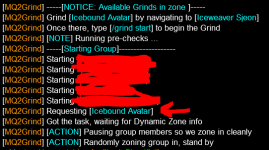
Found a blocking shared task Griklor the Restless ... stopping it. Its just spamming that message, none of my characters currently have that shared task.

Thanks for any help, very new to this :)

rebooted pc, auto updated plugins and we are in :)
 
Hi

Looking for a bit of help. I just purchased this today followed the video guide without any problems. I am now at the instance when i grind start i get message......

Found a blocking shared task Griklor the Restless ... stopping it. Its just spamming that message, none of my characters currently have that shared task.

Thanks for any help, very new to this :)

rebooted pc, auto updated plugins and we are in :)
I'm not sure if this means you fixed yourself or you were telling me how you loaded up.

The error you shared is most commonly when a toon you were previously grouped with doing a mission didn't end the mission and is now camped out.

Please let me know.
 
I'm not sure if this means you fixed yourself or you were telling me how you loaded up.

The error you shared is most commonly when a toon you were previously grouped with doing a mission didn't end the mission and is now camped out.

Please let me know.
Hi

You're 100% correct, thats what it was , I logged him back in and removed mission but it still kept giving same message. I rebooted and auto-updated plugins and problem gone.

I assume it just needed a reboot to clear.

Thanks
 
Hi

You're 100% correct, thats what it was , I logged him back in and removed mission but it still kept giving same message. I rebooted and auto-updated plugins and problem gone.

I assume it just needed a reboot to clear.

Thanks

/bcga //taskquit will usually fix the issue you had, in case it comes up again.
 
Question, I don't think was asked yet. If I'm running this on 2 separate groups is there a way for it not to change settings from group 1 to group 2. I noticed that if I start my first group with an SK tank using CWTN they go in do their thing. then on my second group I choose Paladin CWTN as tank it will change it on both groups. Or is this just meant to be ran with 1 group only? Either way love the plugin
 
Question, I don't think was asked yet. If I'm running this on 2 separate groups is there a way for it not to change settings from group 1 to group 2. I noticed that if I start my first group with an SK tank using CWTN they go in do their thing. then on my second group I choose Paladin CWTN as tank it will change it on both groups. Or is this just meant to be ran with 1 group only? Either way love the plugin
I can also confirm this issue lol
 
Question, I don't think was asked yet. If I'm running this on 2 separate groups is there a way for it not to change settings from group 1 to group 2. I noticed that if I start my first group with an SK tank using CWTN they go in do their thing. then on my second group I choose Paladin CWTN as tank it will change it on both groups. Or is this just meant to be ran with 1 group only? Either way love the plugin
Good morning @EQman0311 and @Teichou

What you both are experiencing is managed via the configuration of MQ2Grind. I exposed the configuration so that you could do just about anything you wanted to.

Here's a post, in this thread, which I think might have escaped both of you, that I believe will address what you want:

Let me know? :)
 
I never doubted this is a great plugin, but for one reason or another, including a lack of funds after giving CWTN all my money, I did not purchase it. Well, let me tell you, I wish I had gotten this earlier! This is amazeballs! I've already run Restless Assault 3 times without a hiccup, and that is while also running overseer which, in my experience, has caused some noticeable lag for me. Still, Grind didn't miss a beat. Thanks, Hytek, awesome work man!
 
I am using the plugin to grind Restless Assault the last few days, the tool is working great except one glitch I found. When there's a death in the group, the toons that's alive will keep on fighting until it's out of combat to rez when your healer don't have combat rez or didn't get to it until fight is over. But by that time, often the toons position is a little bit away from where the death happened, and its out of range for healer to auto rez it. Then the whole team will sit there paused but not rezzing the dead. Sometime this lead to the toon that's dead lose the corpse and attached exp. Is it possible that when team is waiting for corpse to be rezzed, move towards the corpse so its within rez radius? Thanks.
 
I am using the plugin to grind Restless Assault the last few days, the tool is working great except one glitch I found. When there's a death in the group, the toons that's alive will keep on fighting until it's out of combat to rez when your healer don't have combat rez or didn't get to it until fight is over. But by that time, often the toons position is a little bit away from where the death happened, and its out of range for healer to auto rez it. Then the whole team will sit there paused but not rezzing the dead. Sometime this lead to the toon that's dead lose the corpse and attached exp. Is it possible that when team is waiting for corpse to be rezzed, move towards the corpse so its within rez radius? Thanks.
I have had this happen as well and it was when my ass wasn't in my chair. :bang:

/grind pause...take care of dead business
/grind resume
 
I have had this happen as well and it was when my ass wasn't in my chair. :bang:

/grind pause...take care of dead business
/grind resume
Yeah, I know that can be taken care of manually. But would be nice if this can be automated. So the grind will only stop if healer dead or all deal.
 
So last night my game crashed while doing restless assault. It was late so I didn't log back on. Today I logged on and I was on same spot but in the regular zone as expected. Now I am trying to start the instance again but it doesn't want to work. I get the initial pre-checks and puts all my toons on pause, but from there it does nothing. Any ideas?
 
So last night my game crashed while doing restless assault. It was late so I didn't log back on. Today I logged on and I was on same spot but in the regular zone as expected. Now I am trying to start the instance again but it doesn't want to work. I get the initial pre-checks and puts all my toons on pause, but from there it does nothing. Any ideas?
There's far too little information here for me to ascertain what might be wrong.

If you are still having this problem please run /grind debug and share the output with me.
 
Yeah, I know that can be taken care of manually. But would be nice if this can be automated. So the grind will only stop if healer dead or all deal.

Grind stops if any group member dies and a corpse is present. If you have hidden ALL corpses; this might pose a problem. I would recommend using /hidecorpse alwaysnpc
 
Is that necessary though? I have all of the CWTN plugins but Paladin, but never ran into an issue with not selecting which plugin for which class, etc.
 
Is that necessary though? I have all of the CWTN plugins but Paladin, but never ran into an issue with not selecting which plugin for which class, etc.

not really no...but I know @hytiek has some changes coming to make it run even better

I am running 3 groups atm with 1 war 1 sk and 1 pal...and they have no issues
 
Hey. Can you put in a precheck to make sure a compatible CWTN plugin is picked for the tank? Thanks!

The configuration is 100% up to you. Creating ESP Module inside MQ2Grind wouldn't serve me as well as for MQ2PowerBall

Thanks for understanding :)
 
I've been having an issue with The Darkness Howls.
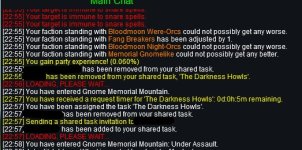
The tank grabs a new task after just finishing one. Instantly kicks my Enchanter out of the task and then proceeds to have everyone zone in. Then he stands there and has the whole group keep saying "ready" until I manually add the enchanter back to the task.
 

Attachments

  • grindissue.jpg
    grindissue.jpg
    66.8 KB · Views: 7
Reviewing the snippet you shared; I don't see a problem.

The way that MQ2Grind works is like a tour guide of an instance, taking you near creatures to kill until the pre-defined route has completed. The plugin will then move you to a place where I believe you are safe to exit the instance and do it again, and again, and again...

The way that the plugin can consistently exit an instance and recycle it is to kick all group players from the instance in order to exit the zone and prepare to get a new instance. The snippet you shared depicts just those things.

If I have misunderstood your point or if you could please provide MQ2Grind related info in the next reply that could help me better understand that would be great.
 
So last night my game crashed while doing restless assault. It was late so I didn't log back on. Today I logged on and I was on same spot but in the regular zone as expected. Now I am trying to start the instance again but it doesn't want to work. I get the initial pre-checks and puts all my toons on pause, but from there it does nothing. Any ideas?
I had this happen to me a handful of times and what works for me is just do a /grind end command or if you already have a hot button set for it already just press it once or twice and run grind again and it will do pre-check and get the instance again for you. (make sure you have your tank set as Main Assist). Hope this helps.
 
I had this happen to me a handful of times and what works for me is just do a /grind end command or if you already have a hot button set for it already just press it once or twice and run grind again and it will do pre-check and get the instance again for you. (make sure you have your tank set as Main Assist). Hope this helps.
I don't think you read what Berkz said...
 
Reviewing the snippet you shared; I don't see a problem.

The way that MQ2Grind works is like a tour guide of an instance, taking you near creatures to kill until the pre-defined route has completed. The plugin will then move you to a place where I believe you are safe to exit the instance and do it again, and again, and again...

The way that the plugin can consistently exit an instance and recycle it is to kick all group players from the instance in order to exit the zone and prepare to get a new instance. The snippet you shared depicts just those things.

If I have misunderstood your point or if you could please provide MQ2Grind related info in the next reply that could help me better understand that would be great.
I think it was a hiccup Hytiek, I haven't encountered the issue again. Thank you!
 
The "issue" isn't Grind related; what you described is a collapsed instance which drops you in normal zone. That's EQ.
 
I've been trying to set up a react so that when my cleric is OOM or my DPS is below 10% endurance for MQ2Grind to stop and med. However, I am horrible at using TLOs and programming in general so I am not able to get anything to work. Could I pick your brain to get something like that going please?
 
Fun plugin, been playing with it for a day now. Is mq2groupinfo intended to be a requirement? I had to load mq2groupinfo to bypass an issue at "/grind start" where the lead tries to execute cometome at the mission NPC. The Overview page here didn't list this dependency. Maybe it doesn't need to be? Looking at that plugin's doc that command is an alias for what is configured in the groupinfo's ini.

/dgge /multiline ; /afollow off;/nav stop;/timed 5 /nav id ${Me.ID}

Keep up the great work!
 
Fun plugin, been playing with it for a day now. Is mq2groupinfo intended to be a requirement? I had to load mq2groupinfo to bypass an issue at "/grind start" where the lead tries to execute cometome at the mission NPC. The Overview page here didn't list this dependency. Maybe it doesn't need to be? Looking at that plugin's doc that command is an alias for what is configured in the groupinfo's ini.

/dgge /multiline ; /afollow off;/nav stop;/timed 5 /nav id ${Me.ID}

Keep up the great work!

That's a really good point I never considered, but you are right as Grind is looking at Group TLO.

In hindsight, I think this became a requirement when GroupInfo, TargetInfo, and another were broken apart into separate plugins. I'll get that added to the resource page!

BTW I don't use /afollow in the plugin, I'm not sure why that reference is shared.
 
BTW I don't use /afollow in the plugin, I'm not sure why that reference is shared.
I shared that snippet because I am less intelligent after midnight than usual. What the dependency REALLY is about is "mimicme", not "cometome".

DoCommand - Couldn't parse '/groupinfo mimicme off'

Previously when I incorrectly thought the problem was ComeToMe , I posted that snippet from their plugin's INI of how that command is configured.
 
I've been trying to set up a react so that when my cleric is OOM or my DPS is below 10% endurance for MQ2Grind to stop and med. However, I am horrible at using TLOs and programming in general so I am not able to get anything to work. Could I pick your brain to get something like that going please?

It sounds like you are under geared trying something more than you should - or you have a KA INI full of every single possible spell to spam out. I've heard / seen this often.

As far as creating a react for you, I'm sorry I just don't have the time to do that.

There are plenty of examples in the documentation (docs.macroquest.org) and throughout the forums you could piece together.
 
Release MQ2Grind

Users who are viewing this thread

Back
Top
Cart