
-
 Hail, we're RedGuides. We want you to play six (yes, 6!) EverQuest characters at once. We have scripts and a friendly community to help, please join our playstyle and say hello! 👋
You are using an out of date browser. It may not display this or other websites correctly.
You should upgrade or use an alternative browser.
You should upgrade or use an alternative browser.

Release MQ2Grind (6 Viewers) 3.1.52471.42
- Thread starter hytiek
- Start date
- Seller
- #843
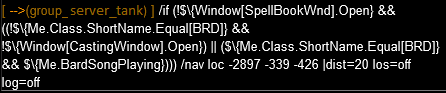
I can't use/grind startas everytime it does, my monk crashes. Any insights? I run this the command on my monk,
If you have that DMP file, please send it to me.
- Seller
- #844
Hello !
Let me first say that this plugin runs flawlessly.
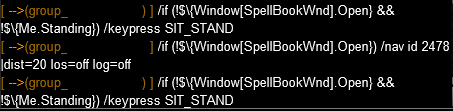
I am although looking to hide these messages that clutter my mqnext chat window.
My MT echoes them to everyone and its really annoying.
Thanks for the help!
View attachment 38220
View attachment 38221
Hey there, if you want to hide that, /dnet localecho off
- Buyer
- #845
I pulled the trigger purchasing this plugin a little too fast. I forgot that I can't run mq2dannet under Wine (environment for running windows programs under Linux), so far its the only plugin that fails (crashes on load). Is there any chance of adding eqbcs support to mq2grind?


- Seller
- #847
heya hytiek,
wonder what happened to your plans for adding pause/resume when group is low on mana.
didnt you want to add some marks for mana/health so my group doenst run oom all the time?

The plans are to support it. I have some code written to support it, I just haven't finished it as I have been working on some core changes to support other types of instances. MQ2React is still the best way to handle it for now until I release this. I have a few personal things that I want to take care of before I get to this and other things in the todo list. I may just propose a list and let folks vote on the most important/impact change and let that drive my efforts.

ishio
Member
- Buyer
- #849
So I looked into it a little more and found out what the issue was. It was a typical UE (User Error) issue. Turns out the UI I was using, wasn't actually default. Swapped back to default UI and it worked flawlessly. I apologize for that. It wasn't anything with this plugin.If you have that DMP file, please send it to me.

- Buyer
- #850
I also made a fix to groupinfo so if you had a busted ui it wouldn't explodeSo I looked into it a little more and found out what the issue was. It was a typical UE (User Error) issue. Turns out the UI I was using, wasn't actually default. Swapped back to default UI and it worked flawlessly. I apologize for that. It wasn't anything with this plugin.
- Buyer
- #853
This just means that you chose to purchase a new license rather than renew.on mq2grind recently purchased (should have been a renew)
It doesn't mean anything other than you will see 1 expired and 1 current license
- Seller
- #855
I'll get in touch with you privately to resolve this.only seeing 1 expired license, I paid for it on Sunday and it still doesn't show up under my licenses
- Seller
- #856
Here's a few options for my next priorities for the plugin, as I said earlier, this is your chance to vote on what gets done first. Please vote by means of reaction, I'll explain:
New instance (sub lvl 100, maybe even TLP based):
Configuration to allow for delay of Group navigation:
Aggro checker of XTargets (save the healer!):
Designated Quest-Getter (someone other than tank to get mission):
Auto resume (after all PC corpses are rez'd):
Check group for Mana / Endurance / HP:
Let's see what happens with this.
New instance (sub lvl 100, maybe even TLP based):
Configuration to allow for delay of Group navigation:
Aggro checker of XTargets (save the healer!):
Designated Quest-Getter (someone other than tank to get mission):
Auto resume (after all PC corpses are rez'd):
Check group for Mana / Endurance / HP:
Let's see what happens with this.

Jelly Belly
Member
- Buyer
- #857
I cannot wait til my guys are 95 so i can start using this. Only 50 at the moment.

allandallis235
Well-known member
- Buyer
- #858
You'll absolutely love it!I cannot wait til my guys are 95 so i can start using this. Only 50 at the moment.
Kingfisher
Member
- Buyer
- #859
i found that Essedera grind, my group gets stuck waiting for a door to be clicked (have Settings Automatically click doors On in MQ2Nav)...Only when i manually open the door the grind continues....am i doing something wrong? (meshes are up to date)
- Seller
- #860
i found that Essedera grind, my group gets stuck waiting for a door to be clicked (have Settings Automatically click doors On in MQ2Nav)...Only when i manually open the door the grind continues....am i doing something wrong? (meshes are up to date)
I'll give this a look, but would you mind sharing a bit about what races are in your group, are you shrunk? full height? which location or grind location number?
Kingfisher
Member
- Buyer
- #861
races: DE (3), Vah Shir (2), gnome (1) or half-elf(1). All shrunk.
I'll do it again soon and note the sticky places, but on general its at two huge doors that need to be clicked (i cant remember the exact loc, will find that out)
I'll do it again soon and note the sticky places, but on general its at two huge doors that need to be clicked (i cant remember the exact loc, will find that out)
- Seller
- #862
Just before the ice bridge ?races: DE (3), Vah Shir (2), gnome (1) or half-elf(1). All shrunk.
I'll do it again soon and note the sticky places, but on general its at two huge doors that need to be clicked (i cant remember the exact loc, will find that out)
Kingfisher
Member
- Buyer
- #863
ill have to redo the grind..will so in a few  will report back!
will report back!- Buyer
- #864
Today my group has been doing the following for Restless Assault:
1) starts grind 2) finishes the grind 3) boots group out 4) gets new mission 5) gets hung up and stuck at: "got the task, waiting for dynamic zone info"
I have to manually /grind end, and then /grind start after each and every mission. Logged all 6 out, and then back in. Still acting the same. Never seen this before. Thanks for any help!
1) starts grind 2) finishes the grind 3) boots group out 4) gets new mission 5) gets hung up and stuck at: "got the task, waiting for dynamic zone info"
I have to manually /grind end, and then /grind start after each and every mission. Logged all 6 out, and then back in. Still acting the same. Never seen this before. Thanks for any help!

Kilas_Army
Member
- Buyer
- #865
Seconding this as it's been going on for me since Friday night. (March 4) Thought it might be something with EQ but, I see there was an update to Grind yesterday so, perhaps something is up with that. Sometimes, I can do 2 runs before it hangs, most times 1. Tried reinstalling Grind after a full log out and restart. Same deal, though.Today my group has been doing the following for Restless Assault:
1) starts grind 2) finishes the grind 3) boots group out 4) gets new mission 5) gets hung up and stuck at: "got the task, waiting for dynamic zone info"
I have to manually /grind end, and then /grind start after each and every mission. Logged all 6 out, and then back in. Still acting the same. Never seen this before. Thanks for any help!
- Seller
- #866
Seconding this as it's been going on for me since Friday night. (March 4) Thought it might be something with EQ but, I see there was an update to Grind yesterday so, perhaps something is up with that. Sometimes, I can do 2 runs before it hangs, most times 1. Tried reinstalling Grind after a full log out and restart. Same deal, though.
Today my group has been doing the following for Restless Assault:
1) starts grind 2) finishes the grind 3) boots group out 4) gets new mission 5) gets hung up and stuck at: "got the task, waiting for dynamic zone info"
I have to manually /grind end, and then /grind start after each and every mission. Logged all 6 out, and then back in. Still acting the same. Never seen this before. Thanks for any help!
Thank you both for sharing this issue.
I've heard from another about this as well and have started looking into how best to resolve this.
My initial testing seems to lean to the fact that there has been a change on the EQ side and I will cater for this as best as I can.
For now, if you are having this specific issue, please reach out to me directly on Discord and I will provide you with a dev-build which currently handles it.
I've tested my hunch for about 10 hrs now and seems to be correct. I'm not aware of any other instance that this is happening with at this time, but the fix I'll be publishing will cater for it happening at any instance.
- Seller
- #867
hytiek updated MQ2Grind with a new update entry:
Added safety checks, sexy audit, and -spam
Read the rest of this update entry...
Added safety checks, sexy audit, and -spam
03/09/2022
---
Enhancements
- Added checks to ensure we got the task
- Added checks to ensure we got the DZ instance
- Added an audit to compare Group PCs to Shared Task members, invite the missing toon before zoning in
- Added detection of ${DanNet.LocalEcho} and toggle the setting off during the Grind, and re-enable once you end the Grind
Resolved defects
- The added checks should help the recent issues seen at ToV Great Divide: Restless Assault where requesting
a task would work but...
Read the rest of this update entry...
- Seller
- #868
You may see a few new things in your MQ Console or MQ2ChatWnd, I thought I'd share and explain what's going on with these things:
I was never happy with the way I initially provided the brute force fix for those characters that got skipped during the Task Add process. It was cumbersome and ugly. If you don't know what I am talking about, you are very lucky. For those of you who do know what I'm talking about: I've created a feature to scan the toons in the Shared Task and compare about the (PC) toons in the group. If there's a PC which which is in group and not in Shared Task and in the same zone (at quest giver before going in), then the plugin will automatically add the toon(s) for you. Here are 3 screen shots to see the kind of mess EQ has with Shared Tasks:
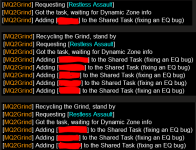
While testing this, I did not interfere with the game mechanics at all, these were all truly 100% EQ's fault and not manipulated by me at all.
Alright, let's move to the next thing. Recently I added some checks for open spell books and or casting and special checks for Bards specifically and this was all done over Dannet commands. Most folks seem to have "localecho" enabled (not sure why, but that's ok) - and I've seen and handled a few queries were folks weren't happy with it or rather questioned WTF was going on. So to help elleviate the visual burden of this, the plugin now checks if you have Dannet localecho enabled and if so, disable it for you until the end of the Grind at which point the plugin will toggle it back to "on" for you since you like having it. if you don't like it disable it by "/dnet localecho off". Any how, here's a view of what you might see relating to this addition:
As you can see we start by detecting that localecho is on, then disable it for you, then when you end your Grind, toggle it back for you. In the case where you have localecho off, we do nothing about it.
That's it for now. I thought I'd get this update in while the servers are down and have time to post this update.
I hope you all have a great day!
I was never happy with the way I initially provided the brute force fix for those characters that got skipped during the Task Add process. It was cumbersome and ugly. If you don't know what I am talking about, you are very lucky. For those of you who do know what I'm talking about: I've created a feature to scan the toons in the Shared Task and compare about the (PC) toons in the group. If there's a PC which which is in group and not in Shared Task and in the same zone (at quest giver before going in), then the plugin will automatically add the toon(s) for you. Here are 3 screen shots to see the kind of mess EQ has with Shared Tasks:
While testing this, I did not interfere with the game mechanics at all, these were all truly 100% EQ's fault and not manipulated by me at all.
Alright, let's move to the next thing. Recently I added some checks for open spell books and or casting and special checks for Bards specifically and this was all done over Dannet commands. Most folks seem to have "localecho" enabled (not sure why, but that's ok) - and I've seen and handled a few queries were folks weren't happy with it or rather questioned WTF was going on. So to help elleviate the visual burden of this, the plugin now checks if you have Dannet localecho enabled and if so, disable it for you until the end of the Grind at which point the plugin will toggle it back to "on" for you since you like having it. if you don't like it disable it by "/dnet localecho off". Any how, here's a view of what you might see relating to this addition:
As you can see we start by detecting that localecho is on, then disable it for you, then when you end your Grind, toggle it back for you. In the case where you have localecho off, we do nothing about it.
That's it for now. I thought I'd get this update in while the servers are down and have time to post this update.
I hope you all have a great day!
- Buyer
- #869
Wanted to add a couple of tips to prevent getting stuck while in a Grind.
1) For melee characters using the /stick option. Try modifying the '/stick how' options to use /stick front 10. This helps to prevent characters from becoming stuck on zone geometry, when by default, characters are attempting to stick snaproll or stick behind.
2) If you are using an Enchanter. Disable the 'Chaotic Mez' option (only when in a Grind). Otherwise the Enchanter attempts to hit every single mob with Chaotic, and this means potential roamers get frozen/mezzed somewhat beyond line of sight on stairwells and around corners etc. Which results in the tank, using /stick, becoming stuck on a corner or a wall while trying to path to the mob.
1) For melee characters using the /stick option. Try modifying the '/stick how' options to use /stick front 10. This helps to prevent characters from becoming stuck on zone geometry, when by default, characters are attempting to stick snaproll or stick behind.
2) If you are using an Enchanter. Disable the 'Chaotic Mez' option (only when in a Grind). Otherwise the Enchanter attempts to hit every single mob with Chaotic, and this means potential roamers get frozen/mezzed somewhat beyond line of sight on stairwells and around corners etc. Which results in the tank, using /stick, becoming stuck on a corner or a wall while trying to path to the mob.
darkfurlord
Member
- Buyer
- #870
Amazing work! started using this today and i cant say a bad thing about it, great job


- Buyer
- #873
I wanted to also note that I have been using the following mac I created for a week now on my Driver Toons to assist with issues where this plugin would pause and not resume until I manually noticed it.
This sends a /grind Resume command every 5min. For me it's usually because a toon died and took a rez and has already been buffed up.
~TheFiddler~
This sends a /grind Resume command every 5min. For me it's usually because a toon died and took a rez and has already been buffed up.
Code:
| Force MQ2Grind to RESUME!!
| Usage: /mac RESUME
| by TheFiddler | 2022/03/09

sub main

:loop
/grind RESUME
/delay 300s
/goto :loop

/return
~TheFiddler~
darkfurlord
Member
- Buyer
- #874
LOVE LOVE LOVE this plugin.
i have to keep resetting my assistat to 100 every time it flip the instance. is there something i should be changing specifically? im using CWTN plugins sk,clr,zer,bst
and all reset to 98 once they zone back into instant. i have typed it in to assist at 100 and used the ui to do it.
i have to keep resetting my assistat to 100 every time it flip the instance. is there something i should be changing specifically? im using CWTN plugins sk,clr,zer,bst
and all reset to 98 once they zone back into instant. i have typed it in to assist at 100 and used the ui to do it.
- Seller
- #875
The assistat value is set on CWTN plugins, not grind; unless its in grind and you haven't updated the configuration.LOVE LOVE LOVE this plugin.
i have to keep resetting my assistat to 100 every time it flip the instance. is there something i should be changing specifically? im using CWTN plugins sk,clr,zer,bst
and all reset to 98 once they zone back into instant. i have typed it in to assist at 100 and used the ui to do it.
Take a moment and go into the class configuration and ensure your configuration. If you don't come right with it, send me your INI privately.
For instance:
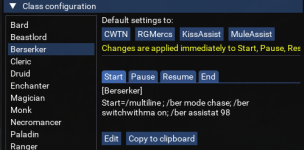
Change that setting and ensure it's not in your Resume setting either (for each class you use)
darkfurlord
Member
- Buyer
- #876
Thank you, so simple cant believe i didnt see that, sorry to waste your time. working perfect!The assistat value is set on CWTN plugins, not grind; unless its in grind and you haven't updated the configuration.
Take a moment and go into the class configuration and ensure your configuration. If you don't come right with it, send me your INI privately.
For instance:
View attachment 38874
Change that setting and ensure it's not in your Resume setting either (for each class you use)
- Buyer
- #877
So been messing around with this on test. In TOL Shei Vinitras I noticed you get stuck on the sacrificial table a lot. Because you almost always have multiple mobs ae aggro fires a lot from tanks. Which means you’ll end up targeting the table which will eventually kill your. I‘ll get screenshots of the area and the example but noticing how often it happens i can’t imagine it’s not causing a hitch in the run through for a lot of folks.
- Seller
- #878
hytiek updated MQ2Grind with a new update entry:
New feature: Last Run
Read the rest of this update entry...
New feature: Last Run
03/29/2022
---
Enhancements
- Added `/grind lastrun` to finish the current instance and then stop Grinding
- Added lastRunCmd (check UI) to be used with `/grind lastrun`; which may be configured to execute a command once you exit the currently run instance (or not...)
- Added additional handling to get rid of the shared task as needed
Resolved defects
- Removed evidence of unfinished instances, shh!
Read the rest of this update entry...
- Seller
- #879
With the new update, I thought it was a good idea to share where to find the configuration and elaborate a bit more...
So when you are in game, you can run `/grind ui` and get the user interface that you see below. Under the General Configuration tab, you'll find lastRunCmd. This is completely optional. Essentially if you execute `/grind lastrun` while in a Grind, this will tell the plugin that it does not want to recycle any more and it will execute the command, no options. So if you want it to do something, configure it.
Sic messaged me this morning and raised this feature, it was such a good idea I couldn't wait to get it into the plugin.
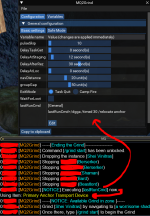
As you can see above, the lastRunCmd has the option to be edited. I do recommend adding a timer based on some tests, just to allow all of the toons in the group to gain full control. You could leave this empty, use the example I've shown here, or execute a macro or Lua script. Hell ... you could `/dg /q` as well if you wanted to. The use case is along the lines of "Damn I gotta go do something and shouldn't afk ... /grind lastrun"
Mileage may vary, have fun and please let me know if there's any issue with this. It was limited testing but such a simple add.
So when you are in game, you can run `/grind ui` and get the user interface that you see below. Under the General Configuration tab, you'll find lastRunCmd. This is completely optional. Essentially if you execute `/grind lastrun` while in a Grind, this will tell the plugin that it does not want to recycle any more and it will execute the command, no options. So if you want it to do something, configure it.
Sic messaged me this morning and raised this feature, it was such a good idea I couldn't wait to get it into the plugin.
As you can see above, the lastRunCmd has the option to be edited. I do recommend adding a timer based on some tests, just to allow all of the toons in the group to gain full control. You could leave this empty, use the example I've shown here, or execute a macro or Lua script. Hell ... you could `/dg /q` as well if you wanted to. The use case is along the lines of "Damn I gotta go do something and shouldn't afk ... /grind lastrun"
Mileage may vary, have fun and please let me know if there's any issue with this. It was limited testing but such a simple add.
- Buyer
- #880
I know this has been reported before but I would like to second this...
Since some days (dunno exactly when it started) my group sometimes doesnt drop the task at the end. The plugin is saying it does but all my toons keep the task. This leads to not leaving the instance of course and force me to manualy drop it.
I dunno what causes this so I cant reproduce.
For me this happens in Restless Assault but atm I dont do any other missions.
Since some days (dunno exactly when it started) my group sometimes doesnt drop the task at the end. The plugin is saying it does but all my toons keep the task. This leads to not leaving the instance of course and force me to manualy drop it.
I dunno what causes this so I cant reproduce.
For me this happens in Restless Assault but atm I dont do any other missions.
Users who are viewing this thread
Total: 7 (members: 0, guests: 7)
Share: