• You've discovered RedGuides, an EverQuest multi-boxing and scripting community 🧙‍♀️⚙️. We want you to play several EQ characters at once, come join us and say hello! 👋

  • A TLP without truebox has thawed (Very Vanilla ready)
    Frostreaver
MQ2Grind

Release MQ2Grind (4 Viewers) 3.1.52471.11

Not sure if this question will make sense, but I'm going to give it a try lol. So, if there are say, three mobs in camp, is there a way to get MQGrind to issue a separate issue call when the tank switches to the second mob?
 
Not sure if this question will make sense, but I'm going to give it a try lol. So, if there are say, three mobs in camp, is there a way to get MQGrind to issue a separate issue call when the tank switches to the second mob?


At the moment no. That being said you've got my interest.

Would you mind elaborating on the use case?
 
So, let's say I'm using something other than the usual things to make MQ do the assist calls on the boxes. However, this doesn't do automatic assist calls in a similar way to CWTN but rather does it "manually" from the driver every time. I added the /assist command into the LTDistPullCmd, to get the assist on the first mob, however MQ2Grind doesn't send out an assist call for each individual mob, only the first one, if that makes sense.
 
So, let's say I'm using something other than the usual things to make MQ do the assist calls on the boxes. However, this doesn't do automatic assist calls in a similar way to CWTN but rather does it "manually" from the driver every time. I added the /assist command into the LTDistPullCmd, to get the assist on the first mob, however MQ2Grind doesn't send out an assist call for each individual mob, only the first one, if that makes sense.

MQ2Grind doesn't send an `/assist` command to the toons within the group, nor do CWTN plugins. Most combat assistant tools (cwtn/kissassist/etc...) look at what the MT/MA is doing and helps at certain mob hp percentage which is defined.

You can message me privately to spell this all out if you wish. Otherwise without full context and understanding I can't really assist further.
 
Been AFK for a few years, will this work at level 125 for AA XP? or would it be too slow?
 
why does my toon sit after getting the tasks in laurion inn (doesn't happen anywhere else...)?
 
Last edited:
also strange red lettering going across my screen seems x target out of range may have gated don't know if that is with this as well
I had this yesterday, nothing todo with grind has I don’t have it. But I have no idea what it is from though.
 
Found a hiccup in the matrix with Mage(s) in HAF. Full cwtn group.

Scenario: While Tank runs to quest giver (after completing a previous run), the group has a little time to buff. Mages will sometimes cast a mod rod for self, and it wont be auto inventoried before the pause call. The mage can no longer zone in by clicking the door because there is a mod rod on cursor. CWTN is paused so it doesn't auto-inventory. This essentially stops the grind.

My guess this can happen with FF considering its a door to zone in, as well.

First thought is it perhaps add an auto-inventory call to the group before door click routine?
 
hiccup in the matrix
Sad Keanu Reeves GIF by Feliks Tomasz Konczakowski
 
dunno what is going on the grind left one toon in the mission and my requester kept trying to request this over and over

That is an EQ bug, not a Grind one.

At the end of a mission Grind triggers a `/kickplayer t` and clicks yes for you, it also tells all toons in the group to `/taskquit`. It's a double attempt to ensure that the task is properly removed after EQ doesn't fully do it. Not much else I can do for that, DBG has to fix their code.
 
also strange red lettering going across my screen seems x target out of range may have gated don't know if that is with this as well

While that's not related to MQ2Grind, I do know what its from and let them know.

I'm certain that after the next build of RG you'll no longer see that :)
 
also strange red lettering going across my screen seems x target out of range may have gated don't know if that is with this as well
I had this yesterday, nothing todo with grind has I don’t have it. But I have no idea what it is from though.
While that's not related to MQ2Grind, I do know what its from and let them know.

I'm certain that after the next build of RG you'll no longer see that :)
yeah already fixed
 
hytiek updated MQ2Grind with a new update entry:

Introduced additional safety checks and added defaults for RGMercs (Lua) version and some fixes

3/03/2024
--
Added
- Introduced a new variable `SafetyExitMinutes` which will exit an instance if you've not progressed through the instance in # minutes (config in the UI)
- Introduced a safety check to avoid the forever-ask-for-quest scenario

Updated
- Updated PULL routine to ensure a valid navigation path exists
- Updated the default option buttons to include `RGMercs (Lua)` auto-configuration
- Updated wording on lock out messaging to be more accurate

Fixes
- Fixed ToV Icebound Avatar...
Read the rest of this update entry...
 
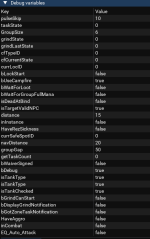
Having a strange issue on progression server with the grounds mission - mashing pumpkins. I have restarted EQ and my PC. Redguides launcher patched to latest release. In the grind UI window, I can click run to quest giver and it works fine. Clicking start, however, produces nothing. In Debug variables I see bGrindCanStart - False.
I have been running this grind all week with no issues, so not sure what I am doing wrong. Is there more info I can provide to help troubleshoot?

I am set to MA/MT on my tank (SK) and attempting to start from that char.

1709506593531.png
 
Having a strange issue on progression server with the grounds mission - mashing pumpkins. I have restarted EQ and my PC. Redguides launcher patched to latest release. In the grind UI window, I can click run to quest giver and it works fine. Clicking start, however, produces nothing. In Debug variables I see bGrindCanStart - False.
I have been running this grind all week with no issues, so not sure what I am doing wrong. Is there more info I can provide to help troubleshoot?

I am set to MA/MT on my tank (SK) and attempting to start from that char.

View attachment 58303
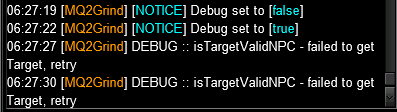
Please enable grind debug. It will tell you what's wrong. Once you see the issue see if you can resolve it if you cannot, let be know what the error states please.
 
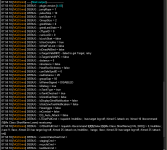
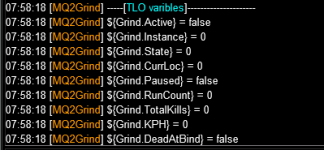
some conflicting information?
MQ window debug shows failed, but grind ui window shows true.
1709512076939.png

1709512090235.png

clicking the start button in grind ui or typing in /grind start doesn't give me any additional error messages to go off of.

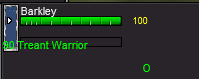
I have the NPC Barkley targetted and can manually request the mission from him. Running away and clicking the run to group quest giver button in grind UI does work fine and runs my group back there. Anything else I can test?
Also, this is 3 characters and 3 mercs if that affects anything.

1709512265472.png

/grind end gives me this as expected
1709512503304.png

but /grind start does nothing
 
some conflicting information?
MQ window debug shows failed, but grind ui window shows true.
View attachment 58308

View attachment 58309

clicking the start button in grind ui or typing in /grind start doesn't give me any additional error messages to go off of.

I have the NPC Barkley targetted and can manually request the mission from him. Running away and clicking the run to group quest giver button in grind UI does work fine and runs my group back there. Anything else I can test?
Also, this is 3 characters and 3 mercs if that affects anything.

View attachment 58310

/grind end gives me this as expected
View attachment 58311

but /grind start does nothing

I'll give it a look. Thanks for reporting this problem.

Anyone else having this issue?
 
That commonly happens when you've camped a toon that was in a previously shared task with your driver; without ending it on them.
Also super easy to fix to just manually request the task then cancel. Start-up is no issue after.
 
some conflicting information?
MQ window debug shows failed, but grind ui window shows true.
View attachment 58308

View attachment 58309

clicking the start button in grind ui or typing in /grind start doesn't give me any additional error messages to go off of.

I have the NPC Barkley targetted and can manually request the mission from him. Running away and clicking the run to group quest giver button in grind UI does work fine and runs my group back there. Anything else I can test?
Also, this is 3 characters and 3 mercs if that affects anything.

View attachment 58310

/grind end gives me this as expected
View attachment 58311

but /grind start does nothing

I just ran this on live, no issues. I have a buddy on TLP who is going to give this a run and confirm if he's experiencing any issues or not.

Few things which may or may not assist in the future, in no order:
  • the debug message about isTargetValidNPC and the information in the UI are different moments in time. The debug message was at that moment, while the User Interface is showing a current view of its target.
  • You mentioned that you have 3 PC + 3 Merc, but the debug you shared shows that you only have 2 group members. Not that it should matter, but the info you are sharing isn't aligning.
  • Running `/grind debug` is not a quick thing to snippet. There's a number of things it will attempt to do and if/when it hits a problem it will print it. The 2 failed to get target is not useful, what it would say in the next 5 lines or so, is.
  • The variable `bGrindCanStart` is internally used and refers to the GRINDING state, not the plugin. Seeing it as false, tells me that you've not received the quest yet; not very helpful.

UPDATE:
10:40PM: I have confirmed the problem on TLP, I'm digging into why now.
10:45PM: testing fix now
10:46PM: confirmed it's working, rebuilding RG now.


@Elrem thank you very much for raising this issue.
 
Last edited:
Awesome, thanks for the rapid repair Hytiek!

Sorry for the unhelpful detail. Was trying to provide enough context to help identify the issue but was grasping at straws without knowing the backend code and different variables. What is that, correlation without causation? or something like that.

Confirmed working again for me. Thanks again! Appreciate your help and love the grind!
 
What is a SANITYCHECK Step 1 scCounter++[1] mean?

That is what I get in the debug messages over and over again. it won't let me start a grind.

Also I have had several issues with toons stalling out and just standing there when they should be going to the next location. All day yesterday I kept having to intervene and manually move my toons before they resumed navigating themselves again. This happens constantly, maybe 1-2 times a clear (20 mins normally to clear).
 
What is a SANITYCHECK Step 1 scCounter++[1] mean?

That is what I get in the debug messages over and over again. it won't let me start a grind.

Also I have had several issues with toons stalling out and just standing there when they should be going to the next location. All day yesterday I kept having to intervene and manually move my toons before they resumed navigating themselves again. This happens constantly, maybe 1-2 times a clear (20 mins normally to clear).


The SANITYCHECK Step 1 means that your group has the minimum number of group members for the Shared Task.

If this message is continually cycling (as you described) this means two things:
  • MacroQuest does not see that you have an EQ Shared Task
or
  • MacroQuest confirms that you have an EQ Shared Task but it's not the correct one for the zone
What would help me is to understand which Grind Instance you are having this problem at, also include any information that would enable me to replicate this issue without asking for more information so that I can address / fix the issue as soon as possible.

In reviewing the code, I've also realized that I should add a debug message for the failure of the above condition which I'm doing now and will push an update so that in future if this happens there will be a debug message informing properly. Currently this would cycle without any kind of error message.

Thank you for raising this issue - I do need more information from you though to look into further.

In regards to your second issue of having toons "stall" out. In that case Grind Debug messages are extremely helpful for both you and I in trying to problem solve the issue. The most common reason that I can imagine is that you may have a group member which is further away from your tank than what the groupGap is set to. Debug message would display such a fact to you.

May I ask that before you manually intervene that you gather and share as much detail to help me fully understand the problem you are facing.

Thank you! :)
 
i got a problem with tank not auto attacking.. tried to remove grind.ini and made a new setup, but it still doesn't attack some mobs (nor uses the shd petition of power to pull - slot 9)
i didn't have any problem with the last version of the plugin though
special thing: on 9/65 toon moves past mob and doesnt agro at all (heroes are forged)
 

Attachments

Release MQ2Grind

Users who are viewing this thread

Back
Top
Cart