• You've discovered RedGuides, an EverQuest multi-boxing and scripting community 🧙‍♀️⚙️. We want you to play several EQ characters at once, come join us and say hello! 👋

  • A TLP without truebox has thawed (Very Vanilla ready)
    Frostreaver
Resource icon

Release MQ2Events

I've always dreaded finishing Dragons of Norrath because Vishimtar and the stupid burden mechanic. I wrote this into my event ini and it worked, though I'm sure not perfectly:

[Vishimtar]
trigger=#*#You sense your doom approaching#*#
command=/multiline ; /${Me.Class.ShortName} pause on ; /target "mournful spirit" ; /nav target ; /timed 150 ; /say shoulder my burden ; /${Me.Class.ShortName} pause off

So the way you wrote this, it will perform the following actions:

At 0 seconds:
  • Pause plugin
  • /target mournful spirit
  • /nav to a target (hoping it has one here, otherwise the nav just dies)
  • randomly pause 150 for no reason
  • /say shoulder my burden
  • unpause the plugin

It does all of those immediately without any pauses whatsoever. This is guaranteed to get your character deathtouched. It's likely some of these don't even process correctly and you don't even nav to the target, or if you do it navs for about 2 inches and then goes right back on fighting Vish.


You need to put /timed as part of an action string.

  • Pause plugin
  • /timed 10 /target mournful spirit
  • /timed 15 /nav to a target
    • Preferably, we just target and nav to the spirit simultaneously -- /tar mournful spirit, and /nav mournful spirit as separate lines, so that we aren't waiting on a valid target to be able to nav to it
  • /timed 100 /if (!${Me.Moving}) /say Shoulder my burden (Maybe do a few of these at 50, 100, 150?)
  • And then put in one or more longer checks to ensure the debuff is off before resuming the plugin, such as:
    • /timed 150 /if !{Me.Buff[Creeping Doom].ID} /${Me.Class.ShortName} pause off (again, can do these at 100, 150, 200, etc)
You could also manually fire off some event that says hey if I have the Creeping Doom debuff, run this loop. That way anything where mq2events may fail on, you could have a hot-button that resolves it.


Sorry, it's been over a year since I've written anything in MQ land, for all the reasons which many of you are aware of.
 
Hi,

I am trying to set up a trigger that will mention two names and if one of the names is mine it will trigger the command. Example: "I call on Name1 and Name2". I want my toons command to work if his name is in either spot. My problem is I don't know what to use as a filler for the other name as I could do "I call on Myname and ???" and then a second trigger for "I call on ??? and Myname" (where ??? would be the filler). If I put my name in both spots in the same trigger it will not fire since it will not match. So I at least need to know if there is a symbol or word that will match the text no matter what name is called, a universal filler if you will, that I can use and make the trigger work.
There maybe an even fancier way to write the trigger so I only need to write one trigger and it will fire regardless of what position my name is in within the text but not trigger if it does not include my name. Any help or direction would be appreciated.

Thanks
 
Hi,

I am trying to set up a trigger that will mention two names and if one of the names is mine it will trigger the command. Example: "I call on Name1 and Name2". I want my toons command to work if his name is in either spot. My problem is I don't know what to use as a filler for the other name as I could do "I call on Myname and ???" and then a second trigger for "I call on ??? and Myname" (where ??? would be the filler). If I put my name in both spots in the same trigger it will not fire since it will not match. So I at least need to know if there is a symbol or word that will match the text no matter what name is called, a universal filler if you will, that I can use and make the trigger work.
There maybe an even fancier way to write the trigger so I only need to write one trigger and it will fire regardless of what position my name is in within the text but not trigger if it does not include my name. Any help or direction would be appreciated.

Thanks
You may want to show what you are trying to do.

A possibility, but you will need to test it:
Rich (BB code):
trigger=#*#I call on #1# and #2# to #*#
command = /if (${EventArg1}=='myname' or ${EventArg2}=='myname') /echo success
 
You may want to show what you are trying to do.

Thank you Stuff,

I am trying to set up a kite/runaway for the event Heros are Forged. I see what you are advising and have come up with this. I will replace 'myname' with the actual toons names. So this is what I will be testing although I am not sure about the use of ;'s in the Command line. That will be the next challenge. Maybe I even need something more complicated like a "/echo success ; If success then..." statement. All this is greek to me but trying to learn though experimentation and helpful hints like yours.

[Music Notes]
trigger=#*#Shalowain links the sounds of footfalls and heartbeats of several people to her musical magic. That music starts to form into a solid object that begins to move toward #1# and #2# #*#
command=command=/multiline ; /if (${EventArg1}=='myname' or ${EventArg2}=='myname') /docommand /war mode 0 /gsay Running Upstairs /timed 5 /nav locyxz 353.36 -1352.22 222.94

Anyway off to test and play with it a bit, thanks for the tips and if anyone sees anything else I am screwing up please let me know.
 
Thank you Stuff,

I am trying to set up a kite/runaway for the event Heros are Forged. I see what you are advising and have come up with this. I will replace 'myname' with the actual toons names. So this is what I will be testing although I am not sure about the use of ;'s in the Command line. That will be the next challenge. Maybe I even need something more complicated like a "/echo success ; If success then..." statement. All this is greek to me but trying to learn though experimentation and helpful hints like yours.

[Music Notes]
trigger=#*#Shalowain links the sounds of footfalls and heartbeats of several people to her musical magic. That music starts to form into a solid object that begins to move toward #1# and #2# #*#
command=command=/multiline ; /if (${EventArg1}=='myname' or ${EventArg2}=='myname') /docommand /war mode 0 /gsay Running Upstairs /timed 5 /nav locyxz 353.36 -1352.22 222.94

Anyway off to test and play with it a bit, thanks for the tips and if anyone sees anything else I am screwing up please let me know.

It is great you're trying to learn this.

The ; is to separate lines of a multiline command. The command is supposed to mimic the hotkey in the game, and multiline is to let you use the "five" lines of a hotkey. I myself don't use it as much, someone with more experience would have to help.

With that said what you're trying to do can get complicated especially when trying to fit it to one command line.

I suggest taking a look at LEM. It allows more scripting to take place when an event happens.


And there is a library for it.

 
Hey Stuff,

Wow quick response. I did try using Lem but for me it was much more complicated unless someone has done all the work for me. Which is great if they do but I would like to be able to do some of my own that may not exist in the Lem Library. I was able to get MQ2Events set up for an event that nobody had done that actually worked, so was embolden to try another one. MQ2Events just seemed to be more straight forward and simple which works to my lack of knowledge in trying to write the actually text/logic lines.

As for the ; I guess I was afraid that if I added them to separate the statements they might run even if not true because all the statements might get separated by the ;'s from the if true statement. I just wasn't sure how much the ;'s isolated each statement. Hope that made sense. Also, not sure if in the final command line if it should be 'myname' or just myname.

Thanks again
 
Hey Stuff,

Wow quick response. I did try using Lem but for me it was much more complicated unless someone has done all the work for me. Which is great if they do but I would like to be able to do some of my own that may not exist in the Lem Library. I was able to get MQ2Events set up for an event that nobody had done that actually worked, so was embolden to try another one. MQ2Events just seemed to be more straight forward and simple which works to my lack of knowledge in trying to write the actually text/logic lines.

As for the ; I guess I was afraid that if I added them to separate the statements they might run even if not true because all the statements might get separated by the ;'s from the if true statement. I just wasn't sure how much the ;'s isolated each statement. Hope that made sense. Also, not sure if in the final command line if it should be 'myname' or just myname.

Thanks again

Strings can get complicated. Generally, if there is a space it needs to be enclosed. Some of the instances where you can use them, it could work. I always enclose strings, unless something tells me not to.


I think multiline would be after the IF in order to run all the commands and be tied to the IF.
 
I think multiline would be after the IF in order to run all the commands and be tied to the IF.

Nice, that actually makes total sense once you mention it and then the ;'s separations make more sense since everything following the if=true statement will run as long as written correctly.

Thanks
 
I'm trying to create an event to use the Cloak of the Fleeting Foot on chars outside my group, but I'm not having any luck. Can someone please take a look at the trigger I created and tell me what's wrong?

[Spirit of Wolf]
trigger=*Your Spirit of Wolf spell has worn off of #1#.
command=/echo Targeting ${EventArg1}

I have reduced this down to a bare bones version of the above and I still can't get it to trigger. I have unloaded the plugin and used the /event load command, but I'm not getting anywhere with this.
 
I'm trying to create an event to use the Cloak of the Fleeting Foot on chars outside my group, but I'm not having any luck. Can someone please take a look at the trigger I created and tell me what's wrong?

[Spirit of Wolf]
trigger=*Your Spirit of Wolf spell has worn off of #1#.
command=/echo Targeting ${EventArg1}

I have reduced this down to a bare bones version of the above and I still can't get it to trigger. I have unloaded the plugin and used the /event load command, but I'm not getting anywhere with this.
[Spirit of Wolf]
trigger=Your Spirit of Wolf spell has worn off of #1#.
command=/echo Targeting ${EventArg1}

Not sure why you have an asterix in the front of it. But likely your issue.
 
[Spirit of Wolf]
trigger=Your Spirit of Wolf spell has worn off of #1#.
command=/echo Targeting ${EventArg1}

Not sure why you have an asterix in the front of it. But likely your issue.
The asterix was left over after some sloppy editing. It turns out MQ2 does not recognize the spell name as simple text.

This works:

[Spirit of Wolf]
trigger=Your #1# spell has worn off of #2#.
command=/if (${EventArg1.Equal[Spirit of Wolf]}) /multiline ; /tar ${EventArg2}; /timed 10 /useitem "Cloak of the Fleeting Foot"

Just need to add a condition or two. Thanks for your help CWTN.
 
The asterix was left over after some sloppy editing. It turns out MQ2 does not recognize the spell name as simple text.

This works:

[Spirit of Wolf]
trigger=Your #1# spell has worn off of #2#.
command=/if (${EventArg1.Equal[Spirit of Wolf]}) /multiline ; /tar ${EventArg2}; /timed 10 /useitem "Cloak of the Fleeting Foot"

Just need to add a condition or two. Thanks for your help CWTN.
It should be stripping links. So that's odd.
 
Just a sanity check for me if you don't mind.. I had this as my events ini:
INI:
trigger=#1#The ice encrusted Avatar of War shouts that |${Me}| must bend the knee!#2#
command=/if (!${Me.Ducking}) /multiline ; /${Me.Class.ShortName} autostandonduck off; /attack off; /target clear; /keypress DUCK
[stand]
trigger=#1#The Avatar of War nods, accepting the subservience of those that gave it#2#
command=/if (${Me.Ducking}) /multiline ; /keypress DUCK
[avatarp2]
trigger=#1#The Avatar of War changes the rules and chooses a new field of battle!#2#
command=/multiline ; /${Me.Class.ShortName} mode 2; /${Me.Class.ShortName} autostandonduck on

and I guess somehow missed until this morning that the new field of battle trigger was throwing parse errors. I found this post that helped me get it working, but I'm curious why the first event always worked? I assume it's because the parsing is different once it gets past that first if clause, but is that expected? Just an MQ quirk I need to keep in mind?
 
Just a sanity check for me if you don't mind.. I had this as my events ini:
INI:
trigger=#1#The ice encrusted Avatar of War shouts that |${Me}| must bend the knee!#2#
command=/if (!${Me.Ducking}) /multiline ; /${Me.Class.ShortName} autostandonduck off; /attack off; /target clear; /keypress DUCK
[stand]
trigger=#1#The Avatar of War nods, accepting the subservience of those that gave it#2#
command=/if (${Me.Ducking}) /multiline ; /keypress DUCK
[avatarp2]
trigger=#1#The Avatar of War changes the rules and chooses a new field of battle!#2#
command=/multiline ; /${Me.Class.ShortName} mode 2; /${Me.Class.ShortName} autostandonduck on

and I guess somehow missed until this morning that the new field of battle trigger was throwing parse errors. I found this post that helped me get it working, but I'm curious why the first event always worked? I assume it's because the parsing is different once it gets past that first if clause, but is that expected? Just an MQ quirk I need to keep in mind?
you probably just didn't notice because autostandonduck was already off, or something
 
you probably just didn't notice because autostandonduck was already off, or something
Hmm.. I hoped you were right, but I tested again and I watched autostandonduck get unchecked. 🤷‍♂️
 
Hmm.. I hoped you were right, but I tested again and I watched autostandonduck get unchecked. 🤷‍♂️
dunno then, it might be due to the parser processing the !${Me. Ducking} portion before hand resolving the information
 
Wrong forum
while inside game, character is loged in I Open PluginManager Window, click on/off MQ2Events plugin, makes toon go LD, its just me, or a bug.
I have loaded and reset many times and cant solve, any idea? thanks and sorry bad english
today i have inserted this lines... perhaps this is the error...
[OOCBeep]
Event=OOC
Text=#*#*ooc*#*#
Command=/beep
 
Each resource on RG has an Overview / Discussion Thread and either a link to their wiki or tabs with FAQ, Commands, Etc.
Please make sure to post in the respective discussion thread, and check the FAQ/Commands/Wiki for information before posting.

mq2events discussion should be put in the mq2events discussion thread
 
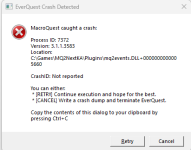
MQ2Events unload is crashing.

---------------------------
EverQuest Crash Detected
---------------------------
MacroQuest caught a crash:

Process ID: 13144
Version: 3.1.1.3520
Location: C:\Games\MQ2RG\Plugins\mq2events.DLL+0000000000005660

CrashID: Not reported

You can either:
* [RETRY] Continue execution and hope for the best.
* [CANCEL] Write a crash dump and terminate EverQuest.

Copy the contents of this dialog to your clipboard by pressing Ctrl+C

---------------------------
Retry Cancel
---------------------------
 
The same thing happens to me every time I disable MQ2Events, Everquest account related crashes, and need to relog account again, no messages just game disapear...
 
not sure why it didnt send a crash report.
but if you try to unload mq2events, it will crash. You can give a try on your machine.
 
Release MQ2Events

Users who are viewing this thread

Back
Top
Cart