• You've discovered RedGuides, an EverQuest multi-boxing and scripting community 🧙‍♀️⚙️. We want you to play several EQ characters at once, come join us and say hello! 👋

  • A TLP without truebox has thawed (Very Vanilla ready)
    Frostreaver
Resource icon

Release MQ2EasyFind

How I fixed it a bit ago - If you know how to update meshes, you need to create a small box just in front of the door that is walkable, so it updates that you can walk all the way to the door. I'm sure there is something with easyfind that can be done, but like others, I always forget to do a backup of the file so it gets overwritten.
no, the mesh issue is a mesh issue - i wonder if meshes got updated (and shouldn't have been).

this is why testing/vetting meshes is important - building on existing updates and stuff carefully.
 
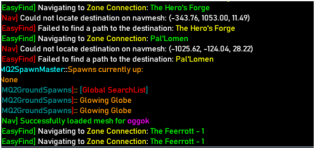
I'm having the same issue. When I use easyfind to /travelto pallomen it tells me failed to find a path to the destination. If I manually put a /nav waypoint to those coordinates, it also does not nav there. When I use -1017, -125, 21 it can navigate to that location
View attachment 56209
Copy + Paste this into your ZoneConnections.yaml file in RedGuides\resources\EasyFind.

[CODE title="zoneconnections.yaml"]
laurioninn:
- type: ZoneConnection
location: [-1022, -127, 25.4799995]
targetZone: pal'lomen
[/CODE]

edit... forgot, you need to /easyfind reload or relog to make changes work
 
Last edited:
no, the mesh issue is a mesh issue - i wonder if meshes got updated (and shouldn't have been).

this is why testing/vetting meshes is important - building on existing updates and stuff carefully.
from what i can tell, the existing location for easyfind put the location right on the other side of the door and the mesh didnt agree. I was experimenting and found easyfind had a yaml file and tweaked the location. Took me a few tries and a reload, but i got it to work.
 
Last edited:
Copy + Paste this into your ZoneConnections.yaml file in RedGuides\resources\EasyFind.

[CODE title="zoneconnections.yaml"]
laurioninn:
- type: ZoneConnection
location: [-1022, -127, 25.4799995]
targetZone: pal'lomen
[/CODE]

edit... forgot, you need to /easyfind reload or relog to make changes work
Confirmed, this worked for me.
 
from what i can tell, the existing location for easyfind put the location right on the other side of the door and the mesh didnt agree. I was experimenting and found easyfind had a yaml file and tweaked the location. Took me a few tries and a reload, but i got it to work.
as per usual, it sounds like you missed my point.

carry on
 
as per usual, it sounds like you missed my point.

carry on
I think I see what you are saying here... so is there a Navmesh file that I can download and replace for Laurion's Inn? I can't seem to get to any zone connection with EasyFind. With a couple of the newer Lua scripts for running missions / quests it's kind of a downer to not be able to have them click the Hero's Forge Door - it would appear that it works for others?

{https://www.redguides.com/community/resources/heroes-are-forged-mission-script.2976/ & https://www.redguides.com/community/resources/the-emberclaw-sisters.2977/}

Asking, since I am inept at creating my own mesh or even editing what's there, (I've looked at and attempted).

Just a shout out, I'm thrilled to see the updates in EasyFind POK, to specify GD vs GD:TOV, OT vs OT;ROS, SV vs SVDivided; NOS and etc. I for one appreciate those updates more than you all can know :).


just for reference:
1706218175445.png
 
I think I see what you are saying here... so is there a Navmesh file that I can download and replace for Laurion's Inn? I can't seem to get to any zone connection with EasyFind.
There was a period I was having this problem. Just launch the Nav Updater from RG Launcher and click [Update]. It should report you have a few new/outdated requiring a fix.
 
There was a period I was having this problem. Just launch the Nav Updater from RG Launcher and click [Update]. It should report you have a few new/outdated requiring a fix.
yeah, I have done that. I even deleted the file and mashed update with missing/updated checked - reloading them all. Anyone have a different quantity than 553?
 
yeah, I have done that. I even deleted the file and mashed update with missing/updated checked - reloading them all. Anyone have a different quantity than 553?
I deleted everything and did a fresh install of RedGuides VVMQ - cured my issues... Thanks all.
 
Last edited:
anyway to configure easyfind so it find the palatial/grand/medium/small guildhall doesn't matter which size from the lobby ?

current config finds them if you travel to but it then zones out to neighborhood then back to guildhall in a loop if the zone isn't what it expected

/eg from lobby
/travelto guildhall3 expects a modest if its a palatial it just loops over and over
 
anyway to configure easyfind so it find the palatial/grand/medium/small guildhall doesn't matter which size from the lobby ?

current config finds them if you travel to but it then zones out to neighborhood then back to guildhall in a loop if the zone isn't what it expected

/eg from lobby
/travelto guildhall3 expects a modest if its a palatial it just loops over and over

"/travelto palatial guild hall" works for me, if you haven't tried that yet.

Edit: Just thinking out loud this might already be a known work around and you're trying to get the other to be configured to work. Just wanted to throw it out there in case someone didn't know this might work for them as well.
 
Not sure if this is more of a question or a problem.

I am a level 2 user, fresh install of Redguides launcher/Very Vanilla MQ. Among the installed plugins in MQ2Nav.

With other plugins (like RGMercs, CWTN stuff), MQ2Nav works fine. However, as a default "standalone plugin" MQ2Nav does not behave anything like it does in the videos.

Expected behavior is that I can CTRL + Click (or do the group hot key) to navigate to something in my find window in PoK or any other zone.

Actual Behavior: the navigation hotkeys in the find window do not work. Additionally, the find window title bar does not display the hot keys.

I have uninstalled/reinstalled the redguides launcher AND Very Vanilla MQ with no avail.

Any ideas as to what I might be missing?
 
Each resource on RG has an Overview / Discussion Thread and either a link to their wiki or tabs with FAQ, Commands, Etc.
Please make sure to post in the respective discussion thread, and check the FAQ/Commands/Wiki for information before posting.
 
Not sure if this is more of a question or a problem.

I am a level 2 user, fresh install of Redguides launcher/Very Vanilla MQ. Among the installed plugins in MQ2Nav.

With other plugins (like RGMercs, CWTN stuff), MQ2Nav works fine. However, as a default "standalone plugin" MQ2Nav does not behave anything like it does in the videos.

Expected behavior is that I can CTRL + Click (or do the group hot key) to navigate to something in my find window in PoK or any other zone.

Actual Behavior: the navigation hotkeys in the find window do not work. Additionally, the find window title bar does not display the hot keys.

I have uninstalled/reinstalled the redguides launcher AND Very Vanilla MQ with no avail.

Any ideas as to what I might be missing?
Have you downloaded the nav meshes? The RG install includes a mesh updater exe that you should run to download the nav meshes. You need one for each zone where you might use nav.
 
Not sure if this is more of a question or a problem.

I am a level 2 user, fresh install of Redguides launcher/Very Vanilla MQ. Among the installed plugins in MQ2Nav.

With other plugins (like RGMercs, CWTN stuff), MQ2Nav works fine. However, as a default "standalone plugin" MQ2Nav does not behave anything like it does in the videos.

Expected behavior is that I can CTRL + Click (or do the group hot key) to navigate to something in my find window in PoK or any other zone.

Actual Behavior: the navigation hotkeys in the find window do not work. Additionally, the find window title bar does not display the hot keys.

I have uninstalled/reinstalled the redguides launcher AND Very Vanilla MQ with no avail.

Any ideas as to what I might be missing?
The functionality you're referring to isn't MQ2Nav, its MQ2EasyFind.
 
Just wanted to let someone know that EasyFind isn't finding the path to Steamfont Mountains through the Ak'Anon portal stone in PoK. Several zones path out through there, such as Loping Plains and Dragonscale Hills.

Anyway, just wanted to mention it in case nobody else has.

Thanks for the cool tool for getting around. Love it.
 
Just wanted to let someone know that EasyFind isn't finding the path to Steamfont Mountains through the Ak'Anon portal stone in PoK. Several zones path out through there, such as Loping Plains and Dragonscale Hills.
The name of the zone is "steamfontmts" or "The Steamfont Mountains".
If you use that, it'll work.
1708216576389.png

"steamfont" doesn't work properly - some legacy name or what-not in the system.
 
It would be awesome if the Easyfind UI could sort on the Category or Description column in the Find Windows tab

Nevermind, I just figured out how to do it. You have to bring up the in-game Find window, and sort it there, and it will resort the easyfind window also

I was going to edit the wiki page on Easyfind to add that fact, but I guess it is restricted. Maybe a blurb: To sort the list in Easyfind UI, sort the list within the in-game Find window.
 
What is the best way to recommend this edit/fix to the YAML file? Just post here or is there a better route via GIT?

[CODE lang="yaml" title="ZoneConnections.yaml" highlight="3"] drachnidhive:
- type: ZoneConnection
switch: 4
location: [283, 1108, 451]
targetZone: dreadspire
- type: ZoneConnection
location: [22, 4, -6]
targetZone: westkorlach
identifier: 2[/CODE]
 
Here is one more that needs a tweak


[CODE lang="yaml" title="ZoneConnections.yaml" highlight="6"] grimling:
- type: ZoneConnection
location: [855, 1935, -267]
targetZone: acrylia
- type: ZoneConnection
location: [1609, -687, 57.4]
targetZone: tenebrous[/CODE]
 
What is the best way to recommend this edit/fix to the YAML file? Just post here or is there a better route via GIT?

[CODE lang="yaml" title="ZoneConnections.yaml" highlight="3"] drachnidhive:
- type: ZoneConnection
switch: 4
location: [283, 1108, 451]
targetZone: dreadspire
- type: ZoneConnection
location: [22, 4, -6]
targetZone: westkorlach
identifier: 2[/CODE]
Here is one more that needs a tweak


[CODE lang="yaml" title="ZoneConnections.yaml" highlight="6"] grimling:
- type: ZoneConnection
location: [855, 1935, -267]
targetZone: acrylia
- type: ZoneConnection
location: [1609, -687, 57.4]
targetZone: tenebrous[/CODE]

if that's too much of a hassle i'll check them out and update it.

i offered to help brain check out easyfind updates
 
I don't see shadowhaven, echo, fungusgrove or twilight in the connections file, however when /travelto katta, it made it through most of those zones, it got stuck on finding to zone line to Katta when inside twilight. Are some of the connections hardcoded in the plugin?
 
I don't see shadowhaven, echo, fungusgrove or twilight in the connections file, however when /travelto katta, it made it through most of those zones, it got stuck on finding to zone line to Katta when inside twilight. Are some of the connections hardcoded in the plugin?

no, they come from the zone guide and the find location window.

the yml file is just overrides and corrections to it.
 
so i am not exactly sure if this is nav or easyfind issue ..so here we go .. i have no issue when using my "main" but if i switch persona on my main ... i end up with my nav not working ..like if i /nav id ${Spawn[NPC Name].ID} the dude will run to that target , but if i try to pull it out of the find list it won't run to target . i am thinking it has to do with the changes from the persona ui . like the Playername_Servername_Class or however its labeled im too lazy to look it up this early in the morning. but i think thats where the issue lies . any fix suggestions would be appricated. ty

Grimlock
 
This needs connections back to PoK, such as from shadeweavertwo

It also got stuck in PoK trying to go to regular shadeweaver, so there was a bad change recently to the config file.
 
MQ2EasyFind is wonderful, thank you for making it!
Can we please add these zone connections (or something similar) to ZoneConnections.yaml so that it is not overwritten with every update?
Code:
    laurioninn:
        -   type: ZoneConnection
            switch: 31
            name: '(RAID) Plane of Mischief'
            location: [-875.93, -88.46, 27.71]
            targetZone: mischiefplane
        -   type: ZoneConnection
            switch: 16
            name: '(RAID) Elddar Forest'
            location: [-854.78, -166.18, 27.71]
            targetZone: elddar
Thank you.
 
Release MQ2EasyFind

Users who are viewing this thread

Back
Top
Cart