• You've discovered RedGuides, an EverQuest multi-boxing and scripting community 🧙‍♀️⚙️. We want you to play several EQ characters at once, come join us and say hello! 👋

  • A TLP without truebox has thawed (Very Vanilla ready)
    Frostreaver
MQ2Discord

Release MQ2Discord

Joined
Jan 13, 2018
RedCents
3,352¢
Plugin that does pretty much what the name says, connects MQ2 to discord. Chat messages that match a filter get sent to a Discord channel, and any commands you enter in that channel get executed:
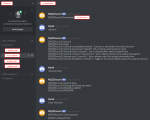
MQ2Discord.png

Please consider it a beta release, may crash, etc. It's running stable for me though, and I'm keen to get other people's thoughts on it!

Setup


  1. Create a server & channel(s) from the Discord client
  2. Create a Discord bot & add it to your server, per the guide here: https://github.com/reactiflux/discord-irc/wiki/Creating-a-discord-bot-&-getting-a-token
  3. Put MQ2Discord.dll in your plugins directory Now included with redguides updater
  4. Put LIBEAY32.dll & SSLEAY32.dll in the same directory as eqgame.exe (these are dependencies of the Discord library I'm using & get loaded from the path of the main exe, not the MQ2 directory. I'll see if I'm able to statically link soon, but for now you're stuck with DLLs)
  5. In game, load the plugin with
    Rich (BB code):
    /plugin mq2discord
  6. Enter your the token for your bot (see linked guide earlier) with
    Rich (BB code):
    /discord token <token>
  7. Enable developer mode in the discord app (settings -> appearance, scroll down)
  8. Enter your user id (right click your username in discord, copy id) with
    Rich (BB code):
    /discord user <user id>
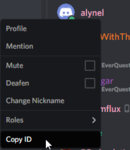
  9. 1555882705105.png
  10. Since the token & user id are the same for all characters, you can do it with EQBC e.g.
    Rich (BB code):
    /bcaa //discord token <token>
  11. Enter the channel id to send messages to from this character (right click channel in discord, copy id) with
    Rich (BB code):
    /discord channel <channel id>
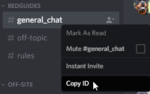
  12. 1555882630949.png
  13. Connect with
    Rich (BB code):
    /discord connect

Filters

A line of chat will be sent to discord if it matches an allow filter, and doesn't match any block filters. Macro event syntax is used, so you can have wildcards (#*#) or variables (|${Var}| in them. For example to allow anything containing your character's name:

Rich (BB code):
/discord allow #*#|${Me}|#*#

By default, anything starting with [MQ2] or [MQ2Discord] will be allowed.

Configuration is stored in the MQ2 directory, in MQ2Discord_server_character.json, if you want to edit it manually. You'll have to unload/load the plugin for it to take effect.

Compiling

Virus check for compiled zip: https://www.virustotal.com/#/file/5...b4265e7a9e090ddd3551260bef8753c6ad9/detection

Otherwise you're welcome to have a go at compiling, it's painful. You'll need sleepy discord, with the patch applied to add a poll method. Also nlohmann json (I installed with vcpkg).

Todo


  • Source code needs tidying up, I'm sure there's some bugs in there from my hack job multithreading among other things. I wasn't going to release it just yet but I realized there's probably some concerns around a plugin that connects externally :/
  • Better default filters - send all chat channels, tells, ooc, say etc
  • Escape discord's special characters e.g. *
  • Convert item links to allakhazam links
  • I could add regex filters if there's any interest, though Blech seems quite well designed for a large number of filters
 

Attachments

Last edited:
Dude,This is awesome.

What is your paypal?
I want to donate to this.
 
eqmule
Have you seen the source code on the Jenkins server?
Is It legit as all our accounts won't went be hacked?
 
eqmule
Have you seen the source code on the Jenkins server?
Is It legit as all our accounts won't went be hacked?

I haven't built in on the MQ2 build service, not a fan of having each little change approved manually. It's also got some extra library dependencies which I can't get into the single file.

I'm building using test server versions of eqgame.h and eqdata.h, which is working fine on live as I believe the only part it actually uses is the offset of Name in SPAWNINFO. Everything else it needs is exported from MQ2Main.

If you or someone else wants to post a compile go for it, I can help out on discord with getting the libraries compiled - it was a hassle.
 
How do you get it to repeat tells and guild messages?

- - - Updated - - -

As a reminder, you can only right click a channel to get the ID if you are in developer mode in discord. Stumped me for quite some time that did!
 
i'm very interested in this. is there a compile that currently works? I tried dropping in the one in the first post, but it refuses to load. i'm assuming its cause of the recent update to MQ2? Idk, but regardless, any help with this would be greatly appreciated.
 
i'm very interested in this. is there a compile that currently works? I tried dropping in the one in the first post, but it refuses to load. i'm assuming its cause of the recent update to MQ2? Idk, but regardless, any help with this would be greatly appreciated.

i'll add it to next compile, thank you so much alynel!
 
How do you get it to repeat tells and guild messages?

- - - Updated - - -

As a reminder, you can only right click a channel to get the ID if you are in developer mode in discord. Stumped me for quite some time that did!

To repeat tells and guild messages:

Rich (BB code):
/discord allow #*#tells you#*#
/discord allow #*#tells the guild#*#

RE: issues loading, the initial version I posted is still working on live. The patch did seem to delete the addition dlls out of my game folder though, which is most likely your issue. Note they need to go in the same location as eqgame.exe, not in the same folder as the plugin.

I haven't had a chance to look at this again for little bit but I will again soon, and I'll see what I can do about static linking to avoid the extra dll requirements.
 
This is Awesome, I think Im having the same issue as Night as when I do /plugin mq2discord it will not load. I dropped the 2 LIBEAY32.dll & SSLEAY32.dll in the EQgame file. Do you have to log out completely and log back in to get it to recognize them? My MQ2discord file is in the release folder as the redguides version doesn't seem to have a plugin folder.
 
yea i never got it to work for me. redbot said he was going to put it in the next release, so was just waiting, unless someone knows of a fix for it.
 
Awesome&#65281;
But anyone get this plugin work?
I could not get to load this plugin, could anyone help this?
 
I'm having trouble getting it to compile, sorry guys.

You'll need sleepy discord, with the patch applied to add a poll method.

I found sleepy discord, not sure how to do the patch.
alynel will you hold my hand? Donations if we can get this going :)
 
I wish i could understand this, and use it... seems like a few hours of trying !! :)
Thanks though, excellent work !
 
It won't work until we compile it. If anyone wants to take a stab at compiling, feel free to apply for Creator's access.
 
Apologies all for the hassle getting this up & running. Attached has no DLL dependencies, so should run if you drop it in your MQ2 folder. Available through redguides updater
@Redbot, need to duck out for a bit but later today I'll post a zip with all my libs and headers etc, seems the easiest way to get a compile happening. Alternatively if you've already got vcpkg in the build environment, there's a list of packages that you can install to get everything ready.
 
Last edited:
Rich (BB code):
/discord allow #*#tells you#*#
/discord allow #*#tells the guild#*#

So I'm using theses 2 options but for some reason before the persons name that either tells the guild or tells me there is a "1" in front, any idea how to fix?
 
this plugin is really cool and i only have part of it working...i only play with 1 group so its simple for me. right now i have 2 discord text channels setup.
5 toons in 1 channel for all spam from kissassist and other mq2 stuff - so i can check and see if everyone is fighting
1 toon in 1 channel for tells(i have all tells being relayed to eqbc and then into discord), /say, /ooc, /shout, general, etc. - check important stuff without any spam

this is what i have so far...slowly adding in things to block out..

spammer
Rich (BB code):
{
    "allow": [
        "[MQ2Discord]#*#",
        "[MQ2]#*#",
        "#*#tells you#*#",
        "#*#out of character#*#",
        "#*#says,#*#"
    ],
    "autoconnect": true,
    "block": [
        "#*#tells you, 'Attacking#*#",
        "#*#You will not evade me,#*#",
        "#*#Sorry, Master... calming down#*#"
    ],
    "channel": "111111111111111111",
    "token": "DONT SHARE THIS",
    "user": "1111"
}

important stuff
Rich (BB code):
{
    "allow": [
        "[MQ2Discord]#*#",
        "#*#tells you,#*#",
        "#*#sent a tell#*#",
        "#*#out of character#*#",
        "#*#shouts,#*#",
        "#*#says,#*#",
        "#*#tells general#*#"
    ],
    "autoconnect": true,
    "block": [
        "#*#tells you, 'Attacking#*#",
        "#*#You will not evade me,#*#",
        "#*#Sorry, Master... calming down#*#"
    ],
    "channel": "111111111111111111",
    "token": "DONT SHARE THIS",
    "user": "1111"
}

- - - Updated - - -

Rich (BB code):
/discord allow #*#tells you#*#
/discord allow #*#tells the guild#*#

So I'm using theses 2 options but for some reason before the persons name that either tells the guild or tells me there is a "1" in front, any idea how to fix?

i get that too, along with some random boxes lol. im not worried about it, just weird blank spaces or values being parsed into text
 
I'm very eager to try this, however, plugin is not loading, and even though i read everything 10 times, can't figure out why, or how to make it work... any help plz ?


----------------------------- EDIT ------------------------------------------

Can't seem to be able to get the BOT in Discord actually, the rest look fine, but without the bot, i guess i can't do much. done everything i could find, tried looking it up on discord help too, can't get the bot into the channel...


---------------------------EDIT 2---------------------------------------------------

Got the bot to work, and it works... for 15 seconds. then if i get a tell, it repeats the message like 10 times, and then EQ crashes...
Still looking for help !

- - - Updated - - -

So, it's me again, new problem : first, it did this, as told on the post above
[COLOR=rgba(255, 255, 255, 0.701961)]1TOONl tells you, 'hey'


[COLOR=rgba(255, 255, 255, 0.701961)][MQ2Discord] \u00121TOON\u0012 tells you, 'hey'


[/COLOR]


[COLOR=rgba(255, 255, 255, 0.701961)][MQ2Discord] [MQ2Discord] \u00121TOON\u0012 tells you, 'hey'


[/COLOR]


[COLOR=rgba(255, 255, 255, 0.701961)][MQ2Discord] [MQ2Discord] [MQ2Discord] \\u00121TOON\\u0012 tells you, 'hey'


[/COLOR]


[COLOR=rgba(255, 255, 255, 0.701961)][MQ2Discord] [MQ2Discord] [MQ2Discord] [MQ2Discord] \\\\u00121TOON\\\\u0012 tells you, 'hey'


[/COLOR]


[COLOR=rgba(255, 255, 255, 0.701961)][MQ2Discord] [MQ2Discord] [MQ2Discord] [MQ2Discord] [MQ2Discord] \\\\\\\\u00121TOON\\\\\\\\u0012 tells you, 'hey'


[/COLOR]


[COLOR=rgba(255, 255, 255, 0.701961)][MQ2Discord] [MQ2Discord] [MQ2Discord] [MQ2Discord] [MQ2Discord] [MQ2Discord] \\\\\\\\\\\\\\\\u00121TOON\\\\\\\\\\\\\\\\u0012 tells you, 'hey'


[/COLOR]


[COLOR=rgba(255, 255, 255, 0.701961)][MQ2Discord] [MQ2Discord] [MQ2Discord] [MQ2Discord] [MQ2Discord] [MQ2Discord] [MQ2Discord] \\\\\\\\\\\\\\\\\\\\\\\\\\\\\\\\u00121TOON\\\\\\\\\\\\\\\\\\\\\\\\\\\\\\\\u0012 tells you, 'hey'


[/COLOR]


[COLOR=rgba(255, 255, 255, 0.701961)][MQ2Discord] [MQ2Discord] [MQ2Discord] [MQ2Discord] [MQ2Discord] [MQ2Discord] [MQ2Discord] [MQ2Discord] \\\\\\\\\\\\\\\\\\\\\\\\\\\\\\\\\\\\\\\\\\\\\\\\\\\\\\\\\\\\\\\\u00121TOON\\\\\\\\\\\\\\\\\\\\\\\\\\\\\\\\\\\\\\\\\\\\\\\\\\\\\\\\\\\\\\\\u0012 tells you, 'hey'


[/COLOR]


[COLOR=rgba(255, 255, 255, 0.701961)][MQ2Discord] [MQ2Discord] [MQ2Discord] [MQ2Discord] [MQ2Discord] [MQ2Discord] [MQ2Discord] [MQ2Discord] [MQ2Discord] \\\\\\\\\\\\\\\\\\\\\\\\\\\\\\\\\\\\\\\\\\\\\\\\\\\\\\\\\\\\\\\\\\\\\\\\\\\\\\\\\\\\\\\\\\\\\\\\\\\\\\\\\\\\\\\\\\\\\\\\\\\\\\\\u00121TOON\\\\\\\\\\\\\\\\\\\\\\\\\\\\\\\\\\\\\\\\\\\\\\\\\\\\\\\\\\\\\\\\\\\\\\\\\\\\\\\\\\\\\\\\\\\\\\\\\\\\\\\\\\\\\\\\\\\\\\\\\\\\\\\\u0012 tells you, 'hey'


[/COLOR]


[COLOR=rgba(255, 255, 255, 0.701961)][MQ2Discord] [MQ2Discord] [MQ2Discord] [MQ2Discord] [MQ2Discord] [MQ2Discord] [MQ2Discord] [MQ2Discord] [MQ2Discord] [MQ2Discord] \\\\\\\\\\\\\\\\\\\\\\\\\\\\\\\\\\\\\\\\\\\\\\\\\\\\\\\\\\\\\\\\\\\\\\\\\\\\\\\\\\\\\\\\\\\\\\\\\\\\\\\\\\\\\\\\\\\\\\\\\\\\\\\\\\\\\\\\\\\\\\\\\\\\\\\\\\\\\\\\\\\\\\\\\\\\\\\\\\\\\\\\\\\\\\\\\\\\\\\\\\\\\\\\\\\\\\\\\\\\\\\\\\\\\\\\\\\\\\\\\\\\\\\\\\\\\\\\u00121TOON\\\\\\\\\\\\\\\\\\\\\\\\\\\\\\\\\\\\\\\\\\\\\\\\\\\\\\\\\\\\\\\\\\\\\\\\\\\\\\\\\\\\\\\\\\\\\\\\\\\\\\\\\\\\\\\\\\\\\\\\\\\\\\\\\\\\\\\\\\\\\\\\\\\\\\\\\\\\\\\\\\\\\\\\\\\\\\\\\\\\\\\\\\\\\\\\\\\\\\\\\\\\\\\\\\\\\\\\\\\\\\\\\\\\\\\\\\\\\\\\\\\\\\\\\\\\\\\\u0012 tells you, 'hey'


[/COLOR][/COLOR]

which eventually led to crash.

But now, it crashes on login. i can get right after char selection screen, and then EQ shuts off, no message, nothing, and only on the account bound to mq2 discord. can log in when MQ2 is off, but as soon as i turn it on, BOOM, crash.
 
Last edited:
What do I need to add "/discord allow xyz" to make /who show in Discord?
 
What do I need to add "/discord allow xyz" to make /who show in Discord?

its weak but something you can work with and probably tweak to get better results...

Rich (BB code):
/discord allow #*#Pri: #*#

this works for me because when i do "/w" in game, it outputs some fancy /w list in the MQ window. in that fancy /w list there is some string of property next to every character listed(i dont know what it means)

[65 High Elf Cleric] Runordie <Red Guides> *Anon* {0.00 S , 0.00Z} {Pri: 11111 Off: 11}

so i just took the "Pri" part and roughly threw wild cards around it, and it works. i think "Pri: " is fairly safe, as in something else is not going to be using that string of characters to output something. it outputs one bunched up list in discord, but its better than nada.

- - - Updated - - -

I'm very eager to try this, however, plugin is not loading, and even though i read everything 10 times, can't figure out why, or how to make it work... any help plz ?


----------------------------- EDIT ------------------------------------------


But now, it crashes on login. i can get right after char selection screen, and then EQ shuts off, no message, nothing, and only on the account bound to mq2 discord. can log in when MQ2 is off, but as soon as i turn it on, BOOM, crash.


lol sounds like you have something in your allow section thats causes it to loop, post your toon's discord config file so we can help. pls remove your discord server's info from that config file.
 
Figured it out, i had to change the token number and now i'm very careful with it, adding stuff one at a time, but so far it works beautifuly !
 
its weak but something you can work with and probably tweak to get better results...

Rich (BB code):
/discord allow #*#Pri: #*#

this works for me because when i do "/w" in game, it outputs some fancy /w list in the MQ window. in that fancy /w list there is some string of property next to every character listed(i dont know what it means)

[65 High Elf Cleric] Runordie <Red Guides> *Anon* {0.00 S , 0.00Z} {Pri: 11111 Off: 11}

so i just took the "Pri" part and roughly threw wild cards around it, and it works. i think "Pri: " is fairly safe, as in something else is not going to be using that string of characters to output something. it outputs one bunched up list in discord, but its better than nada.

Thank you so much. format is little off, but at least it shows!
Is there a EQ Discord for dummy study guide anywhere? would like to see understand more of these..
 
I just can't compile this after today's patch through the online builder. Anyone can help on that? Thanks a ton.

This is one of my favorite plugin so far.
 
i use the normal discord client from discord's website and this plugin still works for me. the only functionality you do NOT get out of the normal discord client is sending commands from discord to an EQ character. sending commands from discord to EQ is a huge feature im missing out on but i can work around it by using chrome remote desktop
 
MQ2Discord is a plugin written by alynel. It allows you to connect MQ2 to Discord. Chat messages that match a filter get sent to a Discord channel, and any commands you enter in that channel get executed.

MQ2Discord.png

Setup


  1. Create a server & channel(s) from the Discord client
  2. Create a Discord bot & add it to your server, per the guide here: https://github.com/reactiflux/discord-irc/wiki/Creating-a-discord-bot-&-getting-a-token
  3. Put View attachment LIBEAY32.dll & View attachment SSLEAY32.dll in the same directory as eqgame.exe (these are dependencies of the Discord library I'm using & get loaded from the path of the main exe, not the MQ2 directory. I'll see if I'm able to statically link soon, but for now you're stuck with DLLs)
  4. In game, load the plugin with
    Rich (BB code):
    /plugin mq2discord
  5. Enter your the token for your bot (see linked guide earlier) with
    Rich (BB code):
    /discord token <token>
  6. Enter your user id (right click your username in discord, copy id) with
    Rich (BB code):
    /discord user <user id>
  7. Since the token & user id are the same for all characters, you can do it with EQBC e.g.
    Rich (BB code):
    /bcaa //discord token <token>
  8. Enter the channel id to send messages to from this character (right click channel in discord, copy id) with
    Rich (BB code):
    /discord channel <channel id>
  9. Connect with
    Rich (BB code):
    /discord connect

Filters

A line of chat will be sent to discord if it matches an allow filter, and doesn't match any block filters. Macro event syntax is used, so you can have wildcards (#*#) or variables (|${Var}| in them. For example to allow anything containing your character's name:

Rich (BB code):
/discord allow #*#|${Me}|#*#

By default, anything starting with [MQ2] or [MQ2Discord] will be allowed.

Configuration is stored in the MQ2 directory, in MQ2Discord_server_character.json, if you want to edit it manually. You'll have to unload/load the plugin for it to take effect.


MQ2Discord DISCUSSION:

https://www.redguides.com/community/threads/62755-MQ2Discord
 
Last edited:
Been Trying to get this plugin working. I have Followed these steps.


  • Create a server & channel(s) from the Discord client ( I Have used the default Discord Client from the website )
  • Create a Discord bot & add it to your server, per the guide here: https://github.com/reactiflux/discor...etting-a-token
  • Put LIBEAY32.dll & SSLEAY32.dll in the same directory as eqgame.exe (these are dependencies of the Discord library I'm using & get loaded from the path of the main exe, not the MQ2 directory. I'll see if I'm able to statically link soon, but for now you're stuck with DLLs)
  • In game, load the plugin with Code:
    /plugin mq2discord
  • Enter your the token for your bot (see linked guide earlier) with Code:
    /discord token <token>
  • Enter your user id (right click your username in discord, copy id) with Code:
    /discord user <user id>
  • Since the token & user id are the same for all characters, you can do it with EQBC e.g. Code:
    /bcaa //discord token <token>
  • Enter the channel id to send messages to from this character (right click channel in discord, copy id) with Code:
    /discord channel <channel id>
  • Connect with Code:
    /discord connect


[MQ2Discord] Error, response text: {"code":0,"message":"404: Not Found"}

Not sure what I am missing. Any help is always appricaited
 
Are you running the dll from my original post, or the one from the very vanilla updater? Highly recommend using the updater rather than mine, in fact I'm going to remove the original attachment.
 
I have tried both ways actually. when i remove the dll's and restarted everything i could not get discord to load up. I can get more info on this later tonight as i am about to leave work for the evening and will have more time to work at this over the weekend
.

- - - Updated - - -

Removed the mq2discord.dll and made sure that LIBEAY32.dll
&
SSLEAY32.dll were not still in the eq Folder. Downloaded the Zip file for the latest update, extracted the mq2discord.dll and placed into the release folder. Deleted all my settings files to make sure. Started over. Made sure of my applications via

https://discordapp.com/developers/applications/me

I do see the bot in my discord server.
Restarted PC just to make sure.
into Everquest.

[2018/05/18 17:54:08] MQ2Log :: Logging is ON
[2018/05/18 17:54:23] Plugin 'mq2discord' loaded.
[2018/05/18 17:54:58] [MQ2Discord] Token: MyToken Taken from the Bot Token Number
[2018/05/18 17:55:29] [MQ2Discord] User: MyDiscordUserName#SomeNumber
[2018/05/18 17:55:49] [MQ2Discord] Channel: #everquest
[2018/05/18 17:55:56] [MQ2Discord] Connected: Mycharacter
[2018/05/18 17:55:56] [MQ2Discord] Error, response text: {"code": 0, "message": "404: Not Found"}
[2018/05/18 17:55:57] [MQ2Discord] Error, response text: {"code": 0, "message": "404: Not Found"}
[2018/05/18 17:55:59] [MQ2Discord] Error, response text: {"code": 0, "message": "404: Not Found"}
[2018/05/18 17:56:00] [MQ2Discord] Error, response text: {"code": 0, "message": "404: Not Found"}
[2018/05/18 17:56:01] [MQ2Discord] Error, response text: {"code": 0, "message": "404: Not Found"}
[2018/05/18 17:56:03] [MQ2Discord] Error, response text: {"code": 0, "message": "404: Not Found"}
[2018/05/18 17:56:03] [MQ2Discord] Disconnected
 
For the user and channel, you need to put an ID rather than the name. To get these, you need to enable "Developer Mode" on in the discord windows app (Settings -> Appearance). When enabled, you can right click on your channel and your user, and select "Copy ID".
 
Must missed that part, but once in Developer mode. I am connected will do more testing. Thank you so much Alynel!


been working great. really like this plugin thank you again
 
Last edited:
Im getting This
[2018/06/06 11:59:07] [MQ2Discord] Exception: Bad Connection
[2018/06/06 11:59:08] [MQ2Discord] Reconnected: (MyName)
[2018/06/06 11:59:08] [MQ2Discord] Error, response text: {"code": 0, "message": "401: Unauthorized"}
[2018/06/06 11:59:09] [MQ2Discord] Error, response text: {"code": 0, "message": "401: Unauthorized"}
[2018/06/06 11:59:10] [MQ2Discord] Error, response text: {"code": 0, "message": "401: Unauthorized"}
[2018/06/06 11:59:11] [MQ2Discord] Error, response text: {"code": 0, "message": "401: Unauthorized"}
[2018/06/06 11:59:12] [MQ2Discord] Error, response text: {"code": 0, "message": "401: Unauthorized"}
[2018/06/06 11:59:14] [MQ2Discord] Error, response text: {"code": 0, "message": "401: Unauthorized"}
 
Have you added your bot to the server? Also the channel and user ids need to be numbers per above posts, not names.
 
It's not possible at the moment, it's been requested before though so it's on the todo list. I think the whole configuration setup needs a bit of an overhaul, but I've been distracted with other projects.

Not sure how exactly to reconcile this with in game commands for configuring, but what I'm thinking from a config file point of view is this:
Rich (BB code):
{
  "token": "12345ASDF",
  "user": "123456",
  "autoconnect": true,
  "channels": [
    {
      "id": "<id of my channel for chat msgs>",
      "allow": [
        "tells you,",
        "sent a tell",
        "out of character",
        "shouts,",
        "says,",
        "tells general"
      ],
      "block": [],
      "users": []
    },
    {
      "id": "<id of my channel macro stuff msgs>",
      "allow": [
        "[MQ2]"
      ],
      "block": [
        "<stuff KISS spams all the time>",
        "<more spam>"
      ],
      "users": [
        "<my user id>",
        "<my friends user id>"
      ]
    }
  ]
}

Which would have your discord bot connect to two channels. It'd send chat messages to one, and wouldn't accept commands from anyone in it. In another channel, it'd send any MQ2 messages, but block some of the more common KISS spam. In this channel, it'd allow you and your buddy to both issue commands.

I think I'll have it put the #*# before and after every filter automatically to save the hassle of having to type it in.

Any thoughts anyone?
 
Release MQ2Discord

Users who are viewing this thread

Back
Top
Cart