
-
 Hail, we're RedGuides. We want you to play six (yes, 6!) EverQuest characters at once. We have scripts and a friendly community to help, please join our playstyle and say hello! 👋
You are using an out of date browser. It may not display this or other websites correctly.
You should upgrade or use an alternative browser.
You should upgrade or use an alternative browser.

Utility - MQ2CWTNCommons (1 Viewer)
- Thread starter ChatWithThisName
- Start date

StickSelectionis their a CWTN TLO for StickHow? I am getting a null value when i try to query it.

BlueBug
Seasoned veteran member
Beyond deleting the "MQ2ClassName_ToonName.ini" is there a way to reset the CWTN plugins setting? As in CampRadius, spell settings, ChaseDistance, etc?
I've found that I change settings for certain mission, raids, different camps, and stuff but on so many different toons I don't remember the original settings that worked like a charm.
Ok ok, I might be drinking a little bit when I play late at night, and that might have affected my recollection. But I'd like to be able to just reset settings and not lose the clickies I've added.
Maybe there is a link / video with the original setting I haven't found? Or is there a way to add a "Reset" button to the plugins? <~~~ that's the maybe request part
Thanks all and thanks CWTN and Sic for the awesomeness of the plugins.
BB~
I've found that I change settings for certain mission, raids, different camps, and stuff but on so many different toons I don't remember the original settings that worked like a charm.
Ok ok, I might be drinking a little bit when I play late at night, and that might have affected my recollection. But I'd like to be able to just reset settings and not lose the clickies I've added.
Maybe there is a link / video with the original setting I haven't found? Or is there a way to add a "Reset" button to the plugins? <~~~ that's the maybe request part
Thanks all and thanks CWTN and Sic for the awesomeness of the plugins.
BB~
Other than resetting it, there isn't.
The nosave option allows you to change it without saving that change for the future, it was added because so many lems and scripts for stuff were coming out and hosing settings for folks without checking what it was, saving that info, then putting it back - nosave allows to skip all that
Only do this if you're  in your capabilities.
- log everyone out
- Copy/save your current settings file elsewhere.
- erase everything except your clicky section
- save file
- load toon
in your capabilities.- log everyone out
- Copy/save your current settings file elsewhere.
- erase everything except your clicky section
- save file
- load toon
The nosave option allows you to change it without saving that change for the future, it was added because so many lems and scripts for stuff were coming out and hosing settings for folks without checking what it was, saving that info, then putting it back - nosave allows to skip all that
Last edited:
Is there a current way, or is it even possible to code it in without presumably severely affecting performance, to only rez corpses of people that aren't already alive during combat? This is specific to when someone gets rezed from something that leaves the corpse, such as the Druid AA Call of the Wild. I specifically just don't want to rez someone that is already alive.
no, but it might be worth turning out the RezCalls and rely on in-combat rezzes including rez sticksIs there a current way, or is it even possible to code it in without presumably severely affecting performance, to only rez corpses of people that aren't already alive during combat? This is specific to when someone gets rezed from something that leaves the corpse, such as the Druid AA Call of the Wild. I specifically just don't want to rez someone that is already alive.

- Commits
- 191
ChatWithThisName updated MQ2CWTNCommons with a new update entry:
03/09/2025
Read the rest of this update entry...
03/09/2025
- Previously added: ReportTimestamp option
- - can prepend output with a timestamp
- Added additional conflicting automations to automatically unload
Read the rest of this update entry...
Sentient_Pasta
Active member
I'm leveling up a team of six including the following classes:
Shaman
Bard
Beastlord
Rogue
Berserker
Monk
However I also have a team of higher level characters that I'm throwing buffs on with...
Whether a higher level toon's buff or a beastlord/shaman buff conflict with an exiting buff on the target, my beastlord and shaman don't seem to care that their spell won't land and constantly try to buff with a lower level version of the same line. They get stuck in a loop and won't do anything until their buff lands on their target.
The only solution I've found so far is to block the lower level spell on everyone (thanks FAQ!) However, it seems to me like this is an area for improvement.
Is it possible to modify the plugins to be sensitive for "Your <spell name> did not take hold on <target> (Blocked by <higher level spell>.)"?
Thanks for considering and reading!
Shaman
Bard
Beastlord
Rogue
Berserker
Monk
However I also have a team of higher level characters that I'm throwing buffs on with...
Whether a higher level toon's buff or a beastlord/shaman buff conflict with an exiting buff on the target, my beastlord and shaman don't seem to care that their spell won't land and constantly try to buff with a lower level version of the same line. They get stuck in a loop and won't do anything until their buff lands on their target.
The only solution I've found so far is to block the lower level spell on everyone (thanks FAQ!) However, it seems to me like this is an area for improvement.
Is it possible to modify the plugins to be sensitive for "Your <spell name> did not take hold on <target> (Blocked by <higher level spell>.)"?
Thanks for considering and reading!
We actually use buff checking, and MQ/EQ reports that you're missing it and it stacks, unfortunately.I'm leveling up a team of six including the following classes:
Shaman
Bard
Beastlord
Rogue
Berserker
Monk
However I also have a team of higher level characters that I'm throwing buffs on with...
Whether a higher level toon's buff or a beastlord/shaman buff conflict with an exiting buff on the target, my beastlord and shaman don't seem to care that their spell won't land and constantly try to buff with a lower level version of the same line. They get stuck in a loop and won't do anything until their buff lands on their target.
The only solution I've found so far is to block the lower level spell on everyone (thanks FAQ!) However, it seems to me like this is an area for improvement.
Is it possible to modify the plugins to be sensitive for "Your <spell name> did not take hold on <target> (Blocked by <higher level spell>.)"?
Thanks for considering and reading!
Some of the early and mid spell lines are pretty lousy for this.
You can also byos on a toon you don't want to buff, and it won't.
- Commits
- 191
ChatWithThisName updated MQ2CWTNCommons with a new update entry:
3/21/2025
Read the rest of this update entry...
3/21/2025
- corrected issue where we'd try and remove an invul spell while we were dead
- corrected issue with ReportTimestamp not saving
Read the rest of this update entry...
Question: Since last update im having issues on puller/tank mode pulling mobs @ 126 it wont pull. if i pull it then the respawns pops at 123-125 it will pull it. it just wont pull if its a yellow con which is 126+ HOWEVER IF ITS A RED CON NAMED IT WILL PULL IT. ANY IDEAS?
sorry for caps
sorry for caps
No. Nothing changed with any of thatQuestion: Since last update im having issues on puller/tank mode pulling mobs @ 126 it wont pull. if i pull it then the respawns pops at 123-125 it will pull it. it just wont pull if its a yellow con which is 126+ HOWEVER IF ITS A RED CON NAMED IT WILL PULL IT. ANY IDEAS?
sorry for caps
You know how to debug pulls, you should do that and it will tell you
actually Sic i do not know how to debug the pulls. if you have time if you can let me know how to? thanks againNo. Nothing changed with any of that
You know how to debug pulls, you should do that and it will tell you
Please see >>> Getting Started with CWTN plugins! (Movement, UI Window, Clickies, Pulling, ETC) Check Here First! <<<actually Sic i do not know how to debug the pulls. if you have time if you can let me know how to? thanks again

/shd debugpull on once would make, for example mq2eskay report out all the spawns it didn't pull and why
- Commits
- 191
ChatWithThisName updated MQ2CWTNCommons with a new update entry:
3/31/2025
Read the rest of this update entry...
3/31/2025
- found/fixed a bug when rewards were claimed that would invalidate data that mq2buffme would use
Read the rest of this update entry...
TLDR: I am trying to find a better way to go about making melee toons more conistently stick where i want them to Front/Rear/Left/Right and rangers to stick around (8 and 9) when shooting.
This is prob more of a moveutils problem, but I use cwtn plugins, i will be happy to move to another forum if its more appropriate:
I have these settings in StickHow, and i find that melee toons will slowly creep around to the back of the mob and stay there regardless of where they are told.
I have Luas that switch modes when mobs change or events occur and do /stick commands to attempt to move toons back around to the front or sides of mobs. Nothing i seem to be able to find makes bots consistently stay where i tell them to be. they are kinda doing their own thing. I am sure its something wrong with my settings, I just cant figure out what.
This is prob more of a moveutils problem, but I use cwtn plugins, i will be happy to move to another forum if its more appropriate:
I have these settings in StickHow, and i find that melee toons will slowly creep around to the back of the mob and stay there regardless of where they are told.
Code:
[Stick]
UseStick=true
StickHow=Do not use percent signs in the stickhow listings, unless you double percent it like: "55%%".
StickSelection=18
StickHow0=!front moveback loose uw
StickHow1=55%% snaproll left moveback loose uw
StickHow2=55%% snaproll right moveback loose uw
StickHow3=55%% snaproll rear moveback loose uw
StickHow4=55%% snaproll front moveback loose uw
StickHow5=55%% snaproll pin loose uw
StickHow6=snaproll behind 10 moveback uw
StickHow7=snaproll behindonce 10 moveback uw
StickHow8=35 moveback front uw
StickHow9=35 moveback behind uw
I have Luas that switch modes when mobs change or events occur and do /stick commands to attempt to move toons back around to the front or sides of mobs. Nothing i seem to be able to find makes bots consistently stay where i tell them to be. they are kinda doing their own thing. I am sure its something wrong with my settings, I just cant figure out what.
Code:
local function change_stick()
    if sticking == 0 then
        if mq.TLO.Target.CleanName() == stick_target then
            mq.cmdf('/%s StickHow %d nosave', my_class, stick_num)
            mq.delay(500)
            mq.cmdf('/stick behind moveback 50')
        else
            mq.cmdf('/%s StickHow 3 nosave', my_class)
            mq.delay(500)
           --mq.cmdf('/stick behind moveback 15')  (no stick command here to let plugin deal with it)
        end

        if mq.TLO.Target.CleanName() then
            me_target = mq.TLO.Target.CleanName()
        end
    end
end
Last edited:
Question: StickHow
with some mobs having a larger attack distance then others is there any way i can adjust the stick how to give me the max melee distance ?
StickHow0=55%% !front moveback loose uw
StickHow1=55%% snaproll behind moveback loose uw
StickHow2=snaproll behind 5 moveback uw
StickHow3=snaproll behind 10 moveback uw
StickHow4=55%% snaproll left moveback loose uw
StickHow5=snaproll left 5 moveback uw
StickHow6=snaproll left 10 moveback uw
StickHow7=55%% snaproll right moveback loose uw
StickHow8=snaproll right 5 moveback uw
StickHow9=snaproll right 10 moveback uw
Thanks
with some mobs having a larger attack distance then others is there any way i can adjust the stick how to give me the max melee distance ?
StickHow0=55%% !front moveback loose uw
StickHow1=55%% snaproll behind moveback loose uw
StickHow2=snaproll behind 5 moveback uw
StickHow3=snaproll behind 10 moveback uw
StickHow4=55%% snaproll left moveback loose uw
StickHow5=snaproll left 5 moveback uw
StickHow6=snaproll left 10 moveback uw
StickHow7=55%% snaproll right moveback loose uw
StickHow8=snaproll right 5 moveback uw
StickHow9=snaproll right 10 moveback uw
Thanks
- Commits
- 191
I find it interesting your StickSelection is 18, but you do not have 18 stick options. Which one are you actually using?TLDR: I am trying to find a better way to go about making melee toons more conistently stick where i want them to Front/Rear/Left/Right and rangers to stick around (8 and 9) when shooting.
This is prob more of a moveutils problem, but I use cwtn plugins, i will be happy to move to another forum if its more appropriate:
I have these settings in StickHow, and i find that melee toons will slowly creep around to the back of the mob and stay there regardless of where they are told.
Code:[Stick] UseStick=true StickHow=Do not use percent signs in the stickhow listings, unless you double percent it like: "55%%". StickSelection=18 StickHow0=!front moveback loose uw StickHow1=55%% snaproll left moveback loose uw StickHow2=55%% snaproll right moveback loose uw StickHow3=55%% snaproll rear moveback loose uw StickHow4=55%% snaproll front moveback loose uw StickHow5=55%% snaproll pin loose uw StickHow6=snaproll behind 10 moveback uw StickHow7=snaproll behindonce 10 moveback uw StickHow8=35 moveback front uw StickHow9=35 moveback behind uw
I have Luas that switch modes when mobs change or events occur and do /stick commands to attempt to move toons back around to the front or sides of mobs. Nothing i seem to be able to find makes bots consistently stay where i tell them to be. they are kinda doing their own thing. I am sure its something wrong with my settings, I just cant figure out what.
Code:local function change_stick() if sticking == 0 then if mq.TLO.Target.CleanName() == stick_target then mq.cmdf('/%s StickHow %d nosave', my_class, stick_num) mq.delay(500) mq.cmdf('/stick behind moveback 50') else mq.cmdf('/%s StickHow 3 nosave', my_class) mq.delay(500) --mq.cmdf('/stick behind moveback 15') (no stick command her to let plugin deal with it) end if mq.TLO.Target.CleanName() then me_target = mq.TLO.Target.CleanName() end end end
Usually use 3 or 4. On ranger use 8 or 9. No idea what that says 18.I find it interesting your StickSelection is 18, but you do not have 18 stick options. Which one are you actually using?
edit: use 1 and 2 often as well.
- Commits
- 191
It's worth pointing out that every directional selection you make in MoveUtils has an "arc" that makes it appropriate. So left, is not exactly the left side of the mob, no more than rear is exactly the rear of the mob.Usually use 3 or 4. On ranger use 8 or 9. No idea what that says 18.
edit: use 1 and 2 often as well.
For example
ArcBehind=45.0
ArcNotFront=135.0
- ArcBehind= - 5.1 to 259.9, user can configure angular distance arc that "stick behind" uses
- ArcNotFront= - 5.1 to 259.9, user can configure angular distance arc that "stick !front" uses
The specifics of MoveUtils functioning is likely best served in the MoveUtils section. While the plugin uses it, it does not manipulate it beyond the plugins capabilities. So there is nothing we can do to change the behavior of how it works.
I have not personally had any issues with directional selections used with the plugin and find it meets my needs.
You issuing stick commands is an effort in futility if the plugins are still running as the plugins will do what they were told, such as issuing their own stick commands, invalidating anything you've issued manually. Instead of manually issuing a stick command, change the method of sticking you want the plugin to use and then stop sticking, the plugin will automatically do whatever the new stick selection.
I am very much having a problem. the plugin will be set to go to the front and it will go behind the mob... or the setting changes and the bot just stands there and keeps doing things. Had a wierd issue with a paladin that it was chasing a tank and going behind mobs despite the fact it was neither in chase or in behind.It's worth pointing out that every directional selection you make in MoveUtils has an "arc" that makes it appropriate. So left, is not exactly the left side of the mob, no more than rear is exactly the rear of the mob.
For example
ArcBehind=45.0
ArcNotFront=135.0
This is how these two are explained. So behind is a 45 degree angle, and front is a 135 degree angle. I do not see an option to set the left/right angles, but those are also going to be an arc and not 90 and 270 degrees exactly.
- ArcBehind= - 5.1 to 259.9, user can configure angular distance arc that "stick behind" uses
- ArcNotFront= - 5.1 to 259.9, user can configure angular distance arc that "stick !front" uses
The specifics of MoveUtils functioning is likely best served in the MoveUtils section. While the plugin uses it, it does not manipulate it beyond the plugins capabilities. So there is nothing we can do to change the behavior of how it works.
I have not personally had any issues with directional selections used with the plugin and find it meets my needs.
You issuing stick commands is an effort in futility if the plugins are still running as the plugins will do what they were told, such as issuing their own stick commands, invalidating anything you've issued manually. Instead of manually issuing a stick command, change the method of sticking you want the plugin to use and then stop sticking, the plugin will automatically do whatever the new stick selection.
- Commits
- 191
Edit: I stand corrected. You do have front ones (4 and 8).I am very much having a problem. the plugin will be set to go to the front and it will go behind the mob... or the setting changes and the bot just stands there and keeps doing things. Had a wierd issue with a paladin that it was chasing a tank and going behind mobs despite the fact it was neither in chase or in behind.
Sounds like you have a problem with MQ2MoveUtils then.
Question: StickHow
with some mobs having a larger attack distance then others is there any way i can adjust the stick how to give me the max melee distance ?
StickHow0=55%% !front moveback loose uw
StickHow1=55%% snaproll behind moveback loose uw
StickHow2=snaproll behind 5 moveback uw
StickHow3=snaproll behind 10 moveback uw
StickHow4=55%% snaproll left moveback loose uw
StickHow5=snaproll left 5 moveback uw
StickHow6=snaproll left 10 moveback uw
StickHow7=55%% snaproll right moveback loose uw
StickHow8=snaproll right 5 moveback uw
StickHow9=snaproll right 10 moveback uw
Thanks



Utility - MQ2MoveUtils
MQ2MoveUtils was created in early 2004 by tonio, giving players a significant improvement over EverQuest's built-in /follow command, as well as a handy way for bards to run "circle" macros. As of 2022, the main features of MQ2MoveUtils are as...
 www.redguides.com
you would want to create/use a stickhow that fits your needs/wants.
unfortunately there isn't a magic 1-sized fits all for perfect "be at the absolute perfect distance away"
Ive been through all of those, been through a hundred settings, what do you think is best way to get characters to go to where you tell them and stay as closely to there as possible? I been messing with these settings for more than a month and some of them dont even do anything. The character will be in front/left/right and will be fighting me to be in the back of the mob. I issue stick commands and they go right back to where I don't want them. The moveutils settings seem to do nothing.
View attachment 69212
View attachment 69213
Utility - MQ2MoveUtils
MQ2MoveUtils was created in early 2004 by tonio, giving players a significant improvement over EverQuest's built-in /follow command, as well as a handy way for bards to run "circle" macros. As of 2022, the main features of MQ2MoveUtils are as...
you would want to create/use a stickhow that fits your needs/wants.
unfortunately there isn't a magic 1-sized fits all for perfect "be at the absolute perfect distance away"
I was talking to KS, you can see I quoted himIve been through all of those, been through a hundred settings, what do you think is best way to get characters to go to where you tell them and stay as closely to there as possible? I been messing with these settings for more than a month and some of them dont even do anything. The character will be in front/left/right and will be fighting me to be in the back of the mob. I issue stick commands and they go right back to where I don't want them. The moveutils settings seem to do nothing.
as you know - cause you cited that you know, we use the slot should you have something in there.Question: Spell Slot 14
Just curious if there will be an update where spell slot 14 will be utilized? Yes, I understand that if i place a spell in slot 14 it will utilize it. just curious if there is a work on the atcual utilization of this slot?
thank you
since you know that, it means you read the replies before about that slot, that we currently don't have plans on adding something to every class's spell loadouts for that slot.
some classes don't actually have a good choice. some classes it is such a flex slot it is wholly dependent on what you want in that slot which defeats the purpose. some classes don't actually have *anything* worthwhile.
as you know, if/when when we want something to change, it'll be changed and updated and folks will be notified
here
here
here which quotes you in bold
you can, and should by this point, have confidence that if we want to add/do something, we will
Nope.Question: Sitting
Is there a way where my assist group those aside from the tank dont always sit? not sure if they are just sitting because of the tank is sitting. even at full endurance they just sit. Thank you
If you don't want to return to camp and sit down then don't be in a mode that does that which is assist
Chase mode and vorpal mode will sit if your ma sits but doesn't sit otherwise.
Manual mode doesn't do any sitting at all.
You can look at the chart at the bottom of the frequently asked questions for that information
Please see >>> Getting Started with CWTN plugins! (Movement, UI Window, Clickies, Pulling, ETC) Check Here First! <<<
- Commits
- 191
ChatWithThisName updated MQ2CWTNCommons with a new update entry:
5/15/2025
Read the rest of this update entry...
5/15/2025
- added named in frostcrypt with specificity
- removed superfluous loadignores call
Read the rest of this update entry...
- Commits
- 191
ChatWithThisName updated MQ2CWTNCommons with a new update entry:
6/02/2025
Read the rest of this update entry...
6/02/2025
- added anny type 3
Read the rest of this update entry...
- Commits
- 191
ChatWithThisName updated MQ2CWTNCommons with a new update entry:
6/12/2025
Read the rest of this update entry...
6/12/2025
- if you are in a mode with a camp, and then swap to vorpal you will now clear your map circle
Read the rest of this update entry...

Noticed something with the latest update: If any toon in your group is on Vorpal Assist and they happen to go off of the Mesh at any point, the plugin causes a constant Beeping and major lag on the toon it's happening on. Running through Gyrospire Beza tonight and the last two floors don't seem to have a mesh, so I had to change the mode or pause the plugins to get the beeping to stop and actually be able to move my toons (lag was just making them wig out). Have never had that happen before, but am able to recreate it by forcing the toons into an area where there appears to be no Mesh.
Here is the output when this happens (as an example):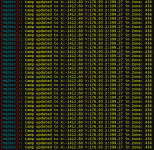
Here is the output when this happens (as an example):
Thanks well take a look.Noticed something with the latest update: If any toon in your group is on Vorpal Assist and they happen to go off of the Mesh at any point, the plugin causes a constant Beeping and major lag on the toon it's happening on. Running through Gyrospire Beza tonight and the last two floors don't seem to have a mesh, so I had to change the mode or pause the plugins to get the beeping to stop and actually be able to move my toons (lag was just making them wig out). Have never had that happen before, but am able to recreate it by forcing the toons into an area where there appears to be no Mesh.
Here is the output when this happens (as an example): View attachment 70191
Should warn you if you go off mesh and beep, but not spam you
- Commits
- 191
ChatWithThisName updated MQ2CWTNCommons with a new update entry:
6/18/2025a
Read the rest of this update entry...
6/18/2025a
- Fix Vorpal spam updating the map.
Read the rest of this update entry...
- Commits
- 191
All sorted now?Noticed something with the latest update: If any toon in your group is on Vorpal Assist and they happen to go off of the Mesh at any point, the plugin causes a constant Beeping and major lag on the toon it's happening on. Running through Gyrospire Beza tonight and the last two floors don't seem to have a mesh, so I had to change the mode or pause the plugins to get the beeping to stop and actually be able to move my toons (lag was just making them wig out). Have never had that happen before, but am able to recreate it by forcing the toons into an area where there appears to be no Mesh.
Here is the output when this happens (as an example): View attachment 70191
Seems to be. If I notice anything weird with it, I'll let you know. Limited playtime the next few days because of work, but logging in and doing a quick run off the mesh didn't seem to have the same effect as before. So, hopefully optimistic! =)All sorted now?
Users who are viewing this thread
Total: 2 (members: 0, guests: 2)
Share: