
thanks, we'll have to check that it actually gives you something worth adding (modern cloaks give you a ds buff)Just an oddity, my Shaman is adding its cloak as a downtime clicky when I log in and then spam clicking it. The buff from the cloak is just one of the permanent AA mana regen buffs. The first time I logged in I removed it, the second time I disabled it. Just an odd thing to get added.
View attachment 55625
View attachment 55626

-
 Hail, we're RedGuides. We want you to play six (yes, 6!) EverQuest characters at once. We have scripts and a friendly community to help, please join our playstyle and say hello! 👋
You are using an out of date browser. It may not display this or other websites correctly.
You should upgrade or use an alternative browser.
You should upgrade or use an alternative browser.

Utility - MQ2CWTNCommons
- Thread starter ChatWithThisName
- Start date

Hi Chat and Sic,
Wondering if this would be helpful: to move the Pause button area to the unused right area. Would open up some room. I see the white lines where the tabs are, I hope reformatting that area would not be difficult. Anyways, thats the idea.
Current:
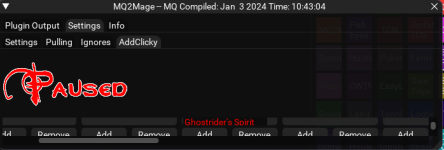
Modified:
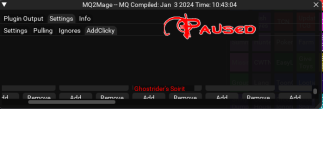
Wondering if this would be helpful: to move the Pause button area to the unused right area. Would open up some room. I see the white lines where the tabs are, I hope reformatting that area would not be difficult. Anyways, thats the idea.
Current:
Modified:
Happy with what we're doing ATM. Not everyone would have that space to the right visible, which would defeat the purpose of ensuring it is visibleHi Chat and Sic,
Wondering if this would be helpful: to move the Pause button area to the unused right area. Would open up some room. I see the white lines where the tabs are, I hope reformatting that area would not be difficult. Anyways, thats the idea.
Current:
View attachment 55632
Modified:
View attachment 55635

Rare Spawn
Well-known member
Having same problem with certain classes and not others. It has something to do with clicking somewhere in the title bar. I know that sounds like a dumbass lobbing BS into the internet, but hear me out. Open your MacroQuest_overlay.ini with your favorite text editor and search for "ClassPluginWnd", you should see entries for all your servername-charnames. The default is pos=60,60, your custom saved locations will be different. Now go in game and left click all around in the title bar of each of your characters CWTN window... the part that shows the plugin name (MQ2Eskay -- MQ Compiled: Jan 5 2024 Time: 03:29:27), click the empty space before it, after it, the plugin name, and the compiled date. Now reopen the MacroQuest_overlay.ini file and see if/which characters still need locations saved, and repeat as needed. I dub this workaround "Click-Fudgery".Anyone else having problems getting the CWTN Plugins UI to save placement and sizing? Ever since the update, I'm experiencing intermittent issues where it resets back to default sizing and location. This has been happening with War, Mag, Clr, Ber, SK, etc. I've tried following the FAQ steps to close the UI after sizing and placing, then do a "show" to bring it back. Also tried doing a /reload, and also tried The EQ options to "Load UI Skin".
Is there any other step(s) that can help save this so I don't have to waste so much time resizing and placing the UI on multiple toons daily.
With the new window, I am see that if you alt tab to another account, or touch the CTWN window at all, your keyboard does not work at all until you click somewhere other then CTWN window.
When alt tabbing i've had it grab the cwtn window unintentially - It defaulted to the assist at selection box. I had this happen on a couple characters, I noticed it because the assist at was replaced with 1 (stopping the character from attacking). So perhaps this is what is happening(your keyboard is functioning its just trying to type in one of the setting boxes by mistake). I have similar issues grabbing Lua windows when tabbing. Sometimes they just end up on my mouse. No idea if cwtn or Lua windows can be locked somehow. For fix/work around I just minimize the cwtn window and haven't noticed the issue.
Did you update? Feel like we keep talking about that partWith the new window, I am see that if you alt tab to another account, or touch the CTWN window at all, your keyboard does not work at all until you click somewhere other then CTWN window.

eqsubi15
Ultimate seasoned veteran member
ARGH!!!! 
 Spent forever rearranging the class GUI on 20+ toons last night. Checked and made sure the Overlay INI file showed all the updated locations. Logged in today and so many of them are showing default class UI location/sizing. Everything was working just fine for so long. Why'd you have to change the UI window...It's all fucked now!
Spent forever rearranging the class GUI on 20+ toons last night. Checked and made sure the Overlay INI file showed all the updated locations. Logged in today and so many of them are showing default class UI location/sizing. Everything was working just fine for so long. Why'd you have to change the UI window...It's all fucked now!
- Commits
- 191
because we wanted to ensure we had a functioning window for people to use to adjust their settings as dbg rolls out new ui implementations and replaces windows, eventually moving everything out of the xml realm and into the new UI.ARGH!!!!
We were being proactive. Sorry you're having issues with your UI windows saving their location. I've been unable to replicate the issue of the windows not saving. If we narrow down the reason for this issue we'll be sure to share the information with you. Sorry it's "all fucked now"
eqsubi15
Ultimate seasoned veteran member
I just ran the RedGuides Launcher as Administrator. Logged in all my toons. Resized and placed all their class UI's. Logged out, rebooted my computer. Re-ran the RedGuides Launcher as Admin and logged in all the same toons again. Not a single toon's UI I had to modify before the reboot held. They all reverted back to default. Two of them, I even removed a clicky from their downtime section, and those popped back in there too.because we wanted to ensure we had a functioning window for people to use to adjust their settings as dbg rolls out new ui implementations and replaces windows, eventually moving everything out of the xml realm and into the new UI.
We were being proactive. Sorry you're having issues with your UI windows saving their location. I've been unable to replicate the issue of the windows not saving. If we narrow down the reason for this issue we'll be sure to share the information with you. Sorry it's "all fucked now"
I don't get it. Something is causing the adjustments in the CWTN plugin UI's to not hold.
@ChatWithThisName / @Sic
While trying to troubleshoot the issue with the UI, I think it is coming down to overwriting conflicts when multiple toons are logged in at the same time. Below is an example timeline that I just ran through with modifying a Cleric's UI, then a Zerker's UI, and then back to that Cleric's UI again. Each time confirming what changes are appearing or not appearing in the MacroQuest_Overlay.ini. (I took out the servername and toon names)
Modified Cleric's UI:
This is what shows in MacroQuest_Overlay.ini
[Window][###SERVER-CLERICClassPluginWnd]
Pos=389,4
Size=555,401
Collapsed=0
----------------------------------------------------------------
Modified Zerker's UI 2nd
This is what shows in MacroQuest_Overlay.ini now:
[Window][###SERVER-CLERICClassPluginWnd]
Pos=60,60
Size=700,220
Collapsed=0
[Window][###SERVER-ZERKERClassPluginWnd]
Pos=389,3
Size=528,400
Collapsed=0
----------------------------------------------------------------
Went Back and Modified Cleric's UI
This is what shows in MacroQuest_Overlay.ini
[Window][###SERVER-CLERICClassPluginWnd]
Pos=391,4
Size=555,401
Collapsed=0
Seems when I went to the Zerker to adjust his UI, it caused the Cleric's entries to default. So, then I went back to the Cleric to redo his UI placement again, the MacroQuest_Overlay.ini completely erased the Zerker's entry that was just previously there.
Tried a new approach. Only logged in the Cleric. Made the UI adjustments and confirmed they are in the MacroQuest_Overlay.ini file. Logged the Cleric out and then brought the Zerker online. Made his UI adjustments and confirmed they showed in the INI file and the Cleric's were still there and correct too. Logged the Zerker out and brought in a 3rd toon online and double-checked the MacroQuest_Overlay.ini file and all entries are still there and correct.
So, it is definitely something to do with multiple toons logged in that affects it. I think it is only during the initial creation entry in the INI file though. As, I have other toons previously configured that haven't been affected by this conflict from what I can tell.
- Commits
- 191
I'm glad you're able to get them to save. For the sake of your sanity you can unload and then load the plugin to verify the changes instead of logging toons in and out.Tried a new approach. Only logged in the Cleric. Made the UI adjustments and confirmed they are in the MacroQuest_Overlay.ini file. Logged the Cleric out and then brought the Zerker online. Made his UI adjustments and confirmed they showed in the INI file and the Cleric's were still there and correct too. Logged the Zerker out and brought in a 3rd toon online and double-checked the MacroQuest_Overlay.ini file and all entries are still there and correct.
So, it is definitely something to do with multiple toons logged in that affects it. I think it is only during the initial creation entry in the INI file though. As, I have other toons previously configured that haven't been affected by this conflict from what I can tell.
eqsubi15
Ultimate seasoned veteran member
Also confirmed that once the initial toons' entries has been added and saved to the MacroQuest_Overlay.ini file, having them all logged in at the same time won't adversly affect their individual UI settings going forward. The issue was only during the initial entry. Seemed like some kind of back-and-forth overwriting issue with the INI file.I'm glad you're able to get them to save. For the sake of your sanity you can unload and then load the plugin to verify the changes instead of logging toons in and out.

Boring
Well-known member
The resetting of the windows was driving me nuts too. Ty for this tip. Edit: It was laborious logging in each toon one at a time but that did the trick. The only window that did not stay put was the Lua window - it keeps creeping bigger to the right side, but perhaps there is a minimum size it must be and it reverts to that size each time. I can live with that.Tried a new approach. Only logged in the Cleric. Made the UI adjustments and confirmed they are in the MacroQuest_Overlay.ini file. Logged the Cleric out and then brought the Zerker online. Made his UI adjustments and confirmed they showed in the INI file and the Cleric's were still there and correct too. Logged the Zerker out and brought in a 3rd toon online and double-checked the MacroQuest_Overlay.ini file and all entries are still there and correct.
So, it is definitely something to do with multiple toons logged in that affects it. I think it is only during the initial creation entry in the INI file though. As, I have other toons previously configured that haven't been affected by this conflict from what I can tell.
Last edited:
So this means you're running into file locking issues with the ini. I would double check you're not file scanning with antivirus or silensy cing with like one drive.The resetting of the windows was driving me nuts too. Ty for this tip. Edit: It was laborious logging in each toon one at a time but that did the trick. The only window that did not stay put was the Lua window - it keeps creeping bigger to the right side, but perhaps there is a minimum size it must be and it reverts to that size each time. I can live with that.
MacroQuest saves it. The plugins don't do anything with it.How do we save windows position?
Did close /bla show but it is not working.
It gets saved in your macroquest_overlay.ini
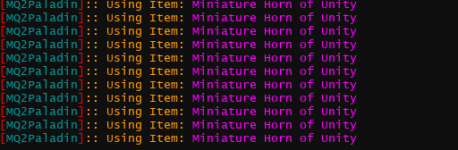
Ks. We do check cooldown timers. We do check stacking.Question: Minature Horn
Any chance that the plugin can check against if this item is on cool down? it keeps trying to cast it even though the cool down timer has yet to be refreshed
View attachment 55656
thx
You probably have the feather buff up, which mq gets incorrect about stacking.
You absolutely know how to ask for help. You absolutely know to check for red eq messages.
Telling us we should check an items cooldown? We've been doing this a while bud, we do.
As I've asked you before - and is in the "how to ask for help" please just provide information on what is happening vs what is expected --- telling us what you think we should do is most often a huge waste of everyone's time.

I ran into this exact problem the other night but decided not to post about it because no one else seemed to be discussing it on the boards. I know it's MY system causing it because it does it with boxhud and alphabuff as well, so I don't think it's isolated to the new ui for the CWTN/Sic plugin window.Also confirmed that once the initial toons' entries has been added and saved to the MacroQuest_Overlay.ini file, having them all logged in at the same time won't adversly affect their individual UI settings going forward. The issue was only during the initial entry. Seemed like some kind of back-and-forth overwriting issue with the INI file.
For those struggling, I did something very similar to eqsubi. I had all toons logged in and then opened the macroquest_overlay.ini file on a separate window and 4 out of 18 toons would save and create the entry below, but ONLY 4;
INI:
[Window][###Servername-ToonnameClassPluginWnd]
Pos=136,4
Size=604,588
Collapsed=0
I left it open as I would move the ui around and I could see it adjust and save on that toon. Upon switching to a different toon and moving the UI, it actually overwrote the exact entry for the previous toon with the new one on the same line. For some reason around 25% of the toons would create their own entry and the remainder would overwrite each other. I solved it by adding an entry for each missing toon manually, logging them in one by one, and moving the ui while verifying the position was saving in the macroquest_overlay.ini file at the same time under the correct toonname.
Definitely feel like it's something on my side and not sure if this is relevant but I just double checked the properties for my entire MQ directory and windows had a read only box checked.
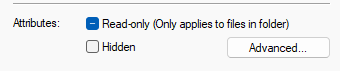
Unchecking it does not stick as the moment I go back to the folder, it's marked as read only again.
Only using windows defender and my entire MQ directory is excluded
Hope this helps those smarter than I =)
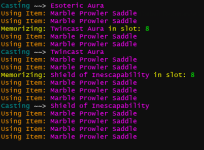
KS, Sic knows best here, but I believe they UI controls auto adds some items (best mounts with stats being one of those items), so go to your AddClicky area and disable the mount you do not want to have clicked. Leave it there in the window (deactivate not remove) because the pluagin is meant to help us with some clicky items., so it will continue to auto add it. Now once that is done you can manually click the mount you want when you want it.Sic and CWTN please help me out here, since the new ui these casters keep doing the same thing. mount example
View attachment 55680
constanly keeps casting her mount even though she is sitting there and even settings are set to auto dismount
thx
ks. you skipped over the other help i tried to give you today, and despite repeatedly doing the "please give us enough to help you" you don't.Sic and CWTN please help me out here, since the new ui these casters keep doing the same thing. mount example
View attachment 55680
constanly keeps casting her mount even though she is sitting there and even settings are set to auto dismount
thx
what red eq error message are you getting?
are you currently up-to-date? (no you're not)
why is it happening? do you have something on your keyring stat slot but you aren't running the most current version?
- Commits
- 191
Sic and CWTN please help me out here, since the new ui these casters keep doing the same thing. mount example
constanly keeps casting her mount even though she is sitting there and even settings are set to auto dismount
thx

VV is currently on 2139
You're on 2112
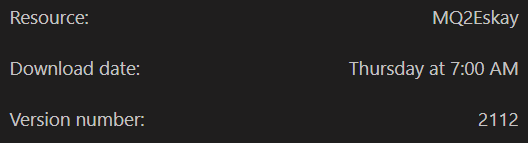
There has been 27 builds since your last update. Until you update, we can't help you. Please update. Bug reports on old builds are not useful.
- Commits
- 191
ChatWithThisName updated MQ2CWTNCommons with a new update entry:
01/07/2024
Read the rest of this update entry...
01/07/2024
- Change highlighted addclickies for better visibility
- If we add an addclicky to usage that is not already added, we will check and disable any other items of the same type
-- this is currently "familiar", "illusion", "mount", or "cloak"
Read the rest of this update entry...
This is a constant and daily struggle with my characters. It's really pissing me off.ARGH!!!!
unfortunately this is an mq -> your computer issue.This is a constant and daily struggle with my characters. It's really pissing me off.
macroquest uses the macroquest_overlay.ini for all of the overlay placement/positions (this is all things imgui - like the new cwtn ui window, or any of the other overlays that you find now like boxhud, or buttonmaster, or portalsetter window, or guildclicky etc)
what appears to be happening is an issue creating entries for all of your toons when they all enter the game at the same time.
when that happens - for some folks - there ends up being a "file locking" issue, where the file is busy being written to by something else, so it can't be written to by the other toons coming in.
I'm curious if the fact that i use isboxer which then puts toons in game 1 by 1 meaning they're staggered actually helps prevent this
unfortunately, this isn't something cwtn or i can do anything about.
you should log your toons in 1 by 1 and do that
if you have an old hard drive, or do file scanning (like AV), or file syncing, this can exacerbate this issue - but unfortunately not something cwtn/sic can change
Another thing that has been happening to folks who use ISBoxer with window tiling - is when you swap which tile has focused, it does something where the other tile gets resized which causes imgui to mess with the position of the window you just had as if you moved it - unfortunately this is ISBoxer doing that, and not something that MQ can do anything about
Rare Spawn
Well-known member
If your using isboxer, just virtualize the ini file in question.

TinyBubbles
Seasoned veteran member
I was having the same issue with the class gui window not saving the location and size I was putting it. After reading the above, I logged in one toon and adjusted the window where I wanted it. Made sure it saved in the macroquest_overlay.ini and then copied that to my other 5 toons and saved the macroquest_overlay.ini file.
I logged in all my other toons, and the window is in the same position and sized as it should be. That was a solution for me because I have the same window layout for all 6 toons.
If you are putting the class GUI window in the same place for all your toons, then its something you might consider trying
I logged in all my other toons, and the window is in the same position and sized as it should be. That was a solution for me because I have the same window layout for all 6 toons.
If you are putting the class GUI window in the same place for all your toons, then its something you might consider trying
I've got some characters that just wont save the cwtn window position. Not a big deal, just a few seconds to adjust when I log them in.
The weirdness that I've had is every character has the mq2war window appears as they're logging out. The class doesn't matter, mq2war window opens up in the same position. The position it opens is the same one that the characters who can't save their window spots appears. Just weird.
The weirdness that I've had is every character has the mq2war window appears as they're logging out. The class doesn't matter, mq2war window opens up in the same position. The position it opens is the same one that the characters who can't save their window spots appears. Just weird.

Not sure if this is the right place, but when in combat the bst necro mage will not auto re summon there pets and then just stand there looking like a turd in a punch bowl ...
- Commits
- 191
ChatWithThisName updated MQ2CWTNCommons with a new update entry:
01/09/2024
Read the rest of this update entry...
01/09/2024
- NoSave is no longer just a toggle with not-saving
-- you can now true/false/on/off/0/1 and use the nosave argument
--- example: /nec UseMelee off nosave
--- this would turn off usemelee, but not "save" the setting
- we will now temporarily open and then close your keyring window if you don't have auto leave enabled
-- EQ/MQ requires "seeing" the keyring window to click on the box inside it.
- Added Insatiable Velocity to the spells we don't care about stripping ranks from
-- this spell can...
Read the rest of this update entry...

@Sic he's on to something, it's been happening across multiple toons on my end too. At first I chalked it up to Tuesday...because you know....Wednesday's right around the corner but I've been watch SK/ENC/CLR and they are getting stuck on shit for sure...Just speaking from my own experience, with both MQ2Cleric and MQ2Enchanter if I have the toons on mounts it is only a matter of time before they will get stuck with an open spellbook. But, I just keep them unmounted and that solves the issue for me personally.

@Sic he's on to something, it's been happening across multiple toons on my end too. At first I chalked it up to Tuesday...because you know....Wednesday's right around the corner but I've been watch SK/ENC/CLR and they are getting stuck on shit for sure...
It will happen eventually without fail on any toons that open spellbook while mounted.
That being said, I have no clue what sets it off because sometimes they could go for hours without so much as a hiccup but eventually they will stick with the book open and stop doing anything at all.
I leave the auto-dismount button checked and never put them on mounts, which is not a huge deal for me since I almost always have my Bard with me.
@Jetanroth , been testing your approach this morning and killed all mounts on everything. It's night and day difference. 0 stuck so far in 6+ hrs continues running in 40+ chars in 3 servers on the same 2 machinesIt will happen eventually without fail on any toons that open spellbook while mounted.
That being said, I have no clue what sets it off because sometimes they could go for hours without so much as a hiccup but eventually they will stick with the book open and stop doing anything at all.
I leave the auto-dismount button checked and never put them on mounts, which is not a huge deal for me since I almost always have my Bard with me.
@Sic & @ChatWithThisName, note this issue was happening both with CWTN, RGMercs, and Kissassist while mounted. For whatever reason killing the mounts resolves it
if you can force dudes to be stuck please do a "debugbook" like@Jetanroth , been testing your approach this morning and killed all mounts on everything. It's night and day difference. 0 stuck so far in 6+ hrs continues running in 40+ chars in 3 servers on the same 2 machines
/clr debugbook on
Last edited by a moderator:

Had this happen on my bst over night. He was in chase mode and the tank was in hunter mode. Auto-dismount has always been ticked for that toon. However, I think in my case it was a UI hiccup because he was up and moving around with the group, but unable to cast anything because the spellbook was stuck open on screen. The plugins surely wouldn't have caused that to happen. Only noticed because his DPS tanked so badly during that event.
Users who are viewing this thread
Total: 1 (members: 0, guests: 1)
Share: