
-
 Hail, we're RedGuides. We want you to play six (yes, 6!) EverQuest characters at once. We have scripts and a friendly community to help, please join our playstyle and say hello! 👋
You are using an out of date browser. It may not display this or other websites correctly.
You should upgrade or use an alternative browser.
You should upgrade or use an alternative browser.

Plugin - MQ2BerZerker (2 Viewers) 3.1.52471.42
- Thread starter ChatWithThisName
- Start date
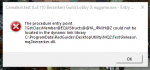


see how it is red on the last updated? for some reason your patcher didn't grab it (maybe network hiccup or something) click the reinstall button so it shows green.Good morning. I'm getting this error on the Test server when trying to load mq2berzerker. Doing a reinstall on the launcher doesn't seem to be updating the plugin.
View attachment 20972
View attachment 20973
having said that, test still needs the fix for the frenzy thing that i pushed to the live patcher yesterday

I moved to a new computer and copied my MQ2 files and EQ files over but now I cant get the MQ2Berzerker window to show. I have the MQUI_BerzerkerWnd.xml file in my ui folder in the MQ2 directory and the EQ directory. I reloaded my UI but it wont show. I checked under the other windows and it doesnt seem to be hidden anywhere. Any ideas on troubleshooting steps to make it show. It showed on my other computer but it wont show on the new one with the same files.
see how it is red on the last updated? for some reason your patcher didn't grab it (maybe network hiccup or something) click the reinstall button so it shows green.
having said that, test still needs the fix for the frenzy thing that i pushed to the live patcher yesterday
Thanks SIC, it's working now! I did try those buttons earlier today but as you said there might have been a network glitch.

Fried
New member
Spelling it wrong , /plugin mq2berzerkerok, pasted in the release folder and see the MQ2BERSERKER.dll file there.
TYPE IN : /plugin mq2berserker> enter
Reads: PLUGIN 'mq2berserker' could not be loaded
Any ideas??
sorry for the late reply @timmy i think both times yo uasked we were in mutliple convos at once.different request, but I’m curious if you’d consider a check for a cop clickie so multiple zerkers aren’t burning all their clicks at the same time or when another class has clicked. It would make sense if this is a technical limitation because the cop click is an addclicky item instead of an innate ability, but I thought I’d use the quote button and take my shot at seeing how you feel about this.
to answer your question clickies do already check to see if you have the buff from it before firing - what is likely happening is they are both saying "hey i have this clicky and i don't have the buff let's click that shit" at the exact same time - it might be worth considering re-ordering your clickies if you have multiple clickies so they stagger differently, because currently there is no way for us to know what the "other" toons are doing with their stuff as far as having a cop clicky and going to press it etc

Crash
Well-known member
I moved to a new computer and copied my MQ2 files and EQ files over but now I cant get the MQ2Berzerker window to show. I have the MQUI_BerzerkerWnd.xml file in my ui folder in the MQ2 directory and the EQ directory. I reloaded my UI but it wont show. I checked under the other windows and it doesnt seem to be hidden anywhere. Any ideas on troubleshooting steps to make it show. It showed on my other computer but it wont show on the new one with the same files.
Did you get window back up? I closed mine and now I cant figure out how to get it back either.

Robban
Ultimate seasoned veteran member
/zerk showDid you get window back up? I closed mine and now I cant figure out how to get it back either.

So I'm having an issue while in Raid Mode and trying to assist the RA#2. The plugin only wants to assist RA#1 and, even though the output says that it's assisting RA#2, it still only follows the #1 assist. I have even asked that the RA roles be reset prior to event start, thinking this an EQ issue, but it hasn't worked.
The 2nd RA isn't missing, both are in zone and with the raid group. Assist roles *appear* to be set correctly in the eq raid window, but switching mq2berzerker from raid assist 1 to raid assist 2 isn't actually changing who the zerk is assisting.if RA 2 is missing, it gets raid assist 1. Nothing I'm able to do about it sadly. Thus, I dub this a feature.

- Commits
- 191
- Seller
- #893
Are they in combat at the time you change the setting? They won't change targets mid combat.
I can do some testing in a bit to see if I can reproduce your issue. The function It's using is part of core MQ2 and hasn't changed since I added the functionality a while back. So I can't see a reason it would have changed without alteration. But like I said I can check to verify it's still working as expected.
I can do some testing in a bit to see if I can reproduce your issue. The function It's using is part of core MQ2 and hasn't changed since I added the functionality a while back. So I can't see a reason it would have changed without alteration. But like I said I can check to verify it's still working as expected.
- Commits
- 191
- Seller
- #894
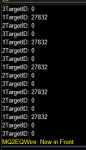
So I was doing some testing to confirm the issue. It appears that some form of the functionality has changed.
Code:
                WriteChatf("1TargetID: %lu", pSpawn->RaidAssistNPC[0]);
                WriteChatf("2TargetID: %lu", pSpawn->RaidAssistNPC[1]);
                WriteChatf("3TargetID: %lu", pSpawn->RaidAssistNPC[2]);
The above is the results of testing. Only RaidAssistNPC[0] is getting a valid target despite having raid assist 1, 2 and 3 assigned (uses 0 indexing, so 0 is 1, 1 is 2, and 2 is 3.
I will check with EQMule about this and see if we can find the disconnect.
As per EQMule, he will look at it in the morning. Will hopefully be able to track down the issue. @Many_Whelps
Last edited:
Not in combat at the time. In my setup, I would use the chase assist role. During prep time, before an event is started, the raid leader will assign RA1 and RA2 roles. I then set raid mode to 'on', raid assist to 1 and then change mode from manual to chase assist. Zerker then runs to RA1 and follows as expected. Toggle mode to manual, change raid assist to 2 then mode back to chase assist and zerk runs back to RA1. I've even asked the raid leader to toggle the assist roles off and on between attempts because I've heard there may be an EQ bug with roles. But that hasn't resolved the problem. It has worked in the past. It's only the last few weeks that I've seen it following the wrong assist.
As an aside, my zerker regularly parses at the top of the entire raid group. Only our top geared, tryhard monks and rogues can out dps my zerker, who is fully automated via mq2berzerker. Even then, they can only beat me once every third fight, or so. But they are 100% focused on a single character and I'm 6 boxing, including main tanking and running a cleric. Zerk isn't even my main. My other dps are also in the top 6-8 for the entire raid. So my hat's off to you, developing a plugin that can play the class, with minimal attending and still perform at a v high level is quite amazing.
As an aside, my zerker regularly parses at the top of the entire raid group. Only our top geared, tryhard monks and rogues can out dps my zerker, who is fully automated via mq2berzerker. Even then, they can only beat me once every third fight, or so. But they are 100% focused on a single character and I'm 6 boxing, including main tanking and running a cleric. Zerk isn't even my main. My other dps are also in the top 6-8 for the entire raid. So my hat's off to you, developing a plugin that can play the class, with minimal attending and still perform at a v high level is quite amazing.

howdy itkit - no none of the cwtn stuff has functionality for mercenaries at this timeDoes MQ2berzerker handle mercenary auto-assist function?
Updated everything this morning to the 4/29 update and loaded up 2 zerkers.
The first zerker loaded fine and the new settings window functioned and looked like it was supposed to:
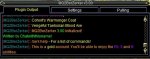
When loading MQ2BerZerker on the second account the settings window looked different and was non-functional
(could not select tabs, could not move window, upper gray banner missing from chat window)
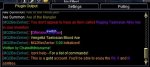
I tried reloading everything and also /loadskin default, but still did not work correctly.
Any ideas on getting the window to function correctly? The plugin itself worked.
The first zerker loaded fine and the new settings window functioned and looked like it was supposed to:
When loading MQ2BerZerker on the second account the settings window looked different and was non-functional
(could not select tabs, could not move window, upper gray banner missing from chat window)
I tried reloading everything and also /loadskin default, but still did not work correctly.
Any ideas on getting the window to function correctly? The plugin itself worked.
you need to minimize and resize the window - there's an issue atm where the window that gets rendered gets rendered in the wrong location - see how your top img has the title bar - find that on your bottom one and click to minimize then resize.Updated everything this morning to the 4/29 update and loaded up 2 zerkers.
The first zerker loaded fine and the new settings window functioned and looked like it was supposed to:
View attachment 21228
When loading MQ2BerZerker on the second account the settings window looked different and was non-functional
(could not select tabs, could not move window, upper gray banner missing from chat window)
View attachment 21229
I tried reloading everything and also /loadskin default, but still did not work correctly.
Any ideas on getting the window to function correctly? The plugin itself worked.

you have to look around your screen and find the title bar it will be on your window *somewhere*I have the same issue Sic. I cannot minimize the window as I can't click on it anywhere, I can't resize, nothing.
its a super annoying issue and we're real sorry about it


Boring
Well-known member
So after the update today, neither the Zerk or the Rogue would load my custom UI properly. (The UI "Your UI appears to be missing Zerker_InputBox_Input4: NULL" and covers every box from 4 through 20). If I go to the UI window, under the Setting Tab, there are a bunch of lettering saying CheckBox 0, CheckBox 1 etc and I cannot choose my options any more. I went and re-installed the extra UI windows that come with MQ2 and now my UI won't load at all. Same goes for my Rogue ... same issue. Help ?
yup.So after the update today, neither the Zerk or the Rogue would load my custom UI properly. (The UI "Your UI appears to be missing Zerker_InputBox_Input4: NULL" and covers every box from 4 through 20). If I go to the UI window, under the Setting Tab, there are a bunch of lettering saying CheckBox 0, CheckBox 1 etc and I cannot choose my options any more. I went and re-installed the extra UI windows that come with MQ2 and now my UI won't load at all. Same goes for my Rogue ... same issue. Help ?
you either need to delete or replace your berzerker ui window in your custom ui folder. if it exists in your custom or default ui folder it will load there before it checks the mq2 ui folder - so if those files are not the up to date files (which are now in your mq2 ui folder), then it won't load the correct file
Boring
Well-known member
So I found and deleted the Berserker UI file. Now, it loads with an empty box/shell where the UI window used to be (it's even called MQ2BerZerker v 3.00 and in the top left corner I have a new UI window which I cannot interact with - your new one? I cannot move it, click on any of the tabs, scroll anything etc. I cannot right click it to open up any sub menu. It has 3 tabs: Plugin Output, Settings and Pulling but I cannot click any tab. Its a static window.
Just for the hell of it, I also put a copy of every MQ2 UI window piece in the default folder too.
Just for the hell of it, I also put a copy of every MQ2 UI window piece in the default folder too.

Boring
Well-known member
Those two files are NOT in my UIFiles Folder under Release etc. I patched today. The only UI files listed in the folder are:
AdvPathWnd.xml
ButtomsWnd.xml
CastTimerWnd.xml
CompareTipWnd.xml
DPSAdvWnd.xml
NotepadWindow.xml
PortalSetterWindow.xml
ToolTipWnd.xml
These files are located in the MQ2 -> Release -> UIFiles folder
Am I missing 2 files then? Can I get them elsewhere? I let MQ2 auto update every time there is a patch including MQ2 Berserker and MQ2 Rogue.
AdvPathWnd.xml
ButtomsWnd.xml
CastTimerWnd.xml
CompareTipWnd.xml
DPSAdvWnd.xml
NotepadWindow.xml
PortalSetterWindow.xml
ToolTipWnd.xml
These files are located in the MQ2 -> Release -> UIFiles folder
Am I missing 2 files then? Can I get them elsewhere? I let MQ2 auto update every time there is a patch including MQ2 Berserker and MQ2 Rogue.
weird, I can see you patched. I actually just deleted my file and patched to ensure they are downloading, and they are... real weird.Those two files are NOT in my UIFiles Folder under Release etc. I patched today. The only UI files listed in the folder are:
AdvPathWnd.xml
ButtomsWnd.xml
CastTimerWnd.xml
CompareTipWnd.xml
DPSAdvWnd.xml
NotepadWindow.xml
PortalSetterWindow.xml
ToolTipWnd.xml
These files are located in the MQ2 -> Release -> UIFiles folder
Am I missing 2 files then? Can I get them elsewhere? I let MQ2 auto update every time there is a patch including MQ2 Berserker and MQ2 Rogue.
Attachments
Hey guys I just got the app and tried using it but had some issues.
The first one I'm not sure is an actual issue was when enabled it scrolled hundreds of lines of text in the mq2 windows nonstop.
The second is that I set /zerk mode 5 for pullertank and my zerker ran around cancelling mq2nav and went back to camp about 20 times and then sat at camp doing nothing indefinitely with a msg in the berzerker window saying it was waiting for valid targets.
Anyone know what's going on?
The first one I'm not sure is an actual issue was when enabled it scrolled hundreds of lines of text in the mq2 windows nonstop.
The second is that I set /zerk mode 5 for pullertank and my zerker ran around cancelling mq2nav and went back to camp about 20 times and then sat at camp doing nothing indefinitely with a msg in the berzerker window saying it was waiting for valid targets.
Anyone know what's going on?
Users who are viewing this thread
Total: 3 (members: 0, guests: 3)
Share: