
-
 Hail, we're RedGuides. We want you to play six (yes, 6!) EverQuest characters at once. We have scripts and a friendly community to help, please join our playstyle and say hello! 👋
You are using an out of date browser. It may not display this or other websites correctly.
You should upgrade or use an alternative browser.
You should upgrade or use an alternative browser.

Plugin - MQ2BerZerker (2 Viewers) 3.1.52471.42
- Thread starter ChatWithThisName
- Start date


Sum1
Warriors are inferior (read: crybaby) tanks
Get rank 12 :-)
@ChatWithThisName !! lol... can you check out my question above? The one about the raid checkbox on the UI feature?
Sum1
Warriors are inferior (read: crybaby) tanks
You are accurate, the only time the raid box matters is if you're in a mode that assists.
How hard would it be to add a toggle where it doesn't automatically hit war cry? For raids, war cry is generally mgb'd and timed... if it's burning it constantly you're leaving a lot of dps on the table in a raid format.

Tom from MySpace
Member
/zerk RaidMode true/false/on/off/0/1 - Sets if you want to use the Raid Assist instead of the Main Assist for getting valid targets. /zerk RaidAssistNum 1-3 - Sets if you should use Raid Assist 1, 2, or 3 when in RaidMode
Sum1
Warriors are inferior (read: crybaby) tanks
/zerk RaidMode true/false/on/off/0/1 - Sets if you want to use the Raid Assist instead of the Main Assist for getting valid targets. /zerk RaidAssistNum 1-3 - Sets if you should use Raid Assist 1, 2, or 3 when in RaidMode
I just need to be able to manually trigger war cry. Spamming it in raids is bad since everyone is timing their burns during the event.

howdy bizban - do aI recently downloaded this plugin and I'm having some issues. I'm not able to mount and my dps meter isnt working. Is there something I'm doing wrong or is this normal? P.S. I did try and put it in normal mode of which it didnt help. Thanks in advance for any guidance
/zerk autodismount off (I'll be going through the CWTN stuff and updating all the command guides here soonAs far as your dps meter goes - that is mq2dpsadv i'm assuming? that is a different plugin and doesn't have any interaction with the cwtn stuff ---
the text dps meter? that is from kissassist (which i don't recommend running with the plugin as you lose a lot of the functionality with having to run in manual mode) - but there is a plugin mq2dpsadv which shows your dpsO.K. thank you with the mounting issue. As far as the dps meter goes maybe I have to use the kissassist to work? If so do I have to remove the original kissassist ini I had made prior?
Looks like this
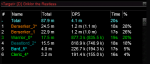
lol - my team isn't anything special - you can do it too!Hot damn @Sic your dps makes me feel inadequate.
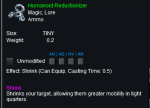
There is a addclicky ShrinkGroup - not sure actually, if it works for self only clickies --- will need to see if i can get a self only and test it hehIs it possible to add a shrink clicky to the clickes section for downtime and not have it spam without the condition I had to make in kiss for it?
but if you have one of these you can /zerk addclicky shrinkgroup while holding it and it'll cycle and shrink your whole group
I'm having issues getting the zerk to autoaccept 96% rez box, even with /rez accept on and /rez pct 95
Is there another setting I'm not considering? Thanks
The plugin doesn't do any interaction with the rez window - everything would be through mq2rez
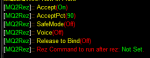
double check your settings with /rez settings
This is what mine looks like
accept - on, obviously
acceptpct - anything 90 or better
safemode - off, i don't care who rezzes me
voice - off, i don't want it talking to me
release to bind - off, no thank you
rez command to run after rez, nada
Yes, all those settings match. I mentioned it here because I've had no issue with mq2war autoaccepting rez box, with identical mq2rez settingsThe plugin doesn't do any interaction with the rez window - everything would be through mq2rez
double check your settings with /rez settings
This is what mine looks like
accept - on, obviously
acceptpct - anything 90 or better
safemode - off, i don't care who rezzes me
voice - off, i don't want it talking to me
release to bind - off, no thank you
rez command to run after rez, nada
View attachment 19795
There is a addclicky ShrinkGroup - not sure actually, if it works for self only clickies --- will need to see if i can get a self only and test it heh
but if you have one of these you can /zerk addclicky shrinkgroup while holding it and it'll cycle and shrink your whole group
View attachment 19793
Thanks Sic I'll try it. I was only concerned with him shrinking himself as they all have a ring lol.

What is the name of the ring hellfyre
I have ring of the ancients on all my guys and the shrinkgroup setting is nice! Ty

im getting a error message that it is out of date. how do i fix this?
- In your launcher, go to the "Very Vanilla" tab and click "update" (if it says "reinstall" instead of "update" ignore this step)
- in the launcher's plugins tab, find MQ2Berzerker and click "update"

bizban666
New member
O.K. I will give that a try thanks again. P.S. I love the app and not being able to use it last night sucked lol.What specifically is out of date? Berzerker?
Bizban - can you confirm what you see in your launcher in the following places:Ive tried to update the MQ2Berzerker file under the plugins tab. however it doesnt update. this all started after i did the normal update for redguides.
Very Vanilla Tab - we're looking for Latest Version and Last Installed

Plugins Tab - We're looking for Last Updated for the plugins in this tab
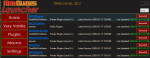
Then lastly we want to check your Settings Tab --- Does the MacroQuest2 directory location match the location you are launching mq2 from?

bizban666
New member
I see the first one at the top here. if i click on plugins i will see the second. dont think i have the bottom or third one listed hereBizban - can you confirm what you see in your launcher in the following places:
Very Vanilla Tab - we're looking for Latest Version and Last Installed
View attachment 19840
Plugins Tab - We're looking for Last Updated for the plugins in this tab
View attachment 19841
Then lastly we want to check your Settings Tab --- Does the MacroQuest2 directory location match the location you are launching mq2 from?
View attachment 19842
bizban666
New member
ok yes i have all three i see them now however my log level says full.I see the first one at the top here. if i click on plugins i will see the second. dont think i have the bottom or third one listed here
bizban666
New member
sorry one last thing and im not sure if it matters but i have mine in my d driveok yes i have all three i see them now however my log level says full.
bizban666
New member
sorry one last thing and im not sure if it matters but i have mine in my d drive



as long as your drive that you are patching your launcher to, and where mq2 is launched from match - you are fine --- I explain that >> HERE <<sorry one last thing and im not sure if it matters but i have mine in my d drive
when it says that it needs to be recompiled, it is because it is out of date - which is why we're trying to ensure you are updating the correct file/folder
When you click the Plugins Tab - is the Last Updated all green like in the image i shared?
bizban666
New member
no, i hope you can see my screen shots. mine is white and says N/A in redas long as your drive that you are patching your launcher to, and where mq2 is launched from match - you are fine --- I explain that >> HERE <<
when it says that it needs to be recompiled, it is because it is out of date - which is why we're trying to ensure you are updating the correct file/folder
When you click the Plugins Tab - is the Last Updated all green like in the image i shared?
ok - the fact that it says it was never installed leads me to believe you don't have your redguide's launcher pointed to your mq2 directory - because you wouldn't have a file for it to be out of dateNi i hope you can see my screen shots. mine is white and says N/A in red
so I would try 2 things.
First - try just hitting that Install button on your plugin like this image below

if nothing changes - then we can pretty much be assured that you don't have your launcher pointing to your mq2 directory --- in which case >> HERE << watch this video
If you still have issues and are going to be available for a few minutes - msg me on discord and i can remote in and walk you through it
bizban666
New member
ok i did it and it turned green. let me give it a shot.ok - the fact that it says it was never installed leads me to believe you don't have your redguide's launcher pointed to your mq2 directory - because you wouldn't have a file for it to be out of date
so I would try 2 things.
First - try just hitting that Install button on your plugin like this image below
View attachment 19847
if nothing changes - then we can pretty much be assured that you don't have your launcher pointing to your mq2 directory --- in which case >> HERE << watch this video
If you still have issues and are going to be available for a few minutes - msg me on discord and i can remote in and walk you through it
bizban666
New member
o.k. it is working again. thank you so much. is there something i need to change so i dont get these kinds of error in the future. Sorry for all of the questions.ok i did it and it turned green. let me give it a shot.
nope not at all - it *should* automatically update the plugin once you patch VV now, but if you ever see something like that again you can just peak at that plugins tab, and if it isn't green - hit that update/install button and it should patch you upo.k. it is working again. thank you so much. is there something i need to change so i dont get these kinds of error in the future. Sorry for all of the questions.
Glad we all got you fixed up!
Users who are viewing this thread
Total: 3 (members: 0, guests: 3)
Share: