
Install the app
How to install the app on iOS
Follow along with the video below to see how to install our site as a web app on your home screen.
Note: This feature may not be available in some browsers.
-
 You've discovered RedGuides, an EverQuest multi-boxing and scripting community 🧙♀️⚙️. We want you to play several EQ characters at once, come join us and say hello! 👋
You are using an out of date browser. It may not display this or other websites correctly.
You should upgrade or use an alternative browser.
You should upgrade or use an alternative browser.

Release MQ2AutoSize
- Thread starter Skyjet2000
- Start date


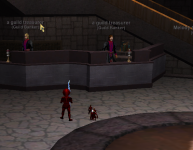


Because you are running the plugin MQ2Autosize.
You can disable it with /autosize off
You can unload it with /plugin autosize unload
You can change the size it makes people, whether it is on for yourself, others, or everyone
/autosize help
You can disable it with /autosize off
You can unload it with /plugin autosize unload
You can change the size it makes people, whether it is on for yourself, others, or everyone
/autosize help

This started when I added 2 more box's to my crew.
My active character is full size, and everyone else, regardless of guild or party, is brownie size. If I'm on Char 1's screen, it's full size and players 2-6 shrunk. If I'm on char 2's screen, char 2 is full size with 1, 3-6 shrunk.
Anyone else have this?
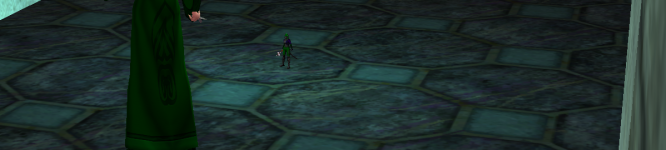
My active character is full size, and everyone else, regardless of guild or party, is brownie size. If I'm on Char 1's screen, it's full size and players 2-6 shrunk. If I'm on char 2's screen, char 2 is full size with 1, 3-6 shrunk.
Anyone else have this?
Interesting, I have no idea how that was ever turned on. I love it, but it was quite confusing.you have mq2autosize on, that happened to me as well
Sic updated MQ2AutoSize with a new update entry:
07/18/2024
Read the rest of this update entry...
07/18/2024
Read the rest of this update entry...
Sic updated MQ2AutoSize with a new update entry:
07/18/2024
Read the rest of this update entry...
07/18/2024
Commits
(ca6cf63) ~brainiacSimplify plugin load detection and use chrono for throttling
- Also remove a bunch of extra returns
Read the rest of this update entry...
I performed an overhaul on this plugin and want to make certain that the details are in your face:
Over the next few days I hope to get the documentation on the resource updated.
Sometimes a picture is worth 1000 words right?
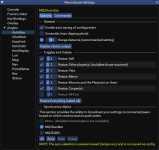
7/11/2024
--
Added
- MQ Settings panel (/mqsettings -> plugin -> AutoSize)
- AutoSize TLO (check wiki for details)
- Introduced Synchronization ability - only available in the UI
- Enhanced options to accept instruction such as on and off, not just be a toggle. This enabled keeping toons in sync by setting values instead of randomly toggling.
Updated / Fixed
- Zonewide now uses 1000 range
- /autosize range # now works
- Reduced organic growth of code and made all toggle options use the ToggleOption function
- Fixed and altered how "Everything" works. Now it will enable the options, which work as intended.
Deprecated
- OptZone since it never worked as expected, replaced with Range of 1000 which is about the same as the EQ visible max clipping plane
- ResizeAll configuration, while Everything is still able to be enabled
- DefaultSize configuration and command (/autosize size), while Everything is still able to be enabled
- SizeDefault since having a default setting to resize something to, which wasn't opted in for resizing, doesn't actually make any sense. Outputs have persisted to ensure no script that scrapes the line breaks.
- SizeTarget (and /autosize target) since it would only resize for one frame if the type was managed by an Option for resizing
- OptByRange and SizeByRange, since the plugin now only uses range to resize
Under the hood
- Changed the majority of floats to integer as there was no reason for using all the floats
- Updated pCharSpawn to pLocalPlayer references
Over the next few days I hope to get the documentation on the resource updated.
Sometimes a picture is worth 1000 words right?
hytiek updated MQ2AutoSize with a new update entry:
07/24/2024
Read the rest of this update entry...
07/24/2024
Read the rest of this update entry...
sounds like you have mq2autosize loaded and runningHiya folks,
For some reason all of my toons are permanently in shrink mode. I have tried over and over to use Grow Spell to counteract however doesn't work.
Any suggestions? I run CWTN on all toons.
Thanks in advance.
/plugin mq2autosize unload

- Joined
- Aug 19, 2020
- RedCents
- 30,871¢
Ironic that "Biggun" is smol-un...Hiya folks,
For some reason all of my toons are permanently in shrink mode. I have tried over and over to use Grow Spell to counteract however doesn't work.
Any suggestions? I run CWTN on all toons.
Thanks in advance.
LOLIronic that "Biggun" is smol-un...
hytiek updated MQ2AutoSize with a new update entry:
07/26/2024
Read the rest of this update entry...
07/26/2024
Automated update: ec97ade72ff78d99d2fcddc1ad94304bc3222870
Read the rest of this update entry...
hytiek updated MQ2AutoSize with a new update entry:
Added a soft switch to toggle (or set) resizing functionality without unloading the plugin
Read the rest of this update entry...
Added a soft switch to toggle (or set) resizing functionality without unloading the plugin
7/26/2024
--
Added
- UI and command to toggle the AutoSize functionality (`/autosize [on|off]`)
- new TLO member: Enabled (`${AutoSize.Enabled}` or `mq.TLO.AutoSize.Enabled()`)
Updated
- Wording for `/autosize` and `/autosize dist [on|off]` to better explain how to use them
Read the rest of this update entry...

eqsubi15
Ultimate seasoned veteran member
- Joined
- Jul 11, 2020
- RedCents
- 973¢
Did something change recently? Noticing that whichever toon I'm driving with is showing up huge. It actively changes when alt-tabbing to other toons. The driving toon will be large and the rest will normal size or shrunk.
eqsubi15
Ultimate seasoned veteran member
- Joined
- Jul 11, 2020
- RedCents
- 973¢
Ah, that's it. Had that plugin enabled for Epiclaziness Lua. Thanks!Have you looked at your autosize settings perhaps? /autosize ui
hytiek updated MQ2AutoSize with a new update entry:
08/14/2024
Read the rest of this update entry...
08/14/2024
Automated update: ccdd9c950ae71c04ae323835c525f30cf83335b3
Read the rest of this update entry...

Thank you sir!Fantastic work, thank you hytiek!
- Joined
- Aug 19, 2020
- RedCents
- 30,871¢
He tested in on his hands, now extra smolThank you sir!

Is there a way to differentiate between combat pets and familiars? I'm assuming not based on the Spawn TLO not showing a difference
The reason I ask is some people run dragon familiars in raid and if they run out of the distance of the plugin their dragon becomes RAID BOSS HUGE! I'll just have to enable zonewide during raids.
The reason I ask is some people run dragon familiars in raid and if they run out of the distance of the plugin their dragon becomes RAID BOSS HUGE! I'll just have to enable zonewide during raids.
hytiek updated MQ2AutoSize with a new update entry:
09/07/2025
Read the rest of this update entry...
09/07/2025
Automated update: ea2a2150d8140e9ac4195034f4aa9805ceb69464
Read the rest of this update entry...

Howdy guys, I am having an issue with my Berserker. His model is gigantic. I can't figure out what is going on. I have zoned and it has no effect. I have removed all of his buffs, and he is still HUGE. I have used shrink on him from another character and he is still huge. Even tho on the other character he definitely shrinks.
Please help. He gets stuck on any door and moving around is a pain in the ass.
Please help. He gets stuck on any door and moving around is a pain in the ass.
/Plugin autosize unloadHowdy guys, I am having an issue with my Berserker. His model is gigantic. I can't figure out what is going on. I have zoned and it has no effect. I have removed all of his buffs, and he is still HUGE. I have used shrink on him from another character and he is still huge. Even tho on the other character he definitely shrinks.
Please help. He gets stuck on any door and moving around is a pain in the ass.
Outstanding, thanks!/Plugin autosize unload
hytiek updated MQ2AutoSize with a new update entry:
07/08/2026
Read the rest of this update entry...
07/08/2026
Automated update: 626824c360342827c1f6cc2713d526de17949913
Read the rest of this update entry...
Users who are viewing this thread
Total: 1 (members: 0, guests: 1)
Share: