Not sure if is a bug or not. I think about 2 Very Vanilla updates ago. suddenly I see more unlooted corpses on the floor. and this week, I went check on them... some of them have diamonds or some other high PPs items on them. I know I set those as keep. and I only set items on Keeps or Destroy. I didn't set any to "ignore" so... I don't know why the loots is not clean. Please help I don't know did I do something wrong. Thank you.

-
 Hail, we're RedGuides. We want you to play six (yes, 6!) EverQuest characters at once. We have scripts and a friendly community to help, please join our playstyle and say hello! 👋
You are using an out of date browser. It may not display this or other websites correctly.
You should upgrade or use an alternative browser.
You should upgrade or use an alternative browser.
Resource icon
Release MQ2AutoLoot
- Thread starter plure
- Start date

some info in the MQ2Autoloot FAQNot sure if is a bug or not. I think about 2 Very Vanilla updates ago. suddenly I see more unlooted corpses on the floor. and this week, I went check on them... some of them have diamonds or some other high PPs items on them. I know I set those as keep. and I only set items on Keeps or Destroy. I didn't set any to "ignore" so... I don't know why the loots is not clean. Please help I don't know did I do something wrong. Thank you.
couple things:
make sure autoloot is turned on - you can do this by checking your autoloot status
/autoloot statusif it is turned off you can turn it on with a:
/autoloot turn onif you are in a raid you will want to ensure you turn on raid looting
/autoloot raidloot onmake sure you don't have "Apply filters" selected in your advanced loot window - otherwise you're using your in-game looting and not mq2autoloot
This needs to be un-checked

You also need to be using advanced loot, you can check this in your
/advloot window and click "Loot Settings" then make sure "Use Advanced Looting" is selected

Just regular 6 pc group (not raid) and it has been looting, just rarely like 1/10 suddenly just leave on corpse on random items. So, is on. just don't know why. Example, it has been looting diamonds without a problem, suddenly there is a corpse on the floor with "Diamond" on it.... I just curious did I do something wrong. or is it some bug. As always, thx Sic on trying to help me hehe.some info in the MQ2Autoloot FAQ
couple things:
make sure autoloot is turned on - you can do this by checking your autoloot status/autoloot status
if it is turned off you can turn it on with a:
/autoloot turn on
if you are in a raid you will want to ensure you turn on raid looting
/autoloot raidloot on
make sure you don't have "Apply filters" selected in your advanced loot window - otherwise you're using your in-game looting and not mq2autoloot
This needs to be un-checked
View attachment 32592
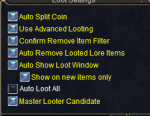
You also need to be using advanced loot, you can check this in your/advlootwindow and click "Loot Settings" then make sure "Use Advanced Looting" is selected
View attachment 32591
View attachment 32590
That happens sometimes with using the in game advanced looting system, it doesn't always loot everything that is sent to the character to be looted I have noticed a handful of times if/when I open up the adv loot window i will have an item or 2 in my "to loot" list up top and i have to manually click the green check mark to loot the item.
Not sure if you still have to be semi close to the corpse in order to loot after the random/give command is given that is really the only thing that I can think of why it doesn't auto loot it as it should.
Not sure if you still have to be semi close to the corpse in order to loot after the random/give command is given that is really the only thing that I can think of why it doesn't auto loot it as it should.

- Commits
- 1
I often has the issue if AutoForage is on. /shrug
make sure you don't have "Apply filters" selected in your advanced loot window - otherwise you're using your in-game looting and not mq2autoloot
This needs to be un-checked
Thank You .... that was my issue
This needs to be un-checked
Thank You .... that was my issue
Ok no it was not my issue... Mine just spams me not stop setting item to keep and never put the item in my personal loot window to loot. If I manually give it to my toon and it goes to the personal loot window, still not looting. I have done /autoloot status and have verified it is on.
Attachments
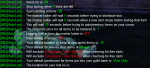
Since the last patch, I'm having an issue where the command to set items to sell, keep, quest, etc. aren't working. I get a message from autoloot that I don't have an item on my cursor, when I clearly do. Is there a setting I need to fix somewhere?
edit: Update on this issue (which is persisting). When I logged in tonight, my group leader/master looter was getting spammed with this message in his MQ2War plugin output: "Found := on the cursor. going to autoinventory it in 15 seconds." This was followed by mq2autoloot messaging: "Putting := into my inventory."
When I unloaded mq2autoloot, both messages stopped. Any ideas what's happening?
edit 2: Tonight, my master looter client crashed when I tried to set an item to sell in mq2autoloot.
edit: Update on this issue (which is persisting). When I logged in tonight, my group leader/master looter was getting spammed with this message in his MQ2War plugin output: "Found := on the cursor. going to autoinventory it in 15 seconds." This was followed by mq2autoloot messaging: "Putting := into my inventory."
When I unloaded mq2autoloot, both messages stopped. Any ideas what's happening?
edit 2: Tonight, my master looter client crashed when I tried to set an item to sell in mq2autoloot.
Last edited:
care to elaborate a little more on that? that doesn't really explain much.I have not had this plugin working for weeks now.
did you check the commands?

Utility - MQ2AutoLoot - Extra info
 www.redguides.com
and the FAQ?
Utility - MQ2AutoLoot - Extra info
www.redguides.com
did you check the FAQ link i shared above?As I said above for some odd reason my toon will never move the loot from grp section to personal section. Just spams the window with setting item to keep. I did a /autoloot status and it seams like the settings are correct. I posted a pic of the settings above.
Utility - MQ2AutoLoot - Extra info
www.redguides.com
Q. Halp! I still am not auto looting and I don't know why?
A. There are a few "common" reasons why you're not autolooting:
- Double-Check in your /advloot window that you do NOT have "Apply Filters" checked, if you DO have this checked you're saying "I would rather use my in-game eq loot filters and not autoloot".
-- Double-Check that you have autoloot turned on with a
/autoloot turn on-- you can also /
autoloot status and check your settings.- Do you have the person you want to autoloot and distribute loot, set as master looter? Right-click in your group window on that person, and set them as master looter.
Q. It keeps telling me an item isn't in my autoloot, but I know 100% that it is.
A. Try doing a /autoloot lootini loot to reload your ini file (this would reload the default loot.ini from your macros folder). do NOT /autoloot lootini loot.ini - otherwise you will try and check loot.ini.ini
Because it sounds like you might have the "apply filters" thing checked, but you didn't say one way or the other, so i'd just give that a double check
A. There are a few "common" reasons why you're not autolooting:
- Double-Check in your /advloot window that you do NOT have "Apply Filters" checked, if you DO have this checked you're saying "I would rather use my in-game eq loot filters and not autoloot". (Checked)
-- Double-Check that you have autoloot turned on with a /autoloot turn on (Checked)
-- you can also /autoloot status and check your settings. (Checked)
- Do you have the person you want to autoloot and distribute loot, set as master looter? Right-click in your group window on that person, and set them as master looter. (Checked)
A. Try doing a /autoloot lootini loot to reload your ini file (this would reload the default loot.ini from your macros folder). do NOT /autoloot lootini loot.ini - otherwise you will try and check loot.ini.ini (Checked)
- Double-Check in your /advloot window that you do NOT have "Apply Filters" checked, if you DO have this checked you're saying "I would rather use my in-game eq loot filters and not autoloot". (Checked)
-- Double-Check that you have autoloot turned on with a /autoloot turn on (Checked)
-- you can also /autoloot status and check your settings. (Checked)
- Do you have the person you want to autoloot and distribute loot, set as master looter? Right-click in your group window on that person, and set them as master looter. (Checked)
A. Try doing a /autoloot lootini loot to reload your ini file (this would reload the default loot.ini from your macros folder). do NOT /autoloot lootini loot.ini - otherwise you will try and check loot.ini.ini (Checked)
blahblahblah84
Well-known member
I used the migration tool to move to Next, and I discovered that the MQ2AutoLoot.ini in the Next installation still has the original directory paths after migration (copy option).
Instead of using the new path \AppData\Local\VeryVanilla\MQNext\Release\config\Loot.ini it is still using the old path \AppData\Local\VeryVanilla\Live\Release\Macros\Loot.ini for it's configuration.
Instead of using the new path \AppData\Local\VeryVanilla\MQNext\Release\config\Loot.ini it is still using the old path \AppData\Local\VeryVanilla\Live\Release\Macros\Loot.ini for it's configuration.
dethangel1
New member
how do i add items ive never seen before to my accepted autoloot?
you have to edit your loot.inihow do i add items ive never seen before to my accepted autoloot?

Almost all the answer was in the title...
You can find other infos about Mq2autoloot on the thread about that plugin.
www.redguides.com
/autoloot turn off to turn it off, and /autoloot turn on to turn it back onYou can find other infos about Mq2autoloot on the thread about that plugin.
Utility - MQ2AutoLoot
2018 ESA Winner MQ2AutoLoot - Version 1.12 Purpose This plugin is designed to handle loot from within the advanced looting window. It uses a loot.ini file located in your macro folder to define what your characters should do with each item. It...
www.redguides.com

you don't want to turn off autoloot, you want to configure autoloot to automatically destroy those unwanted items. This has the added benefit of also clearing out all those corpses that would otherwise hang around with unlooted items on them. Nothing says "Imadirtybotter" like 100 unlooted corpses all around you.

Nothing says "Imadirtybotter" like 100 unlooted corpses all around you.
Except no corpses around you ever

If people are running around without /hidecorpse alwaysnpc how is that my problem?you don't want to turn off autoloot, you want to configure autoloot to automatically destroy those unwanted items. This has the added benefit of also clearing out all those corpses that would otherwise hang around with unlooted items on them. Nothing says "Imadirtybotter" like 100 unlooted corpses all around you.

That sounds like you're using ninjadvloot (with the broken slots) and not mq2autolootWhen my toon tries to loot items I get the following error message. "slot is null: could not send notification to 70 Rightmouseup" toon will loot coin but no items
ninjadvloot isn't a plugin, mq2autoloot is a plugin, but if you don't have your automation configured to use autoloot, you might be using automation that includes ninja looting.I tried to unload ninjaadvloot and got the response ninjadvloot cannot be loaded. I unloaded and reloaded mq2autoloot. still same issue
are you using kissassist? do you have looton=1 in your ini?
Autoloot FAQ
Q. Halp! I still am not auto looting and I don't know why?
A. There are a few "common" reasons why you're not autolooting:
- Double-Check in your /advloot window that you do NOT have "Apply Filters" checked, if you DO have this checked you're saying "I would rather use my in-game eq loot filters and not autoloot".
-- Double-Check that you have autoloot turned on with a /autoloot turn on
-- you can also /autoloot status and check your settings.
- Do you have the person you want to autoloot and distribute loot, set as master looter?
-- Right-click in your group window on that person, and set them as master looter.
if you're getting a msg about "rightmouseup" especially in the case of the incorrect inv slots that wouldn't be autoloot i don't believe. autoloot would left click, and it clicks the items directly in the window with leftmouseup.
is it possible that you're not using autoloot and the error is from something else like a bad useitem?
First off thanks for all you suggestions. I checked all of the things you noted. and had to change the apply filters button. But it still does the same thing. I am using a fresh download of very vanilla MQ2. I havent added or changed anything from that download. So, I will keep working at it. I think it may be in my warriors kissassit file. I changed the auto loot to a different toon it seems to be working now
I'm also running into the issue where MQ2AutoLoot is leaving items on corpses. I'm consistently getting the "<player> does not want <item>. It is either on their never list or they have selected No." I think I might have a bit of information that may help narrow down the issue, however.
When I log in and start hunting, it seems that the completely empty bags in my inventory are initially being registered as having 0 free slots by MQ2AutoLoot. If I look at ${AutoLoot.FreeInventory} it will only increase to the accurate number of free slots if I put an item in each completely empty bag. The item can then be removed from the bag, and the free inventory is still recognized.
I also just recently came back to EQ, and rerolled completely new characters. I'm using summoned Mage bags with a 'Temporary' tag. I have no idea if this is related to the initial free slot calculation.
When I log in and start hunting, it seems that the completely empty bags in my inventory are initially being registered as having 0 free slots by MQ2AutoLoot. If I look at ${AutoLoot.FreeInventory} it will only increase to the accurate number of free slots if I put an item in each completely empty bag. The item can then be removed from the bag, and the free inventory is still recognized.
I also just recently came back to EQ, and rerolled completely new characters. I'm using summoned Mage bags with a 'Temporary' tag. I have no idea if this is related to the initial free slot calculation.

I suspect it doesn’t want to use temp bags.
Really no reason not to, though.
there’s no reason to use temporary bags is in fact correct. 10 slot bags are readily available all over. Mixing bowls are good ones if you don’t want toolbox sounds.

Thanks! I see the issue, it's not related to temporary bags. Your other post helped a lot.I'm currently running MQNext, yes.
Should be fixed in the latest build. Let me know.Awesome. Thanks!
Should be fixed in the latest build. Let me know.
Updated and reloaded. Everything looks good. Thank you!

WhyteTech
Ye Whom says Dumb things
Playing around with Next tonight...
Autoloot is giving me troubles.
First found the Old path issue, fixed that.
Now its not looting... at all.
Screenshots to validate ive read the FAQ
Screenshots purposfully keeping my toon name out of view, I assure you, all from the same Toon.
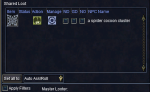
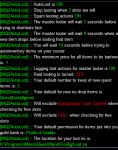

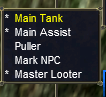
What am I missing here?
Autoloot is giving me troubles.
First found the Old path issue, fixed that.
Now its not looting... at all.
Screenshots to validate ive read the FAQ
Screenshots purposfully keeping my toon name out of view, I assure you, all from the same Toon.
What am I missing here?
WhyteTech
Ye Whom says Dumb things
Update, its actually working on every toon but the Masterlooter.
All the others are properly selecting greed or no, pending how many of the quest item they have, but the ML is still being inactive.
Is it because Im not using any of the automation plugins or scripts for the ML? I mean MQ2AutoLoot is loaded and turned on, does it NEED to be running Kiss/CWTN/RGMerc?
All the others are properly selecting greed or no, pending how many of the quest item they have, but the ML is still being inactive.
Is it because Im not using any of the automation plugins or scripts for the ML? I mean MQ2AutoLoot is loaded and turned on, does it NEED to be running Kiss/CWTN/RGMerc?
no, autoloot doesn't need any particular automation to do looting.Update, its actually working on every toon but the Masterlooter.
All the others are properly selecting greed or no, pending how many of the quest item they have, but the ML is still being inactive.
Is it because Im not using any of the automation plugins or scripts for the ML? I mean MQ2AutoLoot is loaded and turned on, does it NEED to be running Kiss/CWTN/RGMerc?
I had some weird issues with next and autoloot, that's why i swapped to lootly and run that exclusively now
Users who are viewing this thread
Total: 1 (members: 0, guests: 1)
Share: