• You've discovered RedGuides, an EverQuest multi-boxing and scripting community 🧙‍♀️⚙️. We want you to play several EQ characters at once, come join us and say hello! 👋

  • A TLP without truebox has thawed (Very Vanilla ready)
    Frostreaver
Resource icon

Release MQ2AutoLoot

The timer works, but once i leave a loot one time, it ends up leaving it always.

So today I'm at a camp, 6 people get xp, 28 out of group helping to power level. During this grind, there are named that drop gear for pretty much everyone. I'm also working, so the screen is off to my left and i'm not visually watching it every second. So, if i miss a named, then i don't know as it isn't there in the adv window.

I'll see if i can come up with a better solution.
maybe an mq2react to beep at you if you get a named?
you're using several cwtn plugins - any of those in a tank mode can beeponnamed if you turn it on
 
they do beep, but often i'll turn volume off while i code to focus a little more. This gets me like 90% of where i want to be, and good is good enough for now.
 
I don’t have a solution to what you want but I’ll tell you what I do. If I’m going into a new camp / zone I check the names and auto populate it with the items I want And to what toon. Have to admit I sometimes forget and miss the loot as I default to ignore for no drop items.
 
haven't played much in a while, is there a way to only loot a certain number of an item. For example if using MQ2 Mage and I have cauldron for a clicky is there a way I will only summon and then keep a certain # of an item and then discard or destroy the rest?
 
haven't played much in a while, is there a way to only loot a certain number of an item. For example if using MQ2 Mage and I have cauldron for a clicky is there a way I will only summon and then keep a certain # of an item and then discard or destroy the rest?
yes with quest tag

quest|#

it won't split stacks from a mob, but will stop looting after you have xyz number
 
/AutoLoot nodropdefault [quest|keep|ignore] -> Will set new no drop items to this value

have your nodropdefault set to ignore
Sic, thanks for all your coaching on this one. Here's my next dumb question i've seen some examples where it will distribute loot to the appropiate classes. EX: Cliff Stone...like I want my war/pal/sk's to get that if it drops...where the other ones like magma etc...i want that to go to a different class. Any chance you can share the noobie code these two examples? I've finally made the leap up to TBL and my main tank is hogging all the power sources that should be going to the other classes.
 
Sic, thanks for all your coaching on this one. Here's my next dumb question i've seen some examples where it will distribute loot to the appropiate classes. EX: Cliff Stone...like I want my war/pal/sk's to get that if it drops...where the other ones like magma etc...i want that to go to a different class. Any chance you can share the noobie code these two examples? I've finally made the leap up to TBL and my main tank is hogging all the power sources that should be going to the other classes.
sure

it is in the overview and commands tab with examples:

/SetItem Gear -> Will loot if your the specified class up to the number listed in the ini entry.
Example entry: Gear|Classes|WAR|PAL|SHD|BRD|NumberToLoot|2|

I always just end up typing it in the INI rather than doing it with the setitem gear flag while holding it.

gear is a little weird because you have to say Gear, then Classes, then the clas short codes, then "NumberToLoot", then how many
 
sure

it is in the overview and commands tab with examples:

/SetItem Gear -> Will loot if your the specified class up to the number listed in the ini entry.
Example entry: Gear|Classes|WAR|PAL|SHD|BRD|NumberToLoot|2|

I always just end up typing it in the INI rather than doing it with the setitem gear flag while holding it.

gear is a little weird because you have to say Gear, then Classes, then the clas short codes, then "NumberToLoot", then how many
Ok here's my stab at one:

Cliff Stone|WAR|PAL|SHD|=Quest|10
 
Ok here's my stab at one:

Cliff Stone|WAR|PAL|SHD|=Quest|10

Gear|Classes|WAR|PAL|SHD|BRD|NumberToLoot|2|

Cliff Stone=Gear|Classes|WAR|PAL|SHD|BRD|NumberToLoot|2|

Cliff stone is "Gear" distributed to "Classes" these classes are "|WAR|PAL|SHD|BRD|" and NumberToLoot is "2"
 
Got it, why do they say = keep or = quest|10? on the default file?
Thanks again
/SetItem Keep -> Will loot. '/AutoLoot deposit' will put these items into your personal banker.

/SetItem Quest #n -> Will loot up to #n on each character running this plugin.

keep means "i want everyone to keep this all the time"
quest|# means "i wanteveryone to have # of them then stop looting them"
 
/SetItem Keep -> Will loot. '/AutoLoot deposit' will put these items into your personal banker.

/SetItem Quest #n -> Will loot up to #n on each character running this plugin.

keep means "i want everyone to keep this all the time"
quest|# means "i wanteveryone to have # of them then stop looting them"
Thanks again S, much much appreciated
 
Thanks again S, much much appreciated
K, think i screwed it up again. I loaded this last night, fired it up today and it left a magma stone on a corpse instead of giving to enc. Note: i did notice the enchanter inventory was full during assignment. Was that they why it declined it?

Magma Stone=Gear|Classes|ENC|WIZ|MAG|NumberToLoot|6|
 
K, think i screwed it up again. I loaded this last night, fired it up today and it left a magma stone on a corpse instead of giving to enc. Note: i did notice the enchanter inventory was full during assignment. Was that they why it declined it?

Magma Stone=Gear|Classes|ENC|WIZ|MAG|NumberToLoot|6|
you're asking if the enchanter declined it because their inventory was full? aye they wouldn't be able to take it if they had less inventory slots available than their autoloot ini is configured for, and not loot if if they have no slots available

SaveBagSlots= #n will stop looting when #n is the number of open bag slots, not including excludedbag1/excludedbag2. Default is 0.
/AutoLoot saveslots #n -> Stops looting when #n slots are left

Default for save slots is 0, but you will not loot if you can't loot due to being full

make sure you /autoloot reload or do a /autoloot lootini loot if you edit your loot ini manually and not with a slash command
 
you're asking if the enchanter declined it because their inventory was full? aye they wouldn't be able to take it if they had less inventory slots available than their autoloot ini is configured for, and not loot if if they have no slots available

SaveBagSlots= #n will stop looting when #n is the number of open bag slots, not including excludedbag1/excludedbag2. Default is 0.
/AutoLoot saveslots #n -> Stops looting when #n slots are left

Default for save slots is 0, but you will not loot if you can't loot due to being full

make sure you /autoloot reload or do a /autoloot lootini loot if you edit your loot ini manually and not with a slash command
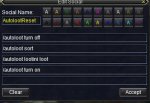
Ok, checking the default next. I picked up a tip earlier on make a default social that does it. Snapshot below:

Screenshot 2021-07-15 112644 - Copy.jpg

Thanks again for all your help. I cleared the bags, gonna to keep monitoring to see if it picks them up.
 
that's a bunch of extra steps - but if you like it, it works ,and you're happy, then by all means
 
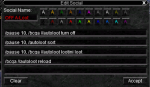
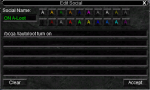
The only /autoloot command you would NOT run on all your gimps is the SORT. Multiple clients trying to sort the same file will cause clients to choke. Otherwise you want to ensure you run the commands on every character that will be getting loot. I use EQBCS2 for my own groups. The STOP and the GO commands are on 2 different socials so that if I'm killing a Named and I'm not sure if I've configured the LOOT.INI I can quickly turn off the plugin.

Here are the buttons that I use:

aloot_off.PNG

and...

aloot_on.PNG
 
Seems like everything loads up and the plugin responds to all commands, but nothing gets looted on any toon. Key peice of information I am missing?
 
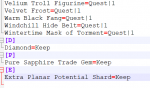
Not sure what I'm doing wrong with this but i've built a list, sorted it (kinda. only half the list sorted wtf?), reloaded, etc etc and autoloot is still adding items i already have in the ini at the end.

Autoloot is putting the letter [A],,[C],etc in the file but it doesn't sort using the letter so i have my built list sorted and a bunch of duplicate crap added to the end of the ini file that autoloot keeps adding.

1627699668459.png
 
Not sure what I'm doing wrong with this but i've built a list, sorted it (kinda. only half the list sorted wtf?), reloaded, etc etc and autoloot is still adding items i already have in the ini at the end.

Autoloot is putting the letter [A],,[C],etc in the file but it doesn't sort using the letter so i have my built list sorted and a bunch of duplicate crap added to the end of the ini file that autoloot keeps adding.

View attachment 31947
i think you can /autoloot sort
 
i think you can /autoloot sort

I've tried sorting dozens of times. rebuilt the list multiple times. tried with smaller lists. doesn't seem to be working. i made a macro with that one big daddy posted a few posts up.

soon as i turn on autoloot and the looting starts the plugin start appending loot i already have in the ini to the end of the ini so i have duplicates.
 
I've tried sorting dozens of times. rebuilt the list multiple times. tried with smaller lists. doesn't seem to be working. i made a macro with that one big daddy posted a few posts up.

soon as i turn on autoloot and the looting starts the plugin start appending loot i already have in the ini to the end of the ini so i have duplicates.
Is this on MQ or MQ2? I ask because I just did a bunch of updates to merge brainiac and my changes together and quite possible I broke something.
 
Hellos

First, would just like to mention I really like the autoloot plugin. Took a while last year to get it figured out and generally it's been working fine.

I have an issue with 'destroy' of items, in that it intermittently does it and then doesn't.


Background

Last year, looting basics were in place and things worked. Following the 'other' issues community experienced since February, I gave a bit more attention to housekeeping. The not wishing to see a pile of corpses on the map at my camp location. With this in mind, I added entries to loot ini, to destroy the unwanted 'no trade' / 'vendor worthless' etc. It may not be perfect, but reduced the mob corpse count at my camp considerably.

The general looting works. Master Looter is picking stuff up and loading the bags, and obey the asks in the loot ini file.
I haven't done anything special to the ini file. It's a series of items i've encountered over the zones, to which they have been simply set to one of - Ignore, Keep, Sell, Quest|num and Destroy.


Observations

The ML contently stuffs their own bags, and what looks to go down group list to see if another wants the item in question if - MLs bags are at capacity, or the item is Quest marked and ML already has. If all the group are filled bags or have enough of them, then it gets left. That's fine.

The destroy activities though, they can start out working and then stop. By that I mean, there have been a few mob deaths, some loot has been collected, and in the mix is item marked destroy. ML is picking it up, and destroying it. Some time later, the ML is picking up the item, placing in bags and not destroying it. Note - bags are not near capacity.

When I look at the MQ window, outputs from MQ2Autoloot:

:: SList: Giving item to me
:: PList : looting item to destroy it
:: Destroying timer ran out, moving on!

Sometimes there may be other few lines of non-loot things in the MQ window, but I've also seen where the ML has the MQ window with those 3 lines and no interruptions of other things written.


I have watched as group, and ML character are out of combat. ML is looting, the unwanted item goes into the bag ( i have it open on screen ), and it doesn't get destroyed. ML doesn't appear to be doing anything else other than looting, whilst infer the MA/Puller is looking for another mob to go bring back.

If I do nothing, the item will sit in the bags and the 'timer ran out' message is written to the MQ window.

If I'm watching, and it doesn't look to be auto-destroying, I'll react on seeing item sitting in the bag, by grab the mouse, move the mouse to the bag and click item - then magically, it gets destroyed, before I can move and click the destroy button on inventory window.

Other times I do get to complete the click it, destroy it myself. With hopes that the next time the item is looted it gets auto-destroyed, but often it's not the case.


Initial investigation

I looked at the source, and see there is only one output of the destroy moving on message, and that's when the clock has exceeded a timer value 'DestroyStuffCancelTimer'.
The code sees the item being checked is marked for destroy, outputs the looting to destroy it message, and sets a timer current time + 10 (hardcoded) seconds.

This lead to wondering, how often does the plugin look to destroy. It's called from the pulse method, so very frequently.

I am therefore at a loss, as to how 10 seconds can pass from picking up an item and it not being destroyed.


The destroy code, called from pulse reads straight forward.
  • Bail out if the 10 second timer has lapsed.
  • If the item id on cursor is the same id of item to destroy, then /destroy issued, and "Destroying item" is written to the MQ window. Returning from the destroy code.
  • Not on the cursor it looks through the inventory. A quick read over that, and it's doing top level and then bag searches, finding a match it 'picks up' the item and returns from the destroy code.
I infer, the intention here is to let the current pulse finish, and the subsequent pulse will find item on cursor leading to the issue of the /destroy command.


The code for Autoloot - DestroyStuff(), reads very similar between the VeryVanilla source and Next source versions.


Closing comments on setup

This is running with MQ Next.

All characters are making use of KissAssist, no CWTN plugins.

I avoid having the tank as ML, and so often throw this responsibility to a DPS. In recent test cases, this has been mage and bard. Both of which have had the 'not destroying what should be destroyed' issue. As such, the ML is in 'assist' role.

I'd tried the change from the mage to bard, on the chance the loot was being held up by casting buffs or what not, but this doesn't appear to be the case. The bard experiences the same issue.

As this is Next, I've also looked at the FPS Limiter stuff, initially as defaults and followed up after watching Sics video. Enabled frame limit, background game scene not checked, foreground game scene is. Simulation FPS is 30.0, the clear screen not checked, both renders are checked.

With that in mind, loot and destroy has worked initially on the ML bard in background, with the puller tank in foreground process. So it can work in foreground / background, and equally continue to not work, when I'm watching the ML in foreground and it saving items that should be destroyed.


Regards and Best Wishes
 
Update


In my report above, I detailed experience of an intermittent problem in which MQ2AutoLoot would loot items marked for destroy, but then not destroy them and leave them in the inventory.

Again to confirm - the above was using a team managed by KissAssist in MQ Next, and the ML was most recently assigned to a bard.
The group has previously hunted the same camp area, same mobs, same looting rules, and experienced the issue in a couple of game sessions ( hence change from mage ML to bard ML ).


I have done some re-tests.


To try and establish a baseline, I have switched back to using Very Vanilla MQ2, and in broad strokes, that's the only change.


The config files from Next, for KissAssist and autoloot, were copied back to VeryVanilla.
The same team of characters, back hunting the same camp area, mobs etc as previous sessions, with the same roles of assist tank, and the bard as ML.
Yes, this is the same computer, as well.


result: ~ 2 hours of running, the looting went perfectly and the camp was kept relatively clean. 👍
(items left to rot, matched the profile of 'ignore', and rare drops. 2 or 3 corpse max, rotting at over the 2 hour period )


The ML initially looting all, and destroying those marked in the loot ini, without issue.
Once capacity got low, 3 spots remaining, I watched closely. ML continued to take items which would fit into existing stacks, other items were pushed to others in the group to take. ML continued to pick up and destroy.

All in all, perfect. 🙂👍


It may be early to speculate, but the sign is that the troubles are operating in MQ Next, and yet work fine with Very Vanilla MQ2.

Perhaps the following test should be to ensure have latest Next build, and re-test again with that.


Regards and Best Wishes.
 
Just something to point out. If you move your config files from Live to Next or use the Migrator to move the files to Next you end up with your MQ2Autoloot.ini in Next still pointing to your loot.ini in your old Live for any toons that have already been using Autoloot. So you can be editing the loot.ini in your Next folder, but it won't matter if your toons are still using the loot.ini in VV Live. New toons that start using autoloot after you move to Next will be using the loot.ini in the Next folder. So you can end up with your group using 2 different inis without realizing it.

Check your MQ2Autoloot.ini or do /autoloot reload to see where the configs are that you are using.

Make sure your inis are pointing to where you think they are.

[Bard]
lootini=C:\Users\username\AppData\Local\VeryVanilla\MQNext\Release\Config\Loot.ini
UseAutoLoot=1

[Bard]
lootini=C:\Users\username\AppData\Local\VeryVanilla\Live\Release\Macros\loot.ini
UseAutoLoot=1
 
That's a good tip there @Tibberu, something that may catch people out. 👍


I could see that scenario being the problem if the two loot ini files were configured differently. To destroy in VV, and leave or keep etc. in Next; and the behaviour was consistent throughout the sessions from start to finish.


However i confirm the ini file use is correct.
Plus, the nature of the issue is that I see the loot and destroy taking place early on, in all the sessions, with Next and VV.
In Next, with no operational change from me during a running session it stops destroying, it remains in the bag and the mq window comments about the time out on the destroy action.


From this, we know its configured correctly to destroy the offending item, but ceases to do so after a while in MQ Next but continues to work fine and destroy in Very Vanilla MQ2.


It's the pain of investigation, intermittent.
Where it can work initially for a time and then something happens later and it goes wrong.

I am inferring it is a run time condition, something is happening mid active session that derails the wheels off the track for loot destroy in Next, and that doesn't happen in VV.
 
Things like autoforage running concurrently on the master looter can cause individual items to be inventoried instead of destroyed. There are a few different ways an item might sneak by the mq2autoloot check.
 
Things like autoforage running concurrently on the master looter can cause individual items to be inventoried instead of destroyed. There are a few different ways an item might sneak by the mq2autoloot check.

Thanks for taking an interest in this quirky little problem.

I don't know the code of autoforage, but then i don't really know the code of autoloot either for that matter.


Keeping in mind that the loot and destroy worked in VeryVanilla throughout a session and never observed a problem with it. Whereas with Next, the session starts, items are getting destroyed then after some time it stops and they appear in the inventory, and the comment about destroy timeout is posted to the macroquest window.


Checking the macroquest ini, the autoforage is listed in both VV and Next with 1. Infer both have it loaded.
The mage has no forage skill, the bard does, but i don't recall it doing any forage actions.

There is per character 'mq2forage_name_server' files. VV has it in the root directory, and Next has it in the config directory.
The files are the same, sharing date and time stamp.

Both have the [general] section and declare:
AutoKeepAll=on
AutoAddAll=on
ForageOn=off


The presence and configuration of autoforage, looks consistent between both VV and Next installs.


Guess I'll look to find time to read the forage code, and see what is enabled / disabled by that "ForageOn" switch. Hopefully, it disables all the plugin functionality, short of unloading it. As opposed to simply flagging if to use the forage skill or not, on cool down.


Again, thanks for sharing your thoughts.
 
I'm having an issue with one of my characters not looting no trade items. 'Yes' is never clicked on the are you sure you want to loot this item confirmation dialog. Best I can tell her configuration is identical to the rest of my group, none of the other characters are having this issue. Any ideas?

[CODE lang="ini" title="loot.ini"][Settings]
|======================================================================|
Version=1.12
AddNewSales=1
LootForage=1
LootMobs=TRUE
CorpseRadius=100
MobsTooClose=40
ReportLoot=FALSE
LootChannel=g
SpamLootInfo=1
LootForageSpam=1
GlobalLootOn=1
CombatLooting=1
GMLSelect=1
ExcludeBag1=Extraplanar Trade Satchel
ExcludeBag2=NULL
QuestKeep=10
StackPlatValue=0
NoDropDefault=Quest|Keep|Ignore
LootLagDelay=0
SaveBagSlots=3
LogLoot=0
RaidLoot=0
BarMinSellPrice=1
DistributeLootDelay=5
NewItemDelay=0
CursorDelay=10
GuildItemPermission=View Only
[/CODE]
Knightly Edit: Remove Screenshot with character names.
 
Last edited by a moderator:
I'm having an issue with one of my characters not looting no trade items. 'Yes' is never clicked on the are you sure you want to loot this item confirmation dialog. Best I can tell her configuration is identical to the rest of my group, none of the other characters are having this issue. Any ideas?

Hello!


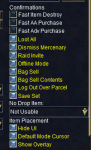
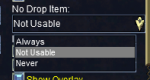
Have a look at the game settings, EQ Options, general tab.

This is what my right hand side, "confirmations" list looks like.

Perhaps compare what it is like for yours?

1628809486448.png

That "no drop" item in particular, and the drop down box of options is what came to mind when I saw your question.

1628809574065.png


Regards and Best Wishes
 
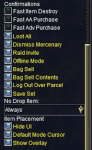
My whole group has the settings below, I'll make the change from 'Always' -> 'Not Usable. But I assume that isn't the issue since only one character is effected.

Screen Shot 2021-08-12 at 8.21.39 PM.png
 
Last edited by a moderator:
It seems like ${AutoLoot.FreeInventory} is wonky on one of my toons, but not all of them.
I have them all exclude Extra Planar Trade Satchels and the other excluded bag is "0"
On one of my toons, the ${AutoLoot.FreeInventory} is only picking up one of my heroic satchels (I have 2 heroic satchels) and none of my other bags. Is this a known bug? I am using Next if that helps.
 
Never mind, it seems to have fixed itself by me moving an item into each one of the bags then clearing the bag... Hmmmm...
Then reverted back to only showing the 1 bag as free after I zoned.
 
Release MQ2AutoLoot

Users who are viewing this thread

Back
Top
Cart