
-
 Hail, we're RedGuides. We want you to play six (yes, 6!) EverQuest characters at once. We have scripts and a friendly community to help, please join our playstyle and say hello! 👋
You are using an out of date browser. It may not display this or other websites correctly.
You should upgrade or use an alternative browser.
You should upgrade or use an alternative browser.
Resource icon
Release MQ2AutoLoot (1 Viewer)
- Thread starter plure
- Start date
For some time now I've been unable to get autoloot to respect the "savebagslots" option. I have not verified on Live in awhile, but think it was doing it there shortly before I switched to Rizlona back in August. I do know that none of my toons are reserving any bag slots currently with my toons on Rizlona. I do have the loot.ini setting defined as `SaveBagSlots=2`

Sum1
Warriors are inferior (read: crybaby) tanks
Feature Request (@plure ):
I would give anything for an option to only loot items with a specific tag (in my case, tradeskill items). I’m in these lowbie zones farming and anything looted That’s not a TS item is wasted bag space. Dialing in the loot.ini for each zone and each area is extremely time consuming, so I’m hoping there is an easier way.
Cheers
I would give anything for an option to only loot items with a specific tag (in my case, tradeskill items). I’m in these lowbie zones farming and anything looted That’s not a TS item is wasted bag space. Dialing in the loot.ini for each zone and each area is extremely time consuming, so I’m hoping there is an easier way.
Cheers
I've had this issue pop up on a few characters of mine and I never remember how to fix it. If it's someone I haven't played in a long while, I get spammed with "The [item] is not in the database, setting it to Keep" even though said item is in the database, and autoloot also will not loot the item.
Item filters are turned off. I don't remember who has told me before but there was a simple /autoloot command that fixed this and I can't remember it. Anyone got any tips?
Item filters are turned off. I don't remember who has told me before but there was a simple /autoloot command that fixed this and I can't remember it. Anyone got any tips?

While troubleshooting a loot issue this afternoon I discovered another EQ oddity that can mess up your GEAR and QUEST looting.
EQ (by accident I'm sure!) allows you to have 2 master looters in your group!
So I was trying to figure out why
Group members
I would see the Bard in slot 3 correctly pass on the Peridot, then I would see the SK calculate to Leave the item on the corpse because the SK didn't match the class in the gear. So I was trying to figure out why the SK was even offered the loot.
After a few hours I found that BOTH the Bard and the SK showed up as Master Looters when you right-clicked on them and looked at roles.
In order to fix, from the SK I assigned the bard as Leader, then the Bard ensured the SK was NOT selected as Master Looter, then I assigned Leader back to the SK and it now showed correctly that the SK was NOT a Master Looter. The next peridot that dropped was correctly given to the Enchanter!
I spent so much time troubleshooting this I ended up creating 2 new hot buttons (only on the Master Looter character!) in order to make sure each character was parsing the correctly updated Loot.INI file...
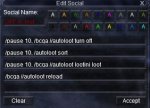
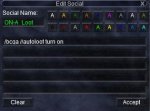
EQ (by accident I'm sure!) allows you to have 2 master looters in your group!
So I was trying to figure out why
Peridot=Gear|Classes|ENC|NumberToLoot|9999| wouldn't work in my group! So here's my group makeup from the standpoint of my SK group leaderGroup members
INI:
Slot 1 = SK (group leader)
Slot 2 = Mage
Slot 3 = Bard (master looter)
Slot 4 = Chanter (who I want to get all Peridots that drop)
Slot 5 = Cleric
Slot 6 = Druid
I would see the Bard in slot 3 correctly pass on the Peridot, then I would see the SK calculate to Leave the item on the corpse because the SK didn't match the class in the gear. So I was trying to figure out why the SK was even offered the loot.
After a few hours I found that BOTH the Bard and the SK showed up as Master Looters when you right-clicked on them and looked at roles.
In order to fix, from the SK I assigned the bard as Leader, then the Bard ensured the SK was NOT selected as Master Looter, then I assigned Leader back to the SK and it now showed correctly that the SK was NOT a Master Looter. The next peridot that dropped was correctly given to the Enchanter!
I spent so much time troubleshooting this I ended up creating 2 new hot buttons (only on the Master Looter character!) in order to make sure each character was parsing the correctly updated Loot.INI file...
I am having the problem of the master looter is not sending the loot to the correct char when I add the item manually or when I edit the line after using /setitem gear to a single class, since unless a class is specified in the loot description it adds all classes which is no help to use it that way, unless you have a limit on how many of each, for each char is set.



you need to reload your loot iniToons won't loot and everyone is getting spammed. anyone have any idea what is causing this.
View attachment 26504
/autoloot lootini loot (assuming the loot ini you want to use it called "loot.ini" in your macros folder. really obnoxious issue that happens now and again
couple thingsanyone got any idea how to make autoloot actually "accept/click yes" seems like it gets held up and tries to keep looting but doesnt actually push the yes button to "confirm"
do a
/autoloot lootini loot --- looks like your ini is bugged a smidgesecond - uncheck apply filters - because if you have that on you're actually using eq's lewt system

the_ovenman
Well-known member
I tried Finding the answer but Did not want to read 17 pages haha is there a way to this so that it will give a certain amount of each Item to all toons in my group except the master looter?
you can flag items as quest or as classI tried Finding the answer but Did not want to read 17 pages haha is there a way to this so that it will give a certain amount of each Item to all toons in my group except the master looter?
the_ovenman
Well-known member
Cool thanksyou can flag items as quest or as class
/SetItem Quest #n -> Will loot up to #n on each character running this plugin.Cool thanks
/SetItem Gear -> Will loot if your the specified class up to the number listed in the ini entry.
Example entry: Gear|Classes|WAR|PAL|SHD|BRD|NumberToLoot|2|

that's pretty unusual.I could be wrong but I think i have narrowed it down to this plugin. When running and on and you type /pic zone it automatically clicks it, any way other than turning it off to prevent that?
I run autoloot and definitely doesn't automatically click pick for me
why do you think autoloot is doing it?
it definitely does have "click yes button" in it for looting no drop items
try turning on "spamlootinfo"when i turned it off it stopped doing it.
/autoloot spamlootinfo on
this will tell you when it tries to click yes (which should be only to do no trade stuff)
if it says that its "accepting a no drop item" - then yup its autoloot lol
one of the more annoying things with eq and "yes" "no" boxes is they're all the same "window"
Last edited:

I just set myself up with using this plugin finally today and have encountered an issue I so far have not been able to resolve and looking through the pages here I have not yet seen where someone else had this same issue.
Issue:
While looting when it gets to a CRO Autoloot takes no action. Nothing is reported about it in the MQ2 window and it just sits there through several mins of killing other mobs and successfully looting all other items. Eventually since I don't want the Ore to rot or go to waste accidentally, I manually right click it and set it to go to one of my toons. At that point it immediately is looted by the toon I select. Perhaps there is something simple I have not done or my settings are out of wack?
Already tried the Reload your Loot.ini file Sic offered.
Already did a cycle of logging entirely out of EQ, Verifying MQ2/Meshes/VV/Plugins are up to date, Logging all back in, verifying AutoLoot was not running on All of them and then Reloading AutoLoot on all toons.
I'm working on camping for several: Crystallized Restless Ore
I have set in my Loot.ini:
The settings I have are:
Issue:
While looting when it gets to a CRO Autoloot takes no action. Nothing is reported about it in the MQ2 window and it just sits there through several mins of killing other mobs and successfully looting all other items. Eventually since I don't want the Ore to rot or go to waste accidentally, I manually right click it and set it to go to one of my toons. At that point it immediately is looted by the toon I select. Perhaps there is something simple I have not done or my settings are out of wack?
Already tried the Reload your Loot.ini file Sic offered.
Already did a cycle of logging entirely out of EQ, Verifying MQ2/Meshes/VV/Plugins are up to date, Logging all back in, verifying AutoLoot was not running on All of them and then Reloading AutoLoot on all toons.
I'm working on camping for several: Crystallized Restless Ore
I have set in my Loot.ini:
Crystallized Restless Ore=Quest|30The settings I have are:
[Settings]
|======================================================================|
Version=1.12
AddNewSales=1
LootForage=1
LootMobs=TRUE
CorpseRadius=30000
MobsTooClose=30
ReportLoot=TRUE
LootChannel=g
LootForageSpam=1
GlobalLootOn=1
CombatLooting=1
SpamLootInfo=1
GMLSelect=1
ExcludeBag1=Extraplanar
ExcludeBag2=NULL
QuestKeep=20
StackPlatValue=0
NoDropDefault=Keep
LootLagDelay=0
SaveBagSlots=3
LogLoot=0
RaidLoot=0
BarMinSellPrice=1
DistributeLootDelay=5
NewItemDelay=10
CursorDelay=10
GuildItemPermission=View Only
True, I don't have "Apply Filters" on.
I had also seen that on a post of yours to someone earlier and that was actually one of the first things I did before I ever turned MQ2AutoLoot on.
I have a new thought though.
My main already has 30, is set as Leader (most of the time) and Master Looter.
If my main has 30 and the other don't, will the plugin just not hand out the loot?
To test this I set the next toon in line that I wanted to be looter retaining my Main as Leader.
--When an ore came up, my main did nothing with it as previously described.
So I then set the target toon I wanted currently looting ores to be the Leader and ensured they were the only one marked as Master Looter as well. At this point that 2ndary toon finally was able to loot some CROs via AutoLoot.
Thoughts are I might have to round robin the Leadership until I can figure more info out. At least that is working for now.
I had also seen that on a post of yours to someone earlier and that was actually one of the first things I did before I ever turned MQ2AutoLoot on.
I have a new thought though.
My main already has 30, is set as Leader (most of the time) and Master Looter.
If my main has 30 and the other don't, will the plugin just not hand out the loot?
To test this I set the next toon in line that I wanted to be looter retaining my Main as Leader.
--When an ore came up, my main did nothing with it as previously described.
So I then set the target toon I wanted currently looting ores to be the Leader and ensured they were the only one marked as Master Looter as well. At this point that 2ndary toon finally was able to loot some CROs via AutoLoot.
Thoughts are I might have to round robin the Leadership until I can figure more info out. At least that is working for now.
you don't want apply filters turned on - I was asking to ensure you didn't - as that will make it skip using autoloot and instead using your loot.
if you have an item set to quest|30, then once your master looter has 30 it will start dishing out to the other toons (which means if you craft the items with the bricks and loot more you would no longer have them idle in your bags and start looking more.
you can also use the GEAR| tag and designate classes and a number - so that is another option - I did this recently when I wanted 1 specific character to get the item
as an example - this would make clerics and shaman loot 10 of the item
if you have an item set to quest|30, then once your master looter has 30 it will start dishing out to the other toons (which means if you craft the items with the bricks and loot more you would no longer have them idle in your bags and start looking more.
you can also use the GEAR| tag and designate classes and a number - so that is another option - I did this recently when I wanted 1 specific character to get the item
as an example - this would make clerics and shaman loot 10 of the item
blah=Gear|Classes|CLR|SHM|NumberToLoot|10|I will try that out and report back when I can - Thanks!

/autoloot turn off
then when you want to turn looting back on, /autoloot turn on
I just made a hotkey for each so i can toggle it whenever im killing a named
then when you want to turn looting back on, /autoloot turn on
I just made a hotkey for each so i can toggle it whenever im killing a named
Is there a way to make it select "always need" for everything? Or should i work on making a simple macro to do that
You can use https://redguides.com/community/advloot-gen/ and set it to AN_ as the file prefix.
if you have the "apply filters" autoloot doesn't actually do autoloot stuff. you should uncheck that box so mq2autoloot can dish stuff out based on the settings of the items themselves in your loot.iniIs there a way to make it select "always need" for everything? Or should i work on making a simple macro to do that
unless if you're asking "can mq2autoloot also adjust my eq loot settings to additionally make it always need" - in which case no
That answers my question thank you.if you have the "apply filters" autoloot doesn't actually do autoloot stuff. you should uncheck that box so mq2autoloot can dish stuff out based on the settings of the items themselves in your loot.ini
unless if you're asking "can mq2autoloot also adjust my eq loot settings to additionally make it always need" - in which case no
And i will take a look at that!You can use https://redguides.com/community/advloot-gen/ and set it to AN_ as the file prefix.
I'm continuing to have some issues getting this to work as expected (or what I think is expected.) I do not have any loot filters set up yet. Basically, I'm looting everything at each camp, and destroying what I do not want, this way, i only get stuff in my bags that is desired, and I dont fill up. Sometimes, it just works, and the window below never stays up waiting for my response. If the item is not in my loot.ini to keep or destroy, it loots the item. Ive been dealing with it, and then decided to delete ALL ini's related to loot from my EQ director, NV_, LF_, and i think there was one other. Relogged, and it was autolooting beautifully.... then i broke camp and ran to another part of zone, and it started doing this again. Why in this screen shot do I have items selected as No, and Greed, when I have no loot specific INIs?
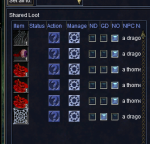
I'm continuing to have some issues getting this to work as expected (or what I think is expected.) I do not have any loot filters set up yet. Basically, I'm looting everything at each camp, and destroying what I do not want, this way, i only get stuff in my bags that is desired, and I dont fill up. Sometimes, it just works. The window below never shows up, or rather stays up, and if the item is not in my loot.ini to keep or destroy, it loots the item. Ive been dealing with it, and then decided to delete ALL ini's related to loot from my EQ director, NV_, LF_, and i think there was one other. Relogged, and it was autolooting beautifully.... then i broke camp and ran to another part of zone, and it started doing this again. Why in this screen shot do I have items selected as No, and Greed, when I have no loot specific INIs?
View attachment 27789
uncheck apply filters.
if you have apply filters on it means you want eq to use eq's advloot to do loot stuff and not mq2autoloot

Users who are viewing this thread
Total: 2 (members: 0, guests: 2)
Share: