• You've discovered RedGuides, an EverQuest multi-boxing and scripting community 🧙‍♀️⚙️. We want you to play several EQ characters at once, come join us and say hello! 👋

  • A TLP without truebox has thawed (Very Vanilla ready)
    Frostreaver
Resource icon

Release MQ2AutoLoot

I'm in old world camping Lord Bergurgle and at first, I was thinking autoloot was having problems with stacked items. But it seems to be a problem with anything with the quest flag autoloot will just stop doing anything until I click leave on corpse everything in the loot window. Then it will runb as normal. Also if I click loot all autoloot will delete items that I have listed as delete except for the quest items (which are marked as delete in the ini).

I can confirm that the plugin works for the live build and does not have that issue. My feeling is that once redbot releases a new version of test that problem will go away. I built the test version of mq2autoloot against a slightly newer version of the mq2 source code
 
Brand new to using the plugin. I moved over to KA12, which is trying to move people away from ninjaadvloot.

I'm trying to get this plugin to act just like ninjaadvloot. Ive set my no drop setting to keep, but whenever a new no drop item comes up.... it keeps spamming "PLlist setting xxxx to loot" over and over and it wont do anything.

Can anyone help me figure this one out? I'd like it to follow my advloot and just loot items that I don't have marked already, including no drop items
 
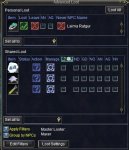
After this most recent update I have had a little issue with auto loot. I have changed absolutely nothing other than updated MQ2. Before the update when I killed stuff it would auto loot items (even no drop items) unless I told it not to loot it via the loot.ini. Now since the update it will no longer loot no drop items and in fact it pops up the confirm window to loot the item and when i click yes it does nothing no matter how many times I click yes. The work around is that I have to click the green check mark on the personal loot section then hit the yes. This is quite annoying and to top things off if I have 2 of the same no drop items in my window it completely locks my clicking. At this point i can't even target a mom other than F8 and i cant click attack other than hitting Q. Please tell me how to fix this.
 
Brand new to using the plugin. I moved over to KA12, which is trying to move people away from ninjaadvloot.

I'm trying to get this plugin to act just like ninjaadvloot. Ive set my no drop setting to keep, but whenever a new no drop item comes up.... it keeps spamming "PLlist setting xxxx to loot" over and over and it wont do anything.

Can anyone help me figure this one out? I'd like it to follow my advloot and just loot items that I don't have marked already, including no drop items

They changed the text that this plugin reads to determine when to click the confirmation dialog box. I pushed changes to fix this. Till redbot releases a new compile i posted a working version on in a previous post. Look on the 13th page of this thread.
 
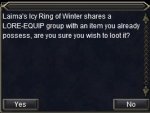
something new I ran across? Lore-Equip group items are jamming up my loot window any chance of adding an auto accept for it?
 

Attachments

  • EQ000039.jpg
    EQ000039.jpg
    41.1 KB · Views: 14
  • EQ00039.jpg
    EQ00039.jpg
    87.8 KB · Views: 13
@plure thanks for your help! That did fix my problem. Your plugin is a work of art!
 
@plure are you saying that AutoLoot has been updated, so I should patch to the most recent VV?
 
When the window pops up again could you place your mouse over the window and type:

/echo ${EverQuest.LastMouseOver}

Then place the mouse over the yes and repeat the command.
ive been waiting all day for that stupid ring to drop again so i could use the command and as soon as i got it again it worked fine :shrug:. thanks for the fix :golfclap:
 
Ok, I've run into a few problems since the update. Don't know if I'm being dumb, or if there is something wrong.

1. I'm controlling everything from my main/masterlooter. All of the stuff I have marked in eqadvloot as ignore, my other characters seem to be looting all the trash now. A solution I came up with is to make blank loot filters and have them replace their filters with blank ones. Is there a better way to do this?

2. I am confused as to the differences between the loot.ini in the release folder and the personal character inis. For example, when I'm designating gear for certain characters, Do I need to do the Gear|Classes|xxx|NumbertoLoot|x| in the personal section, the general loot ini, or do I need to do them in every single one, or is it just the Master looters personal ini?

3. Sometimes, it appears that even with the plugin loaded and my no drop settings set to keep, a character will be given the specific no drop loot they havent seen before and do nothing with it. Has anyone else run into this problem?


Thanks in advance for the replies!
 
1. If you have advloot filters set to ignore on your ML but your other toons this will happen. If you remove your filters from your ML and set those items to Ignore/Destroy (my preference is destroy, I like clean camps) then you won't loot those items. The other solution would be to copy your ML advloot filters to your other toons and then they will also ignore those items.

2. The default location for your loot.ini is Macros folder this is what controls the vast majority of MQ2AutoLoot, the MQAutoLoot.ini is in the Release folder and it is just there to tell your characters if they should be using MQ2AutoLoot and to point to the location of your loot.ini file.

3. I am not really certain, I had hoped we had gotten rid of that issue since the latest update. Hopefully if others are having this problem the can chime in so we can figure it out (I play on FV so don't see alot of no drop stuff)/
 
@plure Thank you so much for responding! Would I need to manually transpose my advloot filters to my loot.ini filters to accomplish this?
 
@plure

Hey, just wanted to say thanks for the great plugin. Since I got the crew straightened out, this (automated loot distribution) has been one of the best things about running MQ2.
 
@plure Thank you so much for responding! Would I need to manually transpose my advloot filters to my loot.ini filters to accomplish this?

How I would deal with this would be to delete the advloot filters on your ML for you junk loot, and once they pop up again on your ML pick up the item and type:

/setitem destroy

That will cause your ML to loot the items but then destroy them, this will end up keeping your camp clean of corpses. If that worries you, and you just the items left on the corpse you can type:

/setitem ignore

That will just leave the items on the corpses.

The other option would be to make sure the advloot filter is consistent between all of your characters for junk loot. Whatever you decide should work.
 
auto loot works fine on my warrior and bard , but on my shaman it does not loot, and LootOn=1, any ideas?
 
auto loot works fine on my warrior and bard , but on my shaman it does not loot, and LootOn=1, any ideas?

LootOn=1 is for ninjadvloot, that shouldn't matter for MQ2AutoLoot. The first thing I would check is try turning the plugin on for your shaman by typing:

/AutoLoot turn on

If that doesn't solve it, what is it doing on the shaman? Is it not clicking need/greed/ignore for any items? Is it not doing anything when items are pushed to the personal loot window?
 
Here's a question for ya. You run a group through a zone and have your Loot.ini set to take only the right number of quest items. Everyone get their share of loot and the right number of quest stuff. Now the group no longer needs any of the quest items (they are now trash) . The group goes and turn in the quest items and so far everything is a GO. Now if I set the quest items to be destroyed or ignored everything is great with that group (dundadun) until I change a member in the group that still needs the quest items. So now I can't ignore them or destroy them. If I leave them as quest|1 in the Loot.ini then everyone will get one more of the trashy quest item. The question is does AutoLoot have a way to check or set up a Loot.ini for each character to use?


Now I have found a way around this problem.
 
Here's a question for ya. You run a group through a zone and have your Loot.ini set to take only the right number of quest items. Everyone get their share of loot and the right number of quest stuff. Now the group no longer needs any of the quest items (they are now trash) . The group goes and turn in the quest items and so far everything is a GO. Now if I set the quest items to be destroyed or ignored everything is great with that group (dundadun) until I change a member in the group that still needs the quest items. So now I can't ignore them or destroy them. If I leave them as quest|1 in the Loot.ini then everyone will get one more of the trashy quest item. The question is does AutoLoot have a way to check or set up a Loot.ini for each character to use?


Now I have found a way around this problem.
You want to use the Gear tag and specify the class of the one character that should be looting. nameOfQuestItem=Gear|Classes|BRD|WAR|CLR|NumberToLoot|#| where # is the total you want that character to loot. The Gear tag doesn't have to be limited to wearable items, it can go on anything.
 
Neet. I will give it a try and see how it works. thanks

I should have done this first... Reread the Overview for MQ2Autoloot and commands. I saw the gear section and setup for it. (Now if I can just kick myself I might not jump to conclusions.)
 
Last edited:
Another way around this is to have your non-ML characters set the item they no longer need due to completing a quest lets say to set the advloot filter for that item to never. Which will eliminate it from being passed out to them. You can't use this trick on your ML though, as he will not pass out the item if it set to never in your advloot filter.
 
@plure Ok, if I make my advloot filters the same for each character wouldn't they then fight for drops? For example, I'm only wanting my ML to loot a diamond, but since all my characters have the same advloot filters wouldn't they all roll for it?
 
As far as I have seen the Main Looter will get everything (until his bags are full). The ML then starts passing out the loot as it comes in. With quest items once its set for the amount need for the quest, the ML will then pass the quest item to the next one that needs it. This will happen till everyone in the group get the quest amount and then will leave the item on the corpse. As plure has stated once the character get the quest item count, just go and right click one the item and check one of the 4 check boxes. This will the set it so the character (following the Advance Loot system in EQ) will (if set to never loot) will not pick it up again.

The EQ Advance Loot system will override what MQ2Autoloot has set. So what every you set up for EQ will always take president over what MQ2Autoloot.
 
LootOn=1 is for ninjadvloot, that shouldn't matter for MQ2AutoLoot. The first thing I would check is try turning the plugin on for your shaman by typing:

/AutoLoot turn on

If that doesn't solve it, what is it doing on the shaman? Is it not clicking need/greed/ignore for any items? Is it not doing anything when items are pushed to the personal loot window?
/AutoLoot turn on - says it is not a valid command.
and its not doing anything, the stuff is just sitting in the loot window.
 
Try this and see what happens. /plugin MQ2PluginManager load This should open up the Plugin Manager. Now from the pluginmanager window you can see what plugin's are turned on. Green is on and Red is off.

Now look at the list of Plugins and find MQ2AutoLoot. If it shows being Red and you want to use it just left click it and it will turn Green. If it is Green and you don't want to use it just right click it and it will unload. If you decide to use MQ2AutoLoot go here for a list of commands to use: Go to page 1 of this thread.

On you shammy's Ini you have under the [General] area you have LootOn=1 (1 means turned on and 0 is turned off). An example of a group setting would be (guy with the most bag space) is the ML (his ini loot setting would be 1) . The rest of the group can be set to 0.

With this set up the ML will loot everything. The rest of the group will not loot items. They are using EQ Advanced Loot system. An example would be: you loot a rat ear. First time mq2autoloot drops it in the bag (usually to fast to stop) Now if the ML right clicks and holds a sec the item window opens and you have a chance to set what EQ Advance loot will do with it. Say you never want it and click that check box. The next time you get one it will stay in the Advance Loot window till you do something with it. (this will let you also set the other characters Advance loot window for item disposition.

Every time you have a rat eat come up the Advance Loot system in EQ will deal with it as you have it set and will override the MQ2AutoLoot. So if you do not set an item for the EQ Advance Loot then MQ2AutoLoot will deal with the Item as in what ever your Loot.ini has it set to. (keep, sell, ignore, that setting)

Hope this helps some.
 
@plure Ok, if I make my advloot filters the same for each character wouldn't they then fight for drops? For example, I'm only wanting my ML to loot a diamond, but since all my characters have the same advloot filters wouldn't they all roll for it?

For items like diamonds, stuff to want to just sell to the merchant a better tag then "Keep" in your loot.ini is "Sell". This way you can target a merchant and type "/autoloot sell" and the plugin will open the merchant window and sell all the items marked "sell".

Honestly the only reason you should keep the advloot filters you have is because they have been curated over years and it will take sometime to rebuild your loot.ini based on that. But most of the work isn't so bad unless your moving zones/expansions ever time to you log. I generally advise people to not use advloot filters until you understand what your trying to accomplish with them. Such as when you loot the visible gear but it's a different item when you convert it to your class. Use the gear tag on the unconverted, but once someone has converted it over use the advloot filter to put that to never so you won't take them away from someone that needs it.
 
Suggestion, a way to sort for tradeskills - Maybe a category for each tardeskill so you can mark them like "smithing" so that we could do commands like give all "smithing" to player, or despoit in bank etc
 
So what is wrong with this? Student's Log|Gear|Classes|SHM|NumberToLoot|1 I have this in the loot ini and after coming back from dinner I find that the SK has looted the Student's log and not the Shaman.
 
So what is wrong with this? Student's Log|Gear|Classes|SHM|NumberToLoot|1 I have this in the loot ini and after coming back from dinner I find that the SK has looted the Student's log and not the Shaman.

Does your SK have MQAutoLoot loaded and turned on?
 
Release MQ2AutoLoot

Users who are viewing this thread

Back
Top
Cart