• You've discovered RedGuides, an EverQuest multi-boxing and scripting community 🧙‍♀️⚙️. We want you to play several EQ characters at once, come join us and say hello! 👋

  • A TLP without truebox has thawed (Very Vanilla ready)
    Frostreaver
Resource icon

Release MQ2AutoLoot

Greetings Everyone... I have a couple of questions about AutoLoot. First is when I go to another server (say bristle and go to cazic server and start a character there) will I be using the same Loot.ini that I was using on bristle? As in the loot.ini is used no matter what server you are on or is there a way to say only have a loot.ini for Bristle and a different one for Cazic?

The second one is there a way to change the delay on items that hit the advance loot window? Some items are bagged almost immediately while others wait for the normal Advance Loot to roll them. I do not have a chance to set these items to AN, AG, NV ect.

On a good note I have figured out how to set up Items for Quest|number, Keep, Sell, Ignore, and Destroy. So thanks for all the comments I have read so far... Need to read all these comments.
 
Greetings Everyone... I have a couple of questions about AutoLoot. First is when I go to another server (say bristle and go to cazic server and start a character there) will I be using the same Loot.ini that I was using on bristle? As in the loot.ini is used no matter what server you are on or is there a way to say only have a loot.ini for Bristle and a different one for Cazic?

The second one is there a way to change the delay on items that hit the advance loot window? Some items are bagged almost immediately while others wait for the normal Advance Loot to roll them. I do not have a chance to set these items to AN, AG, NV ect.

On a good note I have figured out how to set up Items for Quest|number, Keep, Sell, Ignore, and Destroy. So thanks for all the comments I have read so far... Need to read all these comments.

The plugin defaults to using the same loot.ini file located in your macro folder no matter which server you are on. You can create a seperate loot_fv.ini but you'd have to link all your characters to it manually by typing "/autoloot lootini loot_fv".

MQ2Autoloot will ignore any items that have been marked using the in-game advanced looting tags, ie AN, AG, etc. If you want new items to hang out longer on the advanced looting window you can type "/autoloot newitemdelay n" where n is the number of seconds you want it to wait till dealing with that item... It only does this for new items, there is no way to do this for items already in your loot.ini.
 
Pretty sure Autoloot is what is causing my mainlooter to crash. I can see Advanceloot window gets stuck and looter is not looting anything. Then at some point crashes out. When I unload Autoloot, no crashes. I am doing Hunter stuff and space my toons far apart in the same zone. I think it happens because my master looter is not close enough to loot many of the corpses. When I have them close enough together, no problems.

I'll look into this. Are you available for questions if I can't reproduce this?
 
Thanks at least I know whats going on... On my new character on Cazic I was not looting stuff and figured that might be the cause of items already set... And Yes I am available I check the whats new all the time while I am learning how to set things up... so just ask... and thanks again
 
Thanks at least I know whats going on... On my new character on Cazic I was not looting stuff and figured that might be the cause of items already set... And Yes I am available I check the whats new all the time while I am learning how to set things up... so just ask... and thanks again

If one of your toons isn't looting try to turn on MQ2Autoloot by typing:

/AutoLoot turn on

If that doesn't fix it let me know and we can try to figure out what's going on.
 
Redbot updated MQ2AutoLoot with a new update entry:

minor code cleanup

Knightly:
  • Replaced #define with constexpr
  • Removed using namespace std
  • Removed the duplicate defines that were already in the ItemActions Header
  • Changed some of the paths to MAX_PATH instead of MAX_STRING
  • Removed redeclared variables
  • Removed unused variables
  • Reduced scope on variables
  • Remove mixed tabs and spaces
  • Use space for alignment

alynel:
  • Cleaned up returns
  • Removed white space on line endings
  • Removed unnecessary GetLength checks...

Read the rest of this update entry...
 
I can't seem to figure out what's going on but my ML is only dealing out quest items to a couple toons, and not the full group. Seems to happen once in a while and I'm not able to resolve it. I've tried unloading/reloading mq2, the autoloot plugin, etc. I have verified it's running on all boxes. Any troubleshooting steps I can take? Here's the entry for my quest item:

Wasp Honey=Quest|4
 
Geezuz....Ok I figured out what's up. My fault. Plugin was excluding some of my bags and I didn't realize the rest were full.
@chizzle thanks for the followup. I can't tell you how useful it is when someone figures it out and then let's the conversation know what the issue was - If i was helping you, it wouldn't have occured to me that you might have some bags blocked. now i can try and remember that to be something to have folks check
 
1591622970283.png

1591623081742.png
1591622995434.png

1591623031566.png

My mq2autoloot seems to disappear from plugins manager and /plugin mq2autoloot load does not load it even though mq2autoloot.dll is still there? Any idea what's wrong?
 
View attachment 22201


Look like the same as the rest. This happens after the latest update I did which was 6/6 version.
do you have mq2 installed two different places (where the launcher is updating to, and where you are running it from) ? this is what it sounds like - I talk about that > Here <

the reason i ask is those dates are very wrong (alternatively is your computer date incorrect?)
 
do you have mq2 installed two different places (where the launcher is updating to, and where you are running it from) ? this is what it sounds like - I talk about that > Here <

the reason i ask is those dates are very wrong (alternatively is your computer date incorrect?)

1591642815529.png
Good catch Sic. I went into the wrong folder before. Here is the correct folder. Look like my mq2autoloot.dll disappeared for some reason. Going to download it separately and put it in there again. I think that should fix it.
 
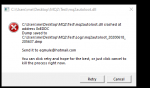
After the 6-9 test patch autoloot seem to not be working. Before the VV nav patch I was needing to say yes to every no drop item. After the 6-10 VV patch autoloot is not looting anything. It sends the message shown below but dosen't loot anything.


1591809532623.png
 
After the 6-9 test patch autoloot seem to not be working. Before the VV nav patch I was needing to say yes to every no drop item. After the 6-10 VV patch autoloot is not looting anything. It sends the message shown below but dosen't loot anything.


View attachment 22259

I know that they made some changes to how loot is being handled on test and mule is looking into it.
 
What looks like is happening is instead of the main looter taking everything that is set to keep in the ini, he is trying to give it to group members. And when I look at the group members their advloot window is opened and the I don't want checkbox is blinking on all 5 toons.
 
I am 99.5% sure the PLOOTITEM struct is wrong, and mule said he will look at it tomorrow morning and fix. Hopefully this will solve any issues but if not let me know once the struct has been fixed I will start poking around again.
 
Mule has fixed the struct and I see that there is something changed that has caused no drop items to not be clicked. I found the change in the confirmation box text output... I will submit a change to redbot to get this fixed asap.
 
Last edited:
LIVE version of MQ2AutoLoot... Until the compile has been updated here is a working version of MQ2AutoLoot for the live servers.
 

Attachments

Last edited:
Until the compile has been updated here is a working version of MQ2AutoLoot for the live servers.
Got the dll did and /plugin mq2autoloot unload | replaced the dll |started autoloot back up nothing seems to be happening
 
Test version of MQ2AutoLoot... This has to be used with the latest version of the test compile.

I'd like to thank drawthow for testing this so I could get it out quicker.
 

Attachments

Test version of MQ2AutoLoot... This has to be used with the latest version of the test compile.

I'd like to thank drawthow for testing this so I could get it out quicker.
thanks a ton, seems to be working very well
 
Test version of MQ2AutoLoot... This has to be used with the latest version of the test compile.

I'd like to thank drawthow for testing this so I could get it out quicker.
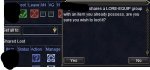
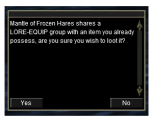
Seems the update doesn't support the lore-equip prompt window.
 
I'm in old world camping Lord Bergurgle and at first, I was thinking autoloot was having problems with stacked items. But it seems to be a problem with anything with the quest flag autoloot will just stop doing anything until I click leave on corpse everything in the loot window. Then it will runb as normal. Also if I click loot all autoloot will delete items that I have listed as delete except for the quest items (which are marked as delete in the ini).
 
Release MQ2AutoLoot

Users who are viewing this thread

Back
Top
Cart