
• You've discovered RedGuides, an EverQuest multi-boxing and scripting community 🧙‍♀️⚙️. We want you to play several EQ characters at once, come join us and say hello! 👋

  • A TLP without truebox has thawed (Very Vanilla ready)
    Frostreaver

Lua - MQ2AutoGroup Lua Gui

Joined
Nov 23, 2023
RedCents
401¢
I started an ambitious project to create my own Lua using ai because why not... I had issue after issue and decided to start with something simpler. I picked this plugin at random but also because it was fairly simple and didn't have a ui already. i think i have a decent little Lua gui for this plugin now. sharing it here to because it is just an interface for the plugin (requires MQ2autogroup plugin) not for standalone use. I welcome feedback but don't want to derail the thread here. many of the comments here have directed people to other resources and this plugin does have some limitations.
*edit because post was moved to it's own thread* **thanks for that**
 

Attachments
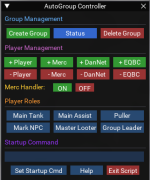
Last edited:
if you want to have a resource on the site you should consider submitting it as an actual resource - not just a random zip posted willy nilly, so it can be handled with the launcher and have all the bonuses that come with that - overview, discussion thread, commands, faq etc. it also helps you as a programmer/developer with being able to work on version control, and ensuring the support you're giving on your hard work is the same thing you're looking at on your screen - nothing worse than trying to assist with something that you've already fixed because someone is using some super outdated version and don't know.

keep in mind that it often becomes a mess when you try and extend a resource outside of the resource itself and often times it is better to handle it directly in the original resource - so command/settings panel can/should be just built-in to autogroup itself (which would go into the mq settings -> plugins -> mq2autogroup section
 
if you want to have a resource on the site you should consider submitting it as an actual resource - not just a random zip posted willy nilly, so it can be handled with the launcher and have all the bonuses that come with that - overview, discussion thread, commands, faq etc. it also helps you as a programmer/developer with being able to work on version control, and ensuring the support you're giving on your hard work is the same thing you're looking at on your screen - nothing worse than trying to assist with something that you've already fixed because someone is using some super outdated version and don't know.

keep in mind that it often becomes a mess when you try and extend a resource outside of the resource itself and often times it is better to handle it directly in the original resource - so command/settings panel can/should be just built-in to autogroup itself (which would go into the mq settings -> plugins -> mq2autogroup section
good advice, working on that now
 
Lua - MQ2AutoGroup Lua Gui

Users who are viewing this thread

Back
Top
Cart