




It's been a few years since original post edit... So here you go. I'll also add some/most of this to the resource page.
MQ2AFNuke, which was designed originally as a high-end raid quality DPS machine to replace some old macros. It is a highly configurable plugin that will currently play the following classes:
Wizard - Like a boss
Magician - Pretty-much like a boss
Enchanter - Pretty good as long as you're here for DPS!!!
Druid - Works with MQ2Heals too
Ranger - Plays very well
Works in progress:
Shadowknight - Work in progress, but does okay right now
Beastlord - Needs updated for new spell rotations, discs, burns
Warrior - Mine got banned in the bannening, so... I'm working on it.
ToDo List:
Paladin
Monk
Rogue
Bard
Berserker
Necromancer
Shaman (MQ2Heals will heal with your shaman)
Cleric? (Do you really want to DPS with your cleric? MQ2Heals will heal with your cleric)
Now, you ask... So, it does all these classes? It's slow, right... Well, no. It's designed to play any class, but each class has its own code. It detects your class, loads the appropriate code, and only runs code for that class.
Right now, the settings are the same for every class, but... I'm going to add class-specific features to classes, so the pages aren't quite as cluttered.
How do I get started?
/plugin afnuke
/nuke resume
AFNuke doesn't load your spells for you, but will use the optimal lineup for whatever class it's playing IF you memorize the spells. If you want AFNuke to memorize spells for you, and you play an end-game wizard, you can:
/nuke memorize
AFNuke has some basic camp support, autofollow/chase support (/nuke chase on), but has to be running (/nuke resume) to chase.
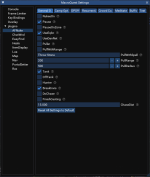
Settings live in the main MQ settings panel. EQ Button -> MacroQuest -> Settings
Most of the settings are self-descirptive (intuitive), but there's a nice little ? icon you can hover over to see what it does.
Tanking and pulling support are in the works, so might be buggy. There are loads of options to play with.
I'm probably going to add a "Optimal Settings" button later to optimize DPS for unsure players.
As you can see from below, this one is currently disabled (NukesOn is unchecked, and Pause is checked). Right now, they both effectively disable the plugin (and this SHOULD be default).
You have to turn it on to use. /nuke resume will change these to check Nukes on, and uncheck Pause.
MQ2AFNuke, which was designed originally as a high-end raid quality DPS machine to replace some old macros. It is a highly configurable plugin that will currently play the following classes:
Wizard - Like a boss
Magician - Pretty-much like a boss
Enchanter - Pretty good as long as you're here for DPS!!!
Druid - Works with MQ2Heals too
Ranger - Plays very well
Works in progress:
Shadowknight - Work in progress, but does okay right now
Beastlord - Needs updated for new spell rotations, discs, burns
Warrior - Mine got banned in the bannening, so... I'm working on it.
ToDo List:
Paladin
Monk
Rogue
Bard
Berserker
Necromancer
Shaman (MQ2Heals will heal with your shaman)
Cleric? (Do you really want to DPS with your cleric? MQ2Heals will heal with your cleric)
Now, you ask... So, it does all these classes? It's slow, right... Well, no. It's designed to play any class, but each class has its own code. It detects your class, loads the appropriate code, and only runs code for that class.
Right now, the settings are the same for every class, but... I'm going to add class-specific features to classes, so the pages aren't quite as cluttered.
How do I get started?
/plugin afnuke
/nuke resume
AFNuke doesn't load your spells for you, but will use the optimal lineup for whatever class it's playing IF you memorize the spells. If you want AFNuke to memorize spells for you, and you play an end-game wizard, you can:
/nuke memorize
AFNuke has some basic camp support, autofollow/chase support (/nuke chase on), but has to be running (/nuke resume) to chase.
Settings live in the main MQ settings panel. EQ Button -> MacroQuest -> Settings
Most of the settings are self-descirptive (intuitive), but there's a nice little ? icon you can hover over to see what it does.
Tanking and pulling support are in the works, so might be buggy. There are loads of options to play with.
I'm probably going to add a "Optimal Settings" button later to optimize DPS for unsure players.
As you can see from below, this one is currently disabled (NukesOn is unchecked, and Pause is checked). Right now, they both effectively disable the plugin (and this SHOULD be default).
You have to turn it on to use. /nuke resume will change these to check Nukes on, and uncheck Pause.
Last edited:


