• You've discovered RedGuides, an EverQuest multi-boxing and scripting community 🧙‍♀️⚙️. We want you to play several EQ characters at once, come join us and say hello! 👋

  • A TLP without truebox has thawed (Very Vanilla ready)
    Frostreaver
Resource icon

Release MQ2AAspend

I seem to be having an issue when i type /aaspend bank 200 it does not save it and is still set to Zero?
any ideas
 
yup like tibs said, you can just load it up - it is already part of the Very Vanilla install. there's nothing extra you need to do for any of the "included" plugins other than fire it up, put your settings to how you want them, and off ya go.

this is what i usually do (type these out in game with the slash)
INI:
/plugin mq2aaspend load
/aaspend bank 200
/aaspend order 53214
/aaspend brute on
/aaspend save

this says:
Load the plugin
set my aa bank to 200 aa points - so you will have 200 points before spending any
i would like to apply my points in this order in the AA tab windows: focus, class, arch, general, special
i would like to brute buy based on those settings
i would like to save these settings


keeping a high bank allows you to ensure you actually buy still you still need to buy in that tab, it also allows for "manual intervention" if you happen to have AAs burning a hole in your pocket - i keep these settings on all the time, and i still pop over and manually spend here and there - but i'll never cap out and be sitting on unspent AA this way
Sic when I do all that it does not save any of the settings.
 
I'm already looking at aaspend so i'll take a look
This is my ini but its not doing anything and in my MQ window it does not show any of these settings.

[MQ2AASpend_Settings]
AutoSpend=0
BruteForce=1
BruteForceBonusFirst=0
BankPoints=200
SpendOrder=53214
[MQ2AASpend_AAList]
[MQ2Rez]
Accept=On
RezPct=90
SafeMode=Off
VoiceNotify=Off
ReleaseToBind=Off
SilentMode=Off
Delay=1
Command Line=DISABLED
 
Hmm, i'm not finding any issues, it appears to be working for me as described in sic's comment.
Ok thanks I will figure it out
somehow haha
Seems like its not loading from the Ini cause all the setting in my MQ window dont Change
 
I somehow installed my MQ2 folder on my Desktop. Does that make anydifference What should the default location be?
your install location doesn't matter much - but you need to ensure that you're not editing in 1 install location but running from another
 
brainiac updated MQ2AAspend with a new update entry:

Merc AA Support

Merc AA is now supported similarly to how regular AA spending works. It can use INI driven list or "Brute force" mode. Brute mode has a priority system that allows you to specify merc types, with the option to prioritize the type of your active merc.

For example, if you have a tank merc active, and you run the following command:
Code:
/aaspend mercorder 241
and then:
Code:
/aaspend mercorder auto on

Then it will prioritize spending tank aa, then melee, then general, then...

Read the rest of this update entry...
 
This is a beautiful plugin that saves a lot of busywork. Bravo @brainiac and whoever else maintains. Just remember to manually take care of toggleable aas
 
this is fixed as well
giphy.gif
 
This will be my first time using mq2aaspend. I'm on a TLP and just want to be able to purchase all the AAs that I need at once without manually doing it. I've created this example for my cleric:


[CODE lang="ini" title="aaspend"][MQ2AASpend_Settings]
AutoSpend=0
BruteForce=0
BankPoints=0
[MQ2AASpend_AAList]
0=Exquisite Benediction|5
1=Innate Run Speed|5
2=Persistent Casting|3
3=Radiant Cure|6
4=Secondary Forte|1
5=Spell Casting Subtlety|6
6=Touch of the Divine|5[/CODE]

I just want to ensure I have this set correctly. As of right now it will not auto spend, and it requires 0 AA banked to begin spending. My character currently has max banked(130). If I then do "/aaspend auto now" it will go down that list I have in [MQ2AASpend_AAList] and buy them in that order, is that correct?
 
This will be my first time using mq2aaspend. I'm on a TLP and just want to be able to purchase all the AAs that I need at once without manually doing it. I've created this example for my cleric:


[CODE lang="ini" title="aaspend"][MQ2AASpend_Settings]
AutoSpend=0
BruteForce=0
BankPoints=0
[MQ2AASpend_AAList]
0=Exquisite Benediction|5
1=Innate Run Speed|5
2=Persistent Casting|3
3=Radiant Cure|6
4=Secondary Forte|1
5=Spell Casting Subtlety|6
6=Touch of the Divine|5[/CODE]

I just want to ensure I have this set correctly. As of right now it will not auto spend, and it requires 0 AA banked to begin spending. My character currently has max banked(130). If I then do "/aaspend auto now" it will go down that list I have in [MQ2AASpend_AAList] and buy them in that order, is that correct?

You can specify M instead of a number at the end of the AA if you want it to max that AA. Otherwise it's going to spend AA's until it reaches that rank.
And while I typically use brute, the overview would suggest that is correct.
/aaspend auto on|off|now - Autospends AA's based on ini on ding, or now if specified.
 
I've been back to EQ for couple months, largely due to what has been made possible by this community, thank you for that. My group recently hit 110 and I'm trying to max out AAs and figuring out what order to get them in is pretty overwhelming. I'm hoping to find/create class specific ini files for MQ2AASpend. I'm not looking for optimized perfection, but an 80% solution of prioritizing the most useful AAs to make my groups progression a little faster/easier.

So, my questions are...

1. Are there class specific ini files somewhere for MQ2AASpend?
2. If not, is there a reason it isn't feasible to create them?

If both answers are no, I volunteer myself to create them. The only problem is that I only considered myself an expert at playing a level 65 necro and that was 20 years ago...so I'll need some help. I'm not going to get ahead of myself yet. I have seen some individual posts about AA priority for some classes but nothing formal, I will start by aggregating those. But this is moot if they already exist.
 
It would be hard to start a thread like Reacts have, where anyone can share their settings.

Not sure how many create extensive lists, my guess is that many setup up the important ones (important to them) and let brute force do the rest.

It also being everyone plays different, with different priorities. Some may be afraid of being told they should focus on this AA over that AA.
 
I've been back to EQ for couple months, largely due to what has been made possible by this community, thank you for that. My group recently hit 110 and I'm trying to max out AAs and figuring out what order to get them in is pretty overwhelming. I'm hoping to find/create class specific ini files for MQ2AASpend. I'm not looking for optimized perfection, but an 80% solution of prioritizing the most useful AAs to make my groups progression a little faster/easier.

So, my questions are...

1. Are there class specific ini files somewhere for MQ2AASpend?
2. If not, is there a reason it isn't feasible to create them?

If both answers are no, I volunteer myself to create them. The only problem is that I only considered myself an expert at playing a level 65 necro and that was 20 years ago...so I'll need some help. I'm not going to get ahead of myself yet. I have seen some individual posts about AA priority for some classes but nothing formal, I will start by aggregating those. But this is moot if they already exist.
1. no not really
2. many folks just use brute, autogrant takes you to EOK these days, then you just want "all of them" after maybe manually purchasing a small handful anyhow.
 
Are brute and auto mutually exclusive? I'm assuming the answer is yes, but just wanted to check.

My desire is to use auto but fallback to brute in case my buy list has been exhausted.
 
The ini. is that suppose to be in the folder where the Macros are?
 
The ini. is that suppose to be in the folder where the Macros are?
in mq2 your aaspend information is in your release folder inside your server_toonname.ini file under 2 sections:
INI:
[MQ2AASpend_Settings]
AutoSpend=0
BruteForce=1
BruteForceBonusFirst=0
BankPoints=180
SpendOrder=53214
[MQ2AASpend_AAList]

in mq your this server_toonname.ini file is in your config folder
 
in mq2 your aaspend information is in your release folder inside your server_toonname.ini file under 2 sections:
INI:
[MQ2AASpend_Settings]
AutoSpend=0
BruteForce=1
BruteForceBonusFirst=0
BankPoints=180
SpendOrder=53214
[MQ2AASpend_AAList]

in mq your this server_toonname.ini file is in your config folder

C:\Users\xxxxx\AppData\Local\VeryVanilla\Live\Release\Macros

In the Macro folder?

In release I do have some aaspend, but its a dll file.

Ha! I found it where you said it was. Thanks!

Let's hope I manage to get it all to work.
 
Last edited:
The ini. is that suppose to be in the folder where the Macros are?

It is in the character ini in the root. For me it is VeryVanilla\Live\Release\server_charname.ini

It'll be something like:

INI:
[MQ2AASpend_Settings]
AutoSpend=0
BruteForce=1
BruteForceBonusFirst=0
BankPoints=200
SpendOrder=35214
[MQ2AASpend_AAList]
0=Combat Stability|M
...

EDIT: oops apparently hadnt refreshed. I should have known I wouldn't beat @Sic
 
Last edited:
It is in the character ini in the root. For me it is VeryVanilla\Live\Release\server_charname.ini

It'll be something like:

INI:
[MQ2AASpend_Settings]
AutoSpend=0
BruteForce=1
BruteForceBonusFirst=0
BankPoints=200
SpendOrder=35214
[MQ2AASpend_AAList]
0=Combat Stability|M
...

EDIT: oops apparently hadnt refreshed. I should have known I wouldn't beat @Sic


Indeed, I also manage to get it to work. Superb!
 
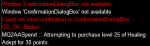
Just enabled this on my Shaman and on the first AA purchase attempt, it seems to fail trying to find the confirmation pop up. Is there a fix for this?

1635358597863.png
 
Any chance of this being updated to support merc AAs? They are now being granted with mercs not even active (you have to own a merc, even if suspended, to accumulate merc AA).
 
Any chance of this being updated to support merc AAs? They are now being granted with mercs not even active (you have to own a merc, even if suspended, to accumulate merc AA).
it already has been done on Next @brainiac did some cool stuff

1635431247208.png
 
The ini for autospend is in the main folder when you open ur redguides launcher and hit open mq folder
 
God, I feel really stupid for having missed this update over a month and a half ago. Thanks man.
https://www.redguides.com/community/resources/mq2aaspend.78/updates#resource-update-4974 and opening all of my server_Character.ini files in Notepad++ and doing a Find/Replace All helped a bunch. ;)
it's not your fault - some of it is just "growing pains" with the site.

once "next" is the "stable" / "primary" version of macroquest that RedGuides is shipping we'll have the resources updated with update notes - but while MQ2 is still the "main show" it would only show those updates so folks don't get too confused.

so all good duders (make sure you let brain know how awesome it is!)
 
So, you are sitting at your computer and you realize all your toons are at 230aa's and not getting anymore. You are playing with MQ Next. It would be one thing if one toon wasn't getting them, but all of them aren't?

Did you want a fix?

Okay fine here it is...

Find your Config folder look for the <Servername>_<charactername>.ini file.

The first command in there will be AutoSpend=0 , change it to 1.

I know, you are screaming at me right now... I already did /aaspend auto on!

Once you have fixed this, simply type in /aaspend bank <number of aa you want to bank> I suggest 210

If this doesn't work right away, log out your toon after and then relog in. Then set your aaspend bank. (Only had to do this on one of my toons)

<Took me about 6 hours of troubleshooting, you are welcome :D>
keep in mind auto is not the same as brute.

/aaspend brute on|off|now - Buys first available ability on ding, or now if specified. Default
/aaspend auto on|off|now - Autospends AA's based on ini on ding, or now if specified. Default
 
Release MQ2AAspend

Users who are viewing this thread

Back
Top
Cart