
• You've discovered RedGuides, an EverQuest multi-boxing and scripting community 🧙‍♀️⚙️. We want you to play several EQ characters at once, come join us and say hello! 👋

  • A TLP without truebox has thawed (Very Vanilla ready)
    Frostreaver

Problem - MQ2 output window is locked, cant move it

surfdog21

Seasoned veteran member
Joined
Jul 26, 2016
RedCents
1,234¢
This just happened this morning. I logged on and on my zerk and war the output window is in the upper right hand of my screen covering my group and other windows. I cannot find a spot on the window to drag it. Is this a new issue? How do I fix this?
 
This just happened this morning. I logged on and on my zerk and war the output window is in the upper right hand of my screen covering my group and other windows. I cannot find a spot on the window to drag it. Is this a new issue? How do I fix this?
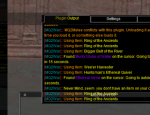
Sorry for the troubles - the current build of the CWTN plugins have an issue with their windows - you should be able to find their title bar (which won't be where it should be) and then click the minimize and then reclick it - now the bar will be in the right spot and you can move it again

Here's an image from another user - this one is a good example of the stooooopid title bar being disconnected from the window - if you hit the little minimize box twice, it'll be back to normal

1589114719376.png
 
Problem - MQ2 output window is locked, cant move it

Users who are viewing this thread

Back
Top
Cart