• Hail, we're RedGuides. We want you to play six (yes, 6!) EverQuest characters at once. We have scripts and a friendly community to help, please join our playstyle and say hello! 👋
  • We've added LLM sections to our Terms & Rules and Resource Rules, for everyone's sanity & in-game safety.
    Read more
    a. Do not replace your voice with an LLM. This goes for your posts and your scripts. Drafting and editing with a tool is fine, but don't take you out of what you share.
    b. Do not replace your EQ character's voice with an LLM. We don't want scripts that speak over /ooc, /shout or other public channels. This has been an unwritten rule that's kept casino scripts off the site for decades, but we're now compelled to make it clear: keep automated communication private.

    Why Does RG Review Scripts?
    Nearly every LLM-written Lua script we see is making your character do impossible things, and rarely in a way that's beneficial to you. We've seen heavy server hammering, /target over impossible distances when /nav spawn would passively accomplish the same thing, a spawn search that fires 20+ times per second, and other pointless actions that are likely annoying GMs.

    You are welcome to use LLMs as a tool to structure, draft, and edit your work, but please read critically before hitting /lua run

Question - MQ2 mesh editing not working

Jalerian

Well-known member
Howdy,
I am trying to edit out a troublesome area in the Hills of Shade. I followed the instructions in this post: https://www.redguides.com/community/threads/mq2war.70026/post-438638. I opened the mesh generator, opened the Hills of Shade zone, moved to the building I want to remove, chose the mark area tool, drew a box around the building I wanted to avoid, clicked create volume, adjusted the height to include everything I wanted to avoid, clicked save, then did a /nav reload in game, and the mesh is the same. Nothing I have tried allows me to save the changes I make in the Mesh Generator.

Please help!
Thanks!
 
Solution
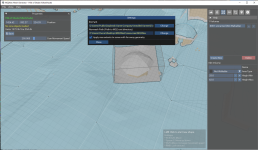
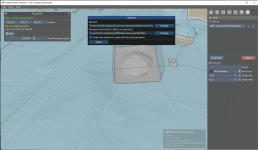
The file saved timestamp for the hills of shade is back in Dec. of 2021. It is not saving the file. The file I checked was located in the same folder as is pointed at in the screenshot below. I did a search on my computer and there is no other hillsofshade file. Here is a screen shot of my mesh generator, with settings shown. I click the Save button that is shown in the top left there under verts and it does not save my changes.View attachment 51118
Your nav path is incorrect. It tells you in the picture it should be the root mq directory, you have it pointing elsewhere (Brainiac is correct)
This is the path copied from the Mesh Generator settings: C:\Users\Owner\Desktop\MQ2Next\resources\MQ2Nav
This is the path copied from the MQ2Nav folder on my computer: C:\Users\Owner\Desktop\MQ2Next\resources\MQ2Nav

Those appear to be the same to me? Is it not supposed to have the MQ2Nav at the end? Ie, end in resources?

Thanks
Look at the file saved timestamp in C:\Users\Owner\Desktop\MQ2Next\resources\MQ2Nav\hillsofshade.navmesh. If the timestamp is not updated on the file, you're saving the mesh to the wrong location. IIRC you can set the navmesh path in 'settings' in the nav mesh generator. I had the same problem when I first used the generator.
 
The file saved timestamp for the hills of shade is back in Dec. of 2021. It is not saving the file. The file I checked was located in the same folder as is pointed at in the screenshot below. I did a search on my computer and there is no other hillsofshade file. Here is a screen shot of my mesh generator, with settings shown. I click the Save button that is shown in the top left there under verts and it does not save my changes.1695521218789.png
 
Last edited by a moderator:
The file saved timestamp for the hills of shade is back in Dec. of 2021. It is not saving the file. The file I checked was located in the same folder as is pointed at in the screenshot below. I did a search on my computer and there is no other hillsofshade file. Here is a screen shot of my mesh generator, with settings shown. I click the Save button that is shown in the top left there under verts and it does not save my changes.View attachment 51118
Your nav path is incorrect. It tells you in the picture it should be the root mq directory, you have it pointing elsewhere (Brainiac is correct)
 
Last edited:
Solution
Question - MQ2 mesh editing not working

Users who are viewing this thread

Back
Top
Cart