
Install the app
How to install the app on iOS
Follow along with the video below to see how to install our site as a web app on your home screen.
Note: This feature may not be available in some browsers.
-
 You've discovered RedGuides, an EverQuest multi-boxing and scripting community 🧙♀️⚙️. We want you to play several EQ characters at once, come join us and say hello! 👋
You are using an out of date browser. It may not display this or other websites correctly.
You should upgrade or use an alternative browser.
You should upgrade or use an alternative browser.
MQ2 does not work
- Thread starter Peppe
- Start date

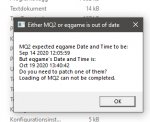

yes patch day today.Is it cuz of the game update?
Thanks!
click > HERE < to get notified when its patched and ready to go
Yes, the patch just completed a short time ago. You will need to wait for EQmule to update VV then Redbot to compile and post. Your launcher should update from 'Patch Day' to 'Update' when the update is available. Alternatively, you can click the 'Watch' button on this thread: https://www.redguides.com/community/threads/very-vanilla-mq2-live-servers.70637/ and ask it to notify you by email when an update is available.
blahblahblah84
Well-known member
- Joined
- Sep 16, 2020
- RedCents
- 1,814¢
I've updated, and I'm getting that same message as the original poster. I've installed the latest version via Very Vanilla. When I look in the MQ2 folder, the executable has today's date. I've also looked in the EQ folder and it has the Oct 19 as the executable date. As far as I can tell it should work now ... but it doesn't. Any suggestions? Is there a cache somewhere that I need to clear?
I would double check that your your macroquest2 is the directory you think is being updated.I've updated, and I'm getting that same message as the original poster. I've installed the latest version via Very Vanilla. When I look in the MQ2 folder, the executable has today's date. I've also looked in the EQ folder and it has the Oct 19 as the executable date. As far as I can tell it should work now ... but it doesn't. Any suggestions? Is there a cache somewhere that I need to clear?
blahblahblah84
Well-known member
- Joined
- Sep 16, 2020
- RedCents
- 1,814¢
Some additional info ... the issue only occurs when I try to launch a profile via MQ2. When I log into EQ manually via the launcher, Mq2 is working. Is there a separate rogue EQ executable that I don't know about?
blahblahblah84
Well-known member
- Joined
- Sep 16, 2020
- RedCents
- 1,814¢
I would double check that your your macroquest2 is the directory you think is being updated.
BTW, I double checked the Macroquest2 directory in the ReGuides Launcher and I am looking at the right MQ2 as far as I can tell.
weird - might need to do the ol rebootarino, then patch, then launch again and see if it shakes looseBTW, I double checked the Macroquest2 directory in the ReGuides Launcher and I am looking at the right MQ2 as far as I can tell.
blahblahblah84
Well-known member
- Joined
- Sep 16, 2020
- RedCents
- 1,814¢
Turns out there was a rogue Everquest. MQ2 was using one at C:\Users\Public\daybreak game company\installed games\everquest that I don't ever recall installing. Go figure.
How does MQ2 decide which Everquest launcher to invoke? I apparently have three EQs installed instead of two.
How does MQ2 decide which Everquest launcher to invoke? I apparently have three EQs installed instead of two.
- Joined
- Apr 25, 2015
- RedCents
- 40¢
Same thing happened to me, but what worked for me was launching EQ without using MQ2 and it had an update. Now mine is working. Otherwise, go into your MQ2 file and look for the autologin configuration file and update the path there.Turns out there was a rogue Everquest. MQ2 was using one at C:\Users\Public\daybreak game company\installed games\everquest that I don't ever recall installing. Go figure.
How does MQ2 decide which Everquest launcher to invoke? I apparently have three EQs installed instead of two.
blahblahblah84
Well-known member
- Joined
- Sep 16, 2020
- RedCents
- 1,814¢
Thanks, I'll look for that autologin config file.Same thing happened to me, but what worked for me was launching EQ without using MQ2 and it had an update. Now mine is working. Otherwise, go into your MQ2 file and look for the autologin configuration file and update the path there.
Users who are viewing this thread
Total: 1 (members: 0, guests: 1)
Share: