
-
 Hail, we're RedGuides. We want you to play six (yes, 6!) EverQuest characters at once. We have scripts and a friendly community to help, please join our playstyle and say hello! 👋
You are using an out of date browser. It may not display this or other websites correctly.
You should upgrade or use an alternative browser.
You should upgrade or use an alternative browser.
MQ "Next" Migration, Functions, and Features - Oh My! (Now known just as "MacroQuest")
- Thread starter Sic
- Start date

That's a function of MQ2Easyfind, not mq2nav, and yes, mq2easyfind for next has different keybinds than easyfind for legacy. You'll want to hold ctrl when clicking on the zone connection in the find menu.Made the new installation and used migration tool, but seems I have lost an important function to me. When I use Find and pick a zoneline, it only shows the path, it doesnt start running there anymore
Was this changed? cause MQ2nav ini file looks the same as far as I can see

Robban
Ultimate seasoned veteran member
from first postMade the new installation and used migration tool, but seems I have lost an important function to me. When I use Find and pick a zoneline, it only shows the path, it doesnt start running there anymore
Was this changed? cause MQ2nav ini file looks the same as far as I can see
mental notes:
1. mq2map click is Control+Shift+Click
2. new easyfind self travel is Control+Click (reminder in find window title bar)
3. new easyfind group travel is Control+Shift+Click
4. If you selected a destination in your zone guide and want to activate it you /travelto activate
5. /yes and /no are now aliases
This seems to work:anyone got the syntax to revert MQ2Map to legacy key strokes of CTRL+Click? my characters have all the dexterity, and my fingers have none
/mapclick left ctrl /nav locyx %y %x log=off

I was watching Sic's video on
MQ "Next" Migration, functions, a features - a quick overview/guide.
I do not have the new map functions or the new maps options. do not think migrator worked on this part of migration not sure how to import them in. Any help would be great.
this is your download activity

it should be "MacroQuest - Live" in the launcher.
and then you just follow those migration instructions and ezpz
> MQ2Map Overview < if you are running and you just need to know mq2map commands. you can also just /mqsettings and then click plugins -> map to see mapfilters.
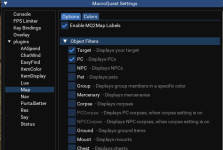
are you sure you're running MQ and not legacy?
It is OFFICIAL! MacroQuest is the version of MacroQuest that we offer here at RedGuides.
You will see this with "MacroQuest - Live" in the RG Launcher.
Please, check out this link: >>> Functions & Features Demo + Migration to the new MacroQuest<<<
There are a couple of small, yet important changes with MacroQuest:
1. mq2map click is Control+Shift+Click
2. new easyfind self travel is Control+Click (reminder in find window title bar)
3. new easyfind group travel is Control+Shift+Click
4. If you selected a destination in your zone guide and want to activate it you /travelto activate
5. /yes and /no are now aliases
6. your ini configuation files (like for kissassist) now reside in your "Config" folder and not your "Macro" folder
Still did not work no new navthis is your download activity
View attachment 37306
it should be "MacroQuest - Live" in the launcher.
and then you just follow those migration instructions and ezpz
> MQ2Map Overview < if you are running and you just need to know mq2map commands. you can also just /mqsettings and then click plugins -> map to see mapfilters.
View attachment 37307
are you sure you're running MQ and not legacy?
It is OFFICIAL! MacroQuest is the version of MacroQuest that we offer here at RedGuides.
You will see this with "MacroQuest - Live" in the RG Launcher.
Please, check out this link: >>> Functions & Features Demo + Migration to the new MacroQuest<<<
There are a couple of small, yet important changes with MacroQuest:
1. mq2map click is Control+Shift+Click
2. new easyfind self travel is Control+Click (reminder in find window title bar)
3. new easyfind group travel is Control+Shift+Click
4. If you selected a destination in your zone guide and want to activate it you /travelto activate
5. /yes and /no are now aliases
6. your ini configuation files (like for kissassist) now reside in your "Config" folder and not your "Macro" folder
there are no plugins loaded in macroquest settings how do I import them?this is your download activity
View attachment 37306
it should be "MacroQuest - Live" in the launcher.
and then you just follow those migration instructions and ezpz
> MQ2Map Overview < if you are running and you just need to know mq2map commands. you can also just /mqsettings and then click plugins -> map to see mapfilters.
View attachment 37307
are you sure you're running MQ and not legacy?
It is OFFICIAL! MacroQuest is the version of MacroQuest that we offer here at RedGuides.
You will see this with "MacroQuest - Live" in the RG Launcher.
Please, check out this link: >>> Functions & Features Demo + Migration to the new MacroQuest<<<
There are a couple of small, yet important changes with MacroQuest:
1. mq2map click is Control+Shift+Click
2. new easyfind self travel is Control+Click (reminder in find window title bar)
3. new easyfind group travel is Control+Shift+Click
4. If you selected a destination in your zone guide and want to activate it you /travelto activate
5. /yes and /no are now aliases
6. your ini configuation files (like for kissassist) now reside in your "Config" folder and not your "Macro" folder
Still did not work no new nav
there are no plugins loaded in macroquest settings how do I import them?
the migration guide will migrate all your settings. this takes less than 10 minutes
you show you downloaded it yesterday

so now all you need to do is follow these instructions in the guide below
It is OFFICIAL! MacroQuest is the version of MacroQuest that we offer here at RedGuides.
You will see this with "MacroQuest - Live" in the RG Launcher.
Please, check out this link: >>> Functions & Features Demo + Migration to the new MacroQuest<<<
There are a couple of small, yet important changes with MacroQuest:
1. mq2map click is Control+Shift+Click
2. new easyfind self travel is Control+Click (reminder in find window title bar)
3. new easyfind group travel is Control+Shift+Click
4. If you selected a destination in your zone guide and want to activate it you /travelto activate
5. /yes and /no are now aliases
6. your ini configuation files (like for kissassist) now reside in your "Config" folder and not your "Macro" folder
I have got nav to work to some extent but my screen does not look like the one in your video. I am sorry to be a pest but I am struggling with converting from a program I was just learning to 1 I do not know. I do not know where to find the commands to make my toons to next. If I could get just 1 converted to next should be able to figure out the rest. The learning curve has taken away the enjoyment of playing for now but know I will work through it. I have been trying to watch anything on next I can find and have been able to make some small steps but 2 major hurddles are infront of me. getting the sreen to look like yours in the video and making a toon a next toon ( nextrogue) for example. I write things down to remember them but do not have a frame of reference to go by. Yopu have been great with your responses and help but I am afraid at this point I am lagging behind terrible.the migration guide will migrate all your settings. this takes less than 10 minutes
you show you downloaded it yesterday
View attachment 37345
so now all you need to do is follow these instructions in the guide below
It is OFFICIAL! MacroQuest is the version of MacroQuest that we offer here at RedGuides.
You will see this with "MacroQuest - Live" in the RG Launcher.
Please, check out this link: >>> Functions & Features Demo + Migration to the new MacroQuest<<<
There are a couple of small, yet important changes with MacroQuest:
1. mq2map click is Control+Shift+Click
2. new easyfind self travel is Control+Click (reminder in find window title bar)
3. new easyfind group travel is Control+Shift+Click
4. If you selected a destination in your zone guide and want to activate it you /travelto activate
5. /yes and /no are now aliases
6. your ini configuation files (like for kissassist) now reside in your "Config" folder and not your "Macro" folder
you might be over thinking this entirely.I have got nav to work to some extent but my screen does not look like the one in your video. I am sorry to be a pest but I am struggling with converting from a program I was just learning to 1 I do not know. I do not know where to find the commands to make my toons to next. If I could get just 1 converted to next should be able to figure out the rest. The learning curve has taken away the enjoyment of playing for now but know I will work through it. I have been trying to watch anything on next I can find and have been able to make some small steps but 2 major hurddles are infront of me. getting the sreen to look like yours in the video and making a toon a next toon ( nextrogue) for example. I write things down to remember them but do not have a frame of reference to go by. Yopu have been great with your responses and help but I am afraid at this point I am lagging behind terrible.
you don't convert toons to next.
"next" is just the "next major version of macroquest" it is still macroquest.
you just use this icon instead of the old mq2 icon

very few things are fundamentally different. it is still macroquest. there are only a handful of behaviors that are different, and there are 6 of them i articulated in the post above.
all you need to do is follow that guide above which will migrate any configuration, settings, resource files from your old macroquest2 installation, to your new macroquest installation. and then you just launch macroquest and play the game like you normally would.
from a usability point of view - these are most of the differences you will find (other than things actually working like they should).
me said:There are a couple of small, yet important changes with MacroQuest:
1. mq2map click is Control+Shift+Click
2. new easyfind self travel is Control+Click (reminder in find window title bar)
3. new easyfind group travel is Control+Shift+Click
4. If you selected a destination in your zone guide and want to activate it you /travelto activate
5. /yes and /no are now aliases
6. your ini configuation files (like for kissassist) now reside in your "Config" folder and not your "Macro" folder
That's really it - you still launch macros with
/mac macroname, you still end a macro with /end or /endmac.plugin loading behavior went back to what it always used to be
/plugin name will always try and load it, instead of toggle load/unload. this isn't listed in that 6 item list because most folks wouldn't notice anyhow.once you are correctly migrated, all of your settings and such are moved over (including your nav meshes if you chose to have them migrated) and then you are golden.
So I still run kissassist and not a new toon file for my bots? As I thought there was an newer program for toons?you might be over thinking this entirely.
you don't convert toons to next.
"next" is just the "next major version of macroquest" it is still macroquest.
you just use this icon instead of the old mq2 icon
View attachment 37348
very few things are fundamentally different. it is still macroquest. there are only a handful of behaviors that are different, and there are 6 of them i articulated in the post above.
all you need to do is follow that guide above which will migrate any configuration, settings, resource files from your old macroquest2 installation, to your new macroquest installation. and then you just launch macroquest and play the game like you normally would.
from a usability point of view - these are most of the differences you will find (other than things actually working like they should).
That's really it - you still launch macros with/mac macroname, you still end a macro with/endor/endmac.
plugin loading behavior went back to what it always used to be/plugin namewill always try and load it, instead of toggle load/unload. this isn't listed in that 6 item list because most folks wouldn't notice anyhow.
once you are correctly migrated, all of your settings and such are moved over (including your nav meshes if you chose to have them migrated) and then you a
if you run kissassist, you can still run kissassist without interruption, just like you would have on legacy mq2 - the only difference is your ini files are now in the config folder instead of the macro folder (#6 on that list i shared).So I still run kissassist and not a new toon file for my bots? As I thought there was an newer program for toons?
There are several other automations, but none are required for anyone to use over another, kissassist, muleassist, rgmercs, cwtn plugins, modbot, entropy, etc
Ok need to just figure out how to get all this to run then thank you for your timeif you run kissassist, you can still run kissassist without interruption, just like you would have on legacy mq2 - the only difference is your ini files are now in the config folder instead of the macro folder (#6 on that list i shared).
There are several other automations, but none are required for anyone to use over another, kissassist, muleassist, rgmercs, cwtn plugins, modbot, entropy, etc

Easy way to go from Legacy -> Next?
1. download next via the RG launcher
(make sure you're installing to a new directory, NO NOT install OVER your mq2 directory)
2. hit the migrator tool (will move any configs/macros etc from old install) https://www.redguides.com/community/resources/macroquest-migrator.2156/
3. setup framelimiter https://www.redguides.com/community/threads/mqnext-framelimiter-demo.78448/
4. load mq2lua /plugin lua
5. if you want the functionality of the MQ2 "MQ2TargetInfo"
- They are now in 3 separate plugins:
/plugin groupinfo
/plugin targetinfo
/plugin xtarinfo
mental notes:
1. mq2map click is Control+Shift+Click
2. new easyfind self travel is Control+Click (reminder in find window title bar)
3. new easyfind group travel is Control+Shift+Click
4. If you selected a destination in your zone guide and want to activate it you /travelto activate
5. /yes and /no are now aliases
6. your ini configuation files (like for kissassist) now reside in your "Config" folder and not your "Macro" folder
eqbc:
Some folks end up with eqbc issues because they are trying to run more than one eqbc server. you should not do this. you should run the new eqbcs from next - you can right click on your mq icon and left-click "Start EQBC Server". if you have an old eqbc server set to run as a windows service you will want to disable that.
Bonus points:
>>> Lootly <<<
Hi all
I have a slight issue. I had deleted mq2 after being suspended recently, removed the folders and all. Well now I want to install again. I can install legacy live but when I try and switch to macroquest live it says it cant find file and wont migrate again. It says it looks like a new install but when i try and install again it tells doesnt add anything to new folder. not sure how to start a new install of mq2next now. I can still use legacy live until it goes away i guess. Thanks in advance for any advice.
you just point it where you want it installed in the settings tab, and then you install.Hi all
I have a slight issue. I had deleted mq2 after being suspended recently, removed the folders and all. Well now I want to install again. I can install legacy live but when I try and switch to macroquest live it says it cant find file and wont migrate again. It says it looks like a new install but when i try and install again it tells doesnt add anything to new folder. not sure how to start a new install of mq2next now. I can still use legacy live until it goes away i guess. Thanks in advance for any advice.
you only can't migrate if you don't have previous mq2 and current mq files to migrate from -> to
thanks sic ill try it in a little while.. you guys rockyou just point it where you want it installed in the settings tab, and then you install.
you only can't migrate if you don't have previous mq2 and current mq files to migrate from -> to
was able to migrate but only thing i cant get to work now is the auto follow, when i connect group does not come to me, still works on legacy. says i need dannet, never needed it before. i tried to load plugin but still did not work. back on legacy for now.
How do I get my toons to run to what I have selected in the find function again? It used to work great....bring up find select so and so and off the toon went . Now I just get the janky magical path to follow. They also don't follow anymore.
> from the migration guide <
mental notes:
1. mq2map click is Control+Shift+Click
2. new easyfind self travel is Control+Click (reminder in find window title bar)
3. new easyfind group travel is Control+Shift+Click
4. If you selected a destination in your zone guide and want to activate it you /travelto activate
5. /yes and /no are now aliases !yes and !no if you
the key for the find window is different on next than live
6. your ini configuation files (like for kissassist) now reside in your "Config" folder and not your "Macro" folder
dannet is the new suggested go to - it all still works on macroquest using eqbc - you probably didn't get everyone connected to the new eqbc server.was able to migrate but only thing i cant get to work now is the auto follow, when i connect group does not come to me, still works on legacy. says i need dannet, never needed it before. i tried to load plugin but still did not work. back on legacy for now.
or you could just load dannet - i would recommend doing so, there is near-zero config.
legacy will very soon no longer be something that is available.
its working now thanks again

jjt
Member
Control Left ClickHow do I get my toons to run to what I have selected in the find function again? It used to work great....bring up find select so and so and off the toon went . Now I just get the janky magical path to follow. They also don't follow anymore.

nope hud still works (tho mq2hud is a cpu hog and abomination!)Ok I finally made the leap and have been pleasantly surprised. I was really building the migration up in my head when everything only took about 30 minutes.
The only functionality I seem to have lost is mq2hud. Has anyone else had issues with that?

Jelly Belly
Member
Since I just joined less than a month ago, I assume that I automatically downloaded MQNext. In the attachment you will see that I do not see any option for MQNext like the guide video showed. I assume that this is because you were in like beta when it was made. Can I just select my SEQDirectory and then hit the "Migrate to Macroquest button? Even tho in the text it warns me to have MQNext preloaded?
Attachments
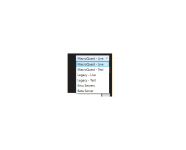
"MacroQuest - Live" is the version you want to use on the launcher.Since I just joined less than a month ago, I assume that I automatically downloaded MQNext. In the attachment you will see that I do not see any option for MQNext like the guide video showed. I assume that this is because you were in like beta when it was made. Can I just select my SEQDirectory and then hit the "Migrate to Macroquest button? Even tho in the text it warns me to have MQNext preloaded?
if you never had an old legacy mq2 installation, then you have nothing to migrate. The migration guide is for folks migrating from legacy mq2 -> MQ
It is OFFICIAL! MacroQuest is the version of MacroQuest that we offer here at RedGuides.
You will see this with "MacroQuest - Live" in the RG Launcher.
Please, check out this link: >>> Functions & Features Demo + Migration to the new MacroQuest<<<
There are a couple of small, yet important changes with MacroQuest:
1. mq2map click is Control+Shift+Click
2. new easyfind self travel is Control+Click (reminder in find window title bar)
3. new easyfind group travel is Control+Shift+Click
4. If you selected a destination in your zone guide and want to activate it you /travelto activate
5. /yes and /no are now aliases
6. your ini configuation files (like for kissassist) now reside in your "Config" folder and not your "Macro" folder
as a new user you can just follow the > Official RG Install Videos < and get setup in a pretty short period of time
not 100% sure whats going on but when Im trying to use the Come to Me Button in the group window I get a message stating
{ -->(group_test_toon_name) } /multiline ;afollow off,/nav stop:/timed 5 /nav id 20149 and my toons just stand there and look at me and do nothing. the Mimic me and Follow me buttons work but not that
{ -->(group_test_toon_name) } /multiline ;afollow off,/nav stop:/timed 5 /nav id 20149 and my toons just stand there and look at me and do nothing. the Mimic me and Follow me buttons work but not that
Do you have mq2nav loaded with nav meshes? Come to me requires thatnot 100% sure whats going on but when Im trying to use the Come to Me Button in the group window I get a message stating
{ -->(group_test_toon_name) } /multiline ;afollow off,/nav stop:/timed 5 /nav id 20149 and my toons just stand there and look at me and do nothing. the Mimic me and Follow me buttons work but not that
Yes I do have mq2nav loaded.. I even unloaded and reloaded to make sure it was running. nav meshes have been updated when I updated to next yesterday.Do you have mq2nav loaded with nav meshes? Come to me requires that
well those are the two thingsYes I do have mq2nav loaded.. I even unloaded and reloaded to make sure it was running. nav meshes have been updated when I updated to next yesterday.
dannet
mq2nav
so assuming you have dannet loaded, and everyone is connected properly, and you have meshes - then it should work
take a look > HERE < just to double check your dannet is working properly
I think I have a botched install.. I tried to update the meshes and I got an error that the meshupdater.exe does not exist. navigating to the folder C:\ProgramData\RedGuides\DesktopUtility\MQ2\Test\Release shows the meshupdater.exe file.well those are the two things
dannet
mq2nav
so assuming you have dannet loaded, and everyone is connected properly, and you have meshes - then it should work
take a look > HERE < just to double check your dannet is working properly
and manually ran it and it showed it was updating missing files.
The Follow me Button works
Come to me does not.
follow me is mq2advpath - it doesn't use meshesI think I have a botched install.. I tried to update the meshes and I got an error that the meshupdater.exe does not exist. navigating to the folder C:\ProgramData\RedGuides\DesktopUtility\MQ2\Test\Release shows the meshupdater.exe file.
and manually ran it and it showed it was updating missing files.
The Follow me Button works
Come to me does not.
if you need to manually download meshes you can do so at > MQMesh < and then you would extract them to your release->resources->MQ2Nav folder
Ill give that a try. Thank you for the help.. Things are getting weird . I really think my install is frakked. I try to load a plugin and it I get an error message of that is not a valid command please use help.
I try to type /plugin mq2eskay load ( for example) into the mq window and it says mq2eskay can not be loaded. try typing it into the norml chat window and get the not a valid command error
I try to type /plugin mq2eskay load ( for example) into the mq window and it says mq2eskay can not be loaded. try typing it into the norml chat window and get the not a valid command error
there is a known bug with typing in eq chat windows that don't accept mq commands - it isn't your fault.Ill give that a try. Thank you for the help.. Things are getting weird . I really think my install is frakked. I try to load a plugin and it I get an error message of that is not a valid command please use help.
I try to type /plugin mq2eskay load ( for example) into the mq window and it says mq2eskay can not be loaded. try typing it into the norml chat window and get the not a valid command error
Silverspaceman
Seasoned veteran member
Thanks for making these idiot-proof videos to help with setup!
you're welcome!Thanks for making these idiot-proof videos to help with setup!


The big brains are working on it, no ETA that i am aware of. There is a discussion/contribution thread from last week =-)I love MQ so far.. been using for about a month.
When is MQNext expected for emu servers?
thanks.
Users who are viewing this thread
Total: 1 (members: 0, guests: 1)
Share: