
-
 Hail, we're RedGuides. We want you to play six (yes, 6!) EverQuest characters at once. We have scripts and a friendly community to help, please join our playstyle and say hello! 👋
You are using an out of date browser. It may not display this or other websites correctly.
You should upgrade or use an alternative browser.
You should upgrade or use an alternative browser.
MQ "Next" Migration, Functions, and Features - Oh My! (Now known just as "MacroQuest")
- Thread starter Sic
- Start date

eqmule does not plan on migrating mq2mule over. > MAUI < is an alternative to the mq2mule pluginDoes MuleAssist work with MQNext?
Just did the migration over and MA wont load. I see the Macro in the folder for MQNext, but in-game it says it "could not be loaded".
muleassist the macro with
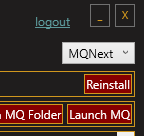
/mac muleassist absolutely works and has been getting next development for a while with @Lemons doing some really awesome stuffdid you watch the video in the first post of this thread/guide?I loaded my RG launcher but do not have the option to install MQNext. Do I need to download something else? My launcher is 1.0.61
It is the dropdown on the right-hand side
I'm pretty sure this is the right thread to post this in, but when I load up NEXT my mq2Eskay etc... kinda work, but only if I manually attack then they use their spells etc.., but do not stick either to the mob.....Also when I choose puller tank, my SK doesn't do anything. Please help.
hi coolman,I'm pretty sure this is the right thread to post this in, but when I load up NEXT my mq2Eskay etc... kinda work, but only if I manually attack then they use their spells etc.., but do not stick either to the mob.....Also when I choose puller tank, my SK doesn't do anything. Please help.
no it is not the correct thread, and it means you missed the stickied thread > HERE < click it and you'll get sorted out

Faust
Active member
I'm not doing this right. I think I'm copying things to the wrong folder but I'm not sure where everything is supposed to go. The migrator tells me that everything looks good, I updated all the plugins, and then I boot up the game and the plugins are not showing up in game. I can't get class windows to open. It's probably something simple and obvious, but this type of thing is not intuitive to me.
I apologize in advance to anyone who thinks they have the patience to help me. It's not my intention to make anyone want to rend their saintly robes. I'm just more kinesthetic than cerebral. I hope this is simple to fix.
I apologize in advance to anyone who thinks they have the patience to help me. It's not my intention to make anyone want to rend their saintly robes. I'm just more kinesthetic than cerebral. I hope this is simple to fix.
make sure you're actually launching next - your downloads show you downloaded them just fine. the migrator just moves your *settings* it doesn't move any plugins or whatnot.I'm not doing this right. I think I'm copying things to the wrong folder but I'm not sure where everything is supposed to go. The migrator tells me that everything looks good, I updated all the plugins, and then I boot up the game and the plugins are not showing up in game. I can't get class windows to open. It's probably something simple and obvious, but this type of thing is not intuitive to me.
I apologize in advance to anyone who thinks they have the patience to help me. It's not my intention to make anyone want to rend their saintly robes. I'm just more kinesthetic than cerebral. I hope this is simple to fix.
I would restart your computer and start there.
well check your plugin tab, that they actually downloaded to this install.I restarted. Next is definitely running, but the plugins are not.
then
/plugin pluginname to load a pluginif you did the migration correctly, it migrates all your files including your macroquest.ini file with the plugin settings you had previously. so perhaps you were correct in thinking that dind't go as you plannedOk. I um... loaded the plugin this time and it worked. lol
I think I got it. I just didn't realize I'm basically starting from scratch.
Mine also still says its unavailable due to patch day. No option for MQ2Nextdid you watch the video in the first post of this thread/guide?
It is the dropdown on the right-hand side
View attachment 35638
no that is not true. mq2 is down, MQNext does not say that.Mine also still says its unavailable due to patch day. No option for MQ2Next
But I dont have the option for MQNext in the drop downno that is not true. mq2 is down, MQNext does not say that.
Okay I reinstalled Redguides launcher and I installed MQnext since it popped up in the drop down. When I load it I get a mismatch error. Is there a fix for that? Its up to date in the luancherno that is not true. mq2 is down, MQNext does not say that.
...Okay I reinstalled Redguides launcher and I installed MQnext since it popped up in the drop down. When I load it I get a mismatch error. Is there a fix for that? Its up to date in the luancher
is your eq updated ?

It should be. Patched it for the new content. I guess I'll restart that too...
is your eq updated ?
eq patched today. (last night - the 9th)It should be. Patched it for the new content. I guess I'll restart that too


You're using IsBoxer or WinEQ and didn't elevate.Hrm, just tried to migrate to Next and nothing is injecting (or at least, none of hte plugins are working.... not even the map). Guess I get to start figuring out what the hell went wrong.....
Yep, so make sure you update Next if you updated EQ (Next was updated right after that).[Thu Dec 09 22:16:30 2021] <SYSTEMWIDE_MESSAGE>: A new client has been pushed to the servers, please log out and run the patcher at your earliest convenience.
Yesterday, EQ pushed a new client.

I did the migration to NEXT and such but am now getting these errors and not sure what I need to change/adjust. I did a cursory google search for them but the returns didn't help. Any ideas?
(edit - formatting picture)
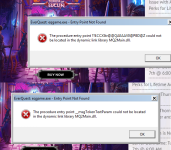
(edit - formatting picture)
this looks like you installed next over top of your mq2 directory or are manually copying filesI did the migration to NEXT and such but am now getting these errors and not sure what I need to change/adjust. I did a cursory google search for them but the returns didn't help. Any ideas?
(edit - formatting picture)
View attachment 35665
did you do either of those things?
you can't copy files around, they're not compatible
next needs its own install directory - you don't want to install over mq2, and you don't want mq2 to install over your next install.
Hey!! Thanks for the quick turn on the response. So exactly what I did was made a new directory, let it build with the patcher, then attempted to run the migration tool. When I did the right click and run with powershell, however, it just put up a command prompt screen for about .5 seconds then closed and would not give me the installer section that your video showed. At that point I did indeed do manual copying of stuff from MQ2 to MQ2Next folder. That's what I get for thinking I could work around.this looks like you installed next over top of your mq2 directory or are manually copying files
did you do either of those things?
you can't copy files around, they're not compatible
next needs its own install directory - you don't want to install over mq2, and you don't want mq2 to install over your next install.
So the next question becomes what do I do if the migration tool doesn't run as intended???
well you will want to determine why powershell isn't working for you.Hey!! Thanks for the quick turn on the response. So exactly what I did was made a new directory, let it build with the patcher, then attempted to run the migration tool. When I did the right click and run with powershell, however, it just put up a command prompt screen for about .5 seconds then closed and would not give me the installer section that your video showed. At that point I did indeed do manual copying of stuff from MQ2 to MQ2Next folder. That's what I get for thinking I could work around.
So the next question becomes what do I do if the migration tool doesn't run as intended???
do you have an up-to-date current windows install?
and saying "i didn the migration" when you didn't =p tsk tsk tsk
Start -> Run -> cmdHey!! Thanks for the quick turn on the response. So exactly what I did was made a new directory, let it build with the patcher, then attempted to run the migration tool. When I did the right click and run with powershell, however, it just put up a command prompt screen for about .5 seconds then closed and would not give me the installer section that your video showed. At that point I did indeed do manual copying of stuff from MQ2 to MQ2Next folder. That's what I get for thinking I could work around.
So the next question becomes what do I do if the migration tool doesn't run as intended???
powershell -ExecutionPolicy Bypass -File “C:\Path\To\Migrator\MacroQuestMigrator.ps1”
Tell me what that says when you run it.
You are absolutely right - I should have said attempted because I definitely did not get all the way to victory so to speak. I do have a current up to date windows install, using Windows 7 Home Premium.well you will want to determine why powershell isn't working for you.
do you have an up-to-date current windows install?
and saying "i didn the migration" when you didn't =p tsk tsk tsk
Here is what I get/see when I type those things into the command prompt:Start -> Run -> cmd
powershell -ExecutionPolicy Bypass -File “C:\Path\To\Migrator\MacroQuestMigrator.ps1”
Tell me what that says when you run it.
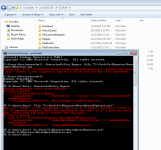
it goes without saying (but I'll say anyway) I do not have a high level of basic computer literacy. I sent a PM as I don't want to congest this thread with m ignorance more than I already have. Thank you guys for being so responsive to help an old hat.Err…that path was meant to be the actual path to the file.

jjt
Member
thanks us newbs would be lost without you hahagive yourself a computer restart
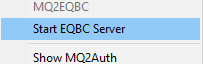
then make sure you run the eqbc server
View attachment 35680
then try again
Users who are viewing this thread
Total: 1 (members: 0, guests: 1)
Share: