• You've discovered RedGuides, an EverQuest multi-boxing and scripting community 🧙‍♀️⚙️. We want you to play several EQ characters at once, come join us and say hello! 👋

  • A TLP without truebox has thawed (Very Vanilla ready)
    Frostreaver

IRL - Monitor Setup Questions

Joined
Oct 26, 2024
RedCents
1,429¢
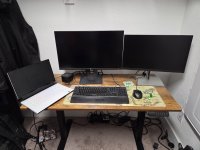
I currently have on my desk a work-provided 27" 1440p monitor and a work provided 2
4" 1080p monitor. Dragging windows between the monitors is annoying because of the resolution differences.

I want to upgrade the 24" to a 32 or 34" 1440p. I'm looking at the $150 to $250 range on Amazon. Some are curved others are flat.

I'm not a hard-core gamer. MQ2 is the most I do. I just want more room to see what's going on.

Any suggestions? Is having a flat next to curved going to look weird?

Pic provided for reference.
 

Attachments

  • 20250524_095808.jpg
    20250524_095808.jpg
    2.8 MB · Views: 0
I currently have on my desk a work-provided 27" 1440p monitor and a work provided 2
4" 1080p monitor. Dragging windows between the monitors is annoying because of the resolution differences.

I want to upgrade the 24" to a 32 or 34" 1440p. I'm looking at the $150 to $250 range on Amazon. Some are curved others are flat.

I'm not a hard-core gamer. MQ2 is the most I do. I just want more room to see what's going on.

Any suggestions? Is having a flat next to curved going to look weird?

Pic provided for reference.
if i ever have the budget to redo my setup or whatnot, i'll not have a curved next to flats --- or even curved next to other (or on top in my case) curved.
for > me < the extra gaps and holes kinda stink
 
I have a 32" 4k flat, next to a 32" 1080 curved, and it's not horrible. There is a small gap between the monitors (about like you have between your two main screens), but that could just be laziness on my part in tweaking the set up.

Does it look weird? Not to my eye, no. I don't even notice the difference between the curved and the flat. Granted, mine aren't immediately adjacent - they're angled at like a 45*, since I sit in the corner of an L shaped desk...

The biggest annoyance is the resolution differnce - but sometimes it's nice to drag the window over to the 1080 screen so the text appears bigger! 🤣
 
if i ever have the budget to redo my setup or whatnot, i'll not have a curved next to flats --- or even curved next to other (or on top in my case) curved.
for > me < the extra gaps and holes kinda stink
This is the comment I need to see. Ill spend the extra $20. Haha.

Any idea as to what size? Questions I didn't ask?
 
This is the comment I need to see. Ill spend the extra $20. Haha.

Any idea as to what size? Questions I didn't ask?
I was actually a little sad when I went to my 34" Samsung G5, because it took me a bit to get used to - having been so used to 1920x1080 for ever and ever - but i use the /viewport thing in EQ which is actually awesome
 
I play on a 34 curved with a 27 flat above it and another 27 flat sideways on the side. The gaps between all three of these would give any OCD person a complete nervous breakdown 🤣

I tend to keep EQ on the main screen, browsers and discord on the top monitor, and Plex and security camera feeds on the vertical monitor.
 
Those mismatched sized in your pic look bad, I could not deal with the size difference. But I will say I was employed in 911 and we had 8 monitors that were all the same size so that is what I got used to. They were stacked and side by side. Curved screens tend to mess with my vision and it often strays to the tv over on the side.

So my suggestion would be, get rid of the company provided ones, get 2 of the same, flat or curved (your choice) and same size.
 
I was actually a little sad when I went to my 34" Samsung G5, because it took me a bit to get used to - having been so used to 1920x1080 for ever and ever - but i use the /viewport thing in EQ which is actually awesome
What is /viewport ? Would that be a command that allowed me to set individual EQ screens at the correct size where I want them?
 
Those mismatched sized in your pic look bad, I could not deal with the size difference. But I will say I was employed in 911 and we had 8 monitors that were all the same size so that is what I got used to. They were stacked and side by side. Curved screens tend to mess with my vision and it often strays to the tv over on the side.

So my suggestion would be, get rid of the company provided ones, get 2 of the same, flat or curved (your choice) and same size.
Only really have budget for 1 right now. Would get one, and then upgrade to get another at a later date.
 
I personally hate curved monitors.
- No matter what you do they pick up a glare from behind you.
- Straight lines become bent unless you are at the perfect spot.

When I replaced my main 27" monitor I tried out a 32" curved display. It had great specs, but I just couldn't get used to the odd visuals and reflections.

I'm currently using a 32" LG in front, a 27" Dell on the right and a 24" samsung on the right. They are all connected to different systems at the moment so I'm not dragging things across the monitors.

At work I've done the mismatched sizes on the same computer and the key for me was to get the top of the monitors at the same physical height. Then match adjust the resolution so they are "close" with respect to pixels per inch.

Example:
32" panel might be running at 2140x1440 while the smaller 24" panel runs 1920x1080.
 
What is /viewport ? Would that be a command that allowed me to set individual EQ screens at the correct size where I want them?
i have an alias "/vp" which issues /viewport 440 0 2560 1440 1 - it makes the sides of the screen black (you can put things like bags or overlays on the side) super fun
 
What is /viewport ? Would that be a command that allowed me to set individual EQ screens at the correct size where I want them?
It allows you to render EQ at a smaller resolution than your EQ window, which generally leaves you with black borders in the unused area.
I saved
Has a nice explanation
 
The one thing that you need to be aware of is that Windows does not deal well with monitors with significantly different resolutions. you will have some strange window sizing issues.
 
I would go with flat, personally. Curved are popular for some reason, but I would only use one for a single monitor setup.

Size-wise, 2560 x 1440 on a 32 inch is what I prefer. With 4K I just end up scaling up the text size anyway. I daresay the EQ player population has eyes similar to mine by now.
 
@Algar and @Sic I don't think Viewport did what I wanted.

I want a command to resize the whole window. When all 6 instances pop up, I want to resize one to be larger and put all of them in a specific spot on my desktop. Is there a built in or MQ2 command that does this?
 
@Algar and @Sic I don't think Viewport did what I wanted.

I want a command to resize the whole window. When all 6 instances pop up, I want to resize one to be larger and put all of them in a specific spot on my desktop. Is there a built in or MQ2 command that does this?
no, EQ loads its display based off the saved ini setting. You would need 2 installs, one with primary and the other basic bots.. this has been a EQ forever, doesnt do displays (or audio) well at all.
 
I run EQ (mostly) on my 42" Samsung, with three additional instances on my 2nd computer. In both cases, I've done as Durango says above and created a separate install for each instance. My 42" has my main opened in a pretty large screen in the middle, with two usable bots on the left (over and under-style), with four really smaller windows on the right set up in a 2x2, that I can use when absolutely needed, but the mostly run RG Mercs as needed. My 2nd computer has a 32" that is full screen and a 27" widescreen in portrait mode that has three windows all tiled top to bottom.
 
@Algar and @Sic I don't think Viewport did what I wanted.

I want a command to resize the whole window. When all 6 instances pop up, I want to resize one to be larger and put all of them in a specific spot on my desktop. Is there a built in or MQ2 command that does this?
Ah yeah, for sure not that unfortunately
 
I'm a bit OCD, when I went to dual monitors I HAD to have identical models. Different brands, sizes, resolutions, colors, or anything different would drive me absolutely nuts. Before I bought my desktop, I used a laptop that had a different resolution than my monitors, and that just had to go! I use 2 x 24" Dell 1920x1080... I got tired of switching to my work docking station when I wanted to play so I bought 2 monitors for personal use. Personal setup on the left, Work on the right. These suit my needs right now, and until I get my home office set up, this is really all the room I have.
 

Attachments

  • IMG_1466.jpg
    IMG_1466.jpg
    175.1 KB · Views: 0
i have 3 monitors the 3rd is vertical the first 2 is where eq happens the middle one is a plain screen with eq viewport set to display on it the other one is for the ui. i keep chat group and target windows on the playable portion.
 

Attachments

  • 20250517_202230.jpg
    20250517_202230.jpg
    3.3 MB · Views: 0


This is an older picture.

The center screen is now slightly larger than the two on the side and I had to finally replace the old ps2 keyboard.
 
i have 3 monitors the 3rd is vertical the first 2 is where eq happens the middle one is a plain screen with eq viewport set to display on it the other one is for the ui. i keep chat group and target windows on the playable portion.
Let me guess - you main a Ranger?
 
no, EQ loads its display based off the saved ini setting. You would need 2 installs, one with primary and the other basic bots.. this has been a EQ forever, doesnt do displays (or audio) well at all.
Sorry to bring this back up, but how hard is it to make a second install and then have RG launcher see the installs for the specific accounts?
 
IRL - Monitor Setup Questions

Users who are viewing this thread

Back
Top
Cart