
-
 Hail, we're RedGuides. We want you to play six (yes, 6!) EverQuest characters at once. We have scripts and a friendly community to help, please join our playstyle and say hello! 👋
 -
 We've added LLM sections to our Terms & Rules and Resource Rules, for everyone's sanity & in-game safety.
Read more
a. Do not replace your voice with an LLM. This goes for your posts and your scripts. Drafting and editing with a tool is fine, but don't take you out of what you share.
b. Do not replace your EQ character's voice with an LLM. We don't want scripts that speak over/ooc,/shoutor other public channels. This has been an unwritten rule that's kept casino scripts off the site for decades, but we're now compelled to make it clear: keep automated communication private.
Why Does RG Review Scripts?
Nearly every LLM-written Lua script we see is making your character do impossible things, and rarely in a way that's beneficial to you. We've seen heavy server hammering,/targetover impossible distances when/nav spawnwould passively accomplish the same thing, a spawn search that fires 20+ times per second, and other pointless actions that are likely annoying GMs.
You are welcome to use LLMs as a tool to structure, draft, and edit your work, but please read critically before hitting/lua run
You are using an out of date browser. It may not display this or other websites correctly.
You should upgrade or use an alternative browser.
You should upgrade or use an alternative browser.

Release (Mighty) Lua Event Manager 12/13/2024
- Thread starter aquietone
- Start date
aquietone updated (Mighty) Lua Event Manager with a new update entry:
12/13/2024
Read the rest of this update entry...
12/13/2024
Automated update: 1082900301f8905699f8e5ab68b09e0d3b63a984
Read the rest of this update entry...
I downloaded the file and extracted everything into my Lua folder (I think), but when I click the Lua tab in EQ, it looks absolutely nothing like all of these example pictures. Have also tried using the commands to start it and the same non-functional window pops up. I did click the watch button and the Lua does show up in my RG launch window under the Lua tab. Help! Thank You in advance.

what Lua you didn't say and no one can guess.I downloaded the file and extracted everything into my lua folder (I think), but when I click the lua tab in EQ, it looks absolutely nothing like all of these example pictures. Have also tried using the commands to start it and the same non-functional window pops up. I did click the watch button and the LUA does show up in my RG launch window under the LUA tab. Help! Thank You in advance.
you should 100% let the RG launcher download it for you (i see you tried).
make sure you watch the *overview* of the Lua script and not the discussion.
but again - which Lua?
Hi Sic! Thank you for replying. I downloaded (Mighty) Lua Event Manager. aquietone submitted it.what lua you didn't say and no one can guess.
you should 100% let the RG launcher download it for you (i see you tried).
make sure you watch the *overview* of the lua script and not the discussion.
but again - which lua?
so you will want to "watch" the overview for LEM > by clicking here < and then restart your RG launcher.Hi Sic! Thank you for replying. I downloaded (Mighty) Lua Event Manager. aquietone submitted it.
once in game you will want to
/lua run lem then you can /lem showif for some reason you insist on manually downloading.
the download is a .zip (lem.zip), you would unzip it and you are left with a folder "lem", you would place this folder in your Lua folder
for me (it will look differently for you) you can see it is here in my release -> Lua folder with release -> Lua -> lem
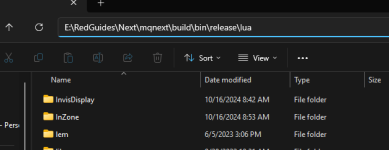
so you will want to "watch" the overview for LEM > by clicking here < and then restart your RG launcher.
once in game you will want to/lua run lemthen you can/lem show
if for some reason you insist on manually downloading.
the download is a .zip (lem.zip), you would unzip it and you are left with a folder "lem", you would place this folder in your lua folder
for me (it will look differently for you) you can see it is here in my release -> lua folder with release -> lua -> lem
I don't mind downloading it via the RG launcher but do not know how. On the Lua tab I have a reinstall option. Im guessing that is how I would do it?
I don't mind downloading it via the RG launcher but do not know how. On the Lua tab I have a reinstall option. Im guessing that is how I would do it?
- watch the overview
- restart the RG launcher (or your PC)
- check the Lua tab
- hit install
mine says "reinstall" because it is already installed
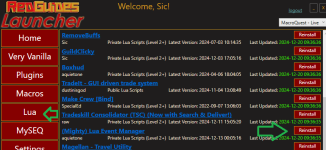
I did everything you said.
- watch the overview
- restart the RG launcher (or your PC)
- check the lua tab
- hit install
mine says "reinstall" because it is already installed
View attachment 67340
When I type /Lua run lem I get the following in my mq window:
Running Lua script 'lem' with PID 1 (in white letters)
In red letters I see this message:
loop or precious error loading module "mq"
stack traceback:
[C]: in function 'require'
...ta\Local\VeryVanilla\MacroQuest\Release\Lua\lem\init.Lua:4 in main chunk
Ending Lua script 'lem' with PID 1 and status 2
The second command opens no window for me but instead says Couldn't parse '/lem show'. I double-checked that my MQ2Lua is active in the /pluginman. I'm sorry. I know dealing with a non-computer-literate has got to be frustrating!
Last edited:

Crypl
Well-known member
aquietone, or anyone else,
I am importing events into this Lua for my driving tank (Shadow Knight) to start trying to do Missions by myself. Specifically looking at the mechanics of Icebound Avatar duck/stand/move. My question that I can't seem to find a direct answer to is this:
Do I have to /Lua run lem and import the events into all 6 of my toons LEM manager? Or is importing them all into my driving toon enough for this to work across all characters I add to my group?
Also was just reviewing the available events to import and had a questions. I noticed that many of the commands referring to Bard's are issuing mqp commands like /mqp on or off /twist off, etc. Do these community made Events work if I am using CWTN and Sics Class plugins? Are there CWTN/Sic plugin based event imports available? Or, will I need to try and work out the commands I need to update if I want to use the LEM events especially for ToL content that has Mez events, cure events, and the whole silence mechanic for Aten Ha Ra?
Thank you in advance if I missed the post or resource that details this.
I am importing events into this Lua for my driving tank (Shadow Knight) to start trying to do Missions by myself. Specifically looking at the mechanics of Icebound Avatar duck/stand/move. My question that I can't seem to find a direct answer to is this:
Do I have to /Lua run lem and import the events into all 6 of my toons LEM manager? Or is importing them all into my driving toon enough for this to work across all characters I add to my group?
Also was just reviewing the available events to import and had a questions. I noticed that many of the commands referring to Bard's are issuing mqp commands like /mqp on or off /twist off, etc. Do these community made Events work if I am using CWTN and Sics Class plugins? Are there CWTN/Sic plugin based event imports available? Or, will I need to try and work out the commands I need to update if I want to use the LEM events especially for ToL content that has Mez events, cure events, and the whole silence mechanic for Aten Ha Ra?
Thank you in advance if I missed the post or resource that details this.
You only need to import the event once, but you need to activate the event on each character you want to use the event or condition. Additionally, LEM does need to be running on each toon.aquietone, or anyone else,
I am importing events into this LUA for my driving tank (Shadow Knight) to start trying to do Missions by myself. Specifically looking at the mechanics of Icebound Avatar duck/stand/move. My question that I can't seem to find a direct answer to is this:
Do I have to /lua run lem and import the events into all 6 of my toons LEM manager? Or is importing them all into my driving toon enough for this to work across all characters I add to my group?
Also was just reviewing the available events to import and had a questions. I noticed that many of the commands referring to Bard's are issuing mqp commands like /mqp on or off /twist off, etc. Do these community made Events work if I am using CWTN and Sics Class plugins? Are there CWTN/Sic plugin based event imports available? Or, will I need to try and work out the commands I need to update if I want to use the LEM events especially for ToL content that has Mez events, cure events, and the whole silence mechanic for Aten Ha Ra?
Thank you in advance if I missed the post or resource that details this.
Support for varying automation is really dependent upon the event or condition creator. If you see BOXR commands, /class shortname commands it was probably coded to work for CWTN stuff.
Crypl
Well-known member
Thanks for the quick reply. I have reviewed the content creator code again and does look like they have the mq.cmdf('/%s pause on', mq.TLO.Me.Class.ShortName()) so I am going to run this Mission today and see how everything goes.You only need to import the event once, but you need to activate the event on each character you want to use the event or condition. Additionally, LEM does need to be running on each toon.
Support for varying automation is really dependent upon the event or condition creator. If you see BOXR commands, /class shortname commands it was probably coded to work for CWTN stuff.

eqsubi15
Ultimate seasoned veteran member
We all love the amazing scripts very talented folks have built and shared. Myself, and probably many others are not skilled enough to make our own. If anyone wanted to take on a great project, a LEM builder app would be a great idea. Doesn't have to be super fancy at the beginning. Something that allows you to go through some questionaire to provide values for the builder to use.
Example:
1. Enter zone name:
2. Enter event name:
3. How many trigger phrases?
4. Provide trigger phrase or text for each one
5. What action do you want to perform when triggered?
6. If run away, what x/y/z coordinates to run to?
7. Will your toon return after?
8. If yes, what duration until return?
I know there are more selections that can be in that list, but you get the idea. I'd be willing to pay for a tool like that
Example:
1. Enter zone name:
2. Enter event name:
3. How many trigger phrases?
4. Provide trigger phrase or text for each one
5. What action do you want to perform when triggered?
6. If run away, what x/y/z coordinates to run to?
7. Will your toon return after?
8. If yes, what duration until return?
I know there are more selections that can be in that list, but you get the idea. I'd be willing to pay for a tool like that
this sounds like a good "default" or addition to LEM itself - should probably post in the lem discussion threadWe all love the amazing scripts very talented folks have built and shared. Myself, and probably many others are not skilled enough to make our own. If anyone wanted to take on a great project, a LEM builder app would be a great idea. Doesn't have to be super fancy at the beginning. Something that allows you to go through some questionaire to provide values for the builder to use.
Example:
1. Enter zone name:
2. Enter event name:
3. How many trigger phrases?
4. Provide trigger phrase or text for each one
5. What action do you want to perform when triggered?
6. If run away, what x/y/z coordinates to run to?
7. Will your toon return after?
8. If yes, what duration until return?
I know there are more selections that can be in that list, but you get the idea. I'd be willing to pay for a tool like that
eqsubi15
Ultimate seasoned veteran member
We all love the amazing scripts very talented folks have built and shared. Myself, and probably many others are not skilled enough to make our own. If anyone wanted to take on a great project, a LEM builder app would be a great idea. Doesn't have to be super fancy at the beginning. Something that allows you to go through some questionaire to provide values for the builder to use.
Example:
1. Enter zone name:
2. Enter event name:
3. How many trigger phrases?
4. Provide trigger phrase or text for each one
5. What action do you want to perform when triggered?
6. If run away, what x/y/z coordinates to run to?
7. Will your toon return after?
8. If yes, what duration until return?
I know there are more selections that can be in that list, but you get the idea. I'd be willing to pay for a tool like that
I know this doesn't directly respond to the concept of a LEM builder - but writing these for yourself actually gets pretty easy once you do a couple and have existing ones to copy/paste code from - especially the respond to text and do something ones. Conditions can be a little trickier. And I'm no coder, but I hack my way through it well enough to get a lot of stuff done.We all love the amazing scripts very talented folks have built and shared. Myself, and probably many others are not skilled enough to make our own. If anyone wanted to take on a great project, a LEM builder app would be a great idea. Doesn't have to be super fancy at the beginning. Something that allows you to go through some questionaire to provide values for the builder to use.
Example:
1. Enter zone name:
2. Enter event name:
3. How many trigger phrases?
4. Provide trigger phrase or text for each one
5. What action do you want to perform when triggered?
6. If run away, what x/y/z coordinates to run to?
7. Will your toon return after?
8. If yes, what duration until return?
I know there are more selections that can be in that list, but you get the idea. I'd be willing to pay for a tool like that
eqsubi15
Ultimate seasoned veteran member
Unfortunately, every attempt I've tried to make my own have failed.I know this doesn't directly respond to the concept of a LEM builder - but writing these for yourself actually gets pretty easy once you do a couple and have existing ones to copy/paste code from - especially the respond to text and do something ones. Conditions can be a little trickier. And I'm no coder, but I hack my way through it well enough to get a lot of stuff done.

We have an entire channel in discord dedicated to coding questions, and in my experience anyone who is fighting the good fight and trying will get people willing to help themUnfortunately, every attempt I've tried to make my own have failed.
eqsubi15
Ultimate seasoned veteran member
I've stayed away from Discord as it reveals my main toon's name. I've reached out on the forums here on some occassions, but didn't get a solution.We have an entire channel in discord dedicated to coding questions, and in my experience anyone who is fighting the good fight and trying will get people willing to help them
Your loss. It's where all the cool kids areI've stayed away from Discord as it reveals my main toon's name. I've reached out on the forums here on some occassions, but didn't get a solution.

I have this issue as well so I have a second Discord account I log in via browser rather than the client for MQ related stuff.I've stayed away from Discord as it reveals my main toon's name. I've reached out on the forums here on some occassions, but didn't get a solution.
Its entirely dependent on what your Event or Condition is doing. If the Event or Condition is telling your driver to send EQBC or Dannet commands to your boxes, then it only needs to be run on the driver, but that would be unusual, and extremely limiting for most events. In most cases you're going to be running it on every character.Do you need to run LEM on each box chars or can it just run from your main(driver)?
ok, thanks for the quick response! Cant wait to try it out.Its entirely dependent on what your Event or Condition is doing. If the Event or Condition is telling your driver to send EQBC or Dannet commands to your boxes, then it only needs to be run on the driver, but that would be unusual, and extremely limiting for most events. In most cases you're going to be running it on every character.

Encountering an error I have not seen before. When trying to import a lem, I am getting an error upon trying to active it. Old ones work just fine.
Any help would be appreciated. Some measures and info below;
Curious to know how to fix this so I can once again import shared lems. Thanks!
Any help would be appreciated. Some measures and info below;
- I did switch over from the launcher to RedFetch and copied over my config directory for what that's worth
- I have tried loading MQ with both the launcher and Redfetch and receive the same error when importing, just different directories
- I have tried importing multiple lems from the library. Both conditions and events
- I CAN add an event manually using the "Add Event" button and placing the code there and it works fine.
Code:
Event registration failed: TankBandoSwap
module 'lemcommons.Commons' not found:
    no field package.preload['lemcommons.Commons']
    no file 'D:\RedFetch\Downloads\VanillaMQ_LIVE\lua\lem\lemcommons\Commons\init.lua'
    no file 'D:\RedFetch\Downloads\VanillaMQ_LIVE\lua\lem\lemcommons\Commons.lua'
    no file 'D:\RedFetch\Downloads\VanillaMQ_LIVE\lua\lemcommons\Commons\init.lua'
    no file 'D:\RedFetch\Downloads\VanillaMQ_LIVE\lua\lemcommons\Commons.lua'
    no file 'D:\RedFetch\Downloads\VanillaMQ_LIVE\modules\2.1.1697887905\luarocks\share\lua\5.1\lemcommons\Commons.lua'
    no file 'D:\RedFetch\Downloads\VanillaMQ_LIVE\modules\2.1.1697887905\luarocks\share\lua\5.1\lemcommons\Commons\init.lua'
    no file 'D:\RedFetch\Downloads\VanillaMQ_LIVE\modules\luarocks\share\lua\5.1\lemcommons\Commons.lua'
    no file 'D:\RedFetch\Downloads\VanillaMQ_LIVE\modules\luarocks\share\lua\5.1\lemcommons\Commons\init.lua'
    no file '.\lemcommons\Commons.lua'
    no file 'D:\Everquest\lua\lemcommons\Commons.lua'
    no file 'D:\Everquest\lua\lemcommons\Commons\init.lua'
    no file 'D:\RedFetch\Downloads\VanillaMQ_LIVE\lua\lem\lemcommons\Commons.dll'
    no file 'D:\RedFetch\Downloads\VanillaMQ_LIVE\modules\2.1.1697887905\luarocks\lib\lua\5.1\lemcommons\Commons.dll'
    no file '.\lemcommons\Commons.dll'
    no file 'D:\Everquest\lemcommons\Commons.dll'
    no file 'D:\Everquest\loadall.dll'
    no file 'D:\RedFetch\Downloads\VanillaMQ_LIVE\lua\lem\lemcommons.dll'
    no file 'D:\RedFetch\Downloads\VanillaMQ_LIVE\modules\2.1.1697887905\luarocks\lib\lua\5.1\lemcommons.dll'
    no file '.\lemcommons.dll'
    no file 'D:\Everquest\lemcommons.dll'
    no file 'D:\Everquest\loadall.dll'
Curious to know how to fix this so I can once again import shared lems. Thanks!
lemcommons sounds like something you might be expected to get from somewhere else. that's not something bundled in lem. wherever you are getting these events from must have this lemcommons folder you should get a copy of. the shared event would only include the main source file of the event, not any extra dependencies it might requireEncountering an error I have not seen before. When trying to import a lem, I am getting an error upon trying to active it. Old ones work just fine.
Any help would be appreciated. Some measures and info below;
- I did switch over from the launcher to RedFetch and copied over my config directory for what that's worth
- I have tried loading MQ with both the launcher and Redfetch and receive the same error when importing, just different directories
- I have tried importing multiple lems from the library. Both conditions and events
- I CAN add an event manually using the "Add Event" button and placing the code there and it works fine.
Code:Event registration failed: TankBandoSwap module 'lemcommons.Commons' not found: no field package.preload['lemcommons.Commons'] no file 'D:\RedFetch\Downloads\VanillaMQ_LIVE\lua\lem\lemcommons\Commons\init.lua' no file 'D:\RedFetch\Downloads\VanillaMQ_LIVE\lua\lem\lemcommons\Commons.lua' no file 'D:\RedFetch\Downloads\VanillaMQ_LIVE\lua\lemcommons\Commons\init.lua' no file 'D:\RedFetch\Downloads\VanillaMQ_LIVE\lua\lemcommons\Commons.lua' no file 'D:\RedFetch\Downloads\VanillaMQ_LIVE\modules\2.1.1697887905\luarocks\share\lua\5.1\lemcommons\Commons.lua' no file 'D:\RedFetch\Downloads\VanillaMQ_LIVE\modules\2.1.1697887905\luarocks\share\lua\5.1\lemcommons\Commons\init.lua' no file 'D:\RedFetch\Downloads\VanillaMQ_LIVE\modules\luarocks\share\lua\5.1\lemcommons\Commons.lua' no file 'D:\RedFetch\Downloads\VanillaMQ_LIVE\modules\luarocks\share\lua\5.1\lemcommons\Commons\init.lua' no file '.\lemcommons\Commons.lua' no file 'D:\Everquest\lua\lemcommons\Commons.lua' no file 'D:\Everquest\lua\lemcommons\Commons\init.lua' no file 'D:\RedFetch\Downloads\VanillaMQ_LIVE\lua\lem\lemcommons\Commons.dll' no file 'D:\RedFetch\Downloads\VanillaMQ_LIVE\modules\2.1.1697887905\luarocks\lib\lua\5.1\lemcommons\Commons.dll' no file '.\lemcommons\Commons.dll' no file 'D:\Everquest\lemcommons\Commons.dll' no file 'D:\Everquest\loadall.dll' no file 'D:\RedFetch\Downloads\VanillaMQ_LIVE\lua\lem\lemcommons.dll' no file 'D:\RedFetch\Downloads\VanillaMQ_LIVE\modules\2.1.1697887905\luarocks\lib\lua\5.1\lemcommons.dll' no file '.\lemcommons.dll' no file 'D:\Everquest\lemcommons.dll' no file 'D:\Everquest\loadall.dll'
Curious to know how to fix this so I can once again import shared lems. Thanks!
Thanks for the fast reply AQ.lemcommons sounds like something you might be expected to get from somewhere else. that's not something bundled in lem. wherever you are getting these events from must have this lemcommons folder you should get a copy of. the shared event would only include the main source file of the event, not any extra dependencies it might require
I just tried this one for simplicity - https://www.redguides.com/community/threads/lua-event-manager-lem-event-library.83548/post-550976
and received
Code:
Event registration failed: TEST
module 'conditions.TEST' not found:
    no field package.preload['conditions.TEST']
    no file 'D:\RedFetch\Downloads\VanillaMQ_LIVE\lua\lem\conditions\TEST\init.lua'
    no file 'D:\RedFetch\Downloads\VanillaMQ_LIVE\lua\lem\conditions\TEST.lua'
    no file 'D:\RedFetch\Downloads\VanillaMQ_LIVE\lua\conditions\TEST\init.lua'
    no file 'D:\RedFetch\Downloads\VanillaMQ_LIVE\lua\conditions\TEST.lua'
    no file 'D:\RedFetch\Downloads\VanillaMQ_LIVE\modules\2.1.1697887905\luarocks\share\lua\5.1\conditions\TEST.lua'
    no file 'D:\RedFetch\Downloads\VanillaMQ_LIVE\modules\2.1.1697887905\luarocks\share\lua\5.1\conditions\TEST\init.lua'
    no file 'D:\RedFetch\Downloads\VanillaMQ_LIVE\modules\luarocks\share\lua\5.1\conditions\TEST.lua'
    no file 'D:\RedFetch\Downloads\VanillaMQ_LIVE\modules\luarocks\share\lua\5.1\conditions\TEST\init.lua'
    no file '.\conditions\TEST.lua'
    no file 'D:\EverquestAlts\lua\conditions\TEST.lua'
    no file 'D:\EverquestAlts\lua\conditions\TEST\init.lua'
    no file 'D:\RedFetch\Downloads\VanillaMQ_LIVE\lua\lem\conditions\TEST.dll'
    no file 'D:\RedFetch\Downloads\VanillaMQ_LIVE\modules\2.1.1697887905\luarocks\lib\lua\5.1\conditions\TEST.dll'
    no file '.\conditions\TEST.dll'
    no file 'D:\EverquestAlts\conditions\TEST.dll'
    no file 'D:\EverquestAlts\loadall.dll'
    no file 'D:\RedFetch\Downloads\VanillaMQ_LIVE\lua\lem\conditions.dll'
    no file 'D:\RedFetch\Downloads\VanillaMQ_LIVE\modules\2.1.1697887905\luarocks\lib\lua\5.1\conditions.dll'
    no file '.\conditions.dll'
    no file 'D:\EverquestAlts\conditions.dll'
    no file 'D:\EverquestAlts\loadall.dll'
One of the posts in the lem library thread had it in. It was talking about being able to include common subroutines in a lem - kinda near the end of the thread, iirc. Found it https://www.redguides.com/community/threads/lua-event-manager-lem-event-library.83548/post-545386
I tried to import this LEM: https://www.redguides.com/community/threads/mq2grind.75417/post-546508 and I can't. I get: ERROR: Failed to import event.
To be clear: I clicked the Import tab in Lem, pasted the code from the post, and clicked the Import Event button and got the error message. Please help!
To be clear: I clicked the Import tab in Lem, pasted the code from the post, and clicked the Import Event button and got the error message. Please help!
@Whodis Yes, I followed the MQ2Grind FAQ about preventing my group from moving on in MQ2Grind when my tank has no mana and it references that post as a solution. There is a LEM in the post that I linked that is supposed to pause MQ2Grind if the tank is below 30% mana, which is common at my current level and gear set.

The import event will be a hex one line string, not the actual code, if that was what you were trying to import. Here is my lem export from that:I tried to import this LEM: https://www.redguides.com/community/threads/mq2grind.75417/post-546508 and I can't. I get: ERROR: Failed to import event.
To be clear: I clicked the Import tab in Lem, pasted the code from the post, and clicked the Import Event button and got the error message. Please help!
Code:
cmV0dXJuIHsKIFsiY29kZSJdID0gImJHOWpZV3dnYlhFZ1BTQnlaWEYxYVhKbEtDZHRjU2NwQ2dwc2IyTmhiQ0J0WldSa2FXNW5YMjVsWldSbFpDQTlJR1poYkhObENncHNiMk5oYkNCdFlXNWhiV0Z3SUQwZ2V3b2dJQ0FnUTB4U1BYdG9hV2RvYldGdVlUMDVOU3dnYkc5M2JXRnVZVDAwTUgwc0NpQWdJQ0JUU0UwOWUyaHBaMmh0WVc1aFBUazFMQ0JzYjNkdFlXNWhQVFF3ZlN3S0lDQWdJRVJTVlQxN2FHbG5hRzFoYm1FOU9UVXNJR3h2ZDIxaGJtRTlOREI5TEFvZ0lDQWdVMGhFUFh0b2FXZG9iV0Z1WVQwNU5Td2diRzkzYldGdVlUMDBNSDBzQ2lBZ0lDQlFRVXc5ZTJocFoyaHRZVzVoUFRrMUxDQnNiM2R0WVc1aFBUUXdmU3dLSUNBZ0lGZEpXajE3YUdsbmFHMWhibUU5T1RVc0lHeHZkMjFoYm1FOU5EQjlMQW9nSUNBZ1FsSkVQWHRvYVdkb2JXRnVZVDA1TlN4c2IzZHRZVzVoUFRJd2ZTd0tmU0FnQ2dwc2IyTmhiQ0J0WVc1aElEMGdibWxzQ2dwc2IyTmhiQ0JtZFc1amRHbHZiaUJqYjI1a2FYUnBiMjRvS1FvZ0lDQWdhV1lnYlhFdVZFeFBMa2R5YVc1a0xrRmpkR2wyWlNncElIUm9aVzRLSUNBZ0lDQWdJQ0JwWmlBb2JYRXVWRXhQTGsxbExsaFVZWEpuWlhRb0tTQThJREVnWVc1a0lDaHRjUzVVVEU4dVIzSnBibVF1VTNSaGRHVW9LU0E5UFNBd0lHOXlJRzF4TGxSTVR5NUhjbWx1WkM1VGRHRjBaU2dwSUQwOUlESXBLU0IwYUdWdUNpQWdJQ0FnSUNBZ0lDQWdJR2xtSUc1dmRDQnRjUzVVVEU4dVIzSnBibVF1VUdGMWMyVmtLQ2tnZEdobGJnb2dJQ0FnSUNBZ0lDQWdJQ0FnSUNBZ0NpQWdJQ0FnSUNBZ0lDQWdJQ0FnSUNCbWIzSWdhU0E5SURBc2JYRXVWRXhQTGtkeWIzVndMa2R5YjNWd1UybDZaU2dwTFRFc01TQmtid29nSUNBZ0lDQWdJQ0FnSUNBZ0lDQWdJQ0FnSUcxaGJtRWdQU0J0WVc1aGJXRndXMjF4TGxSTVR5NUhjbTkxY0M1TlpXMWlaWElvYVNrdVEyeGhjM011VTJodmNuUk9ZVzFsS0NsZENpQWdJQ0FnSUNBZ0lDQWdJQ0FnSUNBZ0lDQWdhV1lnYldGdVlTQjBhR1Z1Q2lBZ0lDQWdJQ0FnSUNBZ0lDQWdJQ0FnSUNBZ0lDQWdJR2xtSUcxeExsUk1UeTVIY205MWNDNU5aVzFpWlhJb2FTa3VVR04wVFdGdVlTZ3BJRHdnYldGdVlTNXNiM2R0WVc1aElIUm9aVzRnQ2lBZ0lDQWdJQ0FnSUNBZ0lDQWdJQ0FnSUNBZ0lDQWdJQ0FnSUNCdFpXUmthVzVuWDI1bFpXUmxaQ0E5SUhSeWRXVUtJQ0FnSUNBZ0lDQWdJQ0FnSUNBZ0lDQWdJQ0FnSUNBZ0lDQWdJSEpsZEhWeWJpQjBjblZsQ2lBZ0lDQWdJQ0FnSUNBZ0lDQWdJQ0FnSUNBZ0lDQWdJR1ZzYzJWcFppQnBJRDA5SUcxeExsUk1UeTVIY205MWNDNUhjbTkxY0ZOcGVtVW9LUzB4SUhSb1pXNGdjbVYwZFhKdUlHWmhiSE5sQ2lBZ0lDQWdJQ0FnSUNBZ0lDQWdJQ0FnSUNBZ0lDQWdJR1Z1WkFvZ0lDQWdJQ0FnSUNBZ0lDQWdJQ0FnSUNBZ0lHVnVaQW9nSUNBZ0lDQWdJQ0FnSUNBZ0lDQWdaVzVrQ2lBZ0lDQWdJQ0FnSUNBZ0lHVnNjMlZwWmlCdGNTNVVURTh1UjNKcGJtUXVVR0YxYzJWa0tDa2dkR2hsYmdvZ0lDQWdJQ0FnSUNBZ0lDQWdJQ0FnY21WMGRYSnVJSFJ5ZFdVS0lDQWdJQ0FnSUNBZ0lDQWdaVzVrQ2lBZ0lDQWdJQ0FnWld4elpXbG1JQ2h0Y1M1VVRFOHVUV1V1V0ZSaGNtZGxkQ2dwSUQ0Z01DQmhibVFnYlhFdVZFeFBMa2R5YVc1a0xsQmhkWE5sWkNncEtTQWdkR2hsYmdvZ0lDQWdJQ0FnSUNBZ0lDQnlaWFIxY200Z2RISjFaUW9nSUNBZ0lDQWdJR1Z1WkFvZ0lDQWdaVzVrQ21WdVpBb0tiRzlqWVd3Z1puVnVZM1JwYjI0Z1lXTjBhVzl1S0NrS0lDQWdJR2xtSUNodWIzUWdiWEV1VkV4UExrZHlhVzVrTGxCaGRYTmxaQ2dwSUdGdVpDQnRaV1JrYVc1blgyNWxaV1JsWkNrZ2RHaGxiZ29nSUNBZ0lDQWdJSEJ5YVc1MEtDSnRZVzVoSUc1dmRDQnBaR1ZoYkN3Z2NtVnpkR2x1WnlJcENpQWdJQ0FnSUNBZ2JYRXVZMjFrS0NjdlozSnBibVFnY0dGMWMyVW5LUW9nSUNBZ0lDQWdJRzF4TG1OdFpDZ25MME5YVkU1QklIQmhkWE5sSUc5bVppY3BDaUFnSUNBZ0lDQWdiWEV1WTIxa0tDY3ZkR2x0WldRZ01UQXdJQzlEVjFST1FTQndZWFZ6WlNCdlptWW5LUW9nSUNBZ0lDQWdJRzF4TG1OdFpDZ25MM1JwYldWa0lESXdNQ0F2UTFkVVRrRWdjR0YxYzJVZ2IyWm1KeWtLSUNBZ0lDQWdJQ0JwWmlBb2JYRXVWRXhQTGsxbExsTjBZVzVrYVc1bktDa2dZVzVrSUc1dmRDQnRjUzVVVEU4dVRXVXVRMkZ6ZEdsdVp5NUpSQ2dwS1NCMGFHVnVDaUFnSUNBZ0lDQWdJQ0FnSUcxeExsUk1UeTVOWlM1VGFYUW9LUW9nSUNBZ0lDQWdJR1Z1WkFvZ0lDQWdaV3h6WldsbUlHMXhMbFJNVHk1SGNtbHVaQzVRWVhWelpXUW9LU0IwYUdWdUNpQWdJQ0FnSUNBZ2FXWWdJRzF4TGxSTVR5NU5aUzVZVkdGeVoyVjBLQ2tnUGlBd0lIUm9aVzRLSUNBZ0lDQWdJQ0FnSUNBZ2NISnBiblFvSW05dmNITXNJRzF2Ym5OMFpYSnpJU0lwQ2lBZ0lDQWdJQ0FnSUNBZ0lHMXhMbFJNVHk1TlpTNVRkR0Z1WkNncENpQWdJQ0FnSUNBZ0lDQWdJRzF4TG1OdFpDZ25MMmR5YVc1a0lISmxjM1Z0WlNjcENpQWdJQ0FnSUNBZ1pXeHpaV2xtSUNodGNTNVVURTh1VFdVdVUzUmhibVJwYm1jb0tTQmhibVFnYldWa1pHbHVaMTl1WldWa1pXUWdZVzVrSUc1dmRDQnRjUzVVVEU4dVRXVXVRMkZ6ZEdsdVp5NUpSQ2dwSUdGdVpDQnRjUzVVVEU4dVRXVXVXRlJoY21kbGRDZ3BJRHdnTVNrZ2RHaGxiZ29nSUNBZ0lDQWdJQ0FnSUNCdGNTNVVURTh1VFdVdVUybDBLQ2tLSUNBZ0lDQWdJQ0JsYkhObENpQWdJQ0FnSUNBZ0lDQWdJRzFsWkdScGJtZGZibVZsWkdWa0lEMGdabUZzYzJVS0lDQWdJQ0FnSUNBZ0lDQWdabTl5SUdrZ1BTQXdMRzF4TGxSTVR5NUhjbTkxY0M1SGNtOTFjRk5wZW1Vb0tTMHhMREVnWkc4S0lDQWdJQ0FnSUNBZ0lDQWdJQ0FnSUcxaGJtRWdQU0J0WVc1aGJXRndXMjF4TGxSTVR5NUhjbTkxY0M1TlpXMWlaWElvYVNrdVEyeGhjM011VTJodmNuUk9ZVzFsS0NsZENpQWdJQ0FnSUNBZ0lDQWdJQ0FnSUNCcFppQnRZVzVoSUhSb1pXNEtJQ0FnSUNBZ0lDQWdJQ0FnSUNBZ0lDQWdJQ0JwWmlCdGNTNVVURTh1UjNKdmRYQXVUV1Z0WW1WeUtHa3BMbEJqZEUxaGJtRW9LU0E4SUcxaGJtRXVhR2xuYUcxaGJtRWdkR2hsYmlBS0lDQWdJQ0FnSUNBZ0lDQWdJQ0FnSUNBZ0lDQWdJQ0FnYldWa1pHbHVaMTl1WldWa1pXUWdQU0IwY25WbENpQWdJQ0FnSUNBZ0lDQWdJQ0FnSUNBZ0lDQWdaVzVrQ2lBZ0lDQWdJQ0FnSUNBZ0lDQWdJQ0JsYm1RS0lDQWdJQ0FnSUNBZ0lDQWdaVzVrSUFvZ0lDQWdJQ0FnSUNBZ0lDQnBaaUJ0WldSa2FXNW5YMjVsWldSbFpDQTlQU0JtWVd4elpTQjBhR1Z1Q2lBZ0lDQWdJQ0FnSUNBZ0lDQWdJQ0J3Y21sdWRDZ2liV0Z1WVNCbmIyOWtMQ0JzWlhSeklHZGxkQ0JqY21GamEybHVaeUlwQ2lBZ0lDQWdJQ0FnSUNBZ0lDQWdJQ0J0Y1M1VVRFOHVUV1V1VTNSaGJtUW9LUW9nSUNBZ0lDQWdJQ0FnSUNBZ0lDQWdiWEV1WTIxa0tDY3ZaM0pwYm1RZ2NtVnpkVzFsSnlrS0lDQWdJQ0FnSUNBZ0lDQWdaVzVrQ2lBZ0lDQWdJQ0FnWlc1a0NpQWdJQ0JsYm1RS1pXNWtDZ3B5WlhSMWNtNGdlMk52Ym1SbWRXNWpQV052Ym1ScGRHbHZiaXdnWVdOMGFXOXVablZ1WXoxaFkzUnBiMjU5IiwKIFsibG9hZCJdID0gewogIFsiYWx3YXlzIl0gPSBmYWxzZSwKICBbInpvbmUiXSA9ICIiLAogIFsiY2xhc3MiXSA9ICIiLAogfSwKIFsidHlwZSJdID0gImNvbmRpdGlvbnMiLAogWyJjYXRlZ29yeSJdID0gIiIsCiBbIm5hbWUiXSA9ICJncmluZF9sb20iLAp9This worked! Thanks!The import event will be a hex one line string, not the actual code, if that was what you were trying to import. Here is my lem export from that:

knave23
Cookie Champion 2022
I typically edit the .ini files. They’re named MQEvents_charname.ini iirc (on mobile so can’t check sorry)Is there a way to add events I have made LUAs for to the LEM without having to add each individually in game by add event? I already have the LUA files in the Event or Conditions folders.
LEM expects you to return a table with the expected keys pointing to your functions for handling the events or conditions, so you'd have to massage the scripts a little to fit it's format.Is there a way to add events I have made LUAs for to the LEM without having to add each individually in game by add event? I already have the LUA files in the Event or Conditions folders.
if you already have working standalone scripts there isn't much point to adding them in LEM, as the standalone scripts will give you more control.
I'm trying to write a LEM condition event so that my secondary tank immediately picks up the primal guardians once it becomes attackable and on my extended target window during the Tantor raid. The problem I am having is that even when my xtmobname and mob_name's are the same, line 31 does not fire.
EDIT - Corrected the line number that isn't firing, and removed reference to any toon name.
EDIT - Corrected the line number that isn't firing, and removed reference to any toon name.
Code:
local mob_name = 'a primal guardian'
local my_class = mq.TLO.Me.Class.ShortName()

local function on_load()
    -- Perform any initial setup here when the event is loaded.
end

---@return boolean @Returns true if the action should fire, otherwise false.
local function condition()
    -- Implement the condition to evaluate here.
    return true
end

local function action()
    -- Implement the action to perform here.

    -- If no primal guardian's up, flips to chase assist NEED TO ADD CHECK for condition being FALSE
    local guardians = mq.TLO.SpawnCount(mob_name)() or 0
    local mode = mq.TLO.CWTN.Mode()

    if guardians > 0 then
    -- If condition is true (primal guardian's up), targets it when able to / switches to SicTank / attacks
        mq.delay (10)
        local xtused = mq.TLO.Me.XTarget() or 0
        if xtused > 0 then
            for i = 1, xtused do
                local xtmob = mq.TLO.Me.XTarget(i)
                if xtmob() then
                    local xtmobname = xtmob.Name or "Unknown"
                    mq.cmd ('/say line 37', xtmobname, mob_name)
                    if xtmobname == mob_name then
                         mq.cmd ('/say line 39')
                         mq.cmdf('/mqtar %s npc', mob_name)
                         mq.delay(10)
                        if mode ~= "SicTank" then
                            mq.cmdf('/%s mode 7', my_class)
                            mq.delay (10)
                            mq.cmd('/attack on')
                        end
                    end
                end
            end
        end
   else
    -- If condition is qfalse (primal guardian's not up), switches to chase / unsets tank role / attacks tantor
    if mode ~= "ChaseAssist" then
        mq.cmdf('/%s mode 2', my_class)
    end
        mq.delay (10)
        mq.cmd('/grouproles unset TOON 1')
        mq.cmd('/attack on')
    end
endat a very quick glance:
xtmob.Name needs to be resolved to Lua with ()
Also, for your debugging attempts... it looks like you have some spaces on those commands... and mq.cmd is unnecessary here.
You can use
Or drop the F if the line doesn't have formatting like strings/etc
xtmob.Name needs to be resolved to Lua with ()
Also, for your debugging attempts... it looks like you have some spaces on those commands... and mq.cmd is unnecessary here.
You can use
printf("Message %s", string)Or drop the F if the line doesn't have formatting like strings/etc
edit: funny typos. Shouldn't post when fighting.I'm trying to write a LEM condition event so that my secondary tank immediately picks up the primal guardians once it becomes attackable and on my extended target window during the Tantor raid. The problem I am having is that even when my xtmobname and mob_name's are the same, line 31 does not fire.
EDIT - Corrected the line number that isn't firing, and removed reference to any toon name.
[CODE]local mob_name = 'a primal guardian'
local my_class = mq.TLO.Me.Class.ShortName()
local function on_load()
-- Perform any initial setup here when the event is loaded.
end
---@return boolean @Returns true if the action should fire, otherwise false.
local function condition()
-- Implement the condition to evaluate here.
return true
end
local function action()
-- Implement the action to perform here.
-- If no primal guardian's up, flips to chase assist NEED TO ADD CHECK for condition being FALSE
local guardians = mq.TLO.SpawnCount(mob_name)() or 0
local mode = mq.TLO.CWTN.Mode()
if guardians > 0 then
-- If condition is true (primal guardian's up), targets it when able to / switches to SicTank / attacks
mq.delay (10)
local xtused = mq.TLO.Me.XTarget() or 0
if xtused > 0 then
for i = 1, xtused do
local xtmob = mq.TLO.Me.XTarget(i)
if xtmob() then
local xtmobname = xtmob.Name or "Unknown"
mq.cmd ('/say line 37', xtmobname, mob_name)
if xtmobname == mob_name then
mq.cmd ('/say line 39')
mq.cmdf('/mqtar %s npc', mob_name)
mq.delay(10)
if mode ~= "SicTank" then
mq.cmdf('/%s mode 7', my_class)
mq.delay (10)
mq.cmd('/attack on')
end
end
end
end
end
else
-- If condition is qfalse (primal guardian's not up), switches to chase / unsets tank role / attacks tantor
if mode ~= "ChaseAssist" then
mq.cmdf('/%s mode 2', my_class)
end
mq.delay (10)
mq.cmd('/grouproles unset TOON 1')
mq.cmd('/attack on')
end
end[/CODE]
Thanks, that was it!
Users who are viewing this thread
Total: 1 (members: 0, guests: 1)
Share: