• You've discovered RedGuides, an EverQuest multi-boxing and scripting community 🧙‍♀️⚙️. We want you to play several EQ characters at once, come join us and say hello! 👋

  • A TLP without truebox has thawed (Very Vanilla ready)
    Frostreaver
(Mighty) Lua Event Manager

Release (Mighty) Lua Event Manager (1 Viewer) 12/13/2024

No permission to download
Pretty stoked about this.

Does anyone have an example of a conditional clicky during combat?

I tried to import just the click part from the jboots example but, although it techincally works it appears to constantly be checking and it causing targeting issues when I need to manually change targets.
 
With some help from @toadwart (initial idea and react) and @aquietone (formatting and understanding lem Lua) here is an event for maxing your toons to max level for the expansions you have, and then altering AA exp % to keep you pushing to 99.99% into max level, while also gaining AA at the same time based on your current exp% level. For example, if you are 15% into 120, this will apply 15% into AA exp gains. Once you hit 16% into level, changes to 16% AA exp, and so on.

This requires you create a Category named "Character", without quotations.

Here is the Import Code:

[CODE title="AAXPOn Import Code"]cmV0dXJuIHsKIGxvYWQgPSB7CiAgYWx3YXlzID0gZmFsc2UsCiAgY2xhc3MgPSAiIiwKICB6b25lID0gIiIsCiB9LAogY29kZSA9ICJiRzlqWVd3Z2JYRWdQU0J5WlhGMWFYSmxLQ2R0Y1NjcENncHNiMk5oYkNCelpYUmhZWEJqZENBOUlEQUtDbXh2WTJGc0lHWjFibU4wYVc5dUlHTnZibVJwZEdsdmJpZ3BDaUFnSUNCc2IyTmhiQ0JzWlhabGJDQTlJRzF4TGxSTVR5NU5aUzVNWlhabGJDZ3BDaUFnSUNCc2IyTmhiQ0J0WVhoc1pYWmxiQ0E5SUcxeExsUk1UeTVOWlM1TllYaE1aWFpsYkNncENpQWdJQ0JzYjJOaGJDQmxlSEJ3WTNRZ1BTQnRjUzVVVEU4dVRXVXVVR04wUlhod0tDa0tJQ0FnSUd4dlkyRnNJR1Y0Y0hCamRHbHVkQ0E5SUcxeExsUk1UeTVOWlM1UVkzUkZlSEF1U1c1MEtDa0tJQ0FnSUd4dlkyRnNJR1Y0Y0hCamRHbHVkREVnUFNCdGNTNVVURTh1VFdVdVVHTjBSWGh3TGtsdWRDZ3BJQ3NnTVFvZ0lDQWdiRzlqWVd3Z1lXRndZM1FnUFNCdGNTNVVURTh1VFdVdVVHTjBSWGh3Vkc5QlFTZ3BDaUFnSUNBS0lDQWdJR2xtSUd4bGRtVnNJSDQ5SUcxaGVHeGxkbVZzSUdGdVpDQmhZWEJqZENBK0lEQWdkR2hsYmdvZ0lDQWdJQ0FnSUhObGRHRmhjR04wSUQwZ01Bb2dJQ0FnSUNBZ0lISmxkSFZ5YmlCMGNuVmxDaUFnSUNCbGJtUUtJQ0FnSUdsbUlHeGxkbVZzSUQwOUlHMWhlR3hsZG1Wc0lHRnVaQW9nSUNBZ0lDQWdJR1Y0Y0hCamRDQStJREV3SUdGdVpBb2dJQ0FnSUNBZ0lHVjRjSEJqZENBOFBTQTVPUzQ1T0NCaGJtUUtJQ0FnSUNBZ0lDQmxlSEJ3WTNScGJuUWdmajBnWVdGd1kzUWdkR2hsYmdvZ0lDQWdJQ0FnSUNBZ0lDQnpaWFJoWVhCamRDQTlJR1Y0Y0hCamRHbHVkQW9nSUNBZ0lDQWdJSEpsZEhWeWJpQjBjblZsQ2lBZ0lDQmxibVFLSUNBZ0lHbG1JR3hsZG1Wc0lEMDlJRzFoZUd4bGRtVnNJR0Z1WkFvZ0lDQWdJQ0FnSUdWNGNIQmpkQ0ErSURrNUxqazRJR0Z1WkNBS0lDQWdJQ0FnSUNCbGVIQndZM1JwYm5ReElINDlJR0ZoY0dOMElIUm9aVzRLSUNBZ0lDQWdJQ0FnSUNBZ2MyVjBZV0Z3WTNRZ1BTQmxlSEJ3WTNScGJuUXhDaUFnSUNBZ0lDQWdjbVYwZFhKdUlIUnlkV1VLSUNBZ0lHVnVaQW9LSUNBZ0lISmxkSFZ5YmlCbVlXeHpaUXBsYm1RS0NteHZZMkZzSUdaMWJtTjBhVzl1SUdGamRHbHZiaWdwQ2lBZ0lDQnBaaUJ6WlhSaFlYQmpkQ0E5UFNBd0lIUm9aVzRLSUNBZ0lDQWdJQ0J0Y1M1amJXUW9KeTloYkhRZ2IyWm1KeWtLSUNBZ0lHVnNjMlVLSUNBZ0lDQWdJQ0J0Y1M1amJXUm1LQ2N2WVd4MElHOXVJQ1Z6Snl3Z2MyVjBZV0Z3WTNRcENpQWdJQ0JsYm1RS1pXNWtDZ3B5WlhSMWNtNGdlMk52Ym1SbWRXNWpQV052Ym1ScGRHbHZiaXdnWVdOMGFXOXVablZ1WXoxaFkzUnBiMjU5IiwKIGNhdGVnb3J5ID0gIkNoYXJhY3RlciIsCiB0eXBlID0gImNvbmRpdGlvbnMiLAogbmFtZSA9ICJBQVBDVCIsCn0=[/CODE]

Here is the Verbose Code:

[CODE title="AAXPOn Verbose Code"]local mq = require('mq')

local setaapct = 0
local function condition()
local level = mq.TLO.Me.Level()
local maxlevel = mq.TLO.Me.MaxLevel()
local exppct = mq.TLO.Me.PctExp()
local exppctint = mq.TLO.Me.PctExp.Int()
local exppctint1 = mq.TLO.Me.PctExp.Int() + 1
local aapct = mq.TLO.Me.PctExpToAA()

if level ~= maxlevel and aapct > 0 then
setaapct = 0
return true
end
if level == maxlevel and
exppct > 10 and
exppct <= 99.98 and
exppctint ~= aapct then
setaapct = exppctint
return true
end
if level == maxlevel and
exppct > 99.98 and
exppctint1 ~= aapct then
setaapct = exppctint1
return true
end
return false
end
local function action()
if setaapct == 0 then
mq.cmd('/alt off')
else
mq.cmdf('/alt on %s', setaapct)
end
end
return {condfunc=condition, actionfunc=action}
[/CODE]
 
Last edited:
I now bring to you automatic Glyph purchase of either Dragon Scales V or Ultimate Power V as you have the ability to train - meaning you have the minimum AA required, and you do not already have it purchased and ready to use. Due to the number of names I will use these on, and I am nearing max AA on my toons, I figure instead of waiting for my MQ2AASpend settings to kick on, I can enable this and buy the glyph on demand automatically so I have it available in case I forget. I am sure these can be combined to one general all-purpose condition, but leaving it as is for now. I did not choose to create the other two glyphs, Arcane Secrets or Inspired Provocation because I will never use them on any of my toons. Hope someone finds this useful.

Ultimate Power V:
[CODE title="Import String"]cmV0dXJuIHsKIGxvYWQgPSB7CiAgYWx3YXlzID0gZmFsc2UsCiAgY2xhc3MgPSAiIiwKICB6b25lID0gIiIsCiB9LAogY29kZSA9ICJiRzlqWVd3Z2JYRWdQU0J5WlhGMWFYSmxLQ2R0Y1NjcENncHNiMk5oYkNCbWRXNWpkR2x2YmlCamIyNWthWFJwYjI0b0tRb2dJQ0FnY21WMGRYSnVJRzF4TGxSTVR5NUJiSFJCWW1sc2FYUjVLQ0kxTXpBMElpa3VRMkZ1VkhKaGFXNG9LUXBsYm1RS0NteHZZMkZzSUdaMWJtTjBhVzl1SUdGamRHbHZiaWdwQ2lBZ0lDQnRjUzVqYldRb0p5OWhiSFFnWW5WNUlEVXpNRFFuS1FwbGJtUUtDbkpsZEhWeWJpQjdZMjl1WkdaMWJtTTlZMjl1WkdsMGFXOXVMQ0JoWTNScGIyNW1kVzVqUFdGamRHbHZibjA9IiwKIGNhdGVnb3J5ID0gIkNoYXJhY3RlciIsCiB0eXBlID0gImNvbmRpdGlvbnMiLAogbmFtZSA9ICJHbHlwaG9mVWx0aW1hdGVQb3dlciIsCn0=[/CODE]

[CODE title="Verbose"]local mq = require('mq')

local function condition()
return mq.TLO.AltAbility("5304").CanTrain()
end

local function action()
mq.cmd('/alt buy 5304')
end

return {condfunc=condition, actionfunc=action}[/CODE]


Dragon Scales V:
[CODE title="Import String"]cmV0dXJuIHsKIGxvYWQgPSB7CiAgY2xhc3MgPSAiIiwKICBhbHdheXMgPSBmYWxzZSwKICB6b25lID0gIiIsCiB9LAogY29kZSA9ICJiRzlqWVd3Z2JYRWdQU0J5WlhGMWFYSmxLQ2R0Y1NjcENncHNiMk5oYkNCbWRXNWpkR2x2YmlCamIyNWthWFJwYjI0b0tRb2dJQ0FnY21WMGRYSnVJRzF4TGxSTVR5NUJiSFJCWW1sc2FYUjVLQ0kxTVRBMElpa3VRMkZ1VkhKaGFXNG9LUXBsYm1RS0NteHZZMkZzSUdaMWJtTjBhVzl1SUdGamRHbHZiaWdwQ2lBZ0lDQnRjUzVqYldRb0p5OWhiSFFnWW5WNUlEVXhNRFFuS1FwbGJtUUtDbkpsZEhWeWJpQjdZMjl1WkdaMWJtTTlZMjl1WkdsMGFXOXVMQ0JoWTNScGIyNW1kVzVqUFdGamRHbHZibjA9IiwKIGNhdGVnb3J5ID0gIkNoYXJhY3RlciIsCiB0eXBlID0gImNvbmRpdGlvbnMiLAogbmFtZSA9ICJHbHlwaG9mRHJhZ29uU2NhbGVzIiwKfQ==[/CODE]

[CODE title="Verbose"]local mq = require('mq')

local function condition()
return mq.TLO.AltAbility("5104").CanTrain()
end

local function action()
mq.cmd('/alt buy 5104')
end

return {condfunc=condition, actionfunc=action}[/CODE]
 
Anyone have a good example of a text event trigger they used and got to work?

Mine work in testing, but then when I get in raid they decide to not go off when a mob calls on them.
 
Doing my first test of this on an easy fight....what could possibly go wrong..

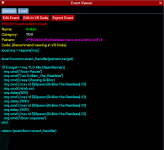
The event fails to load...

1657337567290.png

And I get an Error in the Chat. Event Registration Failed: Griklor

Not sure if its a syntax error or do i need to reload something?
 
1st - there is no then after your if statement.
2nd - /if mq.TLO.Target.CleanName() ~= 'Griklor the Restless' then would be a better option, which would keep the target on him.

There is probably more and I can write something up for it tonight and test. This is first glance of course...but why is this necessary? Why not a /chaseon with your toons and manually play the tank and just run in the circle the whole time. When Grik drops, the toons will auto assist.

I use CWTN and KA and this was literally the easiest thing I did in this game. I just had chase on for my toons, assist on, target griklor, and no one got hit by anything as they were always in the circle and he dropped, 1 shot. Dealt with the adds after he died. Loot chest.
 
well - I am doing the raid version of Griklor. Simple enough but still a good raid to learn LEM on. I was trying to test the Trigger/event handler in lem. not necessarily for this event - but this was the event i was doing at the time.

adding then didnt fix it :(

So I will try to test with something even easier.
 
I am just starting PoP Flagging for the Artisan's Prize and running full groups through. As per @Sic suggestion, I added a PoP category, and formulated this little text condition based off Sic's example in Discord. Will have everyone report back when they receive a character flag, ensuring no one was missed. Enjoy.

[CODE title="Import String"]cmV0dXJuIHsKIGxvYWQgPSB7CiAgYWx3YXlzID0gZmFsc2UsCiAgY2xhc3MgPSAiIiwKICB6b25lID0gIiIsCiB9LAogY29kZSA9ICJiRzlqWVd3Z2JYRWdQU0J5WlhGMWFYSmxLQ2R0Y1NjcENncHNiMk5oYkNCbWRXNWpkR2x2YmlCbGRtVnVkRjlvWVc1a2JHVnlLQ2tLSUNBZ2JYRXVZMjFrS0NjdlpHZDBaV3hzSUdGc2JDQkdiR0ZuSUhWd1pHRjBaV1FuS1FwbGJtUUtDbkpsZEhWeWJpQjdaWFpsYm5SbWRXNWpQV1YyWlc1MFgyaGhibVJzWlhKOSIsCiBjYXRlZ29yeSA9ICJQb1AiLAogdHlwZSA9ICJldmVudHMiLAogbmFtZSA9ICJGbGFnIiwKIHBhdHRlcm4gPSAiIyojWW91J3ZlIHJlY2VpdmVkIGEgY2hhcmFjdGVyIGZsYWchIyojIiwKfQ==[/CODE]

[CODE title="Event Pattern"]#*#You've received a character flag!#*#[/CODE]

[CODE title="Verbose"]local mq = require('mq')

local function event_handler()
mq.cmd('/dgtell all Flag updated')
end

return {eventfunc=event_handler}[/CODE]
 
Ok, I have a definitive need to use my Jann's Veil, Personal Hemic Source or Icebound Ulthork and I do not want either the Illusion or the familiars running around on all my toons. So here is a LEM condition to remove the fam/illusion as soon as it is applied. Since I use CWTN/KA, I have them check for the buff, and if not applied, cast the item. Then the LEM takes off the 2nd half of the buff, either the Illusion or the Familiar, leaving the buffs intact. There are some illusions I do want applied from my chanter, which is why I do not have AutoRemoveIllusion checked in CWTN.

Thanks to @brainiac for providing much needed help. Basically, I had the idea, and while I had code here that did work by running through if statements and redundancy, his solution was very elegant and it is what you see here. TY!

Here you go:

[CODE title="Import String"]cmV0dXJuIHsKIGxvYWQgPSB7CiAgYWx3YXlzID0gZmFsc2UsCiAgY2xhc3MgPSAiIiwKICB6b25lID0gIiIsCiB9LAogY29kZSA9ICJiRzlqWVd3Z2JYRWdQU0J5WlhGMWFYSmxLQ2R0Y1NjcENteHZZMkZzSUd4cFluSmhjbmtnUFNCeVpYRjFhWEpsS0Nkc1pXMHViR2xpY21GeWVTY3BDZ3BzYjJOaGJDQmlkV1ptVEdsemRDQTlJSHNLSUNBZ0lDZFRkVzF0YjI0Z1JtRnRhV3hwWVhJNklGQmxjbk52Ym1Gc0lFaGxiV2xqSUZOdmRYSmpaU2NzQ2lBZ0lDQW5VM1Z0Ylc5dUlFWmhiV2xzYVdGeU9pQkpZMlVnUW05MWJtUWdWV3gwYUc5eWF5Y3NDaUFnSUNBblNXeHNkWE5wYjI0NklFUnFhVzV1SUZOdmJHUnBaWEluTEFwOUNncHNiMk5oYkNCaWRXWm1UbUZ0WlNBOUlHNXBiQW9LTFMwdFFISmxkSFZ5YmlCaWIyOXNaV0Z1SUVCU1pYUjFjbTV6SUhSeWRXVWdhV1lnZEdobElHRmpkR2x2YmlCemFHOTFiR1FnWm1seVpTd2diM1JvWlhKM2FYTmxJR1poYkhObExncHNiMk5oYkNCbWRXNWpkR2x2YmlCamIyNWthWFJwYjI0b0tRb2dJQ0FnWm05eUlGOHNJSFJvWlVKMVptWWdhVzRnYVhCaGFYSnpLR0oxWm1aTWFYTjBLU0JrYndvZ0lDQWdJQ0FnSUdsbUlHMXhMbFJNVHk1TlpTNUNkV1ptS0hSb1pVSjFabVlwS0NrZ2RHaGxiZ29nSUNBZ0lDQWdJQ0FnSUNCaWRXWm1UbUZ0WlNBOUlIUm9aVUoxWm1ZS0lDQWdJQ0FnSUNBZ0lDQWdjbVYwZFhKdUlIUnlkV1VLSUNBZ0lDQWdJQ0JsYm1RS0lDQWdJR1Z1WkFvS0lDQWdJSEpsZEhWeWJpQm1ZV3h6WlFwbGJtUUtDbXh2WTJGc0lHWjFibU4wYVc5dUlHRmpkR2x2YmlncENpQWdJQ0JwWmlCaWRXWm1UbUZ0WlNCMGFHVnVDaUFnSUNBZ0lDQWdiWEV1WTIxa1ppZ25MM0psYlc5MlpXSjFabVlnSWlWeklpY3NJR0oxWm1aT1lXMWxLUW9nSUNBZ1pXNWtDbVZ1WkFvS2NtVjBkWEp1SUh0amIyNWtablZ1WXoxamIyNWthWFJwYjI0c0lHRmpkR2x2Ym1aMWJtTTlZV04wYVc5dWZRPT0iLAogY2F0ZWdvcnkgPSAiQ2hhcmFjdGVyIiwKIHR5cGUgPSAiY29uZGl0aW9ucyIsCiBuYW1lID0gIlJlbW92ZUZhbXMiLAp9[/CODE]

[CODE title="Verbose"]local mq = require('mq')
local mq = require('mq')
local library = require('lem.library')

local buffList = {
'Summon Familiar: Personal Hemic Source',
'Summon Familiar: Ice Bound Ulthork',
'Illusion: Djinn Soldier',
}

local buffName = nil

---@return boolean @Returns true if the action should fire, otherwise false.
local function condition()
for _, theBuff in ipairs(buffList) do
if mq.TLO.Me.Buff(theBuff)() then
buffName = theBuff
return true
end
end

return false
end

local function action()
if buffName then
mq.cmdf('/removebuff "%s"', buffName)
end
end

return {condfunc=condition, actionfunc=action}
[/CODE]
 
Last edited:
Ok, I have a definitive need to use my Jann's Veil, Personal Hemic Source or Icebound Ulthork and I do not want either the Illusion or the familiars running around on all my toons. So here is a LEM condition to remove the fam/illusion as soon as it is applied. Since I use CWTN/KA, I have them check for the buff, and if not applied, cast the item. Then the LEM takes off the 2nd half of the buff, either the Illusion or the Familiar, leaving the buffs intact. There are some illusions I do want applied from my chanter, which is why I do not have AutoRemoveIllusion checked in CWTN.

Thanks to @brainiac for providing much needed help. Basically, I had the idea, and while I had code here that did work by running through if statements and redundancy, his solution was very elegant and it is what you see here. TY!

Here you go:

[CODE title="Import String"]cmV0dXJuIHsKIGxvYWQgPSB7CiAgYWx3YXlzID0gZmFsc2UsCiAgY2xhc3MgPSAiIiwKICB6b25lID0gIiIsCiB9LAogY29kZSA9ICJiRzlqWVd3Z2JYRWdQU0J5WlhGMWFYSmxLQ2R0Y1NjcENteHZZMkZzSUd4cFluSmhjbmtnUFNCeVpYRjFhWEpsS0Nkc1pXMHViR2xpY21GeWVTY3BDZ3BzYjJOaGJDQmlkV1ptVEdsemRDQTlJSHNLSUNBZ0lDZFRkVzF0YjI0Z1JtRnRhV3hwWVhJNklGQmxjbk52Ym1Gc0lFaGxiV2xqSUZOdmRYSmpaU2NzQ2lBZ0lDQW5VM1Z0Ylc5dUlFWmhiV2xzYVdGeU9pQkpZMlVnUW05MWJtUWdWV3gwYUc5eWF5Y3NDaUFnSUNBblNXeHNkWE5wYjI0NklFUnFhVzV1SUZOdmJHUnBaWEluTEFwOUNncHNiMk5oYkNCaWRXWm1UbUZ0WlNBOUlHNXBiQW9LTFMwdFFISmxkSFZ5YmlCaWIyOXNaV0Z1SUVCU1pYUjFjbTV6SUhSeWRXVWdhV1lnZEdobElHRmpkR2x2YmlCemFHOTFiR1FnWm1seVpTd2diM1JvWlhKM2FYTmxJR1poYkhObExncHNiMk5oYkNCbWRXNWpkR2x2YmlCamIyNWthWFJwYjI0b0tRb2dJQ0FnWm05eUlGOHNJSFJvWlVKMVptWWdhVzRnYVhCaGFYSnpLR0oxWm1aTWFYTjBLU0JrYndvZ0lDQWdJQ0FnSUdsbUlHMXhMbFJNVHk1TlpTNUNkV1ptS0hSb1pVSjFabVlwS0NrZ2RHaGxiZ29nSUNBZ0lDQWdJQ0FnSUNCaWRXWm1UbUZ0WlNBOUlIUm9aVUoxWm1ZS0lDQWdJQ0FnSUNBZ0lDQWdjbVYwZFhKdUlIUnlkV1VLSUNBZ0lDQWdJQ0JsYm1RS0lDQWdJR1Z1WkFvS0lDQWdJSEpsZEhWeWJpQm1ZV3h6WlFwbGJtUUtDbXh2WTJGc0lHWjFibU4wYVc5dUlHRmpkR2x2YmlncENpQWdJQ0JwWmlCaWRXWm1UbUZ0WlNCMGFHVnVDaUFnSUNBZ0lDQWdiWEV1WTIxa1ppZ25MM0psYlc5MlpXSjFabVlnSWlWeklpY3NJR0oxWm1aT1lXMWxLUW9nSUNBZ1pXNWtDbVZ1WkFvS2NtVjBkWEp1SUh0amIyNWtablZ1WXoxamIyNWthWFJwYjI0c0lHRmpkR2x2Ym1aMWJtTTlZV04wYVc5dWZRPT0iLAogY2F0ZWdvcnkgPSAiQ2hhcmFjdGVyIiwKIHR5cGUgPSAiY29uZGl0aW9ucyIsCiBuYW1lID0gIlJlbW92ZUZhbXMiLAp9[/CODE]

[CODE title="Verbose"]local mq = require('mq')
local mq = require('mq')
local library = require('lem.library')

local buffList = {
'Summon Familiar: Personal Hemic Source',
'Summon Familiar: Ice Bound Ulthork',
'Illusion: Djinn Soldier',
}

local buffName = nil

---@return boolean @Returns true if the action should fire, otherwise false.
local function condition()
for _, theBuff in ipairs(buffList) do
if mq.TLO.Me.Buff(theBuff)() then
buffName = theBuff
return true
end
end

return false
end

local function action()
if buffName then
mq.cmdf('/removebuff "%s"', buffName)
end
end

return {condfunc=condition, actionfunc=action}
[/CODE]
Great idea 💡
 
Here is a quick LEM for Disabling Windowed Gamma in Bloodfalls Mission. It is so dark in that instance, disabling windowed gamma, kind of whites it out some, but at least you can see. Another trick to fix DBG's incompetence.

I usually keep it disabled until I am in Bloodfalls instance, then enable it. I also have the reverse when not in Bloodfalls. Same thing applies, disabled until in PoK or whatever.

Bloodfalls Mission:

[CODE title="Import String"]cmV0dXJuIHsKIGxvYWQgPSB7CiAgYWx3YXlzID0gZmFsc2UsCiAgY2xhc3MgPSAiIiwKICB6b25lID0gIiIsCiB9LAogY29kZSA9ICJiRzlqWVd3Z2JYRWdQU0J5WlhGMWFYSmxLQ2R0Y1NjcENncHNiMk5oYkNCeVpYRjFhWEpsWkY5NmIyNWxJRDBnSjJKc2IyOWtabUZzYkhOZmJXbHpjMmx2YmljS2JHOWpZV3dnZDJsdVpHOTNJRDBnYlhFdVZFeFBMbGRwYm1SdmR5Z25RV1IyWVc1alpXUkVhWE53YkdGNVQzQjBhVzl1YzFkcGJtUnZkeTlCUkU5WFgwVnVZV0pzWlZkcGJtUnZkMlZrUjJGdGJXRkRhR1ZqYTJKdmVDY3BDZ3BzYjJOaGJDQm1kVzVqZEdsdmJpQnZibDlzYjJGa0tDa0tJQ0FnSUdsbUlHMXhMbFJNVHk1YWIyNWxMbE5vYjNKMFRtRnRaU2dwSUg0OUlISmxjWFZwY21Wa1gzcHZibVVnZEdobGJpQnlaWFIxY200Z1pXNWtDbVZ1WkFvS0xTMHRRSEpsZEhWeWJpQmliMjlzWldGdUlFQlNaWFIxY201eklIUnlkV1VnYVdZZ2RHaGxJR0ZqZEdsdmJpQnphRzkxYkdRZ1ptbHlaU3dnYjNSb1pYSjNhWE5sSUdaaGJITmxMZ3BzYjJOaGJDQm1kVzVqZEdsdmJpQmpiMjVrYVhScGIyNG9LUW9nSUNBZ2NtVjBkWEp1SUcxeExsUk1UeTVhYjI1bExsTm9iM0owVG1GdFpTZ3BJRDA5SUhKbGNYVnBjbVZrWDNwdmJtVUtaVzVrSUNBZ0lDQWdDaUFLQ214dlkyRnNJR1oxYm1OMGFXOXVJR0ZqZEdsdmJpZ3BDaUFnSUNCcFppQjNhVzVrYjNjdVEyaGxZMnRsWkNncElIUm9aVzRLSUNBZ0lDQWdJQ0IzYVc1a2IzY3VUR1ZtZEUxdmRYTmxWWEFvS1FvZ0lDQWdaVzVrQ21WdVpBb0tjbVYwZFhKdUlIdHZibXh2WVdROWIyNWZiRzloWkN3Z1kyOXVaR1oxYm1NOVkyOXVaR2wwYVc5dUxDQmhZM1JwYjI1bWRXNWpQV0ZqZEdsdmJuMD0iLAogY2F0ZWdvcnkgPSAiVG9MIiwKIHR5cGUgPSAiY29uZGl0aW9ucyIsCiBuYW1lID0gIkJsb29kZmFsbHMiLAp9[/CODE]

[CODE title="Verbose"]local mq = require('mq')

local required_zone = 'bloodfalls_mission'
local window = mq.TLO.Window('AdvancedDisplayOptionsWindow/ADOW_EnableWindowedGammaCheckbox')

local function on_load()
if mq.TLO.Zone.ShortName() ~= required_zone then return end
end

---@return boolean @Returns true if the action should fire, otherwise false.
local function condition()
return mq.TLO.Zone.ShortName() == required_zone
end


local function action()
if window.Checked() then
window.LeftMouseUp()
end
end

return {onload=on_load, condfunc=condition, actionfunc=action}[/CODE]


Outside Bloodfalls:

[CODE title="Import String"]cmV0dXJuIHsKIGxvYWQgPSB7CiAgYWx3YXlzID0gZmFsc2UsCiAgY2xhc3MgPSAiIiwKICB6b25lID0gIiIsCiB9LAogY29kZSA9ICJiRzlqWVd3Z2JYRWdQU0J5WlhGMWFYSmxLQ2R0Y1NjcENncHNiMk5oYkNCeVpYRjFhWEpsWkY5NmIyNWxJRDBnSjJKc2IyOWtabUZzYkhOZmJXbHpjMmx2YmljS2JHOWpZV3dnZDJsdVpHOTNJRDBnYlhFdVZFeFBMbGRwYm1SdmR5Z25RV1IyWVc1alpXUkVhWE53YkdGNVQzQjBhVzl1YzFkcGJtUnZkeTlCUkU5WFgwVnVZV0pzWlZkcGJtUnZkMlZrUjJGdGJXRkRhR1ZqYTJKdmVDY3BDZ3BzYjJOaGJDQm1kVzVqZEdsdmJpQnZibDlzYjJGa0tDa0tJQ0FnSUdsbUlHMXhMbFJNVHk1YWIyNWxMbE5vYjNKMFRtRnRaU2dwSUQwOUlISmxjWFZwY21Wa1gzcHZibVVnZEdobGJpQnlaWFIxY200Z1pXNWtDbVZ1WkFvS0xTMHRRSEpsZEhWeWJpQmliMjlzWldGdUlFQlNaWFIxY201eklIUnlkV1VnYVdZZ2RHaGxJR0ZqZEdsdmJpQnphRzkxYkdRZ1ptbHlaU3dnYjNSb1pYSjNhWE5sSUdaaGJITmxMZ3BzYjJOaGJDQm1kVzVqZEdsdmJpQmpiMjVrYVhScGIyNG9LUW9nSUNBZ2NtVjBkWEp1SUcxeExsUk1UeTVhYjI1bExsTm9iM0owVG1GdFpTZ3BJSDQ5SUhKbGNYVnBjbVZrWDNwdmJtVUtaVzVrSUNBZ0lDQWdDaUFLQ214dlkyRnNJR1oxYm1OMGFXOXVJR0ZqZEdsdmJpZ3BDaUFnSUNCcFppQnViM1FnZDJsdVpHOTNMa05vWldOclpXUW9LU0IwYUdWdUNpQWdJQ0FnSUNBZ2QybHVaRzkzTGt4bFpuUk5iM1Z6WlZWd0tDa0tJQ0FnSUdWdVpBcGxibVFLQ25KbGRIVnliaUI3YjI1c2IyRmtQVzl1WDJ4dllXUXNJR052Ym1SbWRXNWpQV052Ym1ScGRHbHZiaXdnWVdOMGFXOXVablZ1WXoxaFkzUnBiMjU5IiwKIGNhdGVnb3J5ID0gIlRvTCIsCiB0eXBlID0gImNvbmRpdGlvbnMiLAogbmFtZSA9ICJOb3RCbG9vZEZhbGxzIiwKfQ==[/CODE]

[CODE title="Verbose"]local mq = require('mq')

local required_zone = 'bloodfalls_mission'
local window = mq.TLO.Window('AdvancedDisplayOptionsWindow/ADOW_EnableWindowedGammaCheckbox')

local function on_load()
if mq.TLO.Zone.ShortName() == required_zone then return end
end

---@return boolean @Returns true if the action should fire, otherwise false.
local function condition()
return mq.TLO.Zone.ShortName() ~= required_zone
end


local function action()
if not window.Checked() then
window.LeftMouseUp()
end
end

return {onload=on_load, condfunc=condition, actionfunc=action}[/CODE]
 
Hey guys, So ive been reading up on Lua and LEM. Is there a basic Syntex that we should follow as a guidline. So far i have seen a few different layouts. I am new to trying this, so any help would be great!
 
I've been using the template and modifying them to get them set up as I need.
 
Shei Bard Event

[CODE title="Shei Bard"]local mq = require('mq')

local function condition()
return mq.TLO.SpawnCount('datiar xi tavuelim npc')() > 0
end

local function action()
local my_class = mq.TLO.Me.Class.ShortName():lower()
local slumber = mq.TLO.Spell('Slumber of the Diabo').RankName()

mq.cmd('/mqp on')
if mq.TLO.Target.CleanName() ~= 'datiar xi tavuelim' then
mq.cmd('/twist off')
mq.cmd('/mqtar datiar xi tavuelim npc')
mq.delay(50)
end
if mq.TLO.Me.SpellReady(slumber)() and not mq.TLO.Me.Casting() then
mq.cmdf('/cast %s', slumber)
mq.delay(1000+mq.TLO.Spell(slumber).MyCastTime())
end
mq.cmd('/mqp off')
end

return {condfunc=condition, actionfunc=action}[/CODE]

Shei Enchanter Event

[CODE title="Import"]cmV0dXJuIHsKIGxvYWQgPSB7CiAgYWx3YXlzID0gZmFsc2UsCiAgY2xhc3MgPSAiIiwKICB6b25lID0gIiIsCiB9LAogY29kZSA9ICJiRzlqWVd3Z2JYRWdQU0J5WlhGMWFYSmxLQ2R0Y1NjcENncHNiMk5oYkNCbWRXNWpkR2x2YmlCamIyNWthWFJwYjI0b0tRb2dJQ0FnY21WMGRYSnVJRzF4TGxSTVR5NVRjR0YzYmtOdmRXNTBLQ2RrWVhScFlYSWdlR2tnZEdGMmRXVnNhVzBnYm5Cakp5a29LU0ErSURBS1pXNWtDZ3BzYjJOaGJDQm1kVzVqZEdsdmJpQmhZM1JwYjI0b0tRb2dJQ0FnYkc5allXd2diWGxmWTJ4aGMzTWdQU0J0Y1M1VVRFOHVUV1V1UTJ4aGMzTXVVMmh2Y25ST1lXMWxLQ2s2Ykc5M1pYSW9LUW9nSUNBZ2JHOWpZV3dnWVdSa2JHVWdQU0J0Y1M1VVRFOHVVM0JsYkd3b0owRmtaR3hsSnlrdVVtRnVhMDVoYldVb0tRb0tJQ0FnSUcxeExtTnRaQ2duTDJWdVl5QndZWFZ6WlNCdmJpY3BDaUFnSUNCcFppQnRjUzVVVEU4dVZHRnlaMlYwTGtOc1pXRnVUbUZ0WlNncElINDlJQ2RrWVhScFlYSWdlR2tnZEdGMmRXVnNhVzBuSUhSb1pXNEtJQ0FnSUNBZ0lDQnRjUzVqYldRb0lpOXpkRzl3WTJGemRDSXBDaUFnSUNBZ0lDQWdiWEV1WTIxa0tDY3ZiWEYwWVhJZ1pHRjBhV0Z5SUhocElIUmhkblZsYkdsdElHNXdZeWNwQ2lBZ0lDQWdJQ0FnYlhFdVpHVnNZWGtvTlRBcENpQWdJQ0JsYm1RS0lDQWdJR2xtSUcxeExsUk1UeTVOWlM1VGNHVnNiRkpsWVdSNUtHRmtaR3hsS1NncElHRnVaQ0J1YjNRZ2JYRXVWRXhQTGsxbExrTmhjM1JwYm1jb0tTQjBhR1Z1Q2lBZ0lDQWdJQ0FnYlhFdVkyMWtaaWduTDJOaGMzUWdKWE1uTENCaFpHUnNaU2tLSUNBZ0lDQWdJQ0J0Y1M1a1pXeGhlU2d4TURBd0syMXhMbFJNVHk1VGNHVnNiQ2hoWkdSc1pTa3VUWGxEWVhOMFZHbHRaU2dwS1FvZ0lDQWdaVzVrQ2lBZ0lDQnRjUzVqYldRb0p5OWxibU1nY0dGMWMyVWdiMlptSnlrS1pXNWtDZ3B5WlhSMWNtNGdlMk52Ym1SbWRXNWpQV052Ym1ScGRHbHZiaXdnWVdOMGFXOXVablZ1WXoxaFkzUnBiMjU5IiwKIGNhdGVnb3J5ID0gIlRvTCIsCiB0eXBlID0gImNvbmRpdGlvbnMiLAogbmFtZSA9ICJzaGVpZW5jaGFudGVyIiwKfQ==[/CODE]

[CODE title="Shei Enchanter"]
local mq = require('mq')

local function condition()
return mq.TLO.SpawnCount('datiar xi tavuelim npc')() > 0
end

local function action()
local my_class = mq.TLO.Me.Class.ShortName():lower()
local addle = mq.TLO.Spell('Addle').RankName()

mq.cmd('/enc pause on')
if mq.TLO.Target.CleanName() ~= 'datiar xi tavuelim' then
mq.cmd("/stopcast")
mq.cmd('/mqtar datiar xi tavuelim npc')
mq.delay(50)
end
if mq.TLO.Me.SpellReady(addle)() and not mq.TLO.Me.Casting() then
mq.cmdf('/cast %s', addle)
mq.delay(1000+mq.TLO.Spell(addle).MyCastTime())
end
mq.cmd('/enc pause off')
end

return {condfunc=condition, actionfunc=action}
[/CODE]
Trying to run this in shei mission but it shuts down as soon as is started
 
Trying to run this in shei mission but it shuts down as soon as is started
Sounds like you're just trying to run them as standalone scripts with "/Lua run <script>"? Lua event manager is a Lua script which manages individual event scripts for you.
So, you would take the shei bard event and add it to LEM through its UI, you can use import with that long import string from the post.
 
Sounds like you're just trying to run them as standalone scripts with "/lua run <script>"? Lua event manager is a lua script which manages individual event scripts for you.
So, you would take the shei bard event and add it to LEM through its UI, you can use import with that long import string from the post.
i see the import for enchanter? is there one for the bard Lua?
 
The import string is just a shortcut, you can also go to condition events > add new event, and paste in the code there.
Thx for the help - had a bit of issues setting this up. Looks pretty awesome!
 
hmm i can't seem to add or import events for some reason. I press add event and nothing happens to imput event info. and trying to import it fails any help
 
Got any screenshot of what is/isn't happening? Also, check the top left corner, the add window might be defaulting to some tiny window near the corner.
 
Got any screenshot of what is/isn't happening? Also, check the top left corner, the add window might be defaulting to some tiny window near the corner.
i found that thanks but import still failing i pasted script from here to the import section keeps saying failed to import was trying to import the bard shei code
 
i found that thanks but import still failing i pasted script from here to the import section keeps saying failed to import was trying to import the bard shei code
pasting the Lua code or the long encoded string? the import only accepts the base64 string. if you just want to paste in the code then go through add event
 
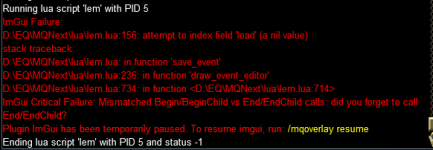
That suggests the code that is saved is incorrect.. the fact it reached that line, means that it successfully loaded the file, but then the file i guess didn't have the content LEM needed. paste the content of the file
Code:
mq/lua/lem/events/<eventname>.lua
.
Also, delete the previous screenshot.
 
Can't get anything to run yet.
I installed lem using the watch button and waiting til the RG launcher did his magic.
Started my first attempts the next day.

My last attempt: Import Event from Update-List:
1663700899979.png

In order to do so I followed the steps described below:
- click Import Event
- copy source code using the copy-button
- paste source code using <CTRL><V>
- click Button "save"

1663700811508.png

I have the feeling I am missing something.
 
Can't get anything to run yet.
I installed lem using the watch button and waiting til the RG launcher did his magic.
Started my first attempts the next day.

My last attempt: Import Event from Update-List:
View attachment 42010

In order to do so I followed the steps described below:
- click Import Event
- copy source code using the copy-button
- paste source code using <CTRL><V>
- click Button "save"

View attachment 42009

I have the feeling I am missing something.
The import event button is meant to paste in the long encoded strings, not code. Code is added just using the normal add event dialog.

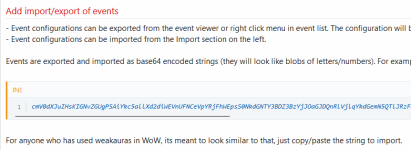
Events can be imported/exported so that they can be more easily shared. Doing so generates a long string of characters like you can see in some of the posts here, which contains all of the relevant data to the event, which is more than just the Lua code for the event.
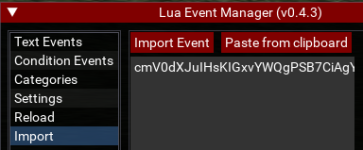
For example, the import window when you paste in the import string would just look like this
1663709451282.png
which you can also see something similar if you right click one of the existing events LEM comes with, and click export, and try pasting that somewhere.

If you've ever used something like weakauras from WoW, where you copy some long opaque import string to copy into the addon, its the same thing here.
 
Can't get anything to run yet.
I installed lem using the watch button and waiting til the RG launcher did his magic.
Started my first attempts the next day.

My last attempt: Import Event from Update-List:
View attachment 42010

In order to do so I followed the steps described below:
- click Import Event
- copy source code using the copy-button
- paste source code using <CTRL><V>
- click Button "save"

View attachment 42009

I have the feeling I am missing something.
Oh nevermind, I see. that event in the update is old and doesn't have some field that LEM was updated to expect so its never going to succeed. I'll look at some sort of update to handle that.. but more the meantime maybe try one of the more recently posted examples.
 
OK, I understood that. Seems I get a hand on it. I got an example working and was able to create a conditioned version of my own bard-Lua for Shei Vinitras working. I like the Organisation of the files, where each Event has his Lua as well as each char has his own config to define which char uses which event.
In this way you are really able to organize all the stuff you like in a sustainable manner.
Well done. I like it and will organize all the stuff already running and import it step by step.
 
Convert as in automatically take an event and turn it into lua? No, nothing like that. However, anything written in mq2events or mq2react should be able to be written with LEM. Its not necessary to convert them unless you just really wanted to for some reason.
The main reason for LEM was to write potentially more complex events without having to write a lot of the plumbing of a one-off script like the ones which have been written for shei and AHR missions. For example, in mq2events it gets complicated very quickly writing some giant multiline ${If[,,,]} statement.

For a comparison from mq2events to lua, can look at the atensilence event I included with lem:

mq2event ini
Code:
[AtenHaRa]
trigger=#*#Aten Ha Ra points at |${Me.Name}|#*#
command=/docommand ${If[${EventArg1.Equal[${Me}]} && !${Group.Member[0].MainAssist},/multiline ; /docommand /${Me.Class.ShortName} mode 0; /mqp on; /twist off; /if (${Me.ActiveDisc.Name.Find[Frenzied Resolve Discipline]}) /stopdisc; /timed 5 /afollow off; /nav stop; /target clear; /timed 10 /nav locxyz 1186.12 0.932035 235.003; /timed 150 /docommand /${Me.Class.ShortName} mode 2; /timed 150 /mqp off; /timed 150 /twist on,/docommand ${If[${EventArg1.Equal[${Group.MainAssist}]} && !${Group.Member[0].MainAssist},/multiline ; /docommand /${Me.Class.ShortName} mode 0; /mqp on; /twist off; /if (${Me.ActiveDisc.Name.Find[Frenzied Resolve Discipline]}) /stopdisc; /timed 5 /afollow off; /nav stop; /target clear; /timed 10 /nav locxyz 1186.12 0.932035 235.003; /timed 150 /docommand /${Me.Class.ShortName} mode 2; /timed 150 /mqp off; /timed 150 /twist on,/echo BAD]}]}

lua code
Lua:
local function event_handler(line, target)
    if not mq.TLO.Zone.ShortName() == 'vexthaltwo_mission' then return end

    local my_class = mq.TLO.Me.Class.ShortName()
    local i_am_ma = mq.TLO.Group.Member(0).MainAssist()
    local my_name = mq.TLO.Me.CleanName()
    local ma_name = mq.TLO.Group.MainAssist.CleanName()

    -- Run away if I am the target and I am not the MA, or if the MA is the target and I am not the MA
    if not i_am_ma and (target == my_name or target == ma_name) then
        mq.cmdf('/%s mode 0', my_class) -- pause CWTN and other sorts of automation
        if my_class == 'BER' and mq.TLO.Me.ActiveDisc.Name() == mq.TLO.Spell('Frenzied Resolve Discipline').RankName() then
            mq.cmd('/stopdisc') -- Stop BER disc that roots you in place so you can run if you are a BER
        end
        mq.cmd('/mqp on')
        mq.cmd('/twist off')
        mq.cmd('/afollow off')
        mq.cmd('/nav stop')
        mq.cmd('/target clear')
        mq.delay(100)

        mq.cmd('/nav locxyz 1222.67 -48.97 236.41') -- Move to the safe spot
        mq.delay(15000)

        mq.cmdf('/%s mode 2', my_class) -- Unpause and return with CWTN chase mode
        mq.cmd('/mqp off')
        mq.cmd('/twist on')
    end
end

These both accomplish the same thing. It just comes down to personal preference. If you're very familiar with macros you could pick apart that giant command into the individual components and make edits to it. Meanwhile, the lua code is pretty readable.
This code is not loading. Has it changed since it was posted?
 
This code is not loading. Has it changed since it was posted?
I don't think that one was a full example but just a snippet comparing mq2event with the event code in Lua.
There should already be an event for the AHR silence in LEM by default, called atensilence.
 
Request: what is necessary to request a new „Chapter“ within “Lua Script“ or „Ressources“ for working events of lem.
As this nice tool offers a great Environment to develop Ressources for VV which differ in structure from standard Lua Scripts, it would be nice to have a dedicated place for them. This would be very useful to separate Discussion and Support of lem from working Events, where new starter of lem can pick from to have useful events at hand, as well as members already working with lem to check, if for their actual idea exist already a running solution.
 
Request: what is necessary to request a new „Chapter“ within “Lua Script“ or „Ressources“ for working events of lem.
As this nice tool offers a great Environment to develop Ressources for VV which differ in structure from standard Lua Scripts, it would be nice to have a dedicated place for them. This would be very useful to separate Discussion and Support of lem from working Events, where new starter of lem can pick from to have useful events at hand, as well as members already working with lem to check, if for their actual idea exist already a running solution.
we've had talks about a library for LEMs like we have with the kiss and mule ini library. I'll make sure the idea is logged
 
Release (Mighty) Lua Event Manager

Users who are viewing this thread

Back
Top
Cart