• You've discovered RedGuides, an EverQuest multi-boxing and scripting community 🧙‍♀️⚙️. We want you to play several EQ characters at once, come join us and say hello! 👋

  • A TLP without truebox has thawed (Very Vanilla ready)
    Frostreaver
Resource icon

Release Max Bind Wounds Skill 1.0

No permission to download
Joined
Oct 21, 2013
RedCents
517¢
So, I'm they type of player who likes to max out all skills. My one skill that I found difficult to max out after hitting max level and max AAs was Bind Wounds. I couldn't find DOTs that would get me down in life enough to keep using bind wounds. So I did a little brain storming and came up with a solution. Unequip all my gear and then reequip it. This would drop my HPs down 30% or more and then I could bind wounds from there.

So I present my Bind Wounds macro:
Rich (BB code):
| Version 1.0 20JAN15 by GPS_Soldier
| Ensure that you have Bind Wounds button enabled on your Action menu Ctrl+C and add it
#include Ninjadvloot.inc
#turbo

Sub Main
	|Replace the name of the bandage vendor from NPCNAME, you only need to put the first name of the vendor
	/declare BandageMerchantName local NPCNAME
	|Replace the number of bandages you want to buy each visit to vendor, replace XYZ with the number of bandages to buy
	/declare BandageCount int local XYZ
	|Replace ABC with skill number you want Bind Wounds to stop at
	/declare BwSkill int local ABC
	
	:PurchaseBandages
	|/echo Entering PurchaseBandages Section
	|Purchase Bandages
	/if (${Me.Skill[Bind Wound]}>=${BwSkill}) {
		/echo Bind Wound is now ${BwSkill}, which is the setting you wanted to stop at.
		/echo Ending the macro now.
        /goto :StopMacro
	}
	/if (${FindItemCount[=Bandages]}==0) {
		/target ${BandageMerchantName}
		/delay 1s
		/call npc "${Target.CleanName}"
		/call Buy "Bandages" ${BandageCount}
	}
	|/echo Leaving PurchaseBandages Section
    /goto :CheckSlots
	
	:CheckSlots
	|/echo Entering CheckSlots Section
	| Check Available Inventory Slots
	/if (${Me.FreeInventory} < 23) {
		/echo You need to free up 23 Inventory Slots to be on the safe side for this Macro, you only have ${Me.FreeInventory} available.
		/echo This macro is now ending so you can free up inventory slots.
		/goto :StopMacro
	}

	/if (${Me.FreeInventory} >=23) {
		/echo You have ${Me.FreeInventory} Slots available, you should not have any problems with taking off gear!
	}
	|/echo Leaving CheckSlots Section
	/goto :MoveEquipment
	
	:MoveEquipment
	|/echo Entering MoveEquipment Section
	|This section creates an array holding equipment information by slot, removes it, and then puts it back on the toon
	/declare EquipID[22] int local
    /declare slot int local
    /declare arrayIndex int local
    /echo Taking gear off now!
    /for slot 0 to 21
		/varcalc arrayIndex ${slot}+1
		/varset EquipID[${arrayIndex}] ${Me.Inventory[${slot}].ID}
		/squelch /unequip ${slot}
		/delay 1s
    /next slot
	/echo Putting all gear back on now!
	/for slot 0 to 21
		/varcalc arrayIndex ${slot}+1
		/squelch /exchange ${EquipID[${arrayIndex}]} ${slot}
		/delay 1s
	/next slot

	/deletevar slot
	/deletevar arrayIndex
	/deletevar EquipID
	|/echo Leaving MoveEquipment Section
	/goto :BindWounds
	
	:BindWounds
	|/echo Entering BindWounds Section
	|Section that binds wounds
	/target clear
	/delay 1s
	/target myself
	/delay 1s
		:loop
			/if (${Me.Skill[Bind Wound]}>=${BwSkill}) {
				/echo Bind Wound is now ${BwSkill}, which is the setting you wanted to stop at.
				/echo Ending the macro now.
				/goto :StopMacro
			}
			/if (${FindItem[bandage].ID} && ${Me.PctHPs}<=100 && ${Me.AbilityReady[Bind Wound]}) {
				/doability "Bind Wound"
				/delay 1s
			}
			/if (!${FindItem[bandage].ID}) {
				/echo You must get more bandages...
				|/echo Leaving BindWounds Section
				/goto :PurchaseBandages
			}
			/delay 3s
			/if (${Me.PctHPs} >= 99) {
				/echo Health is to high, time to take off gear again. Current Bind Wound skill is ${Me.Skill[Bind Wound]}.
				|/echo Leaving BindWounds Section
				/goto :MoveEquipment
			}
		/goto :loop
		
		
	:StopMacro
	/deletevar BandageMerchantName
	/deletevar BandageCount
	/deletevar BwSkill
	/endma
/return
 
1. I had issues at first with it not removing all the items. I had to open the first bag in the inventory for it to start properly.

2. No matter where I place my extraplanar trade sachel in the inventory it errors stating item cannot be moved into it because its only tradeskill. I had to put it in the bank. Is there a config/variable to tell it what bag to use?
 
This is awesome! Works great "out of the box." A Big Thanks to GPS_Soldier for putting this together.

In my case I used a Mage to summon up the Stacks of Bandages I wanted and it worked perfectly with even the "Summoned: Bandages"
Avg about 1 skillup per stack between 500 to 550.

Before I started this Mac I swapped bags so the Top Bag with available slots would be an empty 36-slot.
--Started this Mac
--Mac Proceeded to put my items in the main bag that I usually have on top /shrug.

Since Swapping bags made no difference I tested two theories Zoning and Logging:
All tests done with the bag on top that I wanted my Equipment to be put into. None of these attempts changed the destination bag.
1) Zoning
2) Logging to Server Select and back
3) Logged out completely and back

I suppose if you really have a problem with the destination bag where the Mac is trying to put your Equipment you may just have to put the problematic bag into your bank as Warking2 mentioned above. Unfortunately I don't see the answer immediately for manipulating the outcome of that part. If for some reason I find the answer to this minor inconvenience, I will update my post here.

Regards,
~TheFiddler~
 
Last edited:
I cannot get this to work. It starts to remove equipment places and item on the cursor and stops thats one bug.
It will also cycle once, then stop on the second run through of remove equip. Leaving an item on cursor.

- - - Updated - - -

I cannot get this to work. It starts to remove equipment places and item on the cursor and stops thats one bug.
It will also cycle once, then stop on the second run through of remove equip. Leaving an item on cursor.
 
I created a macro for this some time ago. It was using a shaman and I would have him cannibalize down and my monk (at the time) would bind wounds him back up. Maxed out over night this way. I also had it so that my monk would buy bandages when he ran out. I think I spent more time writing the macro than it would have taken just doing it myself.

Anyway, if anyone has a shaman and want to take a look at this macro, I can post it later.
 
I got this to work by removing the top row of gear and putting it in inventory.
Then I stocked up on bandages and commented out the bandage check and purchase routine.
Now it works fine.
 
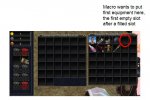
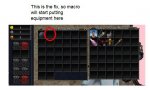
So I was having the same issue drcdevil. This macro was flakey in how it put the items into my inventory, choosing sometimes the first bag, sometimes the second, and always choosing a mid position in the bag. Then it hit me, it was finding the first empty slot AFTER a filled slot. So when I was buying bandages to fill my first bag, it would skip to the next bag which had one item in it, and would start placing the equipment in the first slot that came after a filled slot.

The solution: Put one item in the first empty slot of the first bag and have enough empty slots in that bag for all your equipment. Voila! the macro works like a charm! Make sure that the first item won't be consumed during your bind wound session (i.e. not food or bandages).


Hope this helps, Redcent me if it did!

Fenny

what the macro wants to do.JPG

the fix.JPG
 
Release Max Bind Wounds Skill

Users who are viewing this thread

Back
Top
Cart