The FAQ has everything I've seen regarding luarocks errors. One may work for you.This plugin no longer works for me after 07NOV patch which changed something with the lfs.dll

Install the app
How to install the app on iOS
Follow along with the video below to see how to install our site as a web app on your home screen.
Note: This feature may not be available in some browsers.
-
 You've discovered RedGuides, an EverQuest multi-boxing and scripting community 🧙♀️⚙️. We want you to play several EQ characters at once, come join us and say hello! 👋
You are using an out of date browser. It may not display this or other websites correctly.
You should upgrade or use an alternative browser.
You should upgrade or use an alternative browser.
Resource icon
Release MAUI (MuleAssist UI) 03/26/2024
No permission to download
- Thread starter aquietone
- Start date
The FAQ specifically says in bold that the 2.0.5 in the command should be replaced with whatever version is printed out in the URL when the script attempts to install lfs.dll normally. Not sure what more I could really put there.I guess the lfs.dll was out of date and did not get updated or reinstalled when I deleted it as recommended in a previous post
I ran the following command in a CMD window "runas an administrator"
Code:"C:\Users\%USERNAME%\AppData\Local\VeryVanilla\MacroQuest\Release\luarocks.exe" --lua-version 5.1 --only-server "https://luarocks.macroquest.org/2.1.1697887905" install --deps-mode none --tree "C:\Users\%USERNAME%\AppData\Local\VeryVanilla\MacroQuest\Release\modules\2.1.1697887905\luarocks" "luafilesystem"
Now MAUI and Boxhud run.
And the MAUI FAQs are outdated with the older version 2.0.5 of the luarocks files.
Also the whole reason for all these problems is apparently people running things as administrator which shouldn't be done.

Nobody should be running luarock directly.
You’re breaking your install by running as admin, making it so that MQ can’t write the required files.
Delete the luarocks folder in appdata/local and run eq without elevated
Aqo: we should delete the manual luarocks command instructions
You’re breaking your install by running as admin, making it so that MQ can’t write the required files.
Delete the luarocks folder in appdata/local and run eq without elevated
Aqo: we should delete the manual luarocks command instructions
Eq does not. That’s the only thing that matters here. If it is, you made it do that"
Uhm...update your documentation to match the versions of the required software so non-technical people don't post the same question. I've worked in IT and cyber for 30 years and the most frustrating thing I have ever found is documentation with its doc versioning behind what is required to sucessfully install because programmers don't find it important enough to update their documentation. I spent 22 years in the military and laziness is not something I can tolerate. But thank you for your hard work, knowledge, and plugin.
Redguides launcher and EQ both pop-up a UAC when started.
It should not be doing that. It doesn’t for me. There is zero reason why any game needs admin. It concerns me and it should ABSOULTELY concern you"Redguides launcher and EQ both pop-up a UAC when started."
Sorry the Steam client wants admin rights...not EQ
Just a question - MAUI seems to only want to show 15 entries from the heals section of the ini. When I created the ini, the heals0, heals1, etc were all in order, 0-28, with their conditions right after the heal. When I went back into the ini, its ordered up to 15, then it kinda goes crazy with a few lines that are usually above or below the heals/conditions in after 15, and the rest are pretty well scrambled up. I thought it was just on the computer my cleric is on, but when I checked the others, they also cap out at 15 in MAUI, it's just the cleric that exceeded that amount.
yeah for whatever reason its set to 15 in maui, you can edit it in maui/schemas/ma.Lua just look for Heals properties sectionJust a question - MAUI seems to only want to show 15 entries from the heals section of the ini. When I created the ini, the heals0, heals1, etc were all in order, 0-28, with their conditions right after the heal. When I went back into the ini, its ordered up to 15, then it kinda goes crazy with a few lines that are usually above or below the heals/conditions in after 15, and the rest are pretty well scrambled up. I thought it was just on the computer my cleric is on, but when I checked the others, they also cap out at 15 in MAUI, it's just the cleric that exceeded that amount.

- Joined
- May 17, 2015
- RedCents
- 6,068¢
Do you have mq2lua loaded?Anyone know why I would be getting the error "couldn't parse '/lassist'" when running maui on a emu server (RoF2 client)?
So I confirmed that Mq2Lua plugin was loaded. Noticing some other odd behavior, but it's been a while since I've used MA, so I could be mis-remembering the behavior I'm expecting. Will review the .mac and post or on forums if any questions or issues come up.
aquietone updated MAUI (MuleAssist UI) with a new update entry:
02/11/2024
Read the rest of this update entry...
02/11/2024
0.11.0
- Update to use CursorAttachment for dragging in spell gems.. thought i pushed this already..
Read the rest of this update entry...
aquietone updated MAUI (MuleAssist UI) with a new update entry:
03/26/2024
Read the rest of this update entry...
03/26/2024
Automated update: 1a7844bf83cb122e4f081daf86fbdcf6b8345866
Read the rest of this update entry...
Can anyone help me with this, not sure if im missing a plugin or forgetting to load one. When i try to drag items to my spell boxes in maui it doesnt let me drop it into the box, it disappears as soon as my cursor is over thr ui window. New to all this so its a steep learning curve for me lol.
Shouldn't be any plugins that affect it - I had never dragged and dropped before, just used the right click menu on the spell slot in maui to choose from the menu. Just loaded a toon I'd never used it on, and found that dragging does work, it feels a bit different, as when you click on the spell slot (say, in DPS), the icon on your cursor doesn't go away, although the spell does land in the DPS entry. You do need to bump up the counter for the number of entries you want for each section, and a few of the sections have 2 counbters, like Buffs - one is for buffbegs, the other for actual buffs. The begs section allows you to set up buffs that can be cast based on a tell to that toon with one or more keywords. You'll still need to set up conditions for that spell, etc. by clicking into that slot. Setting up from scratch is a very difficult and drawn out thing - I would definitely recommend looking in the .ini resources are for one that is reasonably close in level to the toon you are setting up, copy and paste everything below general into the starter ini file MuleAssist created in your config directory using notepad, in place of what is there currently. You can use both MuleAssist and Kissassist inis, the KissAssist ones just need to do a conversion to work with Mule. I usually look through what is in several different contributor's offerings, and adjust from there. For extensive conditions, I'd recommend VorpalChicken's inis as a great starting point. Browsing through other's work though really can help you get a better feel for what can be done with the ini. inis without conditions produces the same effective result as putting spellgems in hotkey 1-6 and just going down the row pushing buttons whenever they are available. Conditions put some thought into when you cast particular things, so you don't waste casts that really don't accomplish anything, because the situation is not right when you get to that button.
awesome, appreciate the input. The issue is im trying to set some of my clickable items as a buff. I played on Peq with E3 and could set it up via the ini so im assuming i can probably do the same thing itll just be a matter of learning the language to put in the buff line of the ini.Shouldn't be any plugins that affect it - I had never dragged and dropped before, just used the right click menu on the spell slot in maui to choose from the menu. Just loaded a toon I'd never used it on, and found that dragging does work, it feels a bit different, as when you click on the spell slot (say, in DPS), the icon on your cursor doesn't go away, although the spell does land in the DPS entry. You do need to bump up the counter for the number of entries you want for each section, and a few of the sections have 2 counbters, like Buffs - one is for buffbegs, the other for actual buffs. The begs section allows you to set up buffs that can be cast based on a tell to that toon with one or more keywords. You'll still need to set up conditions for that spell, etc. by clicking into that slot. Setting up from scratch is a very difficult and drawn out thing - I would definitely recommend looking in the .ini resources are for one that is reasonably close in level to the toon you are setting up, copy and paste everything below general into the starter ini file MuleAssist created in your config directory using notepad, in place of what is there currently. You can use both MuleAssist and Kissassist inis, the KissAssist ones just need to do a conversion to work with Mule. I usually look through what is in several different contributor's offerings, and adjust from there. For extensive conditions, I'd recommend VorpalChicken's inis as a great starting point. Browsing through other's work though really can help you get a better feel for what can be done with the ini. inis without conditions produces the same effective result as putting spellgems in hotkey 1-6 and just going down the row pushing buttons whenever they are available. Conditions put some thought into when you cast particular things, so you don't waste casts that really don't accomplish anything, because the situation is not right when you get to that button.
Oh? thats awesome. Ill have play around when I get home in a few days. Again thank you for your help.for clickys I usually just start typing the name into the first line on MAUI, and it will autofill as it finds it in inventory.
ArmorofMars21
New member
- Joined
- Sep 19, 2022
- RedCents
- 10¢
Hey guys, I keep getting this error trying to load Maui Ending Lua script with PID 1 and statues 2.
Are you targeted on an npc? This would be expected, particularly if your start line doesn't specify an assist, or the toon is the assist. If toon is your assist, make sure target is clear, or self. All other toons should be starting with a statement like /mac muleassist assist MyAssist. You can also use a TLO in there, so if you set main assist with grouproles, can do /mac muleassist assist ${Group.Assist} (something like that - if you look at the options in MAUI, you'll get the correct syntax)
- Joined
- Nov 2, 2023
- RedCents
- 10¢
Wrong forum
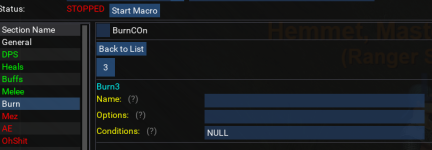
Can someone assist me with the Burn tab on MAUI. I get the Name of the ability, but what do i put for Options line in this? Is it mob HP %?
Does MAUI limit the number of spells in a tab? The buffs section of the INI for my enchanter has 23 total spells, but only the first 20 show up and the last 3 are only visible in the INI. I've attempted to increase the size in MAUI to like 25, but it seems to reset itself to 20.
Same issue with the Cleric:
BuffsSize=22, but cannot display more than 20.
I have the DPS Section on my Zerker set to 29 and it seems to display all the DPS items fine.
Also, I'm noticing the INI is not updating when:
1) I edit the INI outside of EQ and then "Refresh Raw INI" with MAUI
2) Edit the INI in MAUI, then "Save Raw INI" and open it outside of EQ
Is it possible these are errors because I am using MuleAssist INI files that have the level in them?
File name: MuleAssist_server_Mage_1xx.ini
ETA: Overall, I'm very, very impressed with MAUI, it feels like a pretty seamless transition from MQ2Mule, awesome work!
Thanks!
Same issue with the Cleric:
BuffsSize=22, but cannot display more than 20.
I have the DPS Section on my Zerker set to 29 and it seems to display all the DPS items fine.
Also, I'm noticing the INI is not updating when:
1) I edit the INI outside of EQ and then "Refresh Raw INI" with MAUI
2) Edit the INI in MAUI, then "Save Raw INI" and open it outside of EQ
Is it possible these are errors because I am using MuleAssist INI files that have the level in them?
File name: MuleAssist_server_Mage_1xx.ini
ETA: Overall, I'm very, very impressed with MAUI, it feels like a pretty seamless transition from MQ2Mule, awesome work!
Thanks!
Last edited:
There is a file you can edit in a subfoldert of maui: Look for Distro/Lua/Maui/Schemas/ma.Lua - open in an editor - look for the section you need more in, then under that section, look for Max=20, or whatever number it happens to be. Change the number to some larger number you like (I went for 40). save file, now MAUI will display all your entries.
[CODE title="ma.Lua snip"] Buffs={
Controls={
On={
Type='SWITCH',
},
COn=true,
},
Properties={
Buffs={
Type='LIST',
Max=20,
Conditions=true,[/CODE]
[CODE title="ma.Lua snip"] Buffs={
Controls={
On={
Type='SWITCH',
},
COn=true,
},
Properties={
Buffs={
Type='LIST',
Max=20,
Conditions=true,[/CODE]
Greetings,
I am currently working on getting my 6 box crew back up and running after an extended break. Last I really played (August-ish 2025) I was using MAUI with MuleAssist/KissAssist INI files for each character and I recall everything working fine, no errors. While getting toons logged in today and MAUI loaded, I started getting a crashes with MAUI where MQOverlay, MAUI, or ImGui causes a "crash". The issue seems to persist across any of my toons, and it seems to be 100% repeatable. Given that MAUI has not been updated in 2-ish years, I'm not sure if this is a MAUI issue, an MQ Issue, MQOverlay issue, or something else (I have not seen anything that says MAUI is depreciated, other than no updates since 2024).
I should note, when I say "crashing", I do not mean a full exit to desktop crash or EQ crash, just that MQOverlay gets paused and the MAUI script stops running.
The Error
Edit to add: I forgot to mention - this only happens when I click on certain sections. Oh Shit, Aggro, Cures, & GoM. Does not matter if the toon has spells/skills and such in those sections or not. The error does not change based on which section you click, its the same each time (second screen shot below).
- Code uses SetCursorPos()/SetCursorScreenPos() to extend window/parent boundaries. Please submit an item e.g. Dummy() afterwards in order to grow window/parent boundaries. stack.traceback: [C]: in function 'EndChild'
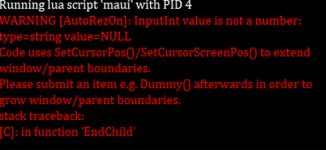
- This is the error that first appeared before reinstalling MAUI
- Currently this is the error popping up
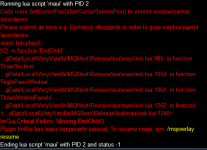
Things I have tried:
- Search both RG and Google to see if I could find a solution
- Did not find anything related to this specific issue or that seemed to steer towards a resolution
- Leverage LLM's with the specific errors and the MAUI Lua files
- Some edits to init.Lua in the maui folder were suggested, I tried those, no change
- These changes/edits have since been removed
- /mqoverlay reload
- No change
- Reinstall MAUI
- Deleted the entire MAUI folder, tried both a manual reinstall via a download from RG AND reinstalling via the RG Launcher
Thanks.

Thank you - I was unsure if this was a MAUI issue, MQ Issue, or something else, so wasn't sure if it was appropriate here or a separate thread.merging your maui post to the maui discussion thread
MuleAssist hasn't been updated for at least a year or two, pretty sure same is true for MAUI. I switched ti KissAssist, which is still being maintained, which has a Lua addon called Quicky Kiss it(QKI) that gives some control of settings, but not ini editing. Then switched to RGMercs Lua, no more ini editing.
After some additional work this week trying to get this issue resolved, and some help from VSCode with Claude and CoPilot, I seem to have arrived at a resolution for this issue.
Two files were updated:
The short version is that the
Changes made to init.lua:
Two files were updated:
\lua\maui\init.luamaui\lib\ImGuiFileDialog.luaThe short version is that the
ImGui.Dummy(1, 1) was added in a few places, impacting the windows that would cause ImGui to reset and MAUI to crash. ImGui.EndChild() was then moved into the ImGUI.BeginTable statement, instead of the ImGui.BeginChild statement.Changes made to init.lua:
Spell Grid Rendering:
Lua:
local function DrawSpellsGemList(spellSection)
    local _,yOffset = ImGui.GetCursorPos()
    local avail = ImGui.GetContentRegionAvail()
    local iconsPerRow = math.floor(avail/36)
    if iconsPerRow == 0 then iconsPerRow = 1 end
    for i=1,13 do
        local offsetMod = math.floor((i-1)/iconsPerRow)
        ImGui.SetCursorPosY(yOffset+(34*offsetMod))
        DrawSpellIconOrButton(spellSection, 'Gem', i)
        if i%iconsPerRow ~= 0 and i < 13 then
            ImGui.SameLine()
        end
    end
    ImGui.Dummy(1, 1)
    -- in case a spell gem was left clicked, don't mark it as selected so we don't enter the selected item drill-down
    selectedListItem = {nil, 0}
    selectedUpgrade = nil
end
Section Child Window:
Lua:
local function DrawSection(sectionName, sectionProperties)
    if sectionName == 'Buffs' then
        useRankNames = true
    end
    if not globals.Config[sectionName] then
        globals.Config[sectionName] = {}
    end
    if sectionProperties['Controls'] then
        DrawSectionControlSwitches(sectionName, sectionProperties['Controls'])
    end
    if ImGui.BeginChild('SectionProperties') then
        -- existing content...
        ImGui.Dummy(1, 1)
        ImGui.EndChild()
    end
    if sectionName == 'Buffs' then
        useRankNames = false
    end
end
Left and Right Pane Child Windows:
Lua:
local function LeftPaneWindow()
    local x,y = ImGui.GetContentRegionAvail()
    if ImGui.BeginChild("left", leftPanelWidth, y-1, ImGuiChildFlags.Border) then
        -- existing content...
        ImGui.Dummy(1, 1)
        ImGui.EndChild()
    end
end

local function RightPaneWindow()
    local x,y = ImGui.GetContentRegionAvail()
    if ImGui.BeginChild("right", x, y-1, ImGuiChildFlags.Border) then
        -- existing content...
        ImGui.Dummy(1, 1)
        ImGui.EndChild()
    end
end
Changes made to ImGuiFileDialog.lua:
Lua:
if ImGui.BeginChild('FileTable') then
    local flags = bit32.bor(ImGuiTableFlags.Resizable, ImGuiTableFlags.Sortable, ImGuiTableFlags.RowBg, ImGuiTableFlags.BordersOuter, ImGuiTableFlags.BordersV, ImGuiTableFlags.NoBordersInBody, ImGuiTableFlags.ScrollY)
    if ImGui.BeginTable('File Dialog', 3, flags) then
        -- existing table rendering code...
        ImGui.EndTable()
    end
    ImGui.Dummy(1, 1)
    ImGui.EndChild()
end
I understand that MAUI has not been updated in a while and there may not be many folks using it still, but if so and anyone else encounters this issue, hopefully this is helpful.
Users who are viewing this thread
Total: 1 (members: 0, guests: 1)
Share: