• You've discovered RedGuides, an EverQuest multi-boxing and scripting community 🧙‍♀️⚙️. We want you to play several EQ characters at once, come join us and say hello! 👋

  • A TLP without truebox has thawed (Very Vanilla ready)
    Frostreaver
Resource icon

Release MAUI (MuleAssist UI) 03/26/2024

No permission to download
Joined
Sep 13, 2019
RedCents
15,633¢
aquietone submitted a new resource:

MAUI (MuleAssist UI) - UI for the MuleAssist macro

MAUI is a replacement for the mq2mule plugin so that MA users on MQ (next) can continue to have a UI to make INI updates.
It doesn't do everything which the old one did, but it should look pretty familiar.

NOTE: Before using, backup your INI. There may (I'm not aware of any at this time) be bugs that would write values in a wrong format that the macro doesn't expect (0/1 instead of TRUE/FALSE, stuff like...

Read more about this resource...
 
Feature request, the old GUI had a button to save current spell set. Any chance that could be added or if it is there kindly point me to where its at? :)
 
aquietone updated MAUI (MuleAssist UI) with a new update entry:

Add debug, update spells sections

This update adds some new sections to the left menu:
- Debug: this section allows selecting debug categories and time window to enable debug for the macro
- Shared Lists: this is currently for viewing only, some buttons are there but not implemented yet. Displays lists like FireMobs, SlowMobs from Lemons_Info.ini

SpellSet section now also displays Gem1-Gem13 from MySpells INI section and allows editing them or assigning from spell bar.

Also includes a bug fix for PetToys to be treated as a...

Read the rest of this update entry...
 
aquietone updated MAUI (MuleAssist UI) with a new update entry:

Update INI handling and maybe some performance things

Updates existing behavior for discovering INI files at startup to match the old plugin more closely:
- It already would search for an INI with the following patterns, loading the first successful match:
1. MuleAssist_server_name_level.ini
2. MuleAssist_server_name.ini
3. MuleAssist_server_name_(level-1).ini thru level-10, so if you were 115 and had a 110 INI, it would find and load the 110 INI into the UI.

- The updated behavior is for (3), it will now automatically copy the INI to a...

Read the rest of this update entry...
 
If you're new to MQNext/Lua like me, don't forget to load the MQ2Lua plugin so this will run.

INI:
/plugin mq2lua load
 
Very important to backup the INI files. I had a nightmare of a time reloading and figuring out how to re-arrange and fix everything back to original state.

The Library helps , but a lot is customizable to your style
 
Very important to backup the INI files. I had a nightmare of a time reloading and figuring out how to re-arrange and fix everything back to original state.

The Library helps , but a lot is customizable to your style
When you say reloading back to original state.. are you just meaning the ordering of keys in the ini? Or did Maui break some setting?

It should for the most part be grouping up list items in order like dps1 dps2 etc minus a couple edge cases. For the overall sections ordering, it puts the sections more commonly used up near the top, but you could edit that order
 
Both .

I had to order the keys and Maui for some reason would stop by itself from time to time. Not sure if its my settings or what. But when I revert back to my original reload, I have no problems
 
Both .

I had to order the keys and Maui for some reason would stop by itself from time to time. Not sure if its my settings or what. But when I revert back to my original reload, I have no problems
If it breaks you should get red text in the mw console with the error stacktrace. Will need that to know what might be wrong.

As far as ordering I probably wouldn't try to fight it.. any time you save from the ui it will get rearranged unless you're just using the raw tab
 
One thing the MQ2Mule UI included that was, in my opinion, invaluable was a right-click context menu in the "Conditions" window. This allowed me to easily select macro options to write conditions. Do you have any plans on implementing such a thing, if it's even possible? Also, does there exist a list of these commands I can access in order to better educate myself on the possible combinations for automation?
 
One thing the MQ2Mule UI included that was, in my opinion, invaluable was a right-click context menu in the "Conditions" window. This allowed me to easily select macro options to write conditions. Do you have any plans on implementing such a thing, if it's even possible? Also, does there exist a list of these commands I can access in order to better educate myself on the possible combinations for automation?

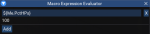
Didn't plan to include any condition builder as there is the macro expression evaluator already available via the MQ console: ctrl + `, tools, macro expression evaluator.
1635647767942.png
It doesn't include the right click context menus but it does display the evaluated value in real time:
1635647639485.png

As far as what TLOs/members exist, its all here: https://docs.macroquest.org/macroquest/data-types-and-top-level-objects/top-level-objects
 
Didn't plan to include any condition builder as there is the macro expression evaluator already available via the MQ console: ctrl + `, tools, macro expression evaluator.
View attachment 34622
It doesn't include the right click context menus but it does display the evaluated value in real time:
View attachment 34621

As far as what TLOs/members exist, its all here: https://docs.macroquest.org/macroquest/data-types-and-top-level-objects/top-level-objects
Woah I wasn't aware of these new functions. First day using the new MacroQuest. Thanks!
 
This is ******* awesome , I think I am going to pop some tags now... but before I go.. where is the documention that explains how to use the anim for the icons? I have am able to put icons on my screen but want a blank slot icon to use for other things.

I tried to pull a fast one and get an icon for an item I don't have.. boom!
 
This is ******* awesome , I think I am going to pop some tags now... but before I go.. where is the documention that explains how to use the anim for the icons? I have am able to put icons on my screen but want a blank slot icon to use for other things.

I tried to pull a fast one and get an icon for an item I don't have.. boom!

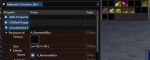
You can use the window inspector to look at the textures of various UI pieces and find what they're loading.
The one you're asking about sounds like you probably want
Code:
local box = mq.FindTextureAnimation("A_RecessedBox")
ImGui.DrawTextureAnimation(boc, width, height)

1635689625606.png
 
You can use the window inspector to look at the textures of various UI pieces and find what they're loading.
The one you're asking about sounds like you probably want
Code:
local box = mq.FindTextureAnimation("A_RecessedBox")
ImGui.DrawTextureAnimation(boc, width, height)

View attachment 34631

So I did find it, I just didn't know how to "use" it. I was stuck on trying to find the icon # for it :) Thank You
 
I like how this allows one to upgrade a spell without having to type it in.
 
Will this support imports? I couldn't find a way to import an ini from Kiss. Not critical, I have been learning the syntax by manually converting it. One question I ran across so far is, MAUI is listing FALSE in the various conditions. What if we don't have one? Set to TRUE or can we erase it?
 
Will this support imports? I couldn't find a way to import an ini from Kiss. Not critical, I have been learning the syntax by manually converting it. One question I ran across so far is, MAUI is listing FALSE in the various conditions. What if we don't have one? Set to TRUE or can we erase it?

Haven't looked at importing KA INIs. was that something which the plugin did?
AFAIK if you have conditions enabled but don't want to use a condition for a particular line, then you should set that condition to TRUE. If its entering false, then it would be because there was no condition for that line in the INI i think? I thought the macro would complain if you had DPS1 defined but no DPSCond1 defined, but I can't say I've ever tried that before.
For example,

Code:
DPSOn=2
DPSCOn=1
DPS1=nuke1
DPSCond1=TRUE
 
May be a long shot, but is there anyway to add functionality to set certain dps, heals, buffs active/inactive without having to remove the condition and set it to false?
 
May be a long shot, but is there anyway to add functionality to set certain dps, heals, buffs active/inactive without having to remove the condition and set it to false?

The easiest way to do that without having to go wipe out your conditions probably is to edit the INI and save the old lines like

Code:
DPS1=nuke1
DPSCond1=FALSE
;DPSCond1=my complicated condition that i don't want to delete
The line starting with ; will be ignored. You could make edits like that in the Raw INI tab of MAUI or just directly to the INI file.
There's nothing in the normal configuration panels of MAUI that would save the disabled lines like that.
 
The easiest way to do that without having to go wipe out your conditions probably is to edit the INI and save the old lines like

Code:
DPS1=nuke1
DPSCond1=FALSE
;DPSCond1=my complicated condition that i don't want to delete
The line starting with ; will be ignored. You could make edits like that in the Raw INI tab of MAUI or just directly to the INI file.
There's nothing in the normal configuration panels of MAUI that would save the disabled lines like that.
Awesome, that'll work!
 
Haven't looked at importing KA INIs. was that something which the plugin did?
AFAIK if you have conditions enabled but don't want to use a condition for a particular line, then you should set that condition to TRUE. If its entering false, then it would be because there was no condition for that line in the INI i think? I thought the macro would complain if you had DPS1 defined but no DPSCond1 defined, but I can't say I've ever tried that before.
For example,

Code:
DPSOn=2
DPSCOn=1
DPS1=nuke1
DPSCond1=TRUE

One of the EQMule vids showed grabbing a KissAssist ini and importing it. Sorry I don't have much more. The KA ini throw conditions at the end, but not terrible to match it up with MAUI.

Today while doing some edits, MAUI was defaulting NULL for cond. This is my first time setting up an assist, so I am not sure what it should like for no conditions (KA allows no condition to be listed base on some of the INI from KA lib I looked through.

I am getting close to finishing the first INI and then test it to see how it works. One other thing I noticed is MAUI won't let you set the long mem, long recast slot to 0 even though the MuleAssist and KA say 0 is to disable it.
 
One of the EQMule vids showed grabbing a KissAssist ini and importing it. Sorry I don't have much more. The KA ini throw conditions at the end, but not terrible to match it up with MAUI.

Today while doing some edits, MAUI was defaulting NULL for cond. This is my first time setting up an assist, so I am not sure what it should like for no conditions (KA allows no condition to be listed base on some of the INI from KA lib I looked through.

I am getting close to finishing the first INI and then test it to see how it works. One other thing I noticed is MAUI won't let you set the long mem, long recast slot to 0 even though the MuleAssist and KA say 0 is to disable it.

If you're interested to try this out, here's a version that makes a quick attempt at importing a KA INI and converting it to an MA INI. I just threw this together, so currently it will only take those sections which have matching names between the two macros, but maybe better than nothing? It should copy the conditions out of KConditions and assign them to the appropriate DPSCond# etc. types of values, as well as set values with no condition defined to have condition=TRUE.

To import the KA INI, on the left side scroll down to "Import KA INI" and then enter the file name of the INI, such as KissAssist_Toonname.ini.

1637201247295.png

Sorry there's no file explorer to choose from, you'll just have to type the INI name.

Needs more work before creating a release but if you try it and have any feedback let me know. Also fixed the MiscGemLW thing.
 

Attachments

If you're interested to try this out, here's a version that makes a quick attempt at importing a KA INI and converting it to an MA INI. I just threw this together, so currently it will only take those sections which have matching names between the two macros, but maybe better than nothing? It should copy the conditions out of KConditions and assign them to the appropriate DPSCond# etc. types of values, as well as set values with no condition defined to have condition=TRUE.

To import the KA INI, on the left side scroll down to "Import KA INI" and then enter the file name of the INI, such as KissAssist_Toonname.ini.

View attachment 35045

Sorry there's no file explorer to choose from, you'll just have to type the INI name.

Needs more work before creating a release but if you try it and have any feedback let me know. Also fixed the MiscGemLW thing.

No worries. I don't mind converting it myself. I have a head scratcher. I am not sure if this is MAUI (MQNext) related or muleassist in general. I checked out @Lemons enchanter muleassist ini and the syntax matches up (and on the MuleAssist Guide). I just can't figure out why muleassist is repeating casting of these buffs as soon as they come off of cooldown. A number of syntax variations were attempted, such as not including the Rk. II. I think Dual is broken and I have to use a Condition to check for the buff instead. At least "Me" works :toot:


1637256314071.png


If I get some time, I will try out that tool for a different character. Right now, I really want to get one working first.
 
For my mage i have the unity line like this and it appears to work fine.
Code:
Buffs1=Thaumaturge's Unity|Dual|Chaotic Bestowal|Me
So maybe just remove the Rk and move Me to the end of the options?
 
If you're interested to try this out, here's a version that makes a quick attempt at importing a KA INI and converting it to an MA INI. I just threw this together, so currently it will only take those sections which have matching names between the two macros, but maybe better than nothing? It should copy the conditions out of KConditions and assign them to the appropriate DPSCond# etc. types of values, as well as set values with no condition defined to have condition=TRUE.

To import the KA INI, on the left side scroll down to "Import KA INI" and then enter the file name of the INI, such as KissAssist_Toonname.ini.

View attachment 35045

Sorry there's no file explorer to choose from, you'll just have to type the INI name.

Needs more work before creating a release but if you try it and have any feedback let me know. Also fixed the MiscGemLW thing.


@aquietone

Initial look is very nice! I put the template in Next\config and it found without any problems. It grabbed the conditions and filled them in the appropriate spots. Working through the file. If I see anything odd, I will let you know. Thanks this is great.👍


1637336486322.png
 
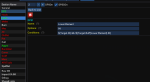
@aquietone -- This doesn't seem like a big problem with the import. It appears to fix entries on the tab when you visit it. Although it means you have to visit each tab to get it to update. In case you want to do anything about it, here is what happened on importing a wizard KA ini.

1637337305571.png
 
Release MAUI (MuleAssist UI)

Users who are viewing this thread

Back
Top
Cart