


So recently I started playing one of my groups that was used for test purposes only. I hadn't played the group in about 2 years other than keeping the tank max level and AAs. The entire group was horribly under geared in Hot and RoF Baz gear. I wanted to gear all of them in EoK group gear. The problem was camping all those named and looting all the gear on each toon. I have only been using my own version of ninjadvloot forever and it doesn't handle passing each item to every toon, so I would have to watch the group and make sure the right toon was looting drops. Meh. Who has time for that any more?
I talked to a lot of members and they were using MQ2Autoloot by plure. I had never used it as I am not a huge fan of EQ's advloot system even though I wrote the original code to let macros loot with it. I only used it enough to update ninjadvloot to use it.I never realized MQ2autoloot used the loot.ini file until plure told me which some people (like me) have been honing for years to their camps and xping. I did not want to set up another entire file with thousands of entries in mq2autoloot.
Well after a lot of questions, trial and error I am now using MQ2Autoloot. I have become a huge fan of this plugin. The problem was I couldn't not find a guide on how to set it up for the average user. I decided to write this one so, with some planning, easy edits and tweaks you can have your entire group loot the items they need to get geared.
Please comment below and add any improvements, tips or tweaks. I will add them as I just started using this so i am sure it can be improved.
What is MQ2AutoLoot?
Its an exclusive plugin by Plure included with the Redguides Very Vanilla Compile.
Read about here MQ2AutoLoot
How do you enable it?
/plugin mq2autoloot
Assign master looter in your group
Turn off any macro looting functions that use ninjadvloot.
Whats it do?
It handles all party looting and replaces ninjadvloot.inc file functions.
What gear does your group need?
My group need everything. I decided easiest and fastest is to get everyone geared was in complete EoK tier 1 group gear.
My group has
What mobs are you going to camp for the gear?
For my first camp I choose Lceanium which has 3 named close enough to pull.
Yeti Patriarch
The Blazing Hen
The Stone Dove
All the mobs drop the armor I need
Yeti drops 2 ears. One earring everyone can use. The rare one has a pet focus on it for my pet classes.
The blazing Hen drops a face and AC aug
The Stone Dove drops a charm
Look up the named mobs and make a list of the drops
Amorphous Cohort's Boots
Amorphous Cohort's Breastplate
Amorphous Cohort's Gauntlets
Amorphous Cohort's Helm
Amorphous Cohort's Leggings
Amorphous Cohort's Sleeves
Amorphous Cohort's Wristguard
Satchel of the Combine Hero
Dove's Cry ? Ranger Bow - I don't need this at all
Stone Feather ? The Charm
Bone Earring
Engraved Bone Earring
Feathered Mask
Glittering Amber Fragment ? AC aug
Add the list to your loot.ini file
We now take the list and assign as quest items using the =Quest tag. This is just the way ninjadvloot and MQ2autoloot handles gear. The syntax is =Quest|#. # is the amount to give each character. We want to give one of each to all toons except the wrist armor piece which we want to give 2. I set the bow to destroy since I have no rangers
Each item must be put under its section in the loot.ini file the are alphabetical and look like
[A]
[C]
Etc.
So my loot goes under the following. Your loot.ini will most likely have many items in them so you just add them to the end of the section
Adjust your group according from the neediest to the best geared
Party order can be important because MQ2autoloot works off your Master Looter and his party list.
The list will want to give all the items to everyone EXCEPT the Rare pet class ears. I want these to go to the mage and Beastlord first.
So with everyone disbanded. I am inviting everyone from my mage who will be group leader and master looter. I am inviting the Beastlord first, so he is the first toon in my party window. Then everyone else since the order after that doesn't matter.
So my Group window on my mage looks like this
Tweaking the Advloot character list as gear drops
PRO TIP #1
Some items like he Amorphous Cohort's armor changes it's name after you right click it to equip on each class i.e. Amorphous Cohort's Boots becomes Cohort's Frostfire Sandals for wizzies. If you do this then MQ2Autoloot will give another pair of boots to that toon because it thinks they don't have one. So you have to wait until every toon has a pair or do the following to let MQ2autoloot know they have already looted a pair.
I found this out the hard way but MQ2Autoloot can also reads the character advloot file and you can use this to prevent MQ2Autoloot from giving new drops to characters that converted their armor.
Here is what you do to prevent MQ2Autoloot from assigning items after their name have been changed
THIS MUST BE DONE BEFORE THE ITEM IS TRANSFORMED IN ANY WAY
Open up your inventory and find the item.
Alt + Left Click on the item to open its description window
You will see 4 boxes. These are the advloot choices.
(Note: this is an MQ2 feature of MQ2Itemdisplay)
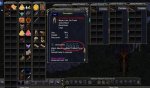
Check the NV box for never loot.
This will assign EQ advloot never to loot this item. MQ2Autoloot will read it and then skip over the item from now on
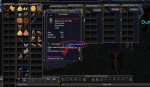
Close the window.
You can now transform and equip the item whenever you want and MQ2Autoloot will not give them another transformed item.
Pro Tip #2
Quick way to mark loot =destroy in loot.ini file with MQ2Autoloot command.
Make this hotkey
When your bags fill up with crap.
Mq2autoloot will mark the item destroy so you will destroy it and longer keep it
EQ will then delete the item off your cursor.
Do this slowly so you don't delete any loot you want to keep
I talked to a lot of members and they were using MQ2Autoloot by plure. I had never used it as I am not a huge fan of EQ's advloot system even though I wrote the original code to let macros loot with it. I only used it enough to update ninjadvloot to use it.I never realized MQ2autoloot used the loot.ini file until plure told me which some people (like me) have been honing for years to their camps and xping. I did not want to set up another entire file with thousands of entries in mq2autoloot.
Well after a lot of questions, trial and error I am now using MQ2Autoloot. I have become a huge fan of this plugin. The problem was I couldn't not find a guide on how to set it up for the average user. I decided to write this one so, with some planning, easy edits and tweaks you can have your entire group loot the items they need to get geared.
Please comment below and add any improvements, tips or tweaks. I will add them as I just started using this so i am sure it can be improved.
What is MQ2AutoLoot?
Its an exclusive plugin by Plure included with the Redguides Very Vanilla Compile.
Read about here MQ2AutoLoot
How do you enable it?
/plugin mq2autoloot
Assign master looter in your group
Turn off any macro looting functions that use ninjadvloot.
Whats it do?
It handles all party looting and replaces ninjadvloot.inc file functions.
What gear does your group need?
My group need everything. I decided easiest and fastest is to get everyone geared was in complete EoK tier 1 group gear.
My group has
- SK
- Cleric
- Mage
- Wizzy
- Beastlord
- Chanter
What mobs are you going to camp for the gear?
For my first camp I choose Lceanium which has 3 named close enough to pull.
Yeti Patriarch
The Blazing Hen
The Stone Dove
All the mobs drop the armor I need
Yeti drops 2 ears. One earring everyone can use. The rare one has a pet focus on it for my pet classes.
The blazing Hen drops a face and AC aug
The Stone Dove drops a charm
Look up the named mobs and make a list of the drops
Amorphous Cohort's Boots
Amorphous Cohort's Breastplate
Amorphous Cohort's Gauntlets
Amorphous Cohort's Helm
Amorphous Cohort's Leggings
Amorphous Cohort's Sleeves
Amorphous Cohort's Wristguard
Satchel of the Combine Hero
Dove's Cry ? Ranger Bow - I don't need this at all
Stone Feather ? The Charm
Bone Earring
Engraved Bone Earring
Feathered Mask
Glittering Amber Fragment ? AC aug
Add the list to your loot.ini file
We now take the list and assign as quest items using the =Quest tag. This is just the way ninjadvloot and MQ2autoloot handles gear. The syntax is =Quest|#. # is the amount to give each character. We want to give one of each to all toons except the wrist armor piece which we want to give 2. I set the bow to destroy since I have no rangers
Each item must be put under its section in the loot.ini file the are alphabetical and look like
[A]
[C]
Etc.
So my loot goes under the following. Your loot.ini will most likely have many items in them so you just add them to the end of the section
Rich (BB code):
[A]
Amorphous Cohort's Boots=|Quest|1
Amorphous Cohort's Breastplate=|Quest|1
Amorphous Cohort's Gauntlets=|Quest|1
Amorphous Cohort's Helm=|Quest|1
Amorphous Cohort's Leggings=|Quest|1
Amorphous Cohort's Sleeves=|Quest|1
Amorphous Cohort's Wristguard=|Quest|2

Bone Earring=|Quest|1
[D]
Dove's Cry=Destroy
[E]
Engraved Bone Earring=|Quest|1
[F]
Feathered Mask=|Quest|1
[G]
Glittering Amber Fragment=|Quest|1

Stone Feather=|Quest|1
Satchel of the Combine Hero=|Quest|1
Adjust your group according from the neediest to the best geared
Party order can be important because MQ2autoloot works off your Master Looter and his party list.
The list will want to give all the items to everyone EXCEPT the Rare pet class ears. I want these to go to the mage and Beastlord first.
So with everyone disbanded. I am inviting everyone from my mage who will be group leader and master looter. I am inviting the Beastlord first, so he is the first toon in my party window. Then everyone else since the order after that doesn't matter.
So my Group window on my mage looks like this
- Beastlord
- SK
- Cleric
- Wizzy
- Chanter
Tweaking the Advloot character list as gear drops
PRO TIP #1
Some items like he Amorphous Cohort's armor changes it's name after you right click it to equip on each class i.e. Amorphous Cohort's Boots becomes Cohort's Frostfire Sandals for wizzies. If you do this then MQ2Autoloot will give another pair of boots to that toon because it thinks they don't have one. So you have to wait until every toon has a pair or do the following to let MQ2autoloot know they have already looted a pair.
I found this out the hard way but MQ2Autoloot can also reads the character advloot file and you can use this to prevent MQ2Autoloot from giving new drops to characters that converted their armor.
Here is what you do to prevent MQ2Autoloot from assigning items after their name have been changed
THIS MUST BE DONE BEFORE THE ITEM IS TRANSFORMED IN ANY WAY
Open up your inventory and find the item.
Alt + Left Click on the item to open its description window
You will see 4 boxes. These are the advloot choices.
(Note: this is an MQ2 feature of MQ2Itemdisplay)
Check the NV box for never loot.
This will assign EQ advloot never to loot this item. MQ2Autoloot will read it and then skip over the item from now on
Close the window.
You can now transform and equip the item whenever you want and MQ2Autoloot will not give them another transformed item.
Pro Tip #2
Quick way to mark loot =destroy in loot.ini file with MQ2Autoloot command.
Make this hotkey
Rich (BB code):
/setitem destroyWhen your bags fill up with crap.
- Stop your macro.
- Shitft B to open all your bags.
- Left click on the items you want to destroy so its on your cursor
- Hit the hotkey
- Rinse and repeat until you clear your bags
Mq2autoloot will mark the item destroy so you will destroy it and longer keep it
EQ will then delete the item off your cursor.
Do this slowly so you don't delete any loot you want to keep
Last edited:


 I have been waiting for someone to highlight that feature, it's made my life easier for sure when it comes to assigning loot rules.


