

• Hail, we're RedGuides. We want you to play six (yes, 6!) EverQuest characters at once. We have scripts and a friendly community to help, please join our playstyle and say hello! 👋
  • We've added LLM sections to our Terms & Rules and Resource Rules, for everyone's sanity & in-game safety.
    Read more
    a. Do not replace your voice with an LLM. This goes for your posts and your scripts. Drafting and editing with a tool is fine, but don't take you out of what you share.
    b. Do not replace your EQ character's voice with an LLM. We don't want scripts that speak over /ooc, /shout or other public channels. This has been an unwritten rule that's kept casino scripts off the site for decades, but we're now compelled to make it clear: keep automated communication private.

    Why Does RG Review Scripts?
    Nearly every LLM-written Lua script we see is making your character do impossible things, and rarely in a way that's beneficial to you. We've seen heavy server hammering, /target over impossible distances when /nav spawn would passively accomplish the same thing, a spawn search that fires 20+ times per second, and other pointless actions that are likely annoying GMs.

    You are welcome to use LLMs as a tool to structure, draft, and edit your work, but please read critically before hitting /lua run

Question - Map and text boxes

Whenever I have my map open, the text in vendors and my text boxes partially disappears. I like keeping my map open on my puller but it makes it near impossible to keep up with tells and other things going on.

Is this a known problem?

I am six boxing, windowed at 4k resolution with light graphics turned on. I have a pretty good system and video card. Turning the graphics effects off doesn't seem to help (I hate playing without them too.)

GPUZ shows that I am only using 30% of my graphics GPU and 3.3 GB (out of 8GB) of video memory.
System CPU is 20 - 30% (of 4.2GHz) and 60% memory used out of 16Gb (the graph below shows more due to all the other stuff I have open right now, normally it's under 60%)
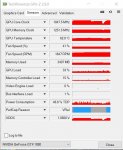
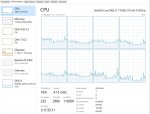
Capture.JPG
Capture.JPG
 
This is a limit in the EQ client. It can only render so much text, so in highly populated zones the map takes it over. You can't really get around it unfortunately. You might try MySEQ to keep track of the zone instead.
 
This is a limit in the EQ client. It can only render so much text, so in highly populated zones the map takes it over. You can't really get around it unfortunately. You might try MySEQ to keep track of the zone instead.

How do I turn off all the garbage text? I know how to move filters around but whenever I click something off, the client turns it back on in the default text window. There just seems to be so much unwanted text streaming by that the default window is useless to try and read.
 
Ahh... it can only render so much text. It's not rendering anything in the textbox that's not showing (IIRC), so that won't help you. I'm not sure how mq2map renders text, but when you have it open with stuff showing, the vast majority of the text rendering is through that plugin. If you want to reduce the amount that's showing, start using
Rich (BB code):
/maphide
to remove things you don't want to see on the map.
 
Whenever I have my map open, the text in vendors and my text boxes partially disappears. I like keeping my map open on my puller but it makes it near impossible to keep up with tells and other things going on.

Is this a known problem?

I am six boxing, windowed at 4k resolution with light graphics turned on. I have a pretty good system and video card. Turning the graphics effects off doesn't seem to help (I hate playing without them too.)

GPUZ shows that I am only using 30% of my graphics GPU and 3.3 GB (out of 8GB) of video memory.
System CPU is 20 - 30% (of 4.2GHz) and 60% memory used out of 16Gb (the graph below shows more due to all the other stuff I have open right now, normally it's under 60%)

View attachment 14350
View attachment 14351

Just turn off labels when you are using a vendor or what not.
 
As they said, there is a limit to how much "draw" EQ can use when making texts. Once it hits the limit, some text just wont be rendered. All you can do is basically limit the amount of displayed text.

https://www.redguides.com/community/threads/24779-MQ2Map

By default I believe RG has a number of things on that you can turn off easily. For instance

/mapfilter named (it is a toggle, and will turn off displaying NPC names unless they are "named", typing it again will turn it back on)
/mapfilter corpse (toggles showing corpses)
/mapfilter ground (toggle, if you are in a zone that has a lot of groundspawn, helps to turn this off. Helps to have it on if you are "shiny" hunting)

What works best is turning what you can off (/mapfilter all) open your map, then zoom in to your area, then turn MQ2Map back on (/mapfilter all) This will limit the amount of text being displayed, as opposed to the entire zone. For instance, if you are using MQ2Map to track NPCs around you, zooming in until you are showing just your pull radius will help a lot.


You can also do, as jackstraw suggested, limiting NPC or PC labeling using EQ options.

And of course, there is the amount of char window text you have displayed at any given time. I generally have just 4 lines showing, unless general is getting lively or I am debugging. I have a "all chat goes here" window, a "all spell/melee spam goes here" window (that is usually closed unless I want to see whats going on) and a "roll/TS/environmental/emote" window, for left overs that sometime become important (quests) and of course MQ2 window and BC window. But then, I am also an information junkie and a modified player window showing all toon stats and more, which uses text as well.
 
Question - Map and text boxes

Users who are viewing this thread

Back
Top
Cart