• You've discovered RedGuides, an EverQuest multi-boxing and scripting community 🧙‍♀️⚙️. We want you to play several EQ characters at once, come join us and say hello! 👋

  • A TLP without truebox has thawed (Very Vanilla ready)
    Frostreaver
Magellan - Travel Utility

Release Magellan - Travel Utility 12-04-2025

No permission to download
Having some trouble with this. I wanted to mess around and see what the other new themes look like and found out these commands don't work:

/lua magellan help
and /Lua run magellan <theme name>

Both return with Unknown command: magellan and Loa script magellan is already running, blah blah.

Is it just me being the terrible old person that can't spell worth shit?

Vrak
 
Having some trouble with this. I wanted to mess around and see what the other new themes look like and found out these commands don't work:

/lua magellan help
and /lua run magellan <theme name>

Both return with Unknown command: magellan and Loa script magellan is already running, blah blah.

Is it just me being the terrible old person that can't spell worth shit?

Vrak
If its already running then you can /Lua stop magellan ( if its running there should be a window up)
then you can run the theme commands. /Lua run magellan help or /Lua run magellan themename

the commands only work on start up of the Lua script.
 
Ahh I see. As I expected it was me and not the imGUI. Thanks Lone Wolf appreciate the guidance.

Vrak
 
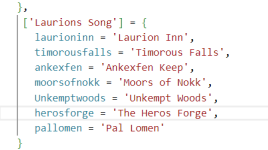
New zones for expansion Laurions Song listed

Code:
   ['Night of Shadows'] = {
      firefallpass = 'Firefall Pass',
      shadeweavertwo = 'Shadeweaver\'s Tangle',
      sharvahltwo = 'Shar Vahl, Divided',
      paludaltwo = 'Paludal Depths',
      shadowhaventwo = 'Ruins of Shadow',
      deepshade = 'The Deepshade',
      darklightcaverns = 'Darklight Caverns'
   },
   ['Laurions Song'] = {
      laurioninn = 'Laurion Inn'
      timorousfalls = 'Timorous Falls'
      ankexfen = 'Ankexfen Keep'
      moorsofnokk = 'Moors of Nokk'
      Unkemptwoods = 'Unkempt Woods'
      herosforge = 'The Heros Forge'
      pallomen = 'Pal Lomen'
   },
}


-- Added NoS Entries again
return zones_heirarchy

I just placed the new zones under Night of Shadows expansion and left for example for anyone who wants to update the list manually.

Thanks for an awesome Utility Coldblooded, use this everyday.
 
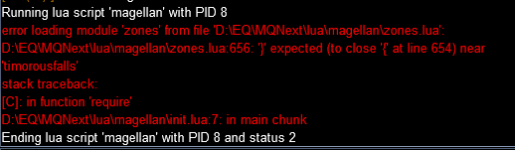
new error after update:
1701951559461.png

caused by missing commatas at the eol of the new Laurion Song zones at the end of zones.Lua

1701951633893.png

the commatas have been missing after update.
After adding the commatas the error is gone.
 
Coldblooded, I just stumbled across Magellan and I like the way that you structured your program. I really like the way it does lookups as you type, while mine requires clicking a button to search. I hope that there isn't too much overlap between our programs, especially since Magellan has been around for so long. I'm curious to see what you think of my NavHelper Lua. In any case, I just wanted to let you know that I like the way your search function is implemented.
 
Love this one - I find it amazing. One suggestion and request, I recently ran into a situation I was doing epics for multiple chars at once and ungrouped...I had multiple Magellan bars open. Would it be possible to put the name of the char that spawned the instance of Magellan in the Magellan window so if you are running 3/4/5 of them you don't have to rely on keeping them lined up to sort of keep them figured out?
 
Hello, I just Heroic's a toon to 100 and I did a /Lua run magellan and the box pops up and when I input the place I want to go and click it, she does nothing. My other toons can use it, but not this new one. Did I forget to do something?
 
Selecting Chardok from the Ladon View tab does not do anything. chardoktwo and chardokb both work as expected.

Selecting Chardok from the By Expansion tab works as expected.

Thanks for the great tool!
 
I'm having an issue with this. Just installed it the other day and started using it. I have a 6 box, whenever I've used it to got from LI zone into HF zone in one of my characters seemingly warps to the HF zone. It seems that way because as soon as I push the zone name to go he immediately zones even if we're all the way across the zone. The rest of the group just runs to the zone in. All toons are using CWTN plugins if that matters.
 
I'm having an issue with this. Just installed it the other day and started using it. I have a 6 box, whenever I've used it to got from LI zone into HF zone in one of my characters seemingly warps to the HF zone. It seems that way because as soon as I push the zone name to go he immediately zones even if we're all the way across the zone. The rest of the group just runs to the zone in. All toons are using CWTN plugins if that matters.
Do you have automatically click doors in your nav settings? If so you may want to move away from the door before issuing the travel command.
 
I really like the ease of use to go to a waypoint I set but what would be very nice would be to be able to set a list of waypoints like go to A then once you reach it go to B etc... that would make easy to set a path avoiding dangerous camps with see invis mobs instead of taking the short way straight trough.
 
Hello all, past couple of days I have been experiencing "NAV: could not find the path to the destination" when using magellan in Laurion's song zoned and guild lobby. Any idea what I need to do to fix this. I downloaded the latest meshes and copied and pasted into the MQ2Nav folder. Thank you.
 
Hello all, past couple of days I have been experiencing "NAV: could not find the path to the destination" when using magellan in Laurion's song zoned and guild lobby. Any idea what I need to do to fix this. I downloaded the latest meshes and copied and pasted into the MQ2Nav folder. Thank you.
You may need to modify the meshes to fix any broken pathing. Also I have noticed lev can effect this as well.
 
Hello all, I must of did something wrong. Every time I type /Lua run magellan the purple box pops up but it takes up 60 percent of my screen. I click on the upper left button so I can see the corner part where I can move it and then I can grab the far right corner to minimize. So I can reduce it, but when I log back in, the box is once again taking 60 percent of my screen. How do I get into the settings so I can have the box smaller when I call the Lua up? Thank you!
 
RetNavChief

You resize it and put it in the position you want it and then CLOSE the Lua completely (with the "X" in upper right hand corner of the window). Then open your "Lua Settings" from the "EQ" button (left click the button to open menu and then at the top you'll see the Lua settings item) and restart the Lua. You'll see it listed at the bottom under the Stopped heading. Some say that should save your settings in the appropriate ini file. I log out using the Camp routine to save the settings. Some Lua's seem to save better that way.

Hope that helps.

Vrak
 
RetNavChief

You resize it and put it in the position you want it and then CLOSE the LUA completely (with the "X" in upper right hand corner of the window). Then open your "LUA Settings" from the "EQ" button (left click the button to open menu and then at the top you'll see the Lua settings item) and restart the LUA. You'll see it listed at the bottom under the Stopped heading. Some say that should save your settings in the appropriate ini file. I log out using the Camp routine to save the settings. Some LUA's seem to save better that way.

Hope that helps.

Vrak
Thank you for this
 
RetNavChief

You resize it and put it in the position you want it and then CLOSE the LUA completely (with the "X" in upper right hand corner of the window). Then open your "LUA Settings" from the "EQ" button (left click the button to open menu and then at the top you'll see the Lua settings item) and restart the LUA. You'll see it listed at the bottom under the Stopped heading. Some say that should save your settings in the appropriate ini file. I log out using the Camp routine to save the settings. Some LUA's seem to save better that way.

Hope that helps.

Vrak
only things that use the eq xml windows require closing and reopening to save ui positions, imgui windows don't

but if you have the window opened on multiple characters and the code is using 1 window name where to save the position, it'll update to the last one when you're doing stuff / changing toons.

i'd suggest log everyone out (or unload it on everyone) but one toon, move it where you want it, then load other toons.

it should now be in the correct place for everyone
 
Is there any was to disable using the adventure camps (I think that's what they are called)? It's really annoying to have one of me people in a different part of the zone from all the others.
 
Request for this to work on Project Lazarus EMU server? - (Runs and hides)
 
Request for this to work on Project Lazarus EMU server? - (Runs and hides)
other than it not saying it works on emu. what about it doesn't (assuming you're using custom zone connections).

did you try loading it?
 
Its just a pretty front end for nav so you don't have to remember the zone shortname. I'd think that the magic will be in your zoneconnections.yaml.
 
other than it not saying it works on emu. what about it doesn't (assuming you're using custom zone connections).

did you try loading it?
So I have the zoneconnections_emu.yaml loaded and a few of the zones do not have find options for the zonline needed. Example - Mistmoore doesnt have the find Lesser Faydark as an option so I cant do the ctrl+shift+click to have my cartoons mvoe to that zoneline and actually leave Mistmoore.

It works when I am in L Faydark and I want to find G Faydark. Ctrl+shift+click zone name works and the pack runs across the zone and doesnt care whats in the way and to the G Fay zoneline and out they go.

I have reloaded to ensure its properly functioning.
 
So I have the zoneconnections_emu.yaml loaded and a few of the zones do not have find options for the zonline needed. Example - Mistmoore doesnt have the find Lesser Faydark as an option so I cant do the ctrl+shift+click to have my cartoons mvoe to that zoneline and actually leave Mistmoore.

It works when I am in L Faydark and I want to find G Faydark. Ctrl+shift+click zone name works and the pack runs across the zone and doesnt care whats in the way and to the G Fay zoneline and out they go.

I have reloaded to ensure its properly functioning.
well, those would be due to the zoneconnections and not due to magellan, right?
 
I'll check this out also but once again, I am throwing new parts at something and would like to figure out the built ins without loading more stuff causing more issues. When you keep throwing more stuff at the same time, you lose sight of what works and what has now crashed at the same time limiting your troubleshooting capabilities.
 
well, those would be due to the zoneconnections and not due to magellan, right?
Oh yes, I was just askign if Magellan would be able to work in EMU since Its not listed as capable. I am still trying to troubleshoot my emu travel stuff with the yaml files.

I dont want to add something else if it wont work and takes coding to fix it to work. I can mess it up real quick if thats the case. :D
 
I love this utility and use it multiple times a day.

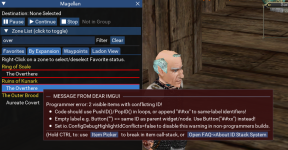
On the test server, it's showing the "MESSAGE FROM DEAR IMGUI" when I hover over some zone names. This does not affect gameplay in any way.


1736856151514.png
 
I need help to run Magellan:
Captura de pantalla 2025-01-28 184634.png

I think That happened after disconnected some plugins in /pluginman (but not sure on this) but forgot wich ones, thanks in advance
Reinstaled from repository and nothing changed
 
Release Magellan - Travel Utility

Users who are viewing this thread

Back
Top
Cart