I'm currently using the Sparxx UI. Macroquest puts the buttons "Come To Me", "Follow Me", and "Mimic Me" on the Target Group window. The problem is that I need to resize the window every single time I login. Does anyone know how to save or adjust the default size of that window?

Install the app
How to install the app on iOS
Follow along with the video below to see how to install our site as a web app on your home screen.
Note: This feature may not be available in some browsers.
-
 You've discovered RedGuides, an EverQuest multi-boxing and scripting community 🧙♀️⚙️. We want you to play several EQ characters at once, come join us and say hello! 👋
You are using an out of date browser. It may not display this or other websites correctly.
You should upgrade or use an alternative browser.
You should upgrade or use an alternative browser.
Question - Macroquest buttons & Target Group Window resize issue
- Thread starter cptrgamer
- Start date

I use Sparxx as well and the attached one that I edited works for meI'm currently using the Sparxx UI. Macroquest puts the buttons "Come To Me", "Follow Me", and "Mimic Me" on the Target Group window. The problem is that I need to resize the window every single time I login. Does anyone know how to save or adjust the default size of that window?
Attachments
Last edited:

Thanks! For those that want to edit the size on their own, it's lines 2573 & 2574. Below are my edits, but you can obviously adjust them to whatever size you like.psy good job!
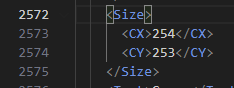
For some reason, that file forced my UI back to default. But I was able to modify my current EQUI file to make it fit perfectly every time. Another hiccup checked off of my list. Thanks for the help!
<Screen item="GroupWindow">
<ScreenID />
<RelativePosition>false</RelativePosition>
<Location>
<X>200</X>
<Y>200</Y>
</Location>
<Size>
<CX>254</CX>
<CY>322</CY>
</Size>
<Screen item="GroupWindow">
<ScreenID />
<RelativePosition>false</RelativePosition>
<Location>
<X>200</X>
<Y>200</Y>
</Location>
<Size>
<CX>254</CX>
<CY>322</CY>
</Size>
That may be due to you being on the most recent version of 1.4.4 as I am still on 1.4.3 sans the new inventory window.For some reason, that file forced my UI back to default. But I was able to modify my current EQUI file to make it fit perfectly every time. Another hiccup checked off of my list. Thanks for the help!
<Screen item="GroupWindow">
<ScreenID />
<RelativePosition>false</RelativePosition>
<Location>
<X>200</X>
<Y>200</Y>
</Location>
<Size>
<CX>254</CX>
<CY>322</CY>
</Size>
Glad you got it working!!
That may be due to you being on the most recent version of 1.4.4 as I am still on 1.4.3 sans the new inventory window.
Ah, you would be correct! My UI folder says Sparx144, so that must mean 1.4.4. Regardless, it's fixed now.

Users who are viewing this thread
Total: 1 (members: 0, guests: 1)
Share: