• You've discovered RedGuides, an EverQuest multi-boxing and scripting community 🧙‍♀️⚙️. We want you to play several EQ characters at once, come join us and say hello! 👋

  • A TLP without truebox has thawed (Very Vanilla ready)
    Frostreaver
[Macro] CheckBarter.mac

Release [Macro] CheckBarter.mac 2019-07-02

No permission to download

ChatWithThisName

⚔️🛡️🗡️
Moderator
Joined
Dec 29, 2017
RedCents
23,978¢
This simple utility will check all the items available to the barter window to see if there is a buy line
  • It will compare the buyer's paying price to the vendor value. If the vendor value is greater it will not report anything.
  • It currently only reports that there were buy lines found and the value of the highest paying price
  • It doesn't compare your inventory quantity to their quantity.
  • It doesn't report at the end, rather it reports it as the information is found Reduced the spam!
  • It does not report the buyer's location, name, etc.
  • It will not navigate you to the buyer in question
  • It does not use an INI of any sort
  • It does not currently have an exclusion list for


  1. [*=1]Items ADDED!
    [*=1]Buyers


Usage: /mac CheckBarter

Requested by @supertimmy

2/14/2018 - Much to my wife's displeasure. I've updated this today.
  1. Added an exclusion list for items.
  2. Corrected issues with EQ's partial name matching. It now checks to make sure it's getting a price for the correct item from the results of the search.
  3. Converted all unessential /echo's into Debugging messages. Now if you want the spam you have to change /declare Debugging bool outer FALSE to TRUE
 
Last edited:
suggestion, only llist the item that currently can sell so it can be used as a sort of checklist instead of listing every item and that you cant sell them.
 
also maybe only allow it to check your bags, so it dont check kronos you have etc.
 
also i forget how we do searches that are the exact match so diamonds dont get fingered when someone is looking for diamonds of other types.
 
Yeah I did need to make it verify that the name is the same as the item name when doing a search. I realized that late last night/early this morning. Was just too tired to do anything about it lol. That should obviously be a base part of the macro. I can add a toggle to show "Searching for Item:" However, additions such as excluding items will be handled different if I either get around to doing something about it, or someone wants to pony up for the changes. I'm sure I'll get to it eventually. Just not a priority.

If I start only checking bags it's going to make this macro get a lot bigger pretty quick. The way I'm handling it is entirely through the /barter window. Your bags aren't even considered when conducting searches. Items that can't be sold such as no drop etc are already excluded by the /barter window and prevents me from having to build a base case for an item to even show up. Then cycling through the bags would require I opened the bags and then cycle through them slot by slot with the barter window open. Which would cause a lot of clutter on screen. As it stands this can be used in any zone to see if items have available buylines. You can run it while you play (Assuming you aren't using another macro of course). However, items you are wearing that are not no drop that can be sold will always be checked unless I generate the exlusion list and add a comparison for the item versus that exclusion list. I could for example by default generate an Array of items that are worn and add those items temporarily to the exclude list per run, then also have an exlusion list available in an INI where a player can input the items they want to ignore. Then include an INI output for any item that has a buyline to include it's current sell price. Problem with using the INI is there is no way to remove things from the INI, thus once it is written, it is there. There are a lot of considerations to be made when considering potential updates to this macro. I do hope to build on it to make it more powerful and user friendly.


With that said, thank you for the suggestions.
 
but yeah kronos are listed in the inventory even though i have them in the krono slot in the currency tab, which is wierd.

but yeah i just remmed out the 2 spots i didndt wnana see, and gfot a nice trading list i coudl go look at.

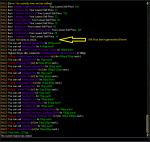
Capture.PNG
 
Yeah I'll probably do that. But leave the echo's and wrap them with an /if (${Debugging})

Will look into the exclusion list.
 
Added a check to verify that the result in the barter window is the same item as the search item to avoid false positives for found buy lines.

Added an exclusion list for items so you can skip items that you don't want to check. (max 2048 characters!!!)

Converted all non-essential echos into debugging messages. If you want to see the extras (more have been added) you must turn on debugging by changing /delcare Debugging bool outer FALSE to TRUE.

Happy Valentines Day!
 
you is little bit awesome chats, but only little bit.
 
dude, i just remembered this command.

Rich (BB code):
/setchattitle Checking (${i}/${itemCount}) - Item: ${Window[BarterSearchWnd].Child[BTRSRCH_InventoryList].List[${i},2]} Quantity: ${Window[BarterSearchWnd].Child[BTRSRCH_InventoryList].List[${i},3]}

sorry i keep messing with things, its just so much fun, and keeps the old grey brain matter going another day
 
So I've improved CheckBarter.mac to include optional selling of items. Now generating an INI file called CheckBarterSellList.ini which should appear next to your CheckBarter.mac
Now you can sell the items from CheckBarter.mac after running it once you've downloaded an updated copy.

How does it work? Well after you've ran the macro and it tries to find a buy line for the first item you've already generated the INI entry for every item in the list. If you let it run till finished it will also generate an INI entry for each item with a found buy line that will be called "Highest" and it will be equal to the amount of the highest buyline ever found. Once you've got the INI generated you can go about setting the lowest price you'll take for the items. Below I include a copy of a section of my ini I was using for testing this update. Items with SellPrice=0 will not be sold. Items with a sell price, such as Steel Ingot, will not be sold unless there is a buyline offer for greater than or equal to that amount. In the case of Steel Ingot I have "SellPrice=300" So if there is a buyline offer for 300 or more it will sell to it. If there are multiple buylines greater than SellPrice it will still always select the highest offer.

IE: Buylines for 300, 400, and 1200. I'll sell it for 300. It will automatically sell it for 1200.

The macro is designed to sell all of the item you have on you. Sometimes the buyer won't want that many, so it will sell partial. It will not then try to sell to the next lowest offer. You would have to run the macro again if they all didn't sell.

CheckBarter.png


Rich (BB code):
[Steel Ingot]
SellPrice=300
Highest=300
[Sunshard Pebble]
SellPrice=0
[Tolapumj's Robe]
SellPrice=0
[Vanadium Ore]
SellPrice=30
Highest=30
[Blue Diamond]
SellPrice=0
[Corrupted Loam]
SellPrice=0
[Antithesis of Fear]
SellPrice=0
[Befouled Animal Pelt]
SellPrice=0
Highest=420
[Befouled Marrow]
SellPrice=0
[Befouled Silk]
SellPrice=0
Highest=5100
 
ChatWithThisName
next iteration of the checkbarter, move excludelist to the ini file, so people aint gotta edit no code!
allow for a command to exclude item on mouse perhaps an alias that adds it to the exlude list, dont know if that can be done without running macro.
 
|v2.2 ~ Updated 3/21/2018
| Now sells all of an item instead of just whatever is
| sold on the first attempt with the sell button. Which
| makes the output Sells totally accurate.
| Now checks for a vendor to still be present when selling
| and stops selling to that list location if they aren't there
| anymore.
| Added code comments for others to understand what I'm doing
| in some places on the code.

I still haven't moved the exclusion list to the INI. Though I am thinking of giving each item in the INI an option

[Extraplanar Silk]
SellPrice=0
Highest=1965
ExcludeThis=TRUE


and you can continue to use coded exclusion list. But I'll get to that another time.
@kaen01 if you want me to do bag exclusions you can send me the code you had and I'll see about working it into my existing code.
 
Rich (BB code):
|23,32 live servers, 23,30 progression
/if (!${Range.Between[24,30:${FindItem[${Window[BarterSearchWnd].Child[BTRSRCH_InventoryList].List[${i},2]}].ItemSlot}]}) /continue
is what i did, so i can just change it to the bag range i wanna exclude, should go in between line 85 and 86 in your code.
 
Seems to sell low cost items just fine but anything couple of k or above MQ window says selling but it will not, any idea?
 
Not that I'm aware of. Mine sells items at 5k+ just fine.


Sub Main
/declare Debugging bool outer FALSE


the first declare in the macro is Debugging, change that to TRUE and try to reproduce the issue. If you do perhaps that would shed light on why it's not selling.

Alternately, you can pull the log for the character and PM the relevant section to me.
 
Line 173 is missing a bracket, which causes the mac to end on my copy once you've sold something. This fixes it:

Code:
/varcalc Sells ${Sells}-${Math.Calc[${highest}*${NumToSell}].Int}

The original (missing bracket after NumToSell):-
Code:
/varcalc Sells ${Sells}-${Math.Calc[${highest}*${NumToSell].Int}
 
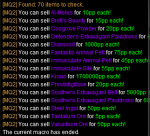
Think I found a bug. This is reporting 5g as 5pp to me on 2 separate items.

EDIT: When checking the INI file it seems to list as 5pp, but when it goes to execute the actual sell it doesn't do it, thankfully! :D
 
Last edited:
I'm not sure I understand. Can you elaborate?

Are you saying that when you go to purchase an item listed for 5pp it says it's 5g? But it is actually putting 5p?
 
Sorry for the late reply. The sale goes right, as expected. The output in the MQ window shows that 'You can sell XXX for 5pp each!' when in fact the barter only has 1 person listing it for 5gp. It maybe just be a log output issue.

Other than that the functionality seemed to work fine.
 
I can't get this to sell items that don't vendor. For example, the essence of life items from TBM that you can turn into spells at level 100. Vendors won't buy them so they don't have a vendor value. People will buy them in barter and I've configured a lowest selling price for them. The macro tells me in the MQ console that it wants to sell it for X platinum but never clicks the buttons to execute, it just moves on. At the end, the value for what it should've sold for is added to the Total Sells. Anything with a vendor value it does the things just fine though.

How can I get it to execute on these sorts of items?
 
Release [Macro] CheckBarter.mac

Users who are viewing this thread

Back
Top
Cart