
Downloading direct is a bad idea, the URL for the site is to mostly just make sure you can get to it and there's no internet issues. The modules are versioned to correspond to the luajit version we're using so you'd have to match that and architecture. From the output, it looks like luarocks isn't executing at all. I'll have to dig more into that.i did follow these steps initially. I even downloaded the .dlls directly from the site and tried that. I kept getting what appears to be a bit difference error, 64 vs 32 bit; i tried to chase that down but who knows what DLLs in wine might be causing the problem but everything i looked at was 64bit confirmed via CLI checks so im unsure if thats the real error or just a red herring

-
 Hail, we're RedGuides. We want you to play six (yes, 6!) EverQuest characters at once. We have scripts and a friendly community to help, please join our playstyle and say hello! 👋
You are using an out of date browser. It may not display this or other websites correctly.
You should upgrade or use an alternative browser.
You should upgrade or use an alternative browser.
Problem - LuaRocks/Packman/lsqlite3 not working correctly
- Thread starter rigo86
- Start date


While in most cases, with individual troubleshooting the user could figure this out, I tend to agree with this and feel that they shouldn't have to.
lsql and lfs are used in enough scripts where I think this would be a positive thing for the community, barring some insurmountable technical hurdle.
lsql and lfs are used in enough scripts where I think this would be a positive thing for the community, barring some insurmountable technical hurdle.
Can't this be fixed with Redfetch? been having this issue since last year, Overseer and others still broken. Even a fresh install with Redfetch didnt help.

While in most cases, with individual troubleshooting the user could figure this out, I tend to agree with this and feel that they shouldn't have to.
lsql and lfs are used in enough scripts where I think this would be a positive thing for the community, barring some insurmountable technical hurdle.
sound suggestion imoCan't this be fixed with Redfetch? been having this issue since last year, Overseer and others still broken. Even a fresh install with Redfetch didnt help.
i tossed up an issue and will check with @Redbot
Ability to pull various luarocks modules directly and automatically with redfetch · Issue #19 · RedGuides/redfetch
https://www.redguides.com/community/threads/luarocks-packman-lsqlite3-not-working-correctly.93938/post-664153 some folks end up with numerous issues with luarocks packman/lsqlite3 and not be able t...
 github.com

If this is on emu, I recently updated the beta version of MQ's RoF2 build and it has some fixes here that might be applicable. If it's not on emu, those would probably have to wait until the other teams merge them in. Happy to troubleshoot if you jump on discord and ping me, either way.when i try to run rgmercs i get a window to install somthing but doent work.
solved problem.
under windows11
settings / privacy & security / windows security / app & browser control / smart app control.
smart app control settings. turn it off, and rgmercs run again.
once again windows trys to put an end to happy gaming.
the pop up i got from windows said something about unsigned dll
my Evaluation mode must have decided to turn it on.
 support.microsoft.com
under windows11
settings / privacy & security / windows security / app & browser control / smart app control.
smart app control settings. turn it off, and rgmercs run again.
once again windows trys to put an end to happy gaming.
the pop up i got from windows said something about unsigned dll
my Evaluation mode must have decided to turn it on.
App & browser control in the Windows Security App | Microsoft Support
Learn how to protect your device with Windows Defender SmartScreen and other app and browser control settings in Windows Security.
support.microsoft.com
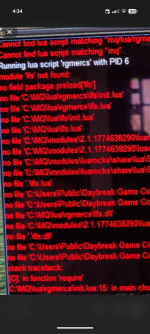
Today I met this problem after the new patch. And I finally solved it by copying my friend's files at '\modules\2.1.1774638290\luarocks'
It seems luarock.exe can't install the right files(even I deleted all old files and make it reinstall).
My friend's luarocks has 'cache' and 'lib' . Mine just has 'cache'.
It seems luarock.exe can't install the right files(even I deleted all old files and make it reinstall).
My friend's luarocks has 'cache' and 'lib' . Mine just has 'cache'.
This doesn't solve the problem it kicks the can down the road. (Edit: Meaning, in the future, you're probably going to need to have a look at this. I know Knightly has been working on improvements).Today I met this problem after the new patch. And I finally solved it by copying my friend's files at '\modules\2.1.1774638290\luarocks'
It seems luarock.exe can't install the right files(even I deleted all old files and make it reinstall).
My friend's luarocks has 'cache' and 'lib' . Mine just has 'cache'.
I understand your frustration, however. I'd expect the file to get removed. They are mq build-specific right now because x86 vs x64 things.
I ran into this issue last night too, but letting it run its process installed the needed applications.
The cmd prompt did seem to hang initially, there was no update information in the window and the UI over EQ seemed to hang because of the process. Given 5ish minute each (it happened for 2 items) it completed updating and worked fine afterwards.
It was the vb distro and the luarocks installations.
The cmd prompt did seem to hang initially, there was no update information in the window and the UI over EQ seemed to hang because of the process. Given 5ish minute each (it happened for 2 items) it completed updating and worked fine afterwards.
It was the vb distro and the luarocks installations.

Had an issue with lootnscoot but resolved it already. Just thought I would explain in case it helps.
I ran "/Lua run lootnscoot standalone" and it gave me a popup to confirm whether I trusted it. But it also popped up in my firewall and it took me a few seconds to click allow. It failed in that time and spammed the MQ window with errors. I couldn't get it to run again. I tried a few things which didn't work. But then I deleted the luarocks folder and next time I ran the command it all worked.
I ran "/Lua run lootnscoot standalone" and it gave me a popup to confirm whether I trusted it. But it also popped up in my firewall and it took me a few seconds to click allow. It failed in that time and spammed the MQ window with errors. I couldn't get it to run again. I tried a few things which didn't work. But then I deleted the luarocks folder and next time I ran the command it all worked.
RGMercs Build: Latest (Fresh install via Redfetch)
Server: Live
Characters level: 3
MQ Version: Very Vanilla (Latest)
The Issue:
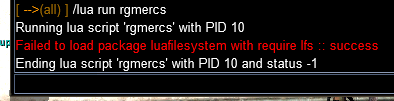
I've been away from EQ and red guides for a couple years and I was having a lot of fun with either kissassist or rgmercs. I can't recall which now. Now starting over I can't get RGMercs to load at all. Every time I try /Lua run rgmercs, I get the red wall of text stating module 'lfs' not found. I have tried to resolve this for several hours with no luck.
I tried
-moving the RG installer into its own c:\mq folder from the downloads folder
- giving admin permission to RG/MQ/EQ
-I tried using Ai and did a bunch of other stuff that just lead to a headache. Like running /Lua packageman, manually Installing the file, and more.
I'll include a picture just in case that helps.
Server: Live
Characters level: 3
MQ Version: Very Vanilla (Latest)
The Issue:
I've been away from EQ and red guides for a couple years and I was having a lot of fun with either kissassist or rgmercs. I can't recall which now. Now starting over I can't get RGMercs to load at all. Every time I try /Lua run rgmercs, I get the red wall of text stating module 'lfs' not found. I have tried to resolve this for several hours with no luck.
I tried
-moving the RG installer into its own c:\mq folder from the downloads folder
- giving admin permission to RG/MQ/EQ
-I tried using Ai and did a bunch of other stuff that just lead to a headache. Like running /Lua packageman, manually Installing the file, and more.
I'll include a picture just in case that helps.
Attachments

- Commits
- 2
Any word on getting this fixed? When I run a db script it asks to install. When accepting it crashes the game.

Just to ass to the ongoing fun of this...
This issue reared it's head again. This time I noticed it in the patcher before getting ingame, though I logged in and confirmed the issue.
The Macroquest folder had somehow come up as "read only" with needing admin permission to alter. Trying to alter this as a user appeared to work... but rechecking the folder it came up as read only again /boggle
Making a new folder did (again) "solve" this issue for me... but since its repeating, i started pounding a hammer on the PC until it coughed up some some potential issues.
One potential was apparently windows security... except I use Avast.
Logged is as administrator, changed the folder properties to remove read only, made exception for the folder Macroquest is in, logged back as a user, macroquest was able to update and operate (and RGmercs able to run)
Not sure why avast would pick today to have issues with something as opposed to the last several months... if this is the issue. Had not previously made exceptions since it has not previously been an issue.
Posting in case this helps someone else. Will repost it if happened again.
This issue reared it's head again. This time I noticed it in the patcher before getting ingame, though I logged in and confirmed the issue.
The Macroquest folder had somehow come up as "read only" with needing admin permission to alter. Trying to alter this as a user appeared to work... but rechecking the folder it came up as read only again /boggle
Making a new folder did (again) "solve" this issue for me... but since its repeating, i started pounding a hammer on the PC until it coughed up some some potential issues.
One potential was apparently windows security... except I use Avast.
Logged is as administrator, changed the folder properties to remove read only, made exception for the folder Macroquest is in, logged back as a user, macroquest was able to update and operate (and RGmercs able to run)
Not sure why avast would pick today to have issues with something as opposed to the last several months... if this is the issue. Had not previously made exceptions since it has not previously been an issue.
Posting in case this helps someone else. Will repost it if happened again.

Just to ass to the ongoing fun of this...
This issue reared it's head again. This time I noticed it in the patcher before getting ingame, though I logged in and confirmed the issue.
The Macroquest folder had somehow come up as "read only" with needing admin permission to alter. Trying to alter this as a user appeared to work... but rechecking the folder it came up as read only again /boggle
Making a new folder did (again) "solve" this issue for me... but since its repeating, i started pounding a hammer on the PC until it coughed up some some potential issues.
One potential was apparently windows security... except I use Avast.
Logged is as administrator, changed the folder properties to remove read only, made exception for the folder Macroquest is in, logged back as a user, macroquest was able to update and operate (and RGmercs able to run)
Not sure why avast would pick today to have issues with something as opposed to the last several months... if this is the issue. Had not previously made exceptions since it has not previously been an issue.
Posting in case this helps someone else. Will repost it if happened again.
uninstall avast
Recommended replacement that plays nice with MQ?uninstall avast
Windows defender.Recommended replacement that plays nice with MQ?

Users who are viewing this thread
Total: 1 (members: 0, guests: 1)
Share: