• You've discovered RedGuides, an EverQuest multi-boxing and scripting community 🧙‍♀️⚙️. We want you to play several EQ characters at once, come join us and say hello! 👋

  • A TLP without truebox has thawed (Very Vanilla ready)
    Frostreaver
Resource icon

Release lootnscoot (for emu) 05/16/2026

No permission to download
I run VeryVanillaMQ on 4 different computers. I am using LootNScoot because i am playing on an EMU server.

Each computer also has an instance of LootNScoot and its own toon. (1 computer = 1 toon). this is how i like to play.

My driver (main PC) is the only PC where I can be bothered to change the rules for looting. How do i sync these rules to the other PCs? i tried copying the resources folder of loot n scoot but then the other PCs where i copied them to wont run lootnscoot anymore and exit with a PID-1 error.

i am using DanNEt for communication

questions:
1. do i need to run lootnscoot for the other PCs and characters?
2. if answer to 1 is yes , how do i sync the rules and databases as they build up every session?
3. if answer to 1 is NO, how do i make it work that the toons in the other PCs (aside from the main driver PC) loot?
4. advloot doesnt seem available and i cannot load it? so i cannot see the advloot interface at all
5. basically i want my main pc to loot all saleable items, and the follower PCs to loot quest items and no drop gear that is class specific

any help will be appreciated
 
I have an entry set to Quest | 1

If three of those items are on a mob, it's seems like its looting all three, full stop, rather than only one.

1776626740679.png1776626755657.png
 
Can this import settings from Loot.ini? That would be super useful. I am planning to try it out beacuse of a bug on EQ Emu where corpses sometimes stay at 0% health and it causes the character to stop fighting.
 
I have an entry set to Quest | 1

If three of those items are on a mob, it's seems like its looting all three, full stop, rather than only one.

View attachment 76664View attachment 76665
i can look at that after work. I think the check happens against all items then looting comenses, I can add a safety check on quest counts after looting an item tagged quest, and before trying to pickup the next item.
 
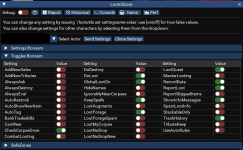
Had an item I needed one per toon, is lore and nodrop. I went into the toggles and turned on quest loot, nodrop loot, and new nodrop loot on all toons. None of them would loot the thing, had to do manually on all 6. This is on Lazarus. Is there another toggle that should be on to loot no drop items?
 
Had an item I needed one per toon, is lore and nodrop. I went into the toggles and turned on quest loot, nodrop loot, and new nodrop loot on all toons. None of them would loot the thing, had to do manually on all 6. This is on Lazarus. Is there another toggle that should be on to loot no drop items?

did the item already have a rule set?
if not do you have UseAutoRules enabled? (if disabled the items sets to "Ask")
If your coin turned gold on the mini button that means there is a new item to set a rule for, this may be set to ask. the AutoShowNewItems toggle will make the new items pop up window show on new items otherwise they can be edited on the new items tab on the main UI (this hides when there are no rules to confirm)
 
aquietone updated lootnscoot (for emu) with a new update entry:

04/22/2026

Bug Fixes 🐛


- Qty check, documentation (#81)
Lore \ quest qty checks

recheck lore and quest qty before each item incase the corpse had multiple of an item that was lore or a quest item we needed one of.

for quest items this prevents one char from taking everything,
for lore items it prevents trying to loot a 2nd lore item and breaking the loot cycle.

documentation

Added a documentation folder with...

Read the rest of this update entry...
 
did the item already have a rule set?
if not do you have UseAutoRules enabled? (if disabled the items sets to "Ask")
If your coin turned gold on the mini button that means there is a new item to set a rule for, this may be set to ask. the AutoShowNewItems toggle will make the new items pop up window show on new items otherwise they can be edited on the new items tab on the main UI (this hides when there are no rules to confirm)
I set a rule when I looted the first one on my driver. (quest|1)
Not sure on AutoRules - When a new item pops up, it does generally have something other than ask selected on many items.
Am using the AutoShow New Items, the popup window is much easier to deal with than the bigger one.
Item was Solist Icy Wand from Kurns Tower, off Burynai Excavators.
 
This is the best thing ever. If I could be greedy my only request would be for it to be able to import settings from the loot.ini that KA uses. Also if it can't already, it would be nice to have a setting that ignores everything except a specific item or two. It would also be useful on emu at least to specify items to loot by the start of their name only. eg: Illegible Tome of Shadow Knight (greater / enhanced / exalted / ascended). Just choose Illegible Tome and it loots them all.
 
Last edited:
i second this request:

"it would be nice to have a setting that ignores everything except a specific item or two. "

sometimes i just need to focus on looting 1 particular item. and i can revert to normal loot rules later on
 
This is the best thing ever. If I could be greedy my only request would be for it to be able to import settings from the loot.ini that KA uses. Also if it can't already, it would be nice to have a setting that ignores everything except a specific item or two. It would also be useful on emu at least to specify items to loot by the start of their name only. eg: Illegible Tome of Shadow Knight (greater / enhanced / exalted / ascended). Just choose Illegible Tome and it loots them all.
Not a full grant of wish, but look into the wildcards tab. Put your search term there, select the rule you want to be default, and when something comes up that matches, it pops up the box to select rule with that rule selected, so you just confirm. For example, I have as a wildcard Spell:, with Bank selected as the rule, and every spell that pops up now has bank selected, I hit confirm, and its done.
 
I noticed sometimes the character gets stuck on looting, it loots the corpse but doesn't click done or something. So it stays looting an empty corpse. Anything I can change to fix that? I'm also not sure what MobsTooClose is for.
 
MobsToClose is if mobs that may aggro are too close to the corpse, it will wait until the likely aggro range is clear. Haven't noticed the staying on empy corpse thing myself.
 
Had this destroy an item by mistake because I had something on my cursor while it was doing stuff and it deleted it :C I wonder if the loot from KA does it a different way because that seems to somehow delete things without affecting whats on the cursor.
 
Had this destroy an item by mistake because I had something on my cursor while it was doing stuff and it deleted it :C I wonder if the loot from KA does it a different way because that seems to somehow delete things without affecting whats on the cursor.


pushed a fix up. should be avail soonish.
 
Can you run this directed by KissAssist so the camphere doesnt keep dragging the character away from loots?
not sure about directed by KA, as i am not sure how KA would handle using actors. but you could edit the macro to call either /lua run lootnscoot once which will run lns to loot and close it right after. or run lns in standalone and turn off doloot (auto looting) and have KA or a button to call /lns loot and lns will run a loot cycle to clean up nearby corpses.
 
not sure about directed by KA, as i am not sure how KA would handle using actors. but you could edit the macro to call either /lua run lootnscoot once which will run lns to loot and close it right after. or run lns in standalone and turn off doloot (auto looting) and have KA or a button to call /lns loot and lns will run a loot cycle to clean up nearby corpses. the 2nd option keeps LNS running and you manually tell it when to loot. where the first one will close after each run
 
Great idea thank you! The main problem I have is having camphere on which holds my character in the right place. But every time he runs to loot something he gets dragged back. And if turn camphere off then he ends up wandering away. But I could maybe edit lootnscoot to run "mqp on" after battles with a 10s delay.

Or I could see if I can edit kissassist to use lns instead of its other loot.
 
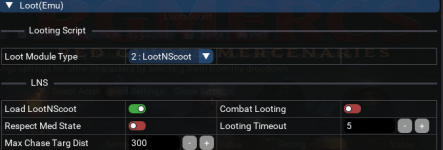
Running Rgmercs and Lootnscoot on emu (laz) - rgmercs is set to start lotnscoot.

Rare behaviour (twice in about 4 months), lootnscoot has looted an item that is set to "ask".
Both times on raids, so embarrassing.

Have now set eq to always ask for confirmation on no drop items as a guardrail to lootnscoot.
Heres my config for all toons.
1779055385869.png

and rgmercs:
1779055438742.png

And the loot history ... shows its is set to ask, but the character at 08:06:32 looted the darn thing.

1779055654844.png

Hopefully the eq setting to always ask for no drop items will prevent this from happening again.
Is there anything else that I can do setting wise?
Or anyone know why this might happen?
 
Running Rgmercs and Lootnscoot on emu (laz) - rgmercs is set to start lotnscoot.

Rare behaviour (twice in about 4 months), lootnscoot has looted an item that is set to "ask".
Both times on raids, so embarrassing.

Have now set eq to always ask for confirmation on no drop items as a guardrail to lootnscoot.
Heres my config for all toons.
View attachment 77133

and rgmercs:
View attachment 77134

And the loot history ... shows its is set to ask, but the character at 08:06:32 looted the darn thing.

View attachment 77135

Hopefully the eq setting to always ask for no drop items will prevent this from happening again.
Is there anything else that I can do setting wise?
Or anyone know why this might happen?
first I would question running loot automation on a raid with other people.
aside from that, you could /lns pause or /lns set doloot false while on the raid if you didn't want to adjust loading through rgmercs. that can easily be a button to toggle.

for debugging what class was the looter I am curious if this is happening on certain classes or types. (I used to see this more on the bard or melee when swapping weapons around, but not in a really long time)
I have seen this happen but its very rare on my end. LNS shouldn't be clicking to pick up the item if the item rule doesn't resolve to keep (through the various thresholds and toggle checks for bank, tribute, sell, quest etc.). anything marked ask should never hit that point.
 
first I would question running loot automation on a raid with other people.
aside from that, you could /lns pause or /lns set doloot false while on the raid if you didn't want to adjust loading through rgmercs. that can easily be a button to toggle.

for debugging what class was the looter I am curious if this is happening on certain classes or types. (I used to see this more on the bard or melee when swapping weapons around, but not in a really long time)
I have seen this happen but its very rare on my end. LNS shouldn't be clicking to pick up the item if the item rule doesn't resolve to keep (through the various thresholds and toggle checks for bank, tribute, sell, quest etc.). anything marked ask should never hit that point.
I normally have a button to toggle /rgl set DoLoot false/true as its a free for all on trash, and when clearing, theres a lot of bodies - I had forgotten to toggle it off.

The class in question was a shaman, no bandolier swapping.

I set items that may be accidentally looted by the wrong character to ask, that way I can see whats on the corpse using the notification ui.
For the next wee while, looting will be turned off on raids. Was very embarrassing.
 
Can you run this directed by KissAssist so the camphere doesnt keep dragging the character away from loots?
edit: My first attempt didn't work too well. This way is much better:

So if you are using KA and want to use Lootnscoot and /camphere, try this:

Edit init.Lua (the code file for lootnscoot)

Go to line 3393 and add this:
Code:
mq.cmdf('/mqp on')
Right before this line: LNS.navToID(corpseID)

Then line 3441 add this:
Code:
mq.cmdf('/mqp off')

Right after the line "actors.FinishedLooting()"


This uses only lootnscoot, no ninjadvloot needed. Setup lootnscoot as usual. This just pauses KA before running to the corpse and unpauses after looting. So it stops /camphere from dragging the character back before looting. Yet they will nav back to the camp spot after looting.

It is working well for me so far. If you don't like it spamming pause on/off in the MQ window you can put /squelch in the brackets part. EG:
mq.cmdf('/squelch /mqp on')
mq.cmdf('/squelch /mqp off')
 
Last edited:
Anyone ever find that lootnscoot leaves stuff behind? If I turn off the CheckCorpseOnce toggle he will go and loot the remaining stuff. (Everything has a rule setup already)
 
Last edited:
I think I figured out what's up with the missing items. It ignores new items that don't have rules yet. No Ask popup or anything, it just skips them. Although sometimes it will loot them if I have CheckCorpseOnce turned off. But once I set up rules for everything in the zone it seems solid.
 
Do you have "AutoShowNewItem" toggled on? I highly suggest it if not.
I think I figured out what's up with the missing items. It ignores new items that don't have rules yet. No Ask popup or anything, it just skips them. Although sometimes it will loot them if I have CheckCorpseOnce turned off. But once I set up rules for everything in the zone it seems solid.
 
Release lootnscoot (for emu)

Users who are viewing this thread

Back
Top
Cart