et508
Member
Got it! Thank you!!All should be directed if you don't want RGMercs and LNS to have conflicting behavior.


Got it! Thank you!!All should be directed if you don't want RGMercs and LNS to have conflicting behavior.

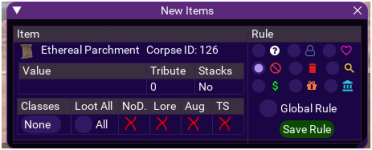
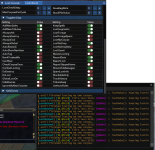
So initially looking at this my first thought was some things aren't aligned and my brain doesn't like that.
local spawnSearch = '%s radius %d zradius 50'local deadCount = mq.TLO.SpawnCount(string.format('npccorpse radius %s zradius 50', settings.Settings.CorpseRadius or 100))()if (deadCount + myCorpseCount) == 0 or (mobsNearby > 0 and not settings.Settings.CombatLooting) or (mq.TLO.Me.Combat() and not settings.Settings.CombatLooting) then
actors.FinishedLooting()
return false
endI considered suggesting that as well. My reason for not doing it is how much processing is done for that to get the path distances of all the corpses and find the nearest one. But I do that in GroundSpawns plugins - so if performance isn't a concern (I don't think it is) then Ill second this.CWTN's post was very long and I am illiterate so I only got a few sentences in, but I would recommend considering using Nav.PathDistance instead of radius anything.
xtarget is beyond unreliable on emu, or at the very least on lazarus, so i tend to never rely on it for mobs on agro.So initially looking at this my first thought was some things aren't aligned and my brain doesn't like that.
My second thought was I need to decipher these single letter choices, but I get where you're going.
Perhaps a better option would be the icons you use in the normal items section to indicate the current choice for each item.
Now my next request is that there be an editable ZRadius - Currently it's set to 50, sometimes my character decides the corpse on the floor above me is a prime target for looting.
In other situations I want to loot the entire zone on one toon as their only job while the rest murder away. But looking at the code you have a couple of places where 50 is hard coded.
Lua:local spawnSearch = '%s radius %d zradius 50'
Lua:local deadCount = mq.TLO.SpawnCount(string.format('npccorpse radius %s zradius 50', settings.Settings.CorpseRadius or 100))()
additionally
the logic you have designed to prevent getting stuck I'm assuming in the navtoid logic. I personally just deleted that break because I was looting such a large area it would nav for a bit, then break then try the next corpse and nav for a bit then break, etc because it was so far to walk - This is on an emu where I had my own instance.
Regarding the issue with "sometimes not looting" My experience has been that it would loot if the rule was set the first time I opened the corpse. If I had ask and I changed it to keep or sell, so it went to loot the corpse again it would not loot the items sometimes. I'm not expecting the logic is different, but that's been my experience.
for what it's worth when I was troubleshooting the zaxis bit I noticed that you /loot and after that you check if we're casting a spell and return false if we are. Often time this happens fast enough that I'm both looting a corpse and casting a spell at the same time. The check for if you're casting may need to be moved prior to the /loot so that it will wait for the spell to finish before it opens the corpse because what ends up happening is you /loot, it detects you're casting, then just stands over the corpse for a bit till the code comes back around which can take a few seconds. That makes it appear as though the script has locked up, and in a way it has. I realize this is a lot to do with conflicting behavior at this point, but still think if a user clicks a spell manually or are in the middle of casting a spell that it shouldn't interrupt it with /loot (which unlike ducking or /stopcast it doesn't actually stop the casting bar).
My last ask is the combat check use XTargets either optionally or by default.
The below code uses Me.Combat() which is actually referencing if attack is on or not. This may have been an intentional choice you made in conjunction with checking for mobs nearby to allow you to loot despite some random thing on the other end of the zone popping up on your xtarget - but I think if you check XTargets and find you have autohaters and combatlooting is on then you can ignore it. Too often have I pulled a swarm of mobs then while waiting for them to arrive LNS has decided I got time to loot.
Lua:if (deadCount + myCorpseCount) == 0 or (mobsNearby > 0 and not settings.Settings.CombatLooting) or (mq.TLO.Me.Combat() and not settings.Settings.CombatLooting) then actors.FinishedLooting() return false end
Sorry, I know it's a lot of feedback and I don't mean to put anything here down at all I promise. I've really been enjoying it!
Commits
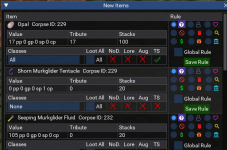
(bcb42ca) ~aquietoneConfigurable zradius and nav timeout, maybe fix pathlength check, icons for new item rules
Combat state reads the window, which relies on the users UI.I am surprised noone has mentioned combat state yet, maybe I am missing something.
i have a question for loot-n-scoot EMU, is it posable while on my driver for my group to tell one of my toons to loot a specific item so i dont have to ALT TAB to loot?
Great, Thanks. Ill look into it.View attachment 74886
well the audio is horrid, but the master loot option will let you dictate to each char to loot items, assuming they are running LNS as well.
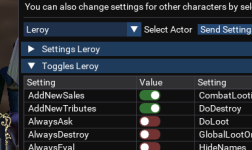
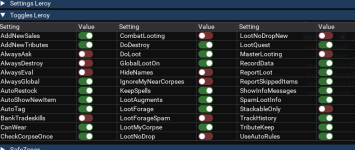
Being told "Puasing looting until finished looting my own corpse." but LootMyCorpse is off.
View attachment 74912
    if not settings.Settings.LootMyCorpse and not settings.Settings.IgnoreMyNearCorpses and foundMine then
        Logger.Debug(LNS.guiLoot.console, 'lootMobs(): Puasing looting until finished looting my own corpse.')
        actors.FinishedLooting()
        return false
    end
I see. My corpses contain nothing of value. I assumed it was meant to ignore the corpse entirely, which was my aim.Lua:if not settings.Settings.LootMyCorpse and not settings.Settings.IgnoreMyNearCorpses and foundMine then Logger.Debug(LNS.guiLoot.console, 'lootMobs(): Puasing looting until finished looting my own corpse.') actors.FinishedLooting() return false end
I could probably rename the IgnoreMyNearCorpses and make it reversed as PauseForMyCorpse
basically not ignoring your corpses will pause looting so you can loot your corpse.
if limit == nil then limit = 50 endfor i = 1, myCorpseCount do
local corpse = mq.TLO.NearestSpawn(string.format("%d, %s", i, pcCorpseFilter))
if corpse() then
if (corpse.DisplayName():lower() == mq.TLO.Me.DisplayName():lower()) then
corpse.DoTarget()
mq.delay(2000, function() return (mq.TLO.Target.ID() or 0) == corpse.ID() end)
mq.cmd("/corpse")
mq.delay(2000, function() return mq.TLO.Target.Distance() <= 10 end)
corpse.RightClick()
mq.delay(2000, function() return mq.TLO.Window('LootWnd').Open() end)
mq.cmdf('/lootall')
mq.delay("45s", function() return not mq.TLO.Window('LootWnd').Open() end)
end
end
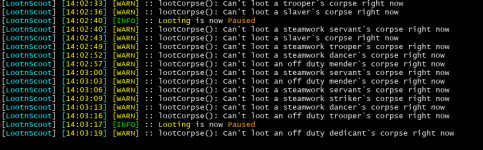
endif corpse() then to if corpse() and not LNS.PauseLooting then which resulted in immediately stopping the loot process.curious why its getting that far, it should get caught at the top of the function.So, pausing isn't working correctly for whatever reason.
View attachment 74982
My guess isif limit == nil then limit = 50 end
in conjunction with
Lua:for i = 1, myCorpseCount do local corpse = mq.TLO.NearestSpawn(string.format("%d, %s", i, pcCorpseFilter)) if corpse() then if (corpse.DisplayName():lower() == mq.TLO.Me.DisplayName():lower()) then corpse.DoTarget() mq.delay(2000, function() return (mq.TLO.Target.ID() or 0) == corpse.ID() end) mq.cmd("/corpse") mq.delay(2000, function() return mq.TLO.Target.Distance() <= 10 end) corpse.RightClick() mq.delay(2000, function() return mq.TLO.Window('LootWnd').Open() end) mq.cmdf('/lootall') mq.delay("45s", function() return not mq.TLO.Window('LootWnd').Open() end) end end end
Is not taking pause into consideration and breaking from the loop.
I was able to confirm it by changingif corpse() thentoif corpse() and not LNS.PauseLooting thenwhich resulted in immediately stopping the loot process.
Applied similar to other loops in the LNS.LootMob function
function LNS.lootMobs(limit)
    local didLoot = false
    settings.TempSettings.LastCheck = os.clock()

    if LNS.PauseLooting or LNS.SafeZones[LNS.Zone] then
        actors.FinishedLooting()
        return false
    end
...Pause fix (#75)
* highlight selected newitem rule
adds a background behind the icon if the radio button is selected.
* fix: pausing while in the middle of looting
added an extra check for pause inside the for loop through corpses.
this should fix pausing while already in the middle of looting a pile of corpses.
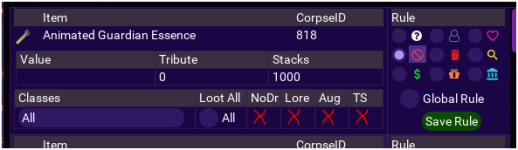
The icons look much better, its cleaned up.
I might offer that the corpse ID thing just looks... out of place, I would think it would be its own cell in a table (or right aligned, or something) rather than tacked on randomly.
View attachment 75136
Features
- TLOs, wildcard nodrop check (#77)
* feat: TLOs, wildcard nodrop check
added some TLO's
`mq.TLO.LNS()` returns 'LootNScoot' if running
`mq.TLO.LNS.Looting()` return if we are looting currently
`mq.TLO.LNS.Paused()` returns pause state
`mq.TLO.LNS.Mode()` returns Mode we are in (once, standalone,directed)
`mq.TLO.LNS.SafeZone()` is the current zone a safezone...
Forgive my ignorance in this matter... but i'm happy to see WildCards available..
I'm assuming .* is for anything... so if i wanted to loot every Xxxxx Sulston Xxxxxxx I would just do .*Sulstone.* ? and so forth for each time?
i do plan on reading the lua doc, and hopfully getting something out of it later
edit... now i'm thinking .*%sSulstone%s.*

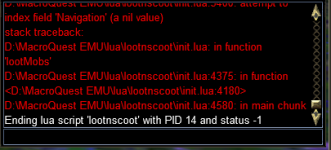
You need to load mq2navI can get this to run but when I kill a mob and there is a corpse it shuts off lootnscoot. been trying to figure this out and get it working for last 3 hours. Any help would be very much apprecaited. thank you!
View attachment 76377
Consolidate tables (#80)
Since Personal rule sets were added, the need for global and normal rule sets became redundant.
Merged the Normal Rules table into the Global rules table, keeping the Global rule on conflicts.
Dropped the Normal Rules table after the migration.
Now we only deal with GLobal rules and Personal Per charcter rules.
Added the ability to share setting items as personal...